I'm a little bit confused as I found out that THEME_preprocess_page() or better the $var is now shared between subthemes and this collide in my subthemes.
I have the main theme named yaml and a subtheme that is named yaml_2col_31 in a subfolder of yaml. Both themes have THEME_preprocess_page() with their individual names
[yaml/template.php]
function yaml_preprocess_page(&$vars) {
  $vars['body_classes'] = $vars['body_classes'] .' hidecol1'
}
[yaml/layouts/yaml_2col_31/template.php]
function yaml_2col_31_preprocess_page(&$vars) {
  // No $vars['body_classes'] will be set, but the yaml themes $var value is shown in the subthemes page.tpl.php
}
[yaml/layouts/yaml_2col_31/yaml_2col_31.info]
base theme = yaml
The problem is now that $vars['body_classes'] from the "yaml" theme is also set in the "yaml_2col_31" theme and now contains a class "hidecol1" that hides a wrong column in yaml_2col_31.
I thought that only phptemplate_preprocess_page() inherits to all themes or am I wrong?


Comments
Comment #1
hass commented#246567: themeName_preprocess_page not getting called for subtheme also tells me it shouldn't or haven't worked this way.
Comment #2
hass commented#252430: Allow BASETHEME_ prefix in preprocessor function names could be the source of this issue.
Comment #3
hass commentedThis regression was introduced in 6.5.
Comment #4
Chill35 commentedThis is not a regression, but the right behavior.
The parent's preprocess functions are inherited by all descendant, when prefixed with the parent theme's name or
phptemplate.This will clarify for you the expected behavior: http://drupal.org/node/225125
If you don't want your child theme to have the same value for $body_classes as passed to the parent, you will need to overwrite that variable in the template.php file of the child, in its own preprocess function for the page.
Comment #5
hass commentedI don't think so. Now I'm no more able to alter the body classes. I need the base body classes without custom base theme classes. I don't know how to solve if this is not possible. If you have an idea - please share.
Comment #6
quicksketchThis is still "by design" and not a bug. If you don't want the body classes added by the base theme (or you want a certain preprocess function skipped entirely), you can implement hook_theme_registry_alter() and remove the preprocess functions executed by the base theme. Though really, I'd recommend not including whatever it is you don't want in the base theme, or do a check in the base theme to see if the active theme provides this same preprocess function.
Comment #7
Moonshine commentedThis is the correct behavior. Sub-themes inherit from their parents. Why should pre-processors be any different than the inherited templates that rely on their variables?
You can do whatever you'd like to $vars['body_classes'] in your yaml_2col_31_preprocess_page() function including stripping classes that a "parent" theme probably shouldn't be adding.
Comment #8
merlinofchaos commentedJust to chime in, it is the correct behavior that a subtheme inherits all parent theme preprocessors.
You can change this behavior by implementing hook_theme() in your subtheme and re-registering that theme hook and specify precisely what preprocess functions you want to run in an array. So if you don't want the parent preprocess_page to run at all, it's doable. Just use the devel.module to peek into the theme registry and see what other preprocessors are registered. Register only the ones you want to use.
Comment #9
johnalbinAlso, since the preprocess functions will run in this order:
parenttheme_preprocess_page()
subhtheme_preprocess_page()
you can also override the work done by the parent theme in the subhtheme_preprocess_page() function.
IMO, you if you avoid phptemplate_* prefixed functions, you can avoid having to do any heavy lifting in hook_theme().
Comment #10
hass commented@quicksketch: Sorry, but I need some more help here... Could you provide me an example code snippet how to "unregister" the theme function "yaml_preprocess_page" before "yaml_2col_31_preprocess_page" is executed, please? Not sure what code I need to add to "yaml_2col_31" theme's template.php, but it sounds like a solution...
I cannot really change the base theme as it have dynamic side bar switching that is specific to only this base theme and non of their subthemes. You might understand that there are many situations like this in advanced themes with multiple subthemes. My subthemes must not have this classes added as the subthemes have static sidebars and some people sometimes like this more or have other special requirements for their subthemes... I'm often asked why theme example "xyz" is gone...
Otherwise I see some pro's about this design, but I'm very unhappy that this behaviour have changed in 6.5 and now people complain at me that their theme is broken and that worked well before and I cannot do a detailed test with every minor core release if the themes got broken or not and something previously undocumented is now active.
Comment #11
merlinofchaos commentedThe pre-existing behavior was a bug and was incorrect. I am sorry that you misunderstood how it was supposed to work, but this is, in fact, the way it was always intended to work.
Comment #12
hass commentedThis seems not working if added to "yaml_2col_31" themes template.php
Comment #13
hass commentedMaking support request.
Comment #14
hass commentedComment #15
merlinofchaos commentedtheme_regsistry_alter is only available to modules. If you take the advice I gave you, you can make this work.
Comment #16
hass commented@merlin: If I would understand theme registry stuff at all I wouldn't ask here this possibly stupid questions... it seems like I'm the first who do such things as I cannot find anything in CVS.
Also tried the following with no success. After adding the below code my "page" theme registry is now duplicated.
Comment #17
hass commentedThis seems to work, but I need to do more testing. Nevertheless - is this the right way or a hack?
Comment #18
hass commentedFound one bug with devel - 'theme paths' now have another duplicated path... why are all this items duplicated or is this a bug? Mabye 'override preprocess functions' have an issue.
Comment #19
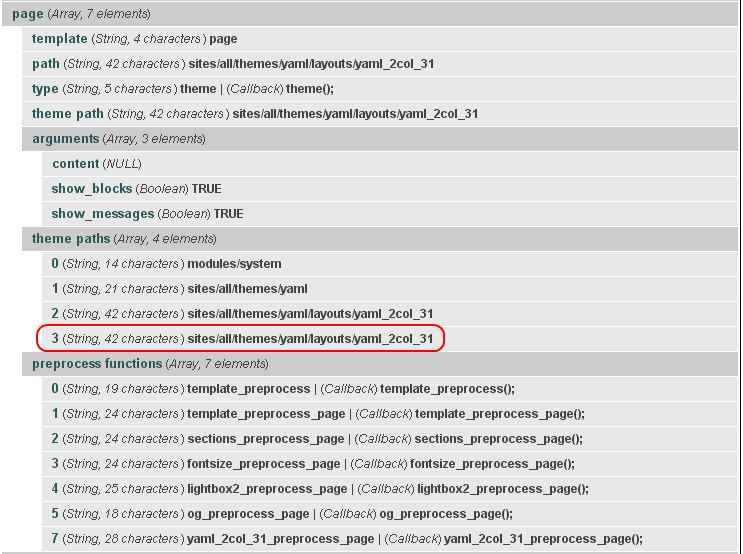
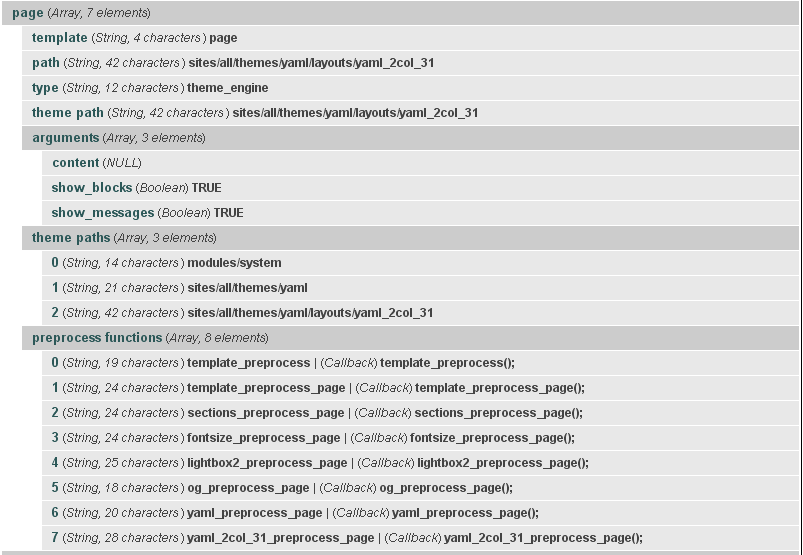
hass commentedLet's show what krumo shows me without using hook_theme in the subtheme (see http://drupal.org/files/issues/theme_registry_without_hook_theme.png).
And now after #17 code is used. We see 'theme paths' contains an additional array member that shouldn't be there (see http://drupal.org/files/issues/theme_registry_with_hook_theme.png)
Any idea what's going wrong here?
Comment #20
hass commentedThere is an issue on blocks page and CCK fields. All drag and drop fields are destroyed. No idea why.
Comment #21
hass commentedAdditional I found out using
phptemplate_preprocess_page()in a base theme runs twice if a subtheme is loaded (subtheme don't havemysubtheme_preprocess_page()in template.php. Both runs with same subthemes theme_key and not one with base theme and one with subtheme. In such a situation page variables are build wrongly. See below code example:As phptemplate_preprocess_page runs twice - I end up having body classes list of
not-front logged-in page-admin one-sidebar sidebar-left hidecol1 hidecol1and you can seehidecol1is added twice. Not sure why the other body classes are not duplicated.Changing
phptemplate_preprocess_page()tomytheme_preprocess_page()in base theme solves this issue.Comment #22
hass commentedIs there any reason why I should use
$themein D6 and we have used$theme_keyin D5, that is also available in D6 and seems to contain simply the same value?Comment #23
dvessel commentedHass, I requested a feature while Earl was working on the theme registry. It's not well known and should be documented better but here's how it works.
Within your sub-theme add your hook_theme() with a special key:
You just need to specify the hook with the key of "override preprocess functions" set to TRUE. It will clean out any preprocessors set before the sub-theme. This can also be done for the base theme wiping out core or module preprocess functions.
btw, the fixed behavior was always intended to work this way. Although the theming guide doesn't explicitly state it, it showed that all pre-preprocessors were supposed to be run when available.
Comment #24
hass commentedOk, only one thing that would be impossible to do such simple as wrote above :-). Normally you need to loop the old 'preprocess functions' array as you are not aware if any module that may added it's own preprocess function to the theme...
Therefore your example seems to look like my try in #17... but when I tried this I've seen many strange side effects that could be bugs. See #18 to #21. I wasn't able to debug this in it's depth, but it was very strange and only caused by the change in #17. I give it a try
Comment #25
ainigma32 commented@hass: Did you manage to try the last suggestion of dvessel?
- Arie
Comment #26
dvessel commentedHe didn't. His previous attempts at unsetting them manually will not work. The 'override preprocess function' flag makes all the difference due to the way the registry is built in looping phases.