Last updated May 7, 2013. Created by O Govinda on February 22, 2008.
Edited by mkesper, passengerabcd, nicxvan, Fiable.biz. Log in to edit this page.
Sub-themes are just like any other theme, with one difference: They inherit the parent theme's resources. There are no limits on the chaining capabilities connecting sub-themes to their parents. A sub-theme can be a child of another sub-theme, and it can be branched and organized however you see fit. This is what gives sub-themes great potential.
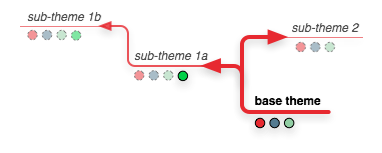
Imagine starting with a base theme designed as wireframes, then applying and refining all the details from a sub-theme. Then, from the same wireframe, testing out alternate designs by branching out another sub-theme. Working on a multi-site installation but you need a cohesive look and feel? With sub-theming, a lot of the design resources can be shared. Site-specific changes can be set to a specific sub-theme, but any shared resources can be edited once to be applied across all the installations. With careful planning, the possibilities are endless.
Creating a sub-theme
The sub-theme to-be should be located in its own directory, inside the folder sites/example.com/themes/ ("example.com" stands for your site name) or, if you want to use your sub-theme for several sites, inside sites/all/themes/ . The sub-theme folder must have another name than the main theme. Don't put any blank in the internal name. This folder name will be the sub-theme internal name, i.e. the name used by Drupal. Let's suppose this sub-theme internal name is "my_subtheme".
File my_subtheme.info
To declare your theme to be a sub-theme of another, you must put a my_subtheme.info file inside your my-subtheme folder (remember that "my-subtheme" stands for your sub-theme internal name). The easiest way is usually to copy the theme_name.info file from the parent theme ("theme_name" stands for the internal name of the parent theme), and to rename it as my_subtheme.info. Then you need to add the following line to my_subtheme.info file to declare its parent or "base theme.": change "theme_name" to the internal name of the parent theme (that is, the name of the parent theme's .info file, usually all lower case).
base theme = theme_name
It is also a good idea to modify the human-readable name of your sub-theme by altering the line beginning by name = , and the description of your sub-theme by altering the line beginning by description = . For instance:
name = My sub-theme
description = This is a sub-theme of theme Bartik, made by John for the web site example.com (red, responsive).
core = 7.x
base theme = bartikAs the sections below indicate, the sub-theme inherits most properties of the base theme. The important exceptions are regions, core version, and color info. You probably want to copy the regions section of your base theme's info file, along with its core version declaration. If your base theme supports the color module and you'd like your sub-theme to support it, you probably also want to copy the color folder from your base theme and add the line from your base theme's info file to your sub-themes info file that looks like
stylesheets[all][] = css/colors.css
and then copy the colors.css from you base theme to the css folder of your sub-theme.
Style sheet inheritance
All style sheets defined in the parent theme will be inherited, as long as you declare at least one stylesheet in your sub-theme's .info file. You must declare at least one stylesheet in your sub-theme for any of the parent theme's stylesheets to be inherited.
Overriding inherited style sheets: Specify a style sheet with the same filename in the sub-theme. For instance, to override style.css inherited from a parent theme, add the following line to your sub-theme's .info file:
stylesheets[all][] = style.css
You will also need to create the style.css stylesheet file; if you simply wish to disable the imported styles, you can create an empty file.
JavaScript inheritance
All JavaScripts defined in the parent theme will be inherited.
Overriding inherited JavaScript: Specify a JavaScript file with the same filename in the sub-theme's .info file. For instance, to override script.js inherited from a parent theme, add the following line to your sub-theme's .info file:
scripts[] = script.js
You will also need to create the script.js file; if you simply wish to disable the imported scripts, you can create an empty file.
Template.php function inheritance
Anything defined in the parent theme's template.php file will be inherited. This includes theme function overrides, preprocess functions and anything else in that file. Each sub-theme should also have its own template.php file, where you can add additional functions or override functions from the parent theme.
There are two main types of functions in template.php: theme function overrides and preprocess functions. The template system handles these two types in very different ways.
Theme functions are called through theme('[hook]', $var, ...). When a sub-theme overrides a theme function, no other version of that theme function is called.
On the other hand, preprocess functions are called before processing a .tpl file. For instance, [theme]_preprocess_page is called before page.tpl.php is rendered. Unlike theme functions, preprocess functions are not overridden in a sub-theme. Instead, the parent theme preprocess function will be called first, and the sub-theme preprocess function will be called next.
There is no way to prevent all functions in the parent theme from being inherited. As stated above, it is possible to override parent theme functions. However, the only way to remove a parent theme's preprocess function is through hook_theme_registry_alter().
Page, node, block and other template (.tpl.php) file inheritance
Drupal provides a large set of files that themes can inherit from. By specifying a particular file name and or structure allows the theme to override or inherit a template. For more information on this review working with template suggestions
Drupal 7 Any .tpl.php files from the parent theme will be inherited. You can add template files with more specificity — for instance, node--blog.tpl.php building on an inherited node.tpl.php.
A single hyphen is still used to separate words: for example, "user-picture.tpl.php" or "node--long-content-type-name.tpl.php", so the double hyphen always indicates a more targeted override of what comes before the "--". See Converting 6.x themes to 7.x for more info.
Drupal 6: Any .tpl.php files from the parent theme will be inherited. However, to add template files with more specificity, you must also copy over the more general template file from the parent theme manually. For instance, to add a node-blog.tpl.php template in a sub-theme, you must also copy over node.tpl.php from the parent theme. This bug has been fixed in Drupal 7 but will not be fixed in Drupal 6.
Overriding inherited .tpl.php templates: Add a template file with the same name in your sub-theme folder to have it override the template from the parent theme.
Screen shots, logo and favicon inheritance
The parent theme's screen shot will be inherited. The parent theme's logo (logo.png/logo.jpg) will not be inherited. The parent theme's favicon (favicon.ico) will not be inherited.
Overriding inherited screen shots: Specify a new image file in your sub-theme's .info file.
Region inheritance
Sub-themes do not inherit custom regions from a parent theme. If you are using custom regions, you should copy the region declarations from the parent theme's .info file. Be sure your sub-theme's page.tpl.php file matches the sub-theme's region settings.
Features inheritance
In Drupal 6, if you use a set of features other than the full range of defaults, these are not inherited from the base theme. If you are using features beyond the default, you should copy the features declarations from the parent theme's .info file.
Color and theme settings inheritance
Color.module support within the color directory is not inherited.
Theme settings set via advanced theme settings' theme-settings.php are not inherited.
Comments
Theme and module with the same name = no content
Thanks for the nice summary. One thing to add: when naming your sub-theme, avoid using the same name for a theme and a module. If you do you will just have "Array" as content of your blocks (I suppose the module and theme functions interfere with each other). I renamed the theme and everything's fine now.
Or worse :)
Themes may implement theme_block(). Modules may implement hook_block(). Having a module and a theme which occupy the same namespace will cause either function to be picked up for both roles.
If your module's hook_block() is picked up by the theme layer, you will see array() as the contents of all blocks.
I'm not sure what happens if your theme's theme_block() matches a module name. Probably nothing disastrous? Let us know!
If both exist, you'll get a fatal error when the theme attempts to redefine the function already defined by the module.
This is touched on in Doesn't Play Nicely. hook_block() is gone in D7 for this (and other) reasons.
If my comments have helped you, please pay it forward!
Use issue queues to discuss module issues - this will help your questions assist others (including yourself!) in future.
http://twitter.com/grobot ● www.giantrobot.co.nz
Overriding inherited style sheets
This guide says that to prevent inheritance you will need to create the style sheet and that it can be empty. However, the documentation in the the zen/STARTERKIT.info.txt says that we don't need to have a file with that name; all we need to do is the array declaration:
stylesheets[all][] = style.cssif we wanted to prevent inheritance of style.css.
No need for empty css files
vegantriathlete wrote:
> we don't need to have a file with that name
Yes, there is no need now for empty css files, it was just a workaround for bugs that were fixed for D6 and D7. As you say, a line in the .info file is enough.
More info: Overriding style sheets from modules and base themes.
Sub-theme bug
There is an important D6 sub-theme (and sub-sub-theme) bug, #481142: Theme settings forms are not inherited by sub-themes, with a patch by Zen's maintainer JohnAlbin (#26) that seems to work but has been waiting for review for a long time.
Bug fixed
#481142: Theme settings forms are not inherited by sub-themes has just been fixed today. That is to say, when Drupal 6.20 will be released (it's 6.19 now). For those who might want to test it now, new bug fixes are added to Drupal 6.x-dev twice a day.
Practical implementation of a preprocess function
I thought this code might be helpful to understanding a practical implementation of a preprocess function.
The code below would check the current path to see if it matches certain criteria and then add an additional stylesheet to the template that renders pages in that path.
Remember that if your theme name is flowers then the preprocess function would be named
flowers_preprocess_page(&$vars)You can include preprocess functions in your theme'stemplate.phpfile. If your theme doesn't have atemplate.phpfile you can simply create the file in your theme's directory.So you would have:
<?php
//template.php
//&$vars is simply the aggregated variables available at this point in the template building process
flowers_preprocess_page(&$vars) {
/**
* add additional CSS files using drupal_add_css()
* but only if my path contains "tulips"
* drupal_add_css() returns an array of stylesheets
* at this point in building the page template, $vars['styles'] has already been built
* so call drupal_get_css() again in order to re-build $vars['styles']
* after the call to drupal_get_css(), $vars['styles'] will be repopulated with
* your additional stylesheet
*/
if( module_exists('path') ) {
$alias = drupal_get_path_alias( $_GET['q'] );
$check_path = "tulips"; //we are looking for any pages that fall in the "tulips" path, e.g., "/tulips/boulder-co-tulip-festival"
if( strpos( $check_path, $alias ) !==FALSE ) {
$addcsspath = path_to_theme() . "/drupaladd.css";
$css = drupal_add_css( $addcsspath, "theme","all" );
//uncomment this line below to see how Drupal builds its internal CSS array
//print_r( $css );
$vars['styles'] = drupal_get_css(); //rebuild the styles variable with an array that includes all previous CSS files and the newer CSS file
}
}
}//flowers_preprocess_page()
?>
Notice that $vars['styles'] is available to your theme's page.tpl.php and other page template files as simply
$styles.Use machine name (in D7)
If you are having trouble with inheriting from a theme, try changing the ParentName to parentname (i.e., the all lower case machine name)
http://horuskol.net/
Theme settings set via
Is this true in Drupal 7? I've subthemed Marinelli 7.x without including theme-settings.php or a number of other .inc files, and they all seem to be automatically inherited...
I can confirm this (is
I can confirm this (is inherited).
If you change theme settings in your subtheme the theme settings of the base theme will not changed.
subthemes dont inherit
subthemes dont inherit 'advanced theme settings' for me, drupal 7.15. i do get the admin form to edit those advanced theme settings, but the defaults are empty - not inherited.
Content doesn't match title
The title implies that this page explains how to create a subtheme; it doesn't.
This fine list of ingredients is missing its recipe. If all that's required for a subtheme is a folder in .../sites/[all, mysite ]/themes containing a .info file that points to an installed parent theme, then we should say so. If we were wiki'd up here, I'd have changed 'er myself.
CSS Inheritance
Inheritance for CSS means that as long as you don't put a file with the same new in your info file, the sub-theme would take the values from the original theme CSS.
Diseñador web basado en Costa Rica. www.comunicacionrapida.com
Sub-Theme CSS
I noticed if you follow these instructions, you have to place the same CSS from the base theme in your alternative sub-theme CSS file to retain the styling.
However, if you modify the .info file to list only a new .css file in the sub-theme's .css folder and either leave it empty or make your override/added styles in that file, it appears to retain all the styles from the base theme without having to actually have them in your .css file.
Seems easier to me. Here's what my folder looks like (bold are folders):
bigdaddy_kid
And in the .info file the only .css related line is:
stylesheets[all][] = mystyles.cssAnd initially mystyles.css is empty for me to add styles to my hearts content.
Seems to me this would allow me to completely update the base theme with no concern for my changes (unless id's or classes or something like that changed in the HTML).
For the gurus, am I correct in how this works?
Why would I not want to do it this way?
Shouldn't your css line in
Shouldn't your css line in the .info file be
stylesheets[all][] = css/mystyles.css? I tried to do exactly this (same folder structure and everything), but it wouldn't load my "mystyles.css" at all.edit: my mistake was a stupid one: I had actived the subtheme, but not made it default... :)
Doh. Finally worked for me
Doh. Finally worked for me after > Appearance > Update ...clearing caches and now I can override the parent style.css on my sub-theme.
re-declaring vs inheriting a single parent-theme CSS
If you use tidy CSS practices, and only have one CSS file for the parent-theme, you are saving minimal code by inheriting the CSS to the sub-theme, but you are introducing an extra lookup, which might slow performance or possibly not load properly sometimes. In this case, it would be better, IMO, to re-declare the parent-theme's CSS file in the sub-theme.
"There are only 10 kinds of people: those who get binary, and those who don't."
—braino
suggested edit of 'Creating a sub-theme'
Creating a sub-theme
The sub-theme to-be should be located in its own directory. Prior to Drupal 6, this directory had to be a subdirectory of its base theme; in Drupal 6 and 7 it can be placed outside of the base theme's directory.
To declare your theme to be a sub-theme of another, it is necessary to alter the sub-theme's xxx.info file. To do this add the following line to the sub-theme's xxx.info file, to declare its parent or "base theme." Change "themeName" to the internal name of the parent theme, e.g., bartik.info, (usually all lower case) and change the 'name' (if you have copied the xxx.info file) to 'base theme'.
base theme = themeName
cloudmaker
"it is possible to inherit color.module information"
Re: "Color and theme settings inheritance"
see also http://drupal.org/node/466268
Favicon Inheritance
The favicon doesn't get inherited in Drupal 6. We should add this to the screenshot and logo section.
yea have the same problem
yea have the same problem inheriting favicon in drupal 6
_
I think this documentation page can help your problem to be fixed and learns you to change the favicon: http://drupal.org/node/362265
Doubt is the father of invention..... Hubmesh
Help me understand
Can someone please help me understand all of this? I really would like to use Zen but and have used it before but it seems like it is such a monster to use. It seems whenever I create a sub theme with it the performance of my website decreases. Homepage takes longer to load, pages take longer, clicking on navigation takes longer. It just seems like in order to use Zen so many preprocesses have to happen, so many http requests for stylesheets, etc.. have to happen and performance suffers.
I am currently on Drpal 7.14. Can someone help put this into perspective or tell me what I might be doing wrong that makes my webiste go slower whenever I use a Zen subtheme? Other than that it seems to be a great starting point for developers and designers.
Screen shot inheritance
At least in D7, there is no need to declare a new screen shot in the sub-theme .info file to override de parent theme's one.
Let the sub-theme inherit (no declaration) the file name of the screen shot (often screenshot.png) and put your own image file (same file name, of course) in the sub-theme's folder. This way, you inherit the screen shot file name but override the screen shot content.
Blekc
Minimal Bartik subtheme for D7
A bit confusing all this. With some experimenting I came to the following minimal subtheme for Bartik. With this everything is inherited (= exactly the same as the original Bartik theme), except for the theme specific settings. Inherited: favicon, default logo, default screenshot, regions, color schemes.
The color stuff is actually optional. But without it, its not possible to modify the color scheme in the settings of the subtheme (like the original Bartik theme offers).
List of all needed subtheme files:
/sites/all/themes/bartiksub/bartiksub.info
/sites/all/themes/bartiksub/color/* (= all original files)
/sites/all/themes/bartiksub/css/color.css
Complete content of bartiksub.info:
name = BartikSubbase theme = bartik
core = 7.x
regions[header] = Header
regions[help] = Help
regions[page_top] = Page top
regions[page_bottom] = Page bottom
regions[highlighted] = Highlighted
regions[featured] = Featured
regions[content] = Content
regions[sidebar_first] = Sidebar first
regions[sidebar_second] = Sidebar second
regions[triptych_first] = Triptych first
regions[triptych_middle] = Triptych middle
regions[triptych_last] = Triptych last
regions[footer_firstcolumn] = Footer first column
regions[footer_secondcolumn] = Footer second column
regions[footer_thirdcolumn] = Footer third column
regions[footer_fourthcolumn] = Footer fourth column
regions[footer] = Footer
Finished.
Below an example to modify the original theme: add some extra css to the styling (without losing anything of the original styling). Custom css must be in a new css file.
Extra file:
/sites/all/themes/bartiksub/css/some_extra_style.css
Add one extra line to bartiksub.info to refer to the new file:
stylesheets[all][] = css/some_extra_style.cssSome possible content for the some_extra_style.css file is this example to remove breadcrumbs:
#breadcrumb {display: none;}#breadcrumb-region .breadcrumb {display: none;}
Mistake in "JavaScript inheritance" section
It seems that the text at the very bottom of JavaScript inheritance has no sense:
SUB THEME
Hi all,
I am astonished on this topic!
It seems that everybody knows something but nobody knows exactly!
I am trying to sub theme CorpClean and did all what was suggested but was unable to make it work.
This should be something "easy" but with all different and conflicting information it's becoming a nightmare!!!
Anyone knows how it really works and which files should remain?
Thanks
Naming your theme...
...ohh it seems like "-" (and other special chars?) in the theme name is an NO-NO! :)
Ole Toubro
http://gearworks.dk
Theme names must be valid PHP
Theme names must be valid PHP function name components, and must not duplicate names of any other loaded modules / themes.
If my comments have helped you, please pay it forward!
Use issue queues to discuss module issues - this will help your questions assist others (including yourself!) in future.
http://twitter.com/grobot ● www.giantrobot.co.nz
Just wanted to point out
Just wanted to point out something and maybe suggest a change by that.
In the case of UrbanSolice the name of its .info file is urban_solice. But the
name =field inside the .info file says UrbanSolice. Now in my subtheme .info puttingbase theme = urbansolicewill produce a dozen errors, while using urban_solice (as the name of the original .info file) works as intented.Plus clicking on the settings page of the parent theme the url above changes to
.../urban_solicewhich i think (correct me if i'm wrong) indicates the true machine name of the theme, since this is generated by $variables. (needs confirmation will help me a lot to my study process :D )What contradicts all the above things i've said, is that the hooks inside template.php are all
urbasolice_style.Explanations ???
Thanks!
This page was very helpful in refactoring my subtheme of a subtheme to avoid code bloat.
I just wish there was more information available on the inheritance of advanced theme settings.
According to a previous comment the settings[] in *.info are not inherited, but what about the functions (such as hook_form_system_theme_settings_alter) in theme-settings.php?
--
clausconrad.com