

Closed (fixed)
Project:
Plugin Manager
Version:
6.x-2.x-dev
Component:
Miscellaneous
Priority:
Normal
Category:
Feature request
Assigned:
Unassigned
Reporter:
Created:
13 Nov 2008 at 08:46 UTC
Updated:
12 Sep 2010 at 16:06 UTC
Jump to comment: Most recent, Most recent file


Comments
Comment #1
jabapyth commentedCheck this out #312426: Requirements.
The error means you are missing a PHP module that is required by Plugin Manager
Comment #2
jabapyth commentedActually, more detailed instructions have just been added to the Plugin Manager page: http://drupal.org/project/plugin_manager, under FAQ.
Comment #3
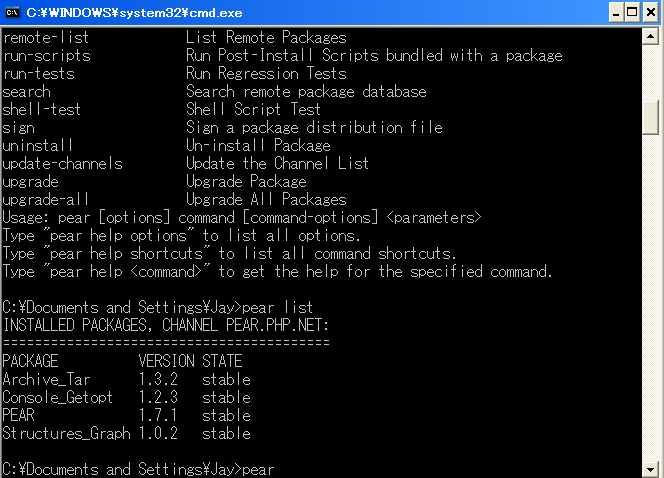
jaypanOk, I installed the pear package, and after that the archive_tar library, and upon running the 'pear list' command, I can see that the package is installed (please see screenshot - maybe I'm mistaken), but I am still getting the same error.
Comment #4
jaypanComment #5
mauror commentedDid you restarted the server? It would be better if you could see the extension loaded in the output of phpinfo().
Why are you suffering like this? Switching to Linux has never been easier...
Comment #6
ozish commentedHakulicious, I am using version 6.x.1-8 of plugin manager, but that shouldn't matter since your problem isn't actually with plugin manager. The problem you're having is configuring Pear to run on your WAMP installation. I had the same problem as you, right up to the point of showing Archive_Tar 1.3.2 as installed.
I fixed it by adding the line:
include_path = ".;C:\wamp\bin\php\php5.2.6\PEAR"to the appropriate section of php.ini, and then restarting all services.
Then I also added that same path to the Windows PATH environment variable.
Note that you'll also have to set up an FTP server (Filezilla is easy) to be able to connect via FTP to your WAMP server. Let me know if this helps.
Comment #8
redhatmatt commented#2 comment seems to no longer be true. Where's the dang documentation?
Comment #9
redhatmatt commentedI added pear path in, and it is clearly good to go. Archive Tar is in the pear directory and is up to date.
Very angry with plugin manager right now, I need some help fixing these training wheels that I don't actually need but am stuck with this acquia package atm due to the client.
Comment #10
Anonymous (not verified) commentedI'm sorry that you're having troubles with this. Unfortunately, I really do not believe it to be the problem of the Plugin Manager. Take a look at this line of code:
@include_once("Archive/Tar.php");
That is the line that imports Archive/Tar.php. The only time you will see that error is if Archive/Tar is not located in a place accessible / known to the plugin manager. Most likely it is still a problem with the path.
Comment #11
redhatmatt commentedphp knows where the path is in phpinfo .:/usr/share/path
my path is also /usr/kerberos/sbin:/usr/kerberos/bin://sbin://bin:/usr/local/sbin:/usr/local/bin:/sbin:/bin:/usr/sbin:/usr/bin:/root/bin:/usr/share/pear
how much more does a person have to go through...
Comment #12
jaypanAre you trying to use this locally? I never was able to get it working locally, but I've never had a single issue trying to get it to work on my server. And if the problem is local, just download it - it's just as easy as using this module. This module's strength comes when you are working with a remote installation.
Comment #13
rfabbri commentedAn easy solution for windows users to make it work who don't have or don't want to use PEAR.
Step 1 :
- Download latest unxutils from http://sourceforge.net/projects/unxutils/files/
- Unzip them or install into the c:\Logiciels\bin path
Step 2 :
- Edit the plugin_manager.module file of this module
Look for 2 lines containing the popen PHP command and modify like that according to the path chosen just before :
@popen("c:\\Logiciels\bin\\tar --version", "r");
Line 227 - modify like this :
popen("c:\\Logiciels\bin\\tar -zvxf $file_safe -C $dir_safe", "r");
The module should now be working
Not all solutions are based on php (like this project who is using tar) so why not using tar ???
Nice module downloading for Windows users : )
Comment #14
Anonymous (not verified) commentedMost recent commit adds Archive_Tar to the plugin_manager.
Comment #16
MoonChilde commentedI know this thread is closed, but the answers above either don't work, or arn't very clean.
In WAMP, although there is a PEAR subdirectory, PEAR is not installed with the Wampserver.
Check here:
http://phphints.wordpress.com/2008/08/26/installing-pear-package-manager...
(maybe Drupal should check this out, instead of leaving it up to wordpress :P
If the link is dead, search for:
php -d phar.require_hash=0 PEAR/go-pear.phar
Cheers