

Closed (fixed)
Project:
AD Redoable
Version:
5.x-1.3
Component:
User interface
Priority:
Critical
Category:
Bug report
Assigned:
Reporter:
Created:
23 Nov 2008 at 22:41 UTC
Updated:
7 Jul 2009 at 19:42 UTC
Jump to comment: Most recent file


Comments
Comment #1
typehost commentedI am having the same problems - in FF & IE. A list of some of the issues involved:
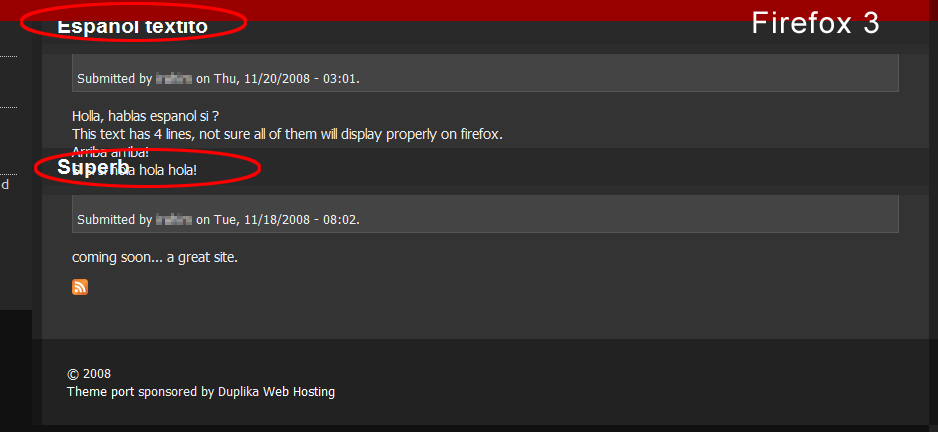
FF - "read more" overlaps title of next post in teaser view
FF - Page header extends over title of first post
FF - comment preview - buttons overlap post display
FF/IE - Views Pages - page Title, tabs, and first article title overlap
IE - Images in teaser view extend and are overlapped with title of next
article
IE - Search button and field text do not display inline in block view
In pages where footer & navigation menu align, navigation links are not
clickable
Comment #2
doomed commented> In pages where footer & navigation menu align, navigation links are not clickable
Hello,
This can be fixed by editing ad_redoable\style.css and changing the z-index of #footer from 1000 to 0.
I'm not sure this will affect something else. I will post if I find some problem.
Comment #3
doomed commentedI would like to add that i really like this theme but it's suffering from some serious Firefox incompatibilities.
I think most are CSS related.
I wish i could fix the problems because i would definitely do it.
Comment #4
djdave commentedI'm having some similar problems with this theme too. I changed that section of code, but am still having issues with the amount of space between audio entries sorted by taxonomy terms. I've looked through the code, however I don't know CSS. This is the only really issue that we're having with this theme, and we really would like to use it if possible. Please help! Thanks..
Dave
Comment #5
Alan Cooney commentedPlease test the latest version and let me know if any of these problems still exist.
Regards,
Alan
Comment #6
doomed commentedHello Alan
Would you mind listing which files were changed?
This would help on the upgrade side.
Comment #7
doomed commentedHello,
I can confirm that on v1.4, the issues reported on the original post are not present anymore.
Screenshots in attachment.
But I cannot comment on the problems brought by typehost on Reply #1 - http://drupal.org/node/338195#comment-1123241 - except for this one:
>> In pages where footer & navigation menu align, navigation links are not clickable
This is still happening on v1.4 !
But anyway, the solution was offered on Reply #2 - http://drupal.org/node/338195#comment-1124371 .
Comment #8
typehost commentedThanks for this - the new release cleared up most of the problems with the display. I still have:
1. Images in teaser view extend and are overlapped with title of next article
2. IE - Search button and field text do not display inline in block view
But should be able to work them out with CSS adjustments.
Comment #9
doomed commentedI can confirm the issues that typehost just posted.
Comment #10
koav commented> FF/IE - Views Pages - page Title, tabs, and first article title overlap
This can be fixed by editing ad_redoable\style.css and changing the margin of .node h2.title from -44px -30px 15px; to -14px -30px 15px;.
IE7
This can be fixed by editing ad_redoable\ie7.css and changing the margin of .node h2.title from -30px; to -10px;.
Comment #11
robert_hanley commentedI can confirm this fixed both issues for me in FF as well as IE 7.
Nice theme & good work
Comment #12
Alan Cooney commentedThe above fix doesn't work for me, but I have added different fixes. To avoid confusion I am closing this issues, please report new issues individually.
Thanks,
Alan