

Closed (fixed)
Project:
LDAP integration
Version:
6.x-1.x-dev
Component:
Code
Priority:
Normal
Category:
Bug report
Assigned:
Unassigned
Reporter:
Created:
27 Nov 2008 at 13:20 UTC
Updated:
2 Jan 2014 at 23:45 UTC
Jump to comment: Most recent, Most recent file

Comments
Comment #1
danbuntu commentedi have the almost the same problem.
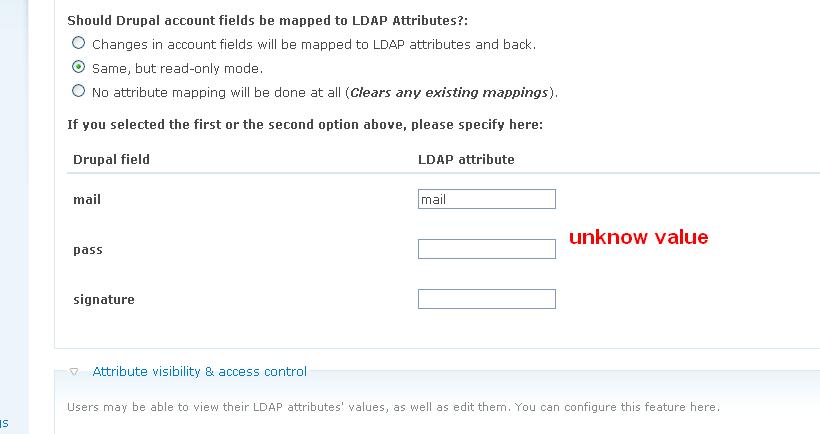
I'm using an Active Driectory Domian and I have set the the pass box to both pass and userPassword but when I go to change the users password it doesn't pass back the information to active directory. It does however say the information has saved.
does anyone have any ideas on this?
Comment #2
BradJ commentedI'm having this very issue as well with Novell eDirectory. I'm using "userPassword" and have verified it to be the correct attribute.
Comment #3
danbuntu commentedLooking around it seems a few peopl ehave this issue. It's a shame really as the rest of the ldap intergration is excellent. I can currently have users change all the other information in their account. With the intranet i'm currently building the ability to change their password as well means that it's a really great alternative to sharepoint or to buying third party products like manage engines self service protal.
Comment #4
miglius commentedLdap integration supports password changes in the LDAP. This feature is implemented and should be working. However, if it is not working, we cannot toubleshoot it for your particular case as the LDAP server can be configured in a number of ways, different access policies can be put in place.
Try to change password directly in LDAP logged in as the user configured in ldap_integration settings and see if it works.
Comment #5
BradJ commentedSo I understand this... It is the 'admin' user defined in the plugin the initiates ALL changes in LDAP? So even though the user initiates the change, the 'admin' account is used to bind and make the updates??
If the USER account is used, I can see where there would be an issue. In Novell eDir (and I believe AD as well), the USER must supply the old password AND the new password (twice) in order to successfully change their passwords. Something this plugin doesnt take into consideration. An administrator is not required to provide the old password (presumably they would never know it) in order to change a users password.
As a test, I mapped the password field back to the 'title' field. As I expected, I was able to see the plugin random generated password in plain text in eDir. However, I was still unable to change the password despite removing the ldap issue of supplying the old password.
I've tried 5.x and 6.x installations of Drupal and the correlating version of the plugin with no success. I can successfully make LDAP changes via other open source apps (MyLDAPAdmin, YALA, etc...)
My next test will be OpenLDAP to completely rule out that it's eDir. I'll keep you all posted...
In the meantime, any thoughts?
Comment #6
miglius commentedYes, the 'admin' user initiates the change of the password in the ldap. This is because if a user has forgotten his password and used a one time login in drupal, we cannot authenticate him with ldap at this point (his password is forgotten), so the changes are done by the admin user.
Comment #7
danbuntu commentedThe user that is configured in the ldap module is my Domain Admin and therefore has full control of the users and the network. This admin can happily change passwords with Active Directory. Also As I mentioned the same user is also happily pulling user data out of AD and changes made to a user account within Drupal are being passed back into AD without a hitch.
Comment #8
presleyd commentedYou will have to have TLS or SSL working in order to change AD attributes or password. I've struggling with this myself. I know have TLS setup on one of my AD servers and the ldapdata module is synching profile data back to the LDAP again (I don't know when it stopped working but I'm sure it did once without TLS). I started playing with the password change now, I hadn't ever tried it from Drupal. The only thing I did so far was put unicodePwd in the ldapdata page corresponding to the profile field 'pass' but that doesn't seem to be working. All other profile fields map just fine to AD attributes.
Comment #9
miglius commentedI don't have an Active Directory at hand to troubleshoot the issue. Would appreciate if somebody having AD could dig into it.
Comment #10
presleyd commentedBest I can tell the encoding is the issue:
From http://msdn.microsoft.com/en-us/library/cc223248(PROT.10).aspx
Something like:
$newpassword = "\"" . $newpassword . "\"";
$newPass = mb_convert_encoding($newpassword, "UTF-16LE");
? Guess I should test this eh?
Comment #11
presleyd commentedYep, this is it entirely. IF you have TLS enabled (or SSL I guess) and can successfully bind with it AND you have set the 'pass' field to unicodePwd in the data module the following addition to includes/LDAPinterface.inc makes AD password changing successful:
This is not intended for public use or committing as a patch... yet We'd need to check for mbstring being enabled and this is not really the best place to put the code most likely but I'll post it here as a proof of concept and in case anyone is dying to get this working until it can be cleaned up, I'll submit a patch when I do but I was hoping a maintainer would recommend the best place to implement this?
Comment #12
presleyd commentedPS for anyone else who's connecting to AD from PHP you will most definitely find it easier to get TLS working by adding the line
to your OpenLDAP ldap.conf file. EVEN if you are on WINDOWS and don't have OpenLDAP installed on your IIS box you will still need to create an ldap.conf file at C:\openldap\sysconf\ldap.conf and put this line in it! This is hard coded in the LDAP extension for LDAP. Where this file is located may vary on Linux installs but typically something like /etc/openldap/ldap.conf (which is probably not the same as /etc/ldap.conf !)
Comment #13
presleyd commentedComment #14
CaptApollo commentedHas anybody had any success with this in some of the newer 6.x versions?
I too am having the original poster's issue with Drupal reporting the password has been updated, while AD remains unchanged.
I am using unicodePwd in the ldapdata setup.
I am having difficulty binding with TLS - is it confirmed that this is a requirement (I would guess it actually varies by setup)?
All systems involved are running windows within the same domain.
Comment #15
presleyd commentedI'm fairly certain TLS is absolutely required. I haven't tried the new version yet to see if this works. Will do so soon.
Comment #16
presleyd commentedI'm submitting this as a patch.. I don't see anyway it can hurt anyone NOT using Active Directory. It basically just checks to see if you are trying to pass an attribute named unicodePwd back to the LDAP server and if so it encodes it the way AD wants.
This is built off of the 6.x-1.0-beta2 version.
Comment #17
ShutterFreak commentedIsn't PHP mbstring support one of the basic requirements for a Drupal installation? Otherwise take a look at hook_requirements.
Comment #18
mississippiman commentedAny progress on this?
I can login and create an account using LDAP but changing the password doesn't work.
Comment #19
presleyd commentedThe authors haven't commented on the patch but we've been using it here for months without any problem. It's still not a beautiful patch but I don't think any other LDAP implementation besides AD uses 'unicodePwd' as the name of the password variable so shouldn't hurt anyone else.
Comment #20
mississippiman commentedYeah it's working for me as well.
Comment #21
prufrock51 commentedworks great. thanks!
Comment #24
mississippiman commentedI'm sure you sell a fine product, but for $1000 (for 200 users...ever thing that some networks have way under that amount) I can find the time to write a FREE solution myself.
Now if you move into the $100 or $200 range we can talk. But for that kind of money you can keep it to yourself.
Comment #25
verta commentedI ignored the first post on this thread from techblue, but two seems like spamming to me. It's at least inappropriate to hijack a thread with an ad.
I'm new here, but how does this get addressed? Does one file an issue for d.o so the web team sees it?
Comment #26
bryan kennedy commented+1 on this patch.
I was experiencing the same problems trying to update the password in an Active Directory system. After applying this patch I was able to update the password. At first glance the fix doesn't seem elegant, but since it doesn't affect people not using AD, and it doesn't require a new interface checkbox for the user, I actually think it makes some sense.
Do the maintainers have an opinion about including this in the next release? I'm changing the issue to a bug report and clarifying the title, since the module seems to suggest that you can change password via LDAP, which is broken for Active Directory unless this patch is applied.
Comment #27
lavamind commentedThis is a good patch, and I also think it should be merged.
However, it should be noted that AD password changes using this patch is equivalent to a administrator changing a password on a user's behalf : domain password policies are ignored!
I opened another issue to deal with this problem, to which I attached a very crude patch that proposes a solution : #987468: Password policy enforcement when using Active Directory
Comment #28
Chilloutfaktor commentedMhhh - how you got the Password changing to work?
I'm running Active Directory (2008 R2) ldap (without TLS or LDAPS) configured on port 389.
Running drupal - ldap authentication in: Only ldap mode (not mixed mode)
I also applied the ADPassword.patch but this seems not to be helping.
I've tried as pass / ldap_attribute the following:
userPassword <- user can change the password, drupal says its successfull - but pw doesn't got changed
unicodePwd <- if user want to change pw - it gets the following error:
warning: ldap_modify(): Modify: Server is unwilling to perform in /var/www/intranet/sites/all/modules/ldap_integration/includes/LDAPInterface.inc on line 265.
The data was not written to LDAP.
As User to change the Data fields i've entered a Domain Admin.
Logging in via AD Credentials and changing other Atributes is no problem.
Just to know, i've set the pass field to title attribute - and i see that the entered password will be written there in clear text.
Any ideas, why the password changing is not working for me ? Its maybe the "only Ldap mode" or cause no TLS ?
Comment #29
lavamind commentedYou absolutely need to go through LDAPS (port 636) to change a password on ActiveDirectory.
Comment #30
erikwebb commentedCan anyone verify #29?
Comment #31
verta commented#29 sounds like what I have read, and makes sense. You don't want to use a PW change mechanism that puts the PW in clear text on the wire.
Comment #32
presleyd commentedYou do not need LDAPS in Server 2003 at least, TLS works fine on port 389. Our AD has not moved to Server 2008 yet so I can't say for that scenario.
Comment #33
johnbarclay commentedthis is committed to head.