I love how it's easy for me, as the admin, to add a photo or video or album just by going to the main acidfree page (mysite.com/acidfree) and clicking on the Add a album (which should be "Add an album," btw), Add a photo, Add a video, or Mass import links. It would be great if these links appeared on this page for users with the appropriate permission, too. Currently, it appears users must use the "create content" link in the user menu to add acidfree content. I'm putting together a community site, and I think people will be much more likely to contribute photos of a particular event, for example, if they see such links prompting them to add a photo on the album page.
Thanks for the great module!


Comments
Comment #1
vhmauery commentedgo to admin/access and configure:
acidfree mass import
create acidfree albums
create acidfree elements
edit own acidfree elements
for your users. If these are configured correctly, the links should show up.
Since as far as I can tell, this is not a bug, I am closing it. If configuring those access settings doesn't work, then there is something else awry. (the settings work for me and my users.)
Comment #2
jazzmak commentedI had the same problem as an user spazfox, but it was not enough to enable acidfree access control. Now I am happy, cause new version of acidfree miracously fixed that out. Big thanks!
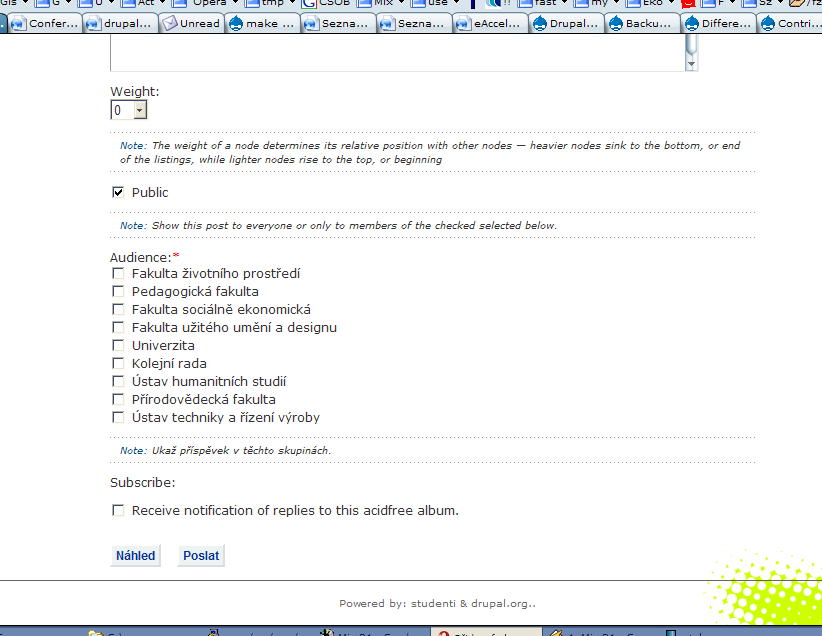
I have another minor problem though. I am using organic groups and mass import dont offfer possibility to choose audience of images like the other acid free types do.
It would be great if it get fixed in future..
Comment #3
vhmauery commented"choose audience of images"?
I don't understand what you mean here. Mass import was intended as a quick and easy way to get images into acidfree. You can use 'album contents' to do mass edits.
Comment #4
spazfoxI'm opening this back up and changing it to a bug report (since apparently my "requested feature" is the intended behavior, but it is not working for me). I have the permissions set as you suggest and have the most recent version of acidfree (v 1.2.2.37), but it is still the case that only the admin has these links on the album pages.
It may very well be that "there is something else awry," but I don't think it can be ruled out yet that this is a potential bug in acidfree (especially since it seems unlikely to me that some other module would affect acidfree's performance in this way).
Comment #5
jazzmak commentedChoose audience and public boxes is a feature of organic groups module, which allows to restrict node to permissioned group. It looks this way.. http://student.ujep.cz/tmp/audience.png
In mass import it is not taken into account and that cause, user cant even see photos he uploaded.
Comment #6
spazfoxThese links still do not show up for my users on the main acidfree page. Two pieces of information that may be relevant to my problem:
1) These links DO show up when I give the role "administer nodes" permission for the node module. This grants more permission than I want to give the role, however.
2) I am also using the node_privacy_byrole module, which apparently may interfere with the acidfree permissions (see http://drupal.org/node/34836). I thought that perhaps this was fixed with the latest release (1.2.2.50), but I'm still having the same problem.
Another odd (seemingly related) behavior is that when users click the "create content" link from the navigation menu, the acidfree album, photo, video, and mass import tabs appear at the top of the create content page. This doesn't happen for the admin.
So do I need to disable node_privacy_byrole in order to get this acidfree content creation links on the main page? That would be a bummer. I'm a little scared to try it out because my site has a lot of content already, and I'm not sure if my node-by-node permission settings will be retained if I disable node_privacy_byrole. Does anyone know if I can disable and enable node_privacy_byrole without any problems?
Comment #7
vhmauery commentedBefore you do anything rash like give all your users admin priviledges, I think I understand what the problem is here. But I am not sure what the correct answer is.
Normally, the links that say "add a photo", etc. are links to something of the form node/add/acidfree/photo/nnnn where nnnn is the album that contains the links. The links show up in albums that the user owns or can edit. However, there is nothing currently to prevent a user from adding photos to an album they don't own (such as the root album) or deleting their own images out of an album they don't own.
So putting links in the root album would mean that all the added items would default to the root album (unless the user selected a different album on the add page -- which not all users would). If this is something that people would like to see special cased for the root album, I might agree to that (since it is owned by user 1 by default).
Is there some way to get more than just your opinion (not that yours doesn't matter, but I would like to hear what other people say too.)
Comment #8
NaX commentedThis is my duplicated thoughts on the topic.
No need to retype when you can link.
http://drupal.org/node/37906
Comment #9
NaX commentedI have put all my ideas for this into a patch. This is my first patch so please tell me if you get any errors applying it. It took me more than a few tries to create a patch that did not error when applying it.
What I did was to add a setting to the "Acidfree Display" settings. Giving the admin the choice of when to show the menu. No need to add admin privileges. I am not sure if my choice of wording is the best for the setting, but it seems to work for me.
Comment #10
NaX commented30 sec after submitting the patch I found a working error. It should be "that are not album owners" not "that or not album owners" Still don't think its worded correctly but if you ignore the typo it should make more sense.
Comment #11
vhmauery commentedThank you for making a try NaX. The idea is good, but I am not sure I like the implementation. I suppose this is as good a place as any to have a discussion about how permissions in albums should go.
This is what I think (not much of this is implemented at this time):
How does something like this sound to you?
Comment #12
NaX commentedOk that all sound great. It will add a lot of flexibility and control. But I have a few questions.
1>
All permissions will be handled by node_access modules. What modules did you have in mind or do you for see having to create this access module? The only module that I know of that comes close to this type of node based control is the "node privacy byrole" module and maybe the "Simple Access" module.
2>
Do you see the scope for adding a admin permission ( administer acidfree elements ) to the acidfree permission. That way a user other than root can administer all acidfree content without having to have administer nodes privileges. This way a very large site can delegate control, but not to much control.
3>
These permissions, will it be role based or view, edit, delete for anybody that has the appropriate acidfree permissions. IE if edit is granted on a album then any user with create acidfree albums permission will be able to edit that album and the contents. (Some thing like that, not to sure how to put my thought into words with that one)
4>
The features you mentioned in point 4 seem to be specific to acidfree and maybe taxonomy. Would this not require the node_access module to be specific to acidfree or will acidfree control the acidfree specific features and only rely on the access module for node by node permission.
5>
You say that not much of this is implemented at this time so do see these features being implemented for drupal 4.6 or will it only come later in 4.7 and then later maybe back ported. If this is the case could my little patch be seen as a temporary measure or maybe some thing similar.
Comment #13
vhmauery commentedI am going to number my responses to your numbered responses just to keep everything straight.
Comment #14
NaX commentedOk I am sold, but that sound like a lot of work. A few more questions and then I will stop bugging you.
If an admin has a small site with just a few albums (lets say less then 5, excluding the root album) and for theming reason does not want the menu to display, but still wants his users to have the appropriate permissions to add content except albums. (And the inverse, small site that wants to display the menu)
If an admin has a very large site with lots of users and wants to display the menu to all users that have the appropriate permissions. (and again the inverse)
So I think for theming flexibility and user interface control their should be menu display controls, looking passed the permissions issue what do you think.
Comment #15
vhmauery commentedThe add media links could certainly be a setting, but I am not don't think they should be able to override the access controls for the album.
I am not sure exactly which access control method it will end up using to determine whether or not a user has permission to add an element to an album. It might have to start out as node_access('update')
I don't have a time frame yet. I am still trying to get Acidfree ready for 4.7, which seems to be more difficult than I think it should. I guess I must have done some things not quite right according to their API. But as far as features go, I think this would be fairly high priority as the current setup is broken.
You patch did make it so the links showed up, just like you said. It is fairly simple, so if you wanted to just use that for now, it probably would not be a hard thing to keep up to date.
Comment #16
shouchen commentedPlease keep taxonomy_access in mind for node access.
Comment #17
NaX commentedAcidfree does not use taxonomy. A album is actually a acidfree node. If you were to use taxonomy_access I dont know how it would work.
Comment #18
vhmauery commentedA clarification: Acidfree does not use taxonomy for its album hierarchy. You can use taxonomy to classify Acidfree nodes if you so desire. But using taxonomy_access should still work.
Comment #19
hadishon commentedI accidently made a dupe bug for this here: http://drupal.org/node/59613
vhmauery stated: "The links probably won't show up in the root album. I am trying to figure out how to get that working. But they will show up in an album you create as a normal (non admin) user."
I don't have any links showing up on any album pages for non admin role users.
I have created all of the albums via the admin role.
If I understand correctly, if the album was created by non admin role, there will be links. My question: Is there a way to change the user that created all of these albums? In other words, can I change them to a non admin role and how?
Thanks
Comment #20
hadishon commentedTo answer my own question...
Log in as admin, edit each album, change "Authoring information" to a non admin user, submit.
Probably not the fastest way but it works... Now I have a lot of albums to change. :-)
Comment #21
hadishon commentedAlthough this works for showing the links to the non admin role that created the album, it doesn't show the links to other non admin roles that should have permissions to add photos...
Is there any possibility to be able to do this? Maybe make it an option so that admins can choose to disply the links to all or not?
Comment #22
hadishon commentedIt seems that the roles I selected to be able to add photots, albums, etc can it's just that there is no links. I'm going to try to make a custom block in a custom region to shw the links.
Comment #23
hadishon commentedHere is the code I'm using to supply the blocks in a custom region:
Now my questions is, does any one know how to place this on all of the album pages other than typing each url into the "listed pages" area of the block configure form?
Can I use a "Show if the following PHP code returns TRUE " ? What php code could I put there?
Comment #24
hadishon commentedBTW, I'm using 4.7 cvs:
I tried using code:
Comment #25
hadishon commentedOk, I got it working.
In 4.7:
1)Make a custome block
2)Insert this in the block body and select php as input type
3)Then specify "Show if the following PHP code returns TRUE (PHP-mode, experts only)" and insert this into the field:
What this will do is display the links in a custom block but only to logged in members and only on acidfree pages. You can then create a custom region if you want and also customize how the list looks by using css.
I'm satisfied with this work around. I think it would be better if we could have more control over who can do what with acidfree but in the mean time, this will work.
Comment #26
vhmauery commented