

Active
Project:
JQuery menu
Version:
7.x-4.0-alpha3
Component:
Code
Priority:
Normal
Category:
Bug report
Assigned:
Issue tags:
Reporter:
Created:
9 Dec 2008 at 19:08 UTC
Updated:
20 Jan 2015 at 23:03 UTC
Jump to comment: Most recent, Most recent file


Comments
Comment #1
jondblackburn commentedLooking through the code for the module (to see if it was themable) . . . I see that apparently, this functionality is supposed to be here already
So, I am changing this to a bug report - though there is obviously the possibility that I am doing something wrong.
More Explanation - added 12/10/08
P.S. Please let me know if I am understanding the code above incorrectly, but it seems like any menu item(s) in the "active trail" should be open/expanded by default.
E.G. If you have ...
Menu Item 1
- SubMenuItem 1
- Page 1
- Page 2
And you are on Page 2
Then, Menu Item 1 and SubMenuItem1 should both have the "open" class - expanding both options when on that page.
Is this correct?
Comment #2
PixelClever commentedWhere is the block you are using? Did you put in the primary links section? Some themes remove the active trail and menus placed in the primary links section almost always have them removed. Go to http://www.pixelclever.com/drupal-theme-conversion-psd-or-fireworks-files and look how the menu responds to the active trail. I use this module on at least 5 themes on separate host without the issue you mentioned, so until I see evidence to the contrary I consider this a theme issue.
Comment #3
Rob T commentedI'm experiencing the same issue, no matter what theme I use. My main theme is based on Basic, but all the core Drupal 6.x themes yield the same result. My menu is a custom one. Many of the links point to spots that are views-like (versus actual nodes), so I am unsure if that has anything to do with anything.
In my custom menu-jquerymenu block, I'm not getting my menu's "li" tagged w/ "active-trail". Only the current page's "a" tag gets an "active".
In my primary links area, "active-trail" tagging seems to work fine.
UPDATE: When I use the jquerymenu block for a primary links block, it works as advertised, but only to a depth of 1. Further tiers still yield the closed parents.
Any suggestions or advice?
Comment #4
PixelClever commentedCould you show me a link to a page that is having this happen so that I can take a look at the classes that are in place? Try it out on a standard theme such as Garland and tell me if it shows up still. If it does then there is something else besides a theming issue coming up. The module makes use of the active trail that is handed to it by the Drupal system on a per page basis, so if the active trail isn't there then there isn't much my module can do about it. Usually though this kind of thing is related to theme functions that override classes or strip them from the menu before displaying.
Really I can't do anything unless I see an example of this error in action since it is not happening on any of my sites.
Comment #5
yhancik commentedI don't have any online example for now, but here's what I get with Garland, on a custom menu :
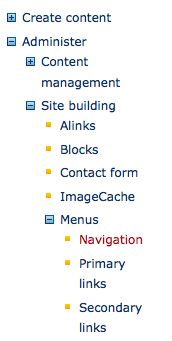
clicking on Item1 closes the Title1 level
VS the administrative menu
--
edit
Obviously, menu_get_active_trail() skips the parent node when clicking on a child.
thus, if the (working) administrative menus have this $url_array
array (
0 => '',
1 => 'node/add',
2 => 'node/add/story',
)
the custom menu returns
array (
0 => '',
1 => 'node/6',
)
when it should be
array (
0 => '',
1 => 'node/5',
2 => 'node/6',
)
Now let's figure out why...
Could it be some kind of incompatibility with another module ? (since I'm using Garland, here)
Comment #6
miiimoooIt's a problem with the activemenu. If the menu you're using isn't drupal's active menu it will set the trail according to the one that is active ('navigation' by default).
For instance if you put this:
then it work correctly.
Is there a better way of doing this though?
Comment #7
miiimoooDidn't take long and I found how to do it properly. Here's the code for the function - it only differs on three lines:
Comment #8
krisrobinson commentedThat worked for me. Thanks.
Comment #9
PixelClever commentedI think there is a module compatibility issue going on here. Some other module or theme function is overriding the active trail. Perhaps this is a reasonable safeguard to insure that it doesn't happen, however I think it would be good to know why this is happening only on a few installations before committing it.
Comment #10
PixelClever commentedComment #11
PixelClever commentedCommitted in 2.1.
Comment #13
drupalninja99 commentedThe problem with this fix above is that I don't think it works with menus that go deeper than just 1 level. If the jquery menu goes a couple menus deep what happens is that the inner most menu has the class "open" but the parent menus have the class "closed" and so what results is that the menu is closed, which looks like a bug.
Possible fix: I modified recursive_link_creator() in v 6.x-2.3, line 189 to add another condition to look up the $item['link']['href'] in the $url_array using a regular expression to see if $item['link']['href'] is in the same path, if so it makes it open as well. This might not be the cleanest solution, maybe someone else can clean it up, but my initial tests look like it works. If it does, will someone please make a patch and commit? Thanks! -J
Comment #14
duckzland commentednot working in acquia marina.
Comment #15
PixelClever commentedI spent some time with someone who was having this problem and it went away when they upgraded to version 3.0 of the module. There have been many changes made in the 3.0 version. I am going to close this issue for now, if it shows up in the 3.0 then reopen it as a 3.0 bug and I will investigate.
Comment #16
ashiwebi commentedIt works on node/nid but we need support on show/nid.
If you have any suggestion on this please respond as soon as possible
Comment #17
adam_b commentedSubscribe - I'm still having this problem with v6.x-3.2. As pointed out in #13, it works for the first level but not for any level below that. I'm using the Basic template with a few CSS-only changes.
Comment #18
PixelClever commentedI tested this on my site at admin/build/menu-customize/navigation which is several levels deep and it opened automatically as would be expected. I am attaching a screen shot to show it. I am not against fixing this bug, the problem is that I don't have the conditions on my installations which are causing it to appear. That being the case, I either need a very precise description of the steps required to reproduce this behavior on a fresh install, or I need a patch to be submitted against the current version that doesn't affect the rest of the module.
Comment #19
digitalfrontiersmediaI wrote this modification to recursive_link_creator about a year ago. It was kind of kludgy then and still is now, but always seems to work for me. I haven't had time to go through and make it more elegant and develop it into a real patch, but I keep coming back to it when using jQuery Menus with Taxonomy Menu:
Basic idea is to get a list of parents for the active menu item prior to setting menus to "open", then just modify the conditional making that determination, using it to set all parents to "open" as well.
Comment #20
digitalfrontiersmediaHi Aaron,
In my experiences, the problem has always shown itself when using JQuery Menu with a Taxonomy Menu module-created menu when the default (or modified) taxonomy_term view is enabled (i.e., not using Drupal's standard taxonomy page handler but the one from Views).
And I think that maybe it's using taxonomy_term that for some reason winds up killing your module's ability to open the items in the active trail, because your module WAS working for me as expected initially, then I found it wasn't after adding that for my results page.
EDIT: Just confirmed this by disabling the taxonomy_term View and reverting back to your core code. If NOT using taxonomy_term View, then your code works. Otherwise, I need to apply my custom modification to get your code to work.
Comment #21
TimG1 commentedHi Everyone,
For me this is working as expected when using the Blocks that are generated in admin/build/block.
However, when trying to use this via the API the parent item is not "open" when on a child page of that parent.
Maybe I'm using this wrong but here is what I'm doing....
Thanks for reading,
-Tim
Comment #22
grego3781 commentedGreetings,
I'm trying to utilize the API to display the a subsection of the
menu.
For example:
Cars-Foreign
--Porsche
--Mercedes
--Lexus
-Domestic
--Ford
--Chevy
--Chrysler
Food
-Fruits
--Apples
--Oranges
--Grapes
-Vegetables
--Tomatoes
--Carrots
--Peas
When I'm on the "Oranges" page, I want to display the following jQuery Menu:
Food
-Fruits
--Apples
--Oranges
--Grapes
-Vegetables
With the "Fruits" menu expanded and the "Vegetables" menu with a '+' sign with the option to expand
When I'm on the "Porsche" page, I want to display the following jQuery Menu:
Cars
-Foreign
--Porsche
--Mercedes
--Lexus
-Domestic
With the "Foreign" menu expanded and the "Domestic" menu with a '+' sign with the option to expand.
Any direction is greatly appreciated.
Thanks
Comment #23
kdhartstrom commentedHaving item expanded to the active menu menu item more then 1 level deep also seems to break with the admin 2.x module http://drupal.org/project/admin enabled and active.
Comment #24
oddhenrik commentedHi, I'm a Drupal and PHP newbie and this is my first post, so be gentle with me ; )
I had the exact problem as this issue, menu items would not keep open as you have described. So i applied DigitalFrontier's modifications. This seemed to work just great. But I have two menu block's and found that occasionally a menu item in the other block would open when I opened one in the other.
After a bit of debugging I found that there where mlid's such as 1234 and 34 and the check:
strpos($active, $item['link']['mlid'])!=0Would return true for both in such cases. I checked the PHP manual and altered the code to be:
This seems to solve the problem. This is about the first line of PHP I have written. So any comments on the solution is welcome.
Comment #25
oddhenrik commentedSite off-line issue made me post triple, sorry....
Comment #26
oddhenrik commentedSite off-line issue made me post triple, sorry....
Comment #27
rilsonraposo commentedHi,
I solved it making a change on javascript. At jquerymenu_no_animation.js, add the folowing line:
If using animations, add the line to jquerymenu.js, as showed bellow:
The added code just finds all <li> tags that are parents of the active <li> tag and opens them.
I hope it helps!
Comment #28
digitalfrontiersmediaI like the jQuery quick fix, but I think the source code coming out of Drupal is the original source of the error and that's where the fix should truly be applied. But so long as these options don't get committed, I guess whatever works, eh?
Comment #29
anybodyTruly needed patch... please fix and release it asap.
Comment #30
nubeli commentedI can confirm that the jquery additions in #27 do the trick.
Comment #31
yochee commentedstill not working for my page. i experience the issue on book-pages. i am using the nitobe theme.
problem 1:
in a menu with normal pages and book-pages (with a real menu path) the book-pages dont open the menu-path as it should. on the normal pages the module just works as it should. (but isnt a book page a normal node but with a more komplex and separete back and forth menu?)
problem 2:
there are some book-pages that dont have a menu path in the main menu, because the are included in a book menu. but i told these book-pages, under which menu point they are.. doesnt work either
Site structure:
main ------------- (normal node, in menu)
-sub1 ------------ (normal node, in menu)
--sub2 ----------- (normal node, in menu)
--sub2 ----------- (normal node, in menu)
--book1 --------- (book page, in menu)
---book2 -------- (book page, in menu)
----book3 ------- (book page; not in menu because of seperate book menu)
----book3 ------- (book page, not in menu)
----book3 ------- (book page, not in menu)
---book2 -------- (book page, in menu)
----book3 ------- (book page, not in menu)
----book3 ------- (book page, not in menu)
----book3 ------- (book page, not in menu)
---book2 -------- (book page, in menu)
----book3 ------- (book page)
----book3 ------- (book page)
----book3 ------- (book page)
--sub2 ----------- (normal node)
--sub2 ----------- (normal node)
maybe this helps for recreating?
Comment #32
arx-e commented#27 fixed the problem for me.
Thank you rilsonraposo!
Comment #33
CarbonPig commented#27 worked for me
http://carbonpig.com
Thanks,
CarbonPig
Comment #34
mesch commentedI can also confirm #27 does the trick w/ version 6.x-3.3. Would definitely like to see this fixed in the next version.
Thanks to rilsonraposo for the hack, and to Aaron and other contributors for a very useful module.
Comment #35
massud commented#27 does the job but it does not change the collapsed icon (+) to expanded (-). The complete solution is:
At jquerymenu_no_animation.js, add the folowing line:
If using animations, add the line to jquerymenu.js, as showed bellow:
Comment #36
anybodyChanged status to needs review. If the patch works without any problems it may walk into the next version?
Comment #37
summit commentedHi,
It would be great to have this also in D7. See http://drupal.org/node/996444#comment-5275708 for D7 port.
Is #35 committed to the module on D6, or something similar may be?
greetings, Martijn
Comment #38
essbee commented#35 works for me.
Comment #39
aa461 commented#35 worked ok for me,
Thanks, massud and rilsonraposo.
Comment #40
summit commentedHi, Does #35 also work with core patch enabled? I am referring to: http://drupal.org/node/942782#comment-5330668.
Thanks for your reply in advance!
Greetings, Martijn
Comment #41
summit commentedHi,
Patch in http://drupal.org/node/344916#comment-4621198 expands nicely on termpages, but it will NOT expand on node pages. Sorry..
How can I get jquerymenu with a taxonomy menu custom menu to expand on node pages (panel node override node pages).
I use D6 latest version, Fervens theme, and from jquery the 6.33 version.
Thanks a lot in advance for your reply.
greetings,
Martijn
Comment #42
amysiano4x3 commentedMartijn-
I am having the same issue with panel node pages. Did you find a solution? I am using this for a product catalog and woul like the menu to remain open on the product.
Comment #43
brst t commented20131102 - removed by author
Comment #44
pat redmond commentedWill fix in the next version, to be posted shortly. Give that a go, and let me know if the problem persists.
Comment #45
hillaryneaf commentedConfirming #35 works for me for node pages... will be good to have it fixed in next version.
Comment #46
pat redmond commentednektir, can you use 6.x-4.0-alpha2 and confirm whether this fixes the error? It should contain the patch so you don't have to change the module at all.
Comment #47
Anonymous (not verified) commentedConfirming that #35 works.
Only half of the patch got into the 7.x-3.x-dev version. jquerymenu_no_animation.js got patched but not jquerymenu.js.
Changed this to a bug report, with priority to "normal"; arguably should be "major". This can be a significant wtf for end-users.
Comment #48
pat redmond commentedCan you double check this for me? Specifically, can you confirm that your jquerymenu.js file at lines 39 and 40, and let me know whether the patch is there?
jquerymenu.js looks significantly different to jquerymenu_no_animation.js - in the D7 version the no_animation version isn't used anymore. Everything happens in the single js file. I will remove the no_animation next time I do an update.
Comment #49
Anonymous (not verified) commentedI've just re-downloaded jquerymenu-7.x-3.x-dev.tar.gz from the project page. In its version of jquerymenu.js, lines 39-40 are:
Note that this applies only to the .open class. The file does not include the needed additional lines:
These apply to the .active class.
Comment #50
pat redmond commentedOK, I will make sure this is added to the next dev release.
Comment #51
1mundus commentedUnfortunately, this feature seems very buggy. It's highlighting only the first term that you open. Here is the example:
- Term 1
--- Term 2
--- Term 3
- Term 4
--- Term 5
--- Term 6
If I land on Term 2, it will display it properly as highlighted and expand Term 1.
However, when I click on Term 5, Term 2 is still the one that is displayed as highlighted and Term 1 is expanded instead of Term 4 being expanded.
Classes used are "parent open" and "leaf open".
The same thing is valid for both term and node pages.
Otherwise the module is great and thank you for your work!
Comment #52
1mundus commentedHm, I have noticed a strange thing - when I'm logged in (administrator), it seems to work properly. As soon as I browse it as an anonymous user, it does what I have described in the previous post. I have cleared all of the caches and tried all of the options on the settings page, but it doesn't change anything.
Comment #53
ranx commentedI can confirm #52
Works well when logged in, does not work for anonymous.
Comment #54
jeepster commentedI fixed this problem by changing 2 lines in jquerymenu.module:
With this fix the menu expands only the item menu-parent and not all menu items.
Hope this help
Comment #55
crutch commentedin reference to #51
I have some confusion.
7.x-4.0-alpha3
Categories
- {Parent} Term 1
--- {Child} Term 2 = Taxonomy list of nodes
------ Node 1 - contains multiple terms
------ Node 2
------ Etc.
--- {Child} Term 3
- {Parent} Term 4
--- {Child} Term 5
------ Node 1 - contains multiple terms
------ Node 2
------ Etc.
--- {Child} Term 6
When clicking to Node 1 under {Parent} Term 4, {Parent} Term 1 is always expanded. It seems to select the first parent term to expand no matter how navigating there.
Comment #56
adanielyan commentedjeepster, does that solve problem described in #52?
Were anybody able to resolve issue #52?
Comment #57
pat redmond commentedCan a few people try this: https://drupal.org/node/1938518
I think mmn has found the issue! I will add it to the next release, which I hope to do in the next couple of days.
Comment #58
adanielyan commentedRecently installed 7.x-4.0-alpha3 version on a different site. The issue is gone and it works as expected.
Comment #59
elliot commentedNot sure if others are still having this issue, but we are. Here's an example link: https://nook.marlboro.edu/public/offices/it/faq/filestransfer The page should open the Information Technology sub-menu, but doesn't. I've attempted https://drupal.org/node/1938518, but haven't done much other investigation yet.
Comment #60
abarpetia commentedHello Elliot,
I am also facing the same problem. Did you found solution for this issue?
When i navigate through my menu items (see attachment 1.png) and click on 1.1.1 Template , it's perfectly open my provided link but the menu item get collapsed completely (see attachment 2.png).
I have also applied this patchhttps://drupal.org/node/1938518, but still not working.
Thanks... :)
Comment #61
abarpetia commentedFound solution. When i used absolute paths in menu path then menu items get collapsed which is fair enough.