

Closed (fixed)
Project:
Advanced Poll
Version:
6.x-1.x-dev
Component:
Code
Priority:
Normal
Category:
Bug report
Assigned:
Unassigned
Issue tags:
Reporter:
Created:
10 Dec 2008 at 04:15 UTC
Updated:
2 Jan 2014 at 23:45 UTC
Jump to comment: Most recent, Most recent file


Comments
Comment #1
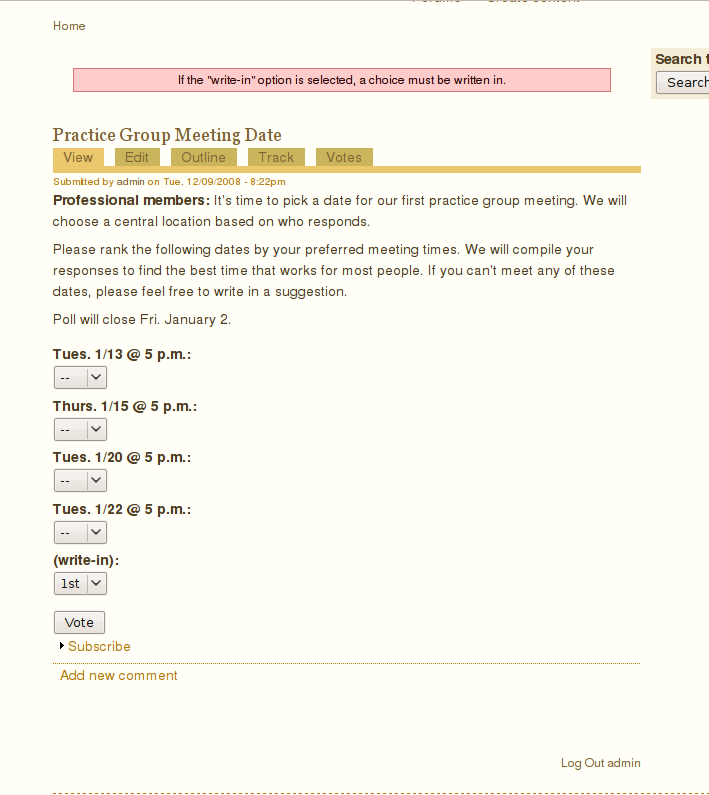
Marat commentedFor me, I couldn't find the field for both anonymous and authenticated users!
Comment #2
ChrisKennedy commentedI just updated write-in handling in D6, which should be closer to working now. Want to try it again with tomorrow's updated build?
Comment #3
ChrisKennedy commentedPinging you guys back on this.
Comment #4
Marat commentedI downloaded the last version, just today, and still cannot see the the field! See attached pic
Comment #5
ChrisKennedy commentedHmm there may be some interaction with another module's JavaScript or something - I just redid some of the code yesterday so it's possible that I fixed it. Are you using any other contrib modules? Can you try disabling them to see if that fixes the issue? Also in FireFox do you mind going to Tools -> Error Console and scrolling to the bottom to see if there's an advpoll related JavaScript error?
Comment #6
Peel commentedI see its been nearly a year and a half since anyone's posted to this issue, but I am experiencing the same thing. When I pick the write-in choice, there is no text box to add the vote to (doesn't matter if I'm logged in or not, and it's not a browser specific thing - fails in all browsers). This is using the 2010-9-9 update
I did as you suggested and went to the Error Console in FF, but there were no javascript errors for advpoll, or any module.
Let me know if there's any other info I can send you to help figure this out.
Comment #7
kayograco commentedI had the same problem, so I searched the code for a div containing the write-in field and found it. There was a css line display:none, so I deactivated it, and when selecting another option the line reapered (as shown in the picture). The wairest thing is that when I refreshed the page, the problem was solved (even in other browsers), and the field appeared automatically when clicking the Write in option.