Closed (fixed)
Project:
Calendar
Version:
6.x-2.0-rc6
Component:
Code
Priority:
Normal
Category:
Feature request
Assigned:
Reporter:
Created:
10 Dec 2008 at 11:08 UTC
Updated:
28 May 2009 at 15:48 UTC
Jump to comment: Most recent file


Problem:
Calendar where user can make booking some type of events for specified hours (depends of availability).
If client signup for specified hour, then this timeslot is marked as booked.
P.S. Any solution, advice or help will be appreciate.
| Comment | File | Size | Author |
|---|---|---|---|
| #7 | booking_timeslots.zip | 11.02 KB | kenorb |
| #4 | party.inc_.gz | 1.29 KB | kenorb |
| #3 | Clipboard03_booking.jpg | 62.2 KB | kenorb |
| #3 | calendar-day.tpl(booking_slots).zip | 1.99 KB | kenorb |
| #2 | calendar-day.tpl(half_hourly).zip | 1.3 KB | kenorb |


Comments
Comment #1
kenorb commentedFirst of all we need Calendar and some custom view of day/week/month views.
Copy your tpl.php files from calendar/theme dir into your theme and modify them as you wish.
If you will have problem that template files will not work, look at this: http://drupal.org/node/342614#comment-1148317
In attachment you have example patch for calendar-day.tpl.php theme file (and whole file).
Example with fixed hours slots even there are not any events.
See attachment for demo.
You can change your time range in following line:
Comment #2
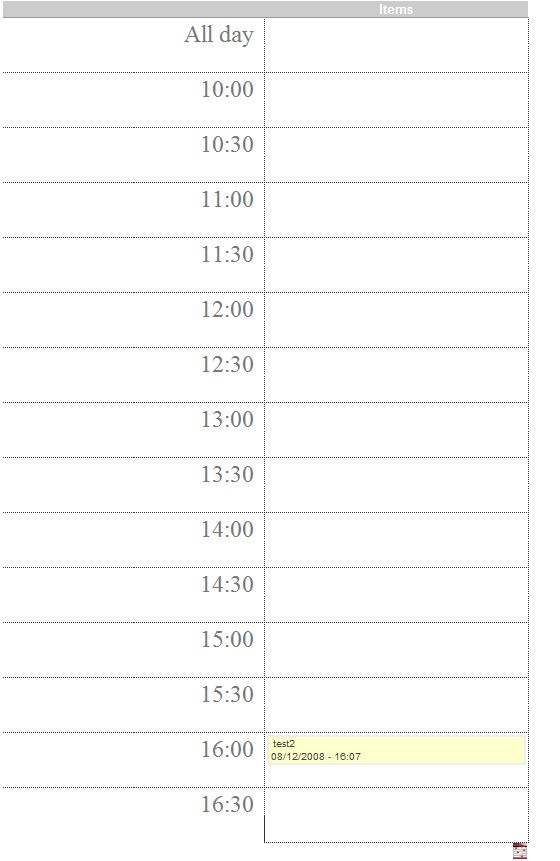
kenorb commentedThis version example theme for each half an hour (see pic).
Make sure that your grouping settings is set to 'Half hour' in your calendar view.
Comment #3
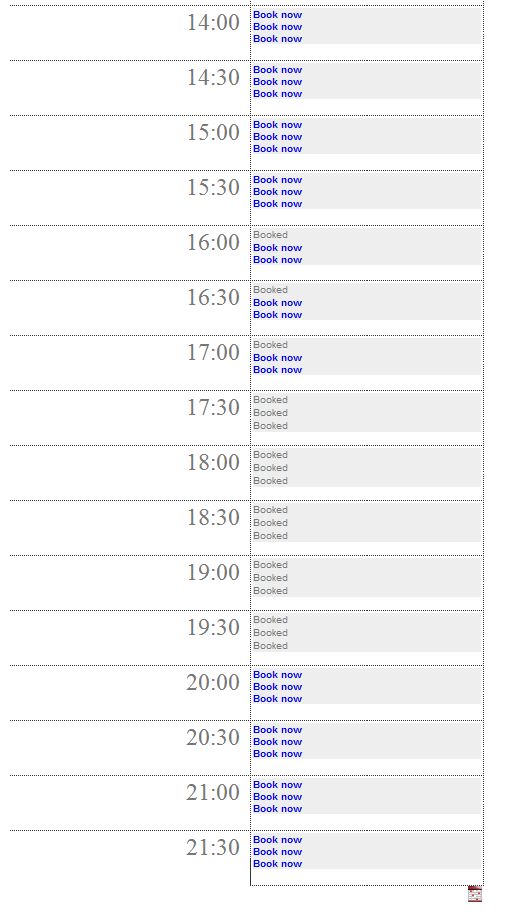
kenorb commentedLets now do some booking theme.
All you need is to change following lines:
Now it's configured that there are 3 available slots in one time and each even is 1,5h long (so the real end time of the event will be ignored).
Note that in theme file you can't check permission of specified time slot, if you will not have permission to access specified dates, on different roles there can be different free time slots. But you can easily modify the theme to check if user can create some content and then you can generate message that booking is not available or something.
See screenshot for live example.
P.S. For PHP 4.x you need to change following section into:
Comment #4
kenorb commentedNow we need to develop relation between Booking link and creation datetime field.
Make some changes to the above theme:
And change content generation to followed:
Now when you click, you will be redirected to page: node/add/my_content_type/2008-12-08 17:20:00
In the form_alter() create something like:
Above function you will find in attachment.
So basically:
user choosing Booking slot from day view (you can modify your week and month themes as well), then it's going to custom booking form with filled datetime fields and that's it.
Note: of course you can make some your own validation to make sure that user will not book some date when he is not allow to do that.
UPDATE:
After some changes into Drupal website I can't edit my attachment files, so there is small patch for party_add_time() function:
Replace following lines:
Comment #6
robotjox commentedjust curious - this sounds awesome! Did you manage to create a fully working booking thingy using calendar with all of the above?
Comment #7
kenorb commentedIn attachment you will find my first version of module.
I can't promise that it will work at it should, but you can fully customize it (read README.txt)
Definitely it will save some time for people who tried make similar thing.
If somebody is interested with development of this module, I'm interested as well.
Comment #8
karens commentedI'm going to reopen this. I have a client interested in something similar so we should explore ways to make this easier to do.
Comment #9
kenorb commentedI agree.
I think the first thing is good to implement in Calendar module some settings that will make grid of hours even there are no any events in those slots (like static slots). Option located close to hour and half-hour settings.
Comment #10
BruisedGhost commentedI managed to fix the parsing of the clock output from a 24 hr clock to a 12 hr clock.
If you change the following times.
it should fix the problem. but you may need to play with the CSS to get the look of the ampm to be correct.
Comment #11
karens commentedYou don't have to make any code changes to get static slots whether or not there is data, if you set the slot values using the 'custom' option it will do that already.
Comment #12
MrDruPaul commentedThis is something that I would be interested in using as well. Subscribing.
Comment #13
redndahead commentedkenorb are you planning on starting a drupal project with this? I am needing this at this moment and could provide a few patches to help get it started.
Comment #14
kenorb commentedredndahead:
you can attach some patches, in my free time I'll create drupal project for this.
At the moment there are some things hardcoded into the code (and I couldn't find time to do that), so some settings have to be moved into the settings page.
In the first time I didn't know that lot of the people will be interested with this functionality.
Comment #15
kenorb commentedOk, anyway, I've created new project:
http://drupal.org/project/booking_timeslots
There are pending issues TODO:
http://drupal.org/project/issues/booking_timeslots
If somebody is interested in development of this module, you're welcome.
Comment #16
dragondad commentedI found your half hour day view is typically what I am looking for, unfortunately, I only installed the drupal 5, could someone here suggest the work around of the hour view for drupal 5 calendar, or any suggestion.
Thanks.
Comment #17
kenorb commenteddragondad: Please create new issue for that.
booking_timeslots is done
There is Settings Page so it's configurable.
Comment #19
GBain22 commentedWhen I go to choose my date or datetime field from my specific content type, the field list is not populated - but those fields definately exist in my custom content type - anyone experienced this?
Comment #20
kenorb commented#19: #475318: Fields category does not get populated