

 Come together with the global Drupal community in Rotterdam, 28 Sept – 1 Oct 2026. Sessions, contribution, connection, and Early Bird savings until 8 June.
This module depends on TinyMCE, but i want use Wysiwyg API module.
| Comment | File | Size | Author |
|---|---|---|---|
| #28 | easy_image_insert.zip | 6.69 KB | alan d. |
| #26 | easy_image_insert.zip | 6.69 KB | alan d. |
| #20 | easy_image_insert.zip | 6.5 KB | alan d. |
| #14 | easy_image_insert.zip | 6.39 KB | alan d. |
| #13 | easy_image_insert.jpg | 35.26 KB | alan d. |

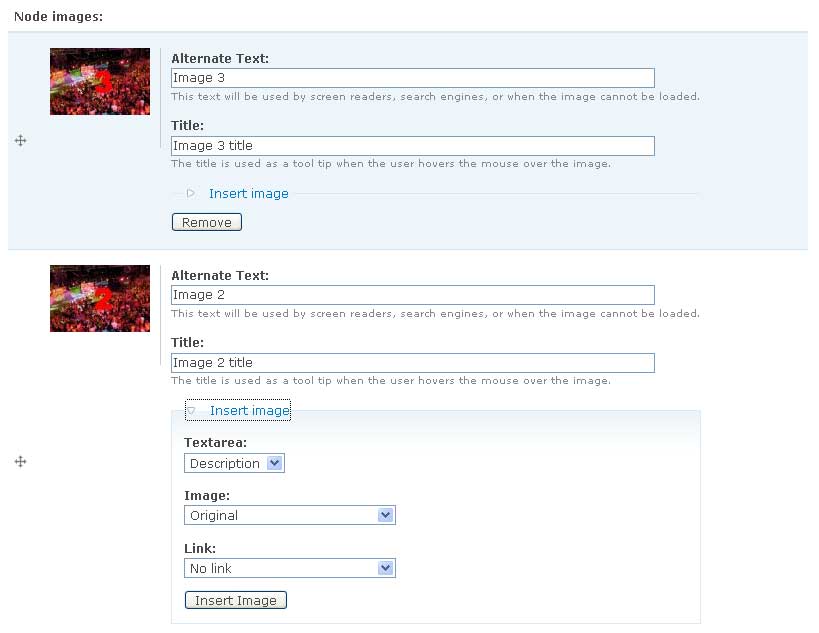
Comments
Comment #1
carlitus commentedIt's a good idea. I don't know when but i'll do it.
Comment #2
manuel garcia commentedTotally second this feature request... Wysiwyg API is the future !
Tthis module would then work with all the editors that work with the API, definitely the way to go ;)
Comment #3
hankpalan.com commented+1 for WYSIWYG API support -
I just changed out TinyMCE module for the WYSIWYG API, because TinyMCE is dead. But this module is the perfect solution I've been looking and waiting for. But I don't want to go back to a dead module...
Comment #4
niklp commentedThis module MUST MUST MUST be given WYSIWYG.module support, or it is utterly useless.
Do that now!
Comment #5
Anonymous (not verified) commentedTo use Easy Image Insert with WYSIWYG API just edit easy_image_insert.info and comment (add a ;) line 7:
dependencies[] = tinymce. This way Easy Image Insert works perfectly with WYSIWYG Api module.To align the inserted image just use the custom css style plugin.
Comment #6
Anjaro commentedYes for WYSIWYG.module support.
I see many post from people looking for a solution like this, while i myself was searching.
Thanks
Comment #7
niklp commentedjmesam: Your post is encouraging - I think it would be helpful if you detailed how you configured the CSS plugin to allow for such measures!
Comment #8
marcvangendThis is a great module, 'official' support for the wysiwyg api would be great, but for now the workaround in #5 will do just fine.
NikLP, I just posted a patch that makes applying css easier in #381562: Add classes for automatic styling.
Comment #9
aleagi commentedHi,
I'm working with the latest versions of EII and WYSIWYG modules.
I inserted the comment in line 7 of .nfo file and everything looks fine, except for one thing.
The image is uploaded by the image filed as expect bu I cannot insert the image on the text.
Is there anymodifications needed on WYSIWYG or TinyMCE to make it work?
Any help will be appreciated!
Thanks in advance!
Aleagi
@:)
Comment #10
marcvangendAleagi, I didn't make any modifications to WYSIWYG or TinyMCE, but it works for me. Which versions are you using?
Comment #11
alan d. commentedThe JScript code has a line that looks for a parent table element of the image and does not try to find the right element to pull the id from:
A quick hack got it working (sorta)
Using Drupal 6.10, CCK 6.x-2.1, ImageField 6.x-3.0-beta1, WYSIWYG 6.x-2.x-dev (8 March 2009), there are no tables to be seen in the HTML
Hope it helps
Comment #12
aleagi commentedHi there,
Sorry for the delay, kind busy in other projects!
Well, solution #11 works really smooth! THANKS! @:)
Comment #13
alan d. commentedI'm using this module for the first time on a fairly large project, and I done a lot of work to port the code into the FAPI for a number of reasons not directly related to the core functionality of the module, but for ease of possible extensions that we'll be looking at latter.
It has fairly limited testing, the supplied code should be considered an early alpha release!
I AM NOT RELATED TO THIS PROJECT. THE CHANGES HERE ARE FAIRLY MAJOR AND HAVE NOT GONE THROUGH ANY OF THE MAINTAINERS. IT IS SUBMITTED FYI ONLY!
Change to the variable storage
eii_TYPE_active > eii_active_TYPE
Added the following settings
Three options for base directory handling:
Options to tidy up the imagecache preset names:
Class for a wrapping DIV element, named "Wrapper".
Class for the anchor (A) element, named "Class".
Rel attribute for the anchor, named "Trigger".
Administration area
Refactored the form elements that are embedded into the imagefield element
This was the biggest change, from HTML into a custom FAPI element. Most likely location for missed bugs!
Presentation changes
Totally removed all custom styles. It is all native Drupal / theme.
Moved the Textarea, Preset, Link fields into a collapsed fieldset, along with the new Wrapper, Class and Trigger fields. See the attached screenshot.
Reasons:
1) The styles now automatically merge into the themes native styling.
2) Space was an issue, the elements were pushing content to far down the page (Out site has many pages with 20+ images)
3) The Insert and Remove buttons were simply to close together. I hit the remove button at least once by mistake.
JavaScript changes
The next most likely place for bugs to be introduced.
The hidden SPAN elements are converted into hidden INPUT elements
The ALT and TITLE have been fixed for the latest WYSIWYG / ImageField modules
New fields have been hooked into the JavaScript.
Major outstanding issues
There is NO sync. with the actual WYSIWYG editor that has been set. The "Textarea" select lists all textareas, not just the textareas that have TinyMCE attached.
The internal path filter lacks a preview state. The img src of "internal:files/.." just can not work in the Editor!
Comment #14
alan d. commentedRefactored things a bit to fit with the WYSIWYG module.
All imagefield widgets get the new eii_option_fields elements, and the form gets the eii_process_form #after_build callback attached. The after build function expands the field depending on the imagefield and format settings of the field in question
This should mean that any field that has an input format assigned to it should now be picked up (untested), just like the WSIWYG module.
The JScript can handle insertion into the tinymce and default editor 'none' (Eg: the simple textarea / disabled state). Additional editor support should be fairly simple, just add then into the case statement near the end of the JScript file. Hoping that an interface via the WSIWYG to eliminate the need to support editors here. @ref http://drupal.org/node/409938
Latest code attached.
Comment #15
confudler commentedI get this error:
WYSIWYG API has changed. Please check for more up to date modules or lodge an issue at Drupal.org with Easy Image Insert
Any ideas?
Comment #16
alan d. commentedCan you let me know exactly what versions you are running.
My setup was for the project that we are working on which are:
drupal 6.10
imagefield 6.x-3.0-beta3
wysiwyg 6.x-2.x-dev (Mar 28)
But I'm happy to help making it more generic.
Comment #17
Anonymous (not verified) commentedI don't get any error, but the picture doesn't insert in the textarea, and the imagefield widget display "array".
drupal 6.10
imagefield 6.x-3.0-beta3
wysiwyg 6.x-2.x-dev (Mar 28)
Comment #18
alan d. commentedA few questions:
Did you remember to flush your cache? The jscript file has changed and a couple of theming functions have been added.
Have you got imagecache enabled?
Did you use the file from #14?
If you still have issues, let me know.
Please remember that this is simply my hack of the existing module into the world of the FAPI, and doesn't reflect the real module.
Comment #19
confudler commentedThanks for the rapid response
I'm using Drupal 6.10
I have upgraded filefield/imagefield from alpha to the latest beta but the error persists.
I tried WYSiWYG 6.x-2.x-dev : this gave the same error, I have since reverted to the stable v1
I have flushed the cache and I am using the version from post 14
Comment #20
alan d. commentedDuh. The project that we were working on had 2 textareas, and a single textarea was the only combo that I hadn't tested at least once.
The attached version should hopefully work, but still needs work. I'm using a custom element to render all of the elements that are used in EII part of imagefield, similar to what wysiwyg does (in the #after_build callback), but still has issues with the setting of names/ids on the fields.
Let me know how you get on.
Comment #21
confudler commentedOK, that worked. Now I have a new problem.
I can insert originals just fine, but the link to thumbnails (which I rather confusingly called gallery) outputs
/drupal-6.10/sites/default/files/imagecache/gallery/sites/default/files/brushes.gif
When I need it to output:
/drupal-6.10/sites/default/files/imagecache/gallery/brushes.gif
or even better:
/drupal-6.10/sites/default/files/imagefield_thumbs/brushes.gif
hmm
Comment #22
alan d. commentedI didn't hook into the imagefield thumbs - are these meant to be used outside imagefield? Please supply some info on the status of these fields.
The link options should be just "Original" or "Original" + 1 option for every ImageCache preset that you have defined. The "gallery" must be one of these?
Image cache works using the URL "files/imagecache/[ImageCache preset]/[files directory]/[path to image within file directory]", guessing this may not be working? The config. gives 3 options for this
Prefix this path with nothing - works without clean URLs, or if BASE HTML is set in the template
Prefix with the Drupal base path, '/drupal-6.10/', required for clean URLs with no BASE set
Prefix with internal: - integrates with internal path filter, but looks like crap as there is no preview state in the wysiwyg editor
Comment #23
Anonymous (not verified) commentedNow it works perfectly, but when I reedit the post display twice and the title and alt attributes displays "undefined". Edit: The text also displays duplicated
Thanks
Comment #24
confudler commentedAh, no, I see now.
What I really want to do is replace
drupal-6.10/sites/default...
with
drupal-6.10/?q=sites/default...
If only I knew some basic JS to rewrite that string
Comment #25
alan d. commentedCan you clearly explain this: "but when I reedit the post display twice"
The newer version adds some error checking on alt / title
Comment #26
alan d. commentedAdded automatic "?q=" to all imagecache presets
Moved to a generic WYSIWYG insert that falls back to a generic HTML insert. It shouldn't matter what editor you use, as long as it implements the 'insert' function
Comment #27
Anonymous (not verified) commentedI'm sorry I meant: when I reedit the post, the picture displays twice. Everytime I visit the node edit form, everything get duplicated.
Comment #28
alan d. commentedMissed one of the bug fixes that I submitted from work.
K, dropped all of the TinyMCE specifics, thinking that these may have been the cause. I've got "clean up html" option enabled in wysiwyg.
Comment #29
confudler commentedOK, I'm getting there. I have got it working but not if it tries to insert an original image (as opposed to an imagecache one).
I tried to change the default on line 244 but it doesn't work. Can you help?
N.B. this is an intranet site so it doesn't have to be perfect!
Comment #30
Anonymous (not verified) commentedEvery time I edit & save, a new copy of the content is created. I have edited & saved 10 times, now the post has 10 copies of the picture and 10 copies of the text. It seem like every time I save the content, the module insert it again.
Using Easy Image insert #28 version and WYIWYG api March 27th version.
Comment #31
alan d. commented@confudler Have you had a play with the Base directory handling settings?
Since you asked for the "?q=", you must be running without clean urls? The imagecache ones will be "?q=files/imagecache/..." and the original will need to be "/drupal-10/files/images/..."?
Here are the results of my tests, inserted via the TinyMCE editor, clean URL's disabled, base directory handling settings set to "Prefix with base path."
If these do not work in the editor, do they work once they are saved?
@jmesam
I simply can not even get close to replicating this. A couple questions / tasks:
Can you paste the following, wrap in HTML code tags to ensure that these show up here:
The disabled HTML (toogle the editor to show this) from insertion.
The disabled HTML after you have saved and tried to reedit the page.
Also, can you disable the EII from showing on the content type and try to see if this still happens.
Cheers guys
Comment #32
Anonymous (not verified) commentedThanks for your tips, it was inline module, I disable it and everything works ok.
Comment #33
avpadernoThe module has been declared deprecated.