

 Come together with the global Drupal community in Rotterdam, 28 Sept – 1 Oct 2026. Sessions, contribution, connection, and Early Bird savings until 8 June.
I'm trying to update, for example, ubercart module via plugin_manager.
After all steps finished it shows "Successfully installed ubercart."
And there are a lot of warnings like that:
user warning: Duplicate entry 'modules/ubercart/LICENSE.txt' for key 1 query: INSERT INTO plugin_manager_files VALUES('ubercart', 'modules/ubercart/LICENSE.txt') in /webs/sportzdrav/www/sites/all/modules/plugin_manager/plugin_manager.admin.inc on line 558.
And no new files were uploaded to module dir :(
| Comment | File | Size | Author |
|---|---|---|---|
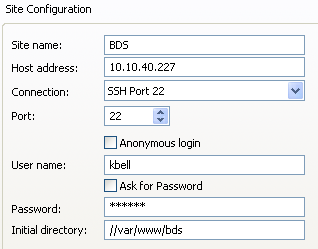
| #6 | plug_ftp.png | 10.61 KB | kbell |
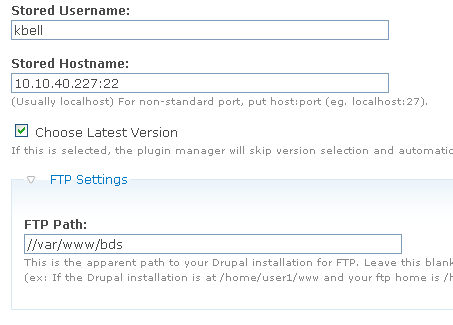
| #6 | pluginmanager_settings3.png | 5.95 KB | kbell |
| #4 | Modules _ www.bulldogsoluti...pdf | 140.44 KB | kbell |

Comments
Comment #1
jabapyth commentedThis has been fixed in 1.6
Comment #2
Antinoo commentedI'm getting the same behaviour with v6.x-1.7, except that the warnings are not displayed anymore.
It says "A drupal install was automatically located on ftp at public_html/sites/all/modules." and "Successfully installed [module_name]", but [module_name] hasn't been installated (nothing is uploaded into that folder).
I'll retry using a fresh installation and let you know.
Giovanni
ps. sometimes (I can't say when), it works correctly. That's very strange.
Comment #3
pmark23 commentedI'm having a similar problem, except there's no warnings and the install shows as a success -- however nothing is updated. This is with the latest dev version and 6.6.
Comment #4
kbell commentedI am using Drupal 6.8, but was also having the problem when using 6.4. I have provided notes under another issue that seems to address the same problem but was labeled as "fixed". Maybe since this one is still open there will be some traction around the issue if I post it here instead?
History - in previous 1.2 version (Friday, and with Drupal core 6.4) I was just getting unsuccessful updates - they would pop me back to the Install page and say there were no modules to update, even after I'd gone through and entered all the checksum hashes. I tried it with all my updating modules, with 4-5 and with 1 - none worked, all had the same result.
I updated to 1.7 today, and also to Drupal core 6.8. Now it has an opening page where I select the checkboxes of the updated modules, and then I hit "submit". Thereafter it says "Done" down in my status bar (after accessing various things too quickly for me to see), but the page doesn't change, and the updates aren't made. Again, I tried just checking one box and 2-3 boxes instead of the 6-7 I need updated, and no luck.
I am attaching my module install list in case there is a conflict about which I am unaware, in case it help you.
Thank you,
Kelly Bell
Comment #5
kbell commentedcorrection: in second sentence, it should read "they would pop me back to the Install page and say there were no modules to Install" - not update.
It's like it was getting its wires crossed and thinking that I was trying to install though clearly I was trying to update modules, and had never clicked on the Install tab until I was sent there erroneously.
Sorry for the error.
thanks,
Kelly
Comment #6
kbell commentedPerhaps there is something wrong with my setup - if so, I'm not getting ANY help from the module in isolating the problem, nor are there any configuration instructions to help identify the problems. In any case, I'm sending a screen shot of my settings to see if that will help. Also, where, in 1.7, does one put one's password credentials for ftp access? And, I'm assuming the username is for the ftp access and not for the site itself, correct?
In any case, screenshots are attached. The site's a dev site and is being run on a Debian box, using SSH2, port 22. I have also attached a screenshot of the ftp settings (ones that work), so you can see what I'm starting with. I've tried every variation I can think of, and because nothing I do makes a change in the functioning of the site I can't tell if it's an access problem or a bug. Regardless, we could really use some error trapping help on the install here - or at least better instructions!
Attach 1 = ftp settings that work
Attach 2 = screen shot of plugin manager settings
Thank you,
K Bell
Comment #7
kbell commentedSo I'm guessing that my problem has to do with multisite being not supported? The module is not working for my xxx.com/sites/all/contrib/modules either, however. I know that my permissions are okay on the ftp server, and I know that everything is fine in terms of the credentials I'm using to access, but I'm still getting ftp server not found errors. I am also getting the "download history" problem, but unlike the other poster, who was just missing the two cache folders, that is not the case for me - I have those cache folders in the same place he specified, plus I've duplicated them in two other places the module might potentially look just in case - no luck in any case.
I gather I'm making some progress in that at least the thing doesn't just give me the tmp directory error and no ftp found error and stop there now, but I'm very frustrated with the lack of documentation available, especially when there are known issues such as the multisite problem, but nowhere is their documentation to guide users on how to fix, or even to tell us that this plugin won't work for us.
Please help?
Comment #8
pmark23 commentedI still have a similar problem and my site is not a multisite.
Comment #9
Anonymous (not verified) commentedThat's an interesting problem. Unfortunately, I'm just not sure what to say.
@pmark23: Are you also running FTP / SSH with nonstandard ports?
Comment #10
pmark23 commentedNo, nothing non-standard. The install process goes through successfully, but nothing actually installs. Could it be a permissions problem on the Modules directory?
Comment #11
pmark23 commentedThe problem is with the "install directory" setting. When I keep the setting blank, it installs to the root directory. When I place the proper path (all possible varients -- trailing slash, no trailing slash, etc) I get a "install directory is invalid" error. Permissions look okay.
Any ideas?