

 The 2026 Drupal Business Survey is open. Your response will help shape the future of the Drupal business ecosystem.
I love this module and am so excited to use it, but have been stuck for two days on this one thing. Using:
HS 5.x-3.0-rc7
Content Taxonomy 5.x-1.x-dev
jQuery Update 5.x-2.0
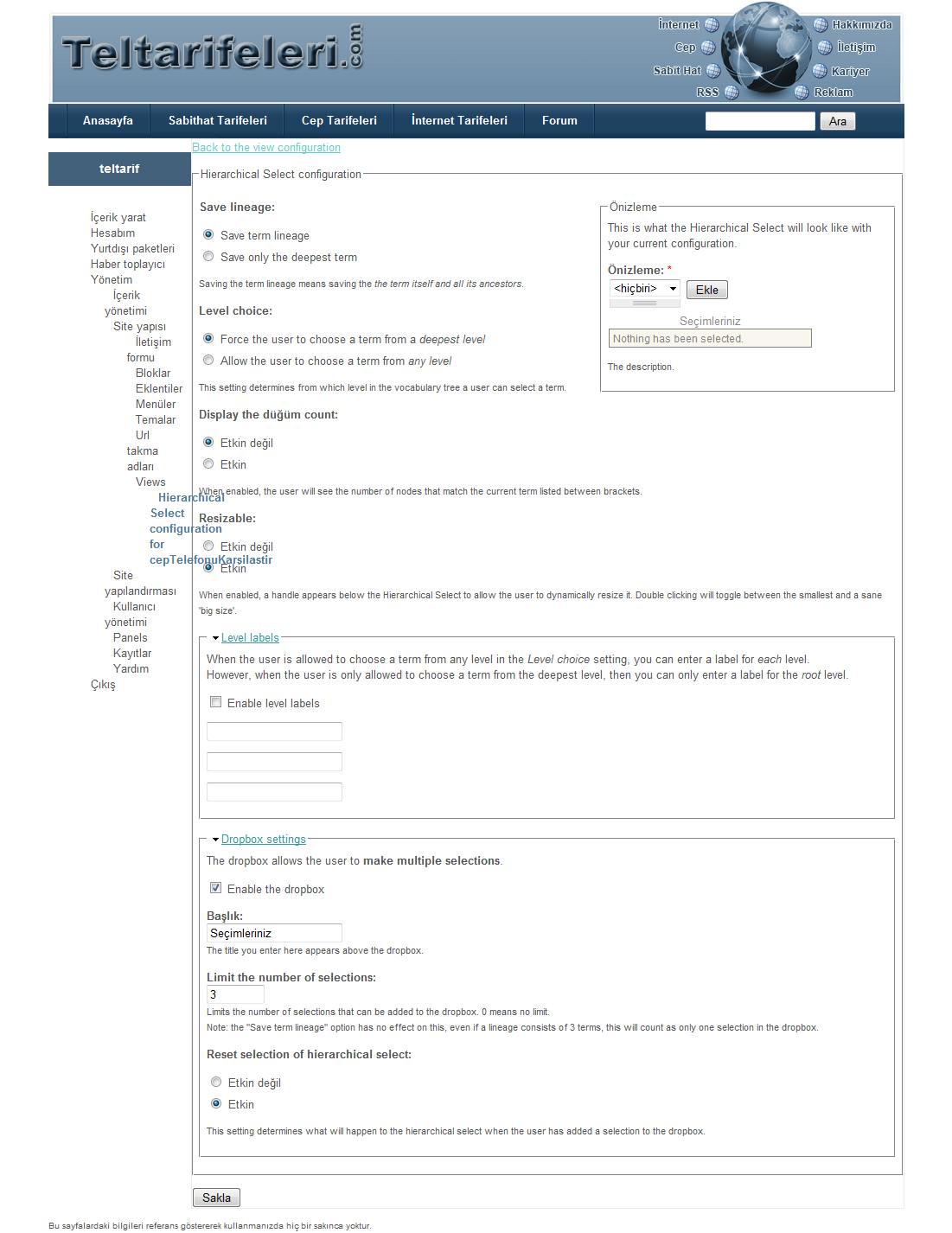
I have a view with an exposed filter on a content taxonomy field, with HS configured like this:
Save only the deepest term
Allow the user to choose a term from any level
Resizable enabled
Dropbox enabled
Limit number of selections set to default zero
Reset selection of hierarchical select enabled
The dropbox and add button appear just fine in the preview section of the HS configure screen. They also appear just fine when editing the node. But in the view page, when I first load the page, for just a second, I get the "You don't have javascript enabled" message just below the exposed filter. But then it disappears, and there is no dropbox or add button.
Javascript is enabled and I tried it in both Safari and Firefox with hard refresh. I've uninstalled and reinstalled all related modules, with HS installed last. And I've verified the following in status report:
Hierarchical Select - All updates installed. jQuery Update 2.x installed. Implementation modules are installed correctly.
Hierarchical Select Content Taxonomy Views - The Views module is new enough.
Hierarchical Select Content Taxonomy Views - The Views module is new enough.
jQuery Update - Installed correctly. The current installed version of jQuery is 1.2.6
I'm new to both Drupal and PHP, so will be deeply grateful for any help. I read the other open issue that mentioned a missing Add button, but I really didn't understand the code workarounds that were listed there and wasn't sure if it was the same root cause. Please let me know what other info I can provide to help figure out what's causing the problem. This site is online but not production, so I could send login info, etc. if necessary.
Thank you,
Leah
| Comment | File | Size | Author |
|---|---|---|---|
| #4 | node1Displayed AlthoughNode2Selected .png | 125.03 KB | Bedestenlioglu |
| #4 | EMPTY.png | 125.71 KB | Bedestenlioglu |
| #1 | view-HS.png | 121.83 KB | Bedestenlioglu |
| #1 | Hierarchical Selectconfiguration.png | 174.41 KB | Bedestenlioglu |


Comments
Comment #1
Bedestenlioglu commentedHello ,
I have same problem that I enable dropbox , no add button appears on views exposed filters for contrent taxonomy fields .. I am using the same configuration .
To clarify problem better, I included some additional information :
- cck taxonomy field is stored in cck table
- I can not edit HS configuration from admin -> side configuration -> HS -edit . Instead of edit page, it took me to the front page .
- tried to export it , the following is the result . I notice that dropdown status is set to 0 and no title is set . This does not match to what I see in HS configuration linked to the views' edit page ( see attached file )
$config = array(
'config_id' => 'Array',
'save_lineage' => 0,
'enforce_deepest' => 0,
'entity_count' => 0,
'resizable' => 1,
'level_labels' => array(
'status' => 0,
'labels' => array(
),
),
'dropbox' => array(
'status' => 0,
'title' => '',
'limit' => 0,
'reset_hs' => 1,
),
'editability' => array(
'status' => 0,
'item_types' => array(
),
'allowed_levels' => array(
),
'allow_new_levels' => 0,
'max_levels' => 3,
),
);
- views export data :
$view = new stdClass();
$view->name = 'cepTelefonuKarsilastir';
$view->description = '';
$view->access = array (
);
$view->view_args_php = '';
$view->page = TRUE;
$view->page_title = '';
$view->page_header = '';
$view->page_header_format = '1';
$view->page_footer = '';
$view->page_footer_format = '1';
$view->page_empty = '';
$view->page_empty_format = '1';
$view->page_type = 'node';
$view->url = 'cep-telefonu-karsilastir';
$view->use_pager = FALSE;
$view->nodes_per_page = '3';
$view->sort = array(
);
$view->argument = array(
);
$view->field = array(
);
$view->filter = array(
array(
'tablename' => 'content_taxonomy_field_model_0',
'field' => 'tid',
'operator' => 'AND',
'options' => '',
'value' => array (
0 => '58',
1 => '60',
2 => '59',
3 => '61',
),
),
);
$view->exposed_filter = array(
array(
'tablename' => 'content_taxonomy_field_model_0',
'field' => 'tid',
'label' => '',
'optional' => '0',
'is_default' => '0',
'operator' => '1',
'single' => '0',
),
);
$view->requires = array(content_taxonomy_field_model_0);
$views[$view->name] = $view;
- In the attached files,
- HS configution
- the resulted view exposed filter
Comment #2
sdsheridanDid you try making the change noted in http://drupal.org/node/340827#comment-1148956 ? That got the add button showing for me. Note that this is, I believe, a defect in the code, and that the post I noted discusses the fix for that defect.
shawn
Comment #3
leahecooper commentedI made the change noted above, and the problem appears to be fixed. THANK YOU!
Leah
Comment #4
Bedestenlioglu commentedMany thanks , the add button now appears but now I have two other problems . Those could be result of my configuration but I could not see what is really going wrong .
1) I have two nodes in my test system . When I select node 1 through HS exposed filters , views bring me Node 2 and when the node 2 selected views brings me node 1 . When I select both of them, it says nothing found ..
2) The content taxonomy field is not shown properly in views. This field stores the second level hirearchy but in views display I can only see first level term ...
I have included the screenshots so that you may virtualize what I am trying to say .
Here you can see the export of my view :
$view = new stdClass();
$view->name = 'cepTelefonuKarsilastir';
$view->description = '';
$view->access = array (
);
$view->view_args_php = '';
$view->page = TRUE;
$view->page_title = '';
$view->page_header = '';
$view->page_header_format = '1';
$view->page_footer = '';
$view->page_footer_format = '1';
$view->page_empty = '
EMPTY
';
$view->page_empty_format = '3';
$view->page_type = 'table';
$view->url = 'cep-telefonu-karsilastir';
$view->use_pager = FALSE;
$view->nodes_per_page = '3';
$view->sort = array(
);
$view->argument = array(
);
$view->field = array(
array(
'tablename' => 'content_taxonomy_field_firma',
'field' => 'tid',
'label' => 'Firma ',
'handler' => 'content_taxonomy_views_field_terms_by_parent',
),
array(
'tablename' => 'content_taxonomy_field_model_0',
'field' => 'tid',
'label' => 'Model',
'handler' => 'content_taxonomy_views_field_terms_by_parent',
),
array(
'tablename' => 'node_data_field_sar',
'field' => 'field_sar_value',
'label' => 'SAR Değeri',
'handler' => 'content_views_field_handler_group',
'options' => 'us_2',
),
array(
'tablename' => 'node_data_field_oyunlar',
'field' => 'field_oyunlar_value',
'label' => 'Oyunlar',
'handler' => 'content_views_field_handler_group',
'options' => 'default',
),
);
$view->filter = array(
array(
'tablename' => 'content_taxonomy_field_model_0',
'field' => 'tid',
'operator' => 'NOR',
'options' => '',
'value' => array (
0 => '58',
),
),
array(
'tablename' => 'node',
'field' => 'type',
'operator' => 'OR',
'options' => '',
'value' => array (
0 => 'ceptelefon',
),
),
);
$view->exposed_filter = array(
array(
'tablename' => 'content_taxonomy_field_model_0',
'field' => 'tid',
'label' => 'Cep Telefonu Seçiniz',
'optional' => '0',
'is_default' => '1',
'operator' => '1',
'single' => '0',
),
);
$view->requires = array(content_taxonomy_field_firma, content_taxonomy_field_model_0, node_data_field_sar, node_data_field_oyunlar, node);
$views[$view->name] = $view;
Comment #5
cnolasco commentedThis is also happening to me
an answer to solve this problem
Thanks
Caro
Comment #6
Bedestenlioglu commentedhttp://drupal.org/node/346033
helped me to solve the empty view problem ...
Comment #7
wim leersThis has been fixed: http://drupal.org/cvs?commit=180082 via http://drupal.org/node/340827#comment-1327312.