Problem/Motivation
(why the issue was filed, steps to reproduce the problem, etc.)
Google will index multiple versions of the same page because quicktabs uses own urls o display the quicktabs.
Example
Site quicktabs is on: http://www.texturecase.com
Quicktab link: http://www.texturecase.com/welcome?quicktabs_1=0#quicktabs-1
Google will now think that the second url (quicktabs) is a different site and so will index both urls as two different pages.
Proposed resolution
(description of the proposed solution, the rationale behind it, and workarounds for people who cannot use the patch)
First, various Blogposts or Articles mentioned
http://www.propdrop.com/blog/duplicate-content-problems-drupal-quicktabs...
http://2bits.com/bing/how-google-and-bing-crawlers-was-confused-quicktab...
Solution 1
Using .htaccess:
Disallow: /*quicktabs_*
Disadvantage, google still sees the urls and may index them.
Solution 2
A bit risky as its against TOS of google. Khaled suggested using settings.php to redirect the crawlers, see his blogpost(2bits) for the whole details.
Solution 3 (seems to be the best solution)
Using canonical tags
More info: http://googlewebmastercentral.blogspot.de/2007/09/google-duplicate-conte...
Solution 4
Not supporting users without javascript, see: http://drupal.org/node/354867#comment-5204212
Additionals
Add rel="nofollow" to the quicktab urls
Remaining tasks
(reviews needed, tests to be written or run, documentation to be written, etc.)
User interface changes
(new or changed features/functionality in the user interface, modules added or removed, changes to URL paths, changes to user interface text)
API changes
(API changes/additions that would affect module, install profile, and theme developers, including examples of before/after code if appropriate)
Original report by [bille]
My quick and dirty fix was to add 'rel' => 'nofollow' as an attribute within the _quicktabs_construct_tab_attributes function like so
 $attributes = drupal_attributes(array(
    'id' => $id,
    'class' => $class,
    'href' => $href,
    'rel' => 'nofollow'
  ));
Of course, that might not be the right fix, so I'm open to other suggestions. I did add a robots.txt entry to keep the spiders away from those links, but not all search engines support wildcards in robots.txt.
Oh, and thanks for Quick Tabs! Great module. Dropped right in, and the zen themed tabs looked great on my site with no css tweaks. This module "just works".
(for legacy issues whose initial post was not the issue summary)
The parameters that Quick Tabs adds to the tab links causes search engines to create duplicate indexed pages, which isn't great for SEO.


Comments
Comment #1
pasqualleThe solution is wrong as it adds 'nofollow' to all tabpages, when only the first tabpage link could be considered as duplicate content..
I think solving issue #361114: Theme functions or template files, would be sufficient to change links as you like.. Marking as postponed until then.
Comment #2
corbacho commentedThanks bille,
I think I will apply that solution. I don't agree with Pasqualle. For Google Webmaster Tools it seems all the quicktabs are duplicate meta description and also it creates duplicate titles.
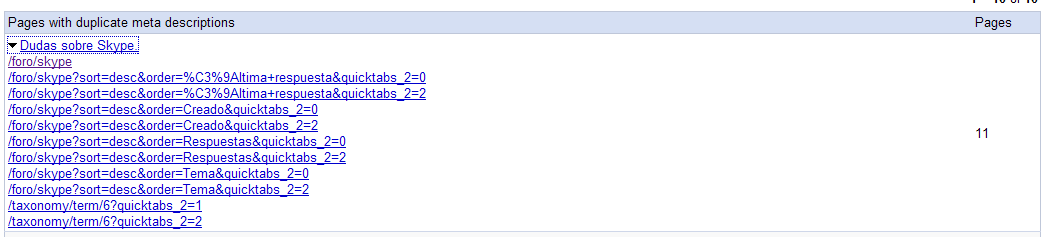
I have attached a screenshot, where I have 1 page with 11 duplicate meta tags. Due of Sort & order forum links and also to Quicktabs.
For sort & order I will use this solution http://tips.webdesign10.com/drupal/forum-module-330.html
I will report soon to confirm these solutions when GWT updates the state.
Comment #3
tsi commentedThis is truley a problem for me too, how can I add 'nofollow' in 6.x-2.0-rc3 ?
Couldn't find this function anywhere (quicktabs_construct_tab_attributes)
Thanks.
Comment #4
highvoltage commentedCan we add something to robots.txt to solve this?
Comment #5
paardje commentedis there any solution??
Comment #6
gregarios commentedI'd like to see Quick Tabs module add a robots.txt entry to fix this.
This is an acceptable fix for Google at least. The official robots.txt doesn't support wildcards, but Google specifically allows this:
Disallow: /*?quicktabs_*
Can the module automatically create this entry in the robots.txt file?
Update: After adding the entry above to my robots.txt file a few days ago, Google is now correctly reading it and is restricting itself from following the Quick Tabs links. Google is not giving an error on the syntax either.
Comment #7
nikmahajan commentedI am also facing the similar issue. My path to article is like this:
http://example.com/content/abc-def-ghi-jkl
After using quicktabs module, it started generating duplicate paths like this one:
http://example.com/content/abc-def-ghi-jkl?quicktabs_2=1
http://example.com/content/abc-def-ghi-jkl?quicktabs_2=2
http://example.com/content/abc-def-ghi-jkl?quicktabs_3=1 , etc.
My question is what should I put in the robots.txt file to stop Google robot from indexing such pages. Should it be like
Disallow: /content/*?quicktabs_*/
or something else.
Comment #8
gregarios commentedUse exactly what I stated before. It is tried and tested through Google's Webmaster Tools. It works and follows Google's own guidelines on the subject:
Disallow: /*quicktabs_*
This will block any URL with a
quicktabs_anywhere in it.Comment #9
nikmahajan commentedAs I am displaying titles as /content/xxxxxxxxxxxxxxxxxxxxx
so wouldn't it be
Disallow: /content/*?quicktabs_*
instead of /*?quicktabs_* alone
Comment #10
gregarios commentedNope.
Asterisks are wildcards in this case. The first one stands for anything before the
quicktabs_and the one at the end stands for everything afterward.Google has thoughtfully hidden this from people in their help section. You have to go to:
http://www.google.com/support/webmasters/bin/answer.py?hl=en&answer=156449
Then click on the "Manually create a robots.txt file" link partway down the page.
In there, you'll see a section with the following:
Comment #11
nikmahajan commentedthanks you so much gregarios. I got it.
Comment #12
jonnyp commentedI'm not happy with using robots.txt to fix this as each tab link will still consume some trust + link juice, even if it is blocked by robots.txt
I looked in quicktabs.module and at line 340 found this:
If you remove 'query'=>$querystring you will lose the ?quicktabs_1= ... from your urls, leaving the #parameter intact. This does not adversely affect pre-loaded tabs but I have not tried with Ajax which I presume might need the parameter.
I've not patched this as I don't know the module writer's purpose in using the querystring but if you are concerned about duplicate content etc its an easy fix to make.
Comment #13
pasqualleThe querystring is required for QT to use it without javascript.
Comment #14
superflyman commentedI am using the Disallow: /*?quicktabs_* workaround and for the most part this takes care of the majority of the duplications (about 6000!!) but for some reason there are about 100 or more that show up as pages with duplicate tags in google. Any thoughts?
Comment #15
gregarios commentedI modified the code in the posts above... this code gets rid of more. Apparently some don't have question-marks in them:
Disallow: /*quicktabs_*Comment #16
superflyman commented@gregarios
Thanks, I'll give it a go and check the analytics....
Comment #17
Anonymous (not verified) commentedsubscribing
Comment #18
pazzypunk commentedI'm going to give it a try ... looks easy enough ...
Comment #19
naden commentedYou better overwrite the themeable function
theme_quicktabs_tabs(...)so you can update without hassle.Comment #20
jrwyse commentedI did a combination of the everything in this thread, in panic mode today, as my site is brand new and being indexed quickly. The * character in robots.txt only works for Google. For extra protection, it's important to use rel='nofollow' in the < a > tags. The directions below will implement both solutions.
Add the following in robots.txt:
Search quicktabs.module for the following:
Add the following line below it:
I'm relatively new to Drupal. It's amazing how much I've been able to do simply by searching Google and reading on these forums. So, I hope this post helps someone!
Comment #21
peterjlord commentedComment #22
caominh commentedQuicktabs Duplicated URLs and Baidu
I am having a similar problem search engines indexing duplicate, quicktabs URLs on my Chinese site. In fact, most of my highest ranked pages on the Chinese search engine, Baidu, come from these quicktabs urls.
I would like to eliminate these duplicate urls, but I have some questions about potential solutions
Best Solution Seems to Be to Use the Nodewords Canonical URL Tag
This fix is already referred to here: http://groups.drupal.org/node/27194
Have already created more than 5000 pages that contain the Quicktabs code
Is there any way to apply the canonical URL tag to existing pages without editing each page manually?
Alternate Solution: Edit the Robots.txt File
This solution is referred to above
However, the primary search engine involved is Baidu, not Google, and wildcards do not work for Baidu
Is there a way to implement this solution without the wildcards
Also, with so many Quicktabs pages already indexed by Baidu, would excluding them through robots.txt lead to a drop in search rank now that all of those ranked pages will be missing?
Third Solution: Edit the .htaccess File
Is it possible to resolve this issue by redirecting references to the quicktabs urls to the standard url through a redirect in the htaccess file?
Any feedback on these questions would be most appreciated by this noob - Thanks!
Comment #23
Andrew Gorokhovets commentedsubscribing
Comment #24
sk33lz commentedI worked in search engine optimization for 3 years. I would look at the comment here by JennySmith and draw your own conclusions, but gregarios is correct in #6 here. Nofollow would also be advisable as spiders will still still pass link juice to pages they don't index as per your robots.txt. Stop the link and stop the leak.
Comment #25
ressaI much prefer adding rel="nofollow" to Quick Tabs links, than editing the robots.txt, I don't think people should have to edit their robots.txt file to use Quick Tabs.
Comment #26
ressaTo remove the quicktabs query string, and redirect to the same page with the standard URL, add this to your .htaccess file:
This will remove the query string from any URL containing the string "quicktabs_", for example:
http://example.com/content/example-page?page=13&quicktabs_2=1
http://example.com/content/example-page?quicktabs_1=1
...will both be redirected to:
http://example.com/content/example-page
Comment #27
gregarios commented@ressa:
You don't think people should have to edit their robots.txt file, but they should edit their .htaccess file? I don't see that logic.
Also, shouldn't the
http://example.com/content/example-page?page=13&quicktabs_2=1in yourexample really be redirected to
http://example.com/content/example-page?page=13, nothttp://example.com/content/example-page?Comment #28
ressaNo, I don't think people should have to edit neither the robots.txt nor the .htaccess file, but the Quick Tabs module have caused Google to identify hundreds of identical Titles and Meta tags on my site.
I probably should have written in my post that it is an attempt to remove these identical posts from the search engines index.
I don't think http://example.com/content/example-page?page=13&quicktabs_2=1 should be redirected to http://example.com/content/example-page?page=13.
If it has "quicktabs_" in the query string, it's because it has arrived from a Quick Tabs link, right? If that's the case I do not want the web crawler to index that URL, but redirect it to the canonical version.
Comment #29
gregarios commentedI don't believe QuickTabs adds pages to links, so in this case,
http://example.com/content/example-page?page=13would be the "canonical" version ofhttp://example.com/content/example-page?page=13&quicktabs_2=1, would it not?Comment #30
ressaIt does if you have a pager at the bottom of the QT block.
I am not even sure the above .htaccess is necessary: I just did a "Fetch as Googlebot" test, and the crawler seems to respect the
Disallow: /*quicktabs_in the robots.txt:Comment #31
gregarios commentedAs I first suggested in comment #6. ;-)
Comment #32
gregarios commentedAnd "if" it doesn't have a pager on the QT block, but rather on the actual page, then you've broken the link with that .htaccess entry.
Comment #33
dotpex commentedTry this solution (fix for active class on a by changing link):
http://drupal.org/node/547586#comment-3560266
Comment #34
llite commentedHi Katbailey and Pasqualle,
Can you give us an option to opt-out non-javascript support in exchange for getting rid of the query string?
Users surfing with a browser doesn't support javascript are likely aware of the possible poor experiences and they usually account for just a small portion.
I believe most webmaster won't compromise their SEO efforts just to cater these small audience.
Even Techcrunch doesn't care, why should we go through the above imperfect methods like robots.txt. .htaccess?
Appreciated if this feature request could be considered.
Regards,
Comment #35
XiaN Vizjereij commentedI agree with the commons sense that SEO >> non-js support. And this is by far not a minor issue for almost every website.
Comment #36
philbar commentedThe problem with restricting it with
robot.txtor usingno-followis that it will exclude all the quicktab parameter links from being included in SEO ranking. While this is better than being adversely hurt by appearing to have duplicate content, this is not the best solution.Google recommends using canonical urls for solving this problem.
We need a mechanism to add a canonical url tag to the
<head>of pages with quicktabs on them. This should be the page URL with all quicktab parameters stripped.Comment #37
philbar commentedDuplicate: #569848: Add Canonoical Tags to Quicktab Pages to Prevent SEO Duplicate
Comment #38
RobertOak commentedThis seems to be the one that works, the above, modifying the code. Why this isn't rolled in to the latest dev is a good question. Quicktabs destroyed my SEO before I realized what was going on and also screwed up my statistics per reads.
Comment #39
sockah commentedSubscribing. Just realized today this is really mucking up SEO on a site I have using quicktabs.
Comment #40
carlos.macao commentedSubscribing
Comment #41
bleen commentedsubscribing
Comment #42
Jessica A commentedsubscribing, removing this module until this is addressed, bummer :(
Comment #43
geek-merlinAJAX & NON-AJAX mode...?
hi there,
i suppose this whole discussion is based on the assumption that people use (1) NON-AJAX mode, where everything is loaded on one page and thus a spider sees duplicated content.
(and i share the opinion that adding a canonical url should be the cure)
but what about (2) AJAX mode (which i think about using on one site for some reosons)?
do i get it right that in AJAX mode there is NO seo problem, as "each tab has its url anyways"?
do i get it right that a cure for the (1) NON-AJAX mode (maybe the "canonical url" thing) should NOT be applied to (2) AJAX mode?
just wanna get this clear...
Comment #44
zincdesign commentedsubscribing
Comment #45
ParisLiakos commentedComment #46
andrew_mallis commentedsubscribe
Comment #47
bleen commentedFYI: you no longer need to "Subscribe" ... there is a shiney new "Follow" button at the top of this page.
DEATH TO SUBSCRIBES
Comment #48
EvanDonovan commentedThis issue badly needs a summary of proposed solutions, if someone could write one. Hopefully, my notes below could be helpful in doing so.
I already implemented canonical link tags months ago; however I just determined today that pages with query strings like ?page=75&quicktabs_16=2 are still included in Google's index (since I was able to find them when I searched Google using the "site:" parameter).
Thus, I am moving to the robots.txt solution, i.e.,
Disallow: /*quicktabs_*. I am not going to modify .htaccess for now, as was suggested in #26, since the potential for improperly rewriting URLs with query strings in them (such as ?page=#) is high. (The .htaccess code in #26 is incorrect.)Since apparently adding canonical link tags via Nodewords is not sufficient to address this problem, a solution should come from this module. I think the suggestion from #34 makes sense: provide a checkbox in the main Quicktabs configuration that allows people to opt-out of the support for Quicktabs when Javascript is not available.
What the checkbox would do is make it so that the query string parameter would not get set in line 372 of quicktabs.module (the _quicktabs_construct_link_options() function).
It should be noted that this SEO issue with Quicktabs has been mentioned in two separate blog posts: http://www.propdrop.com/blog/duplicate-content-problems-drupal-quicktabs... & now also http://2bits.com/bing/how-google-and-bing-crawlers-was-confused-quicktab....
It should also be noted that I believe this issue applies in all branches of the Quicktabs module (6.x-2.x & 7.x as well as 6.x-3.x).
Comment #49
EvanDonovan commentedHere is a theme function which you can use to unset the Quicktabs query strings, if you aren't concerned about supporting users without Javascript:
Comment #50
corbacho commentedI saw Khalid has made a post about fixing this issue with robots.txt.
Nothing new that was not suggested here, but I thought will be nice for reference:
http://2bits.com/bing/how-google-and-bing-crawlers-was-confused-quicktab...
#51: D'oh ... true ;)
Comment #51
EvanDonovan commentedI mentioned that in #48 :)
Comment #52
pasquallepatch for D7 #1438412: opt-out non-javascript support
Comment #53
eule commentedhey,
this issue is from 2009 ..is any working fix aviable to set the links nofollow in the d7 Version?
Comment #53.0
marcoka commentedstarting summary
Comment #54
marcoka commentedi started to write a summary, will soon be ready, more complete
Comment #54.0
marcoka commented.
Comment #54.1
marcoka commented.
Comment #54.2
marcoka commented.
Comment #55
manuel garcia commentedI'm not sure if anyone has checked out this yet, but google has a page with instructions for making ajax applications crawlable:
https://developers.google.com/webmasters/ajax-crawling/
Thoughts?
Comment #56
Exploratus commentedAny work on this? Seems like a pretty big problem, and after years, nobody has a solution to this critical aspect of web design. I am planning on using quicktabs for a site, but now I am rethinking my decision based on this discussion.
Comment #56.0
Exploratus commented.
Comment #57
avpadernoI am closing this issue, since it's for a Drupal version no longer supported.