Closed (duplicate)
Project:
Location
Version:
6.x-3.x-dev
Component:
User interface
Priority:
Critical
Category:
Bug report
Assigned:
Reporter:
Created:
29 Oct 2005 at 00:16 UTC
Updated:
1 Dec 2005 at 04:34 UTC


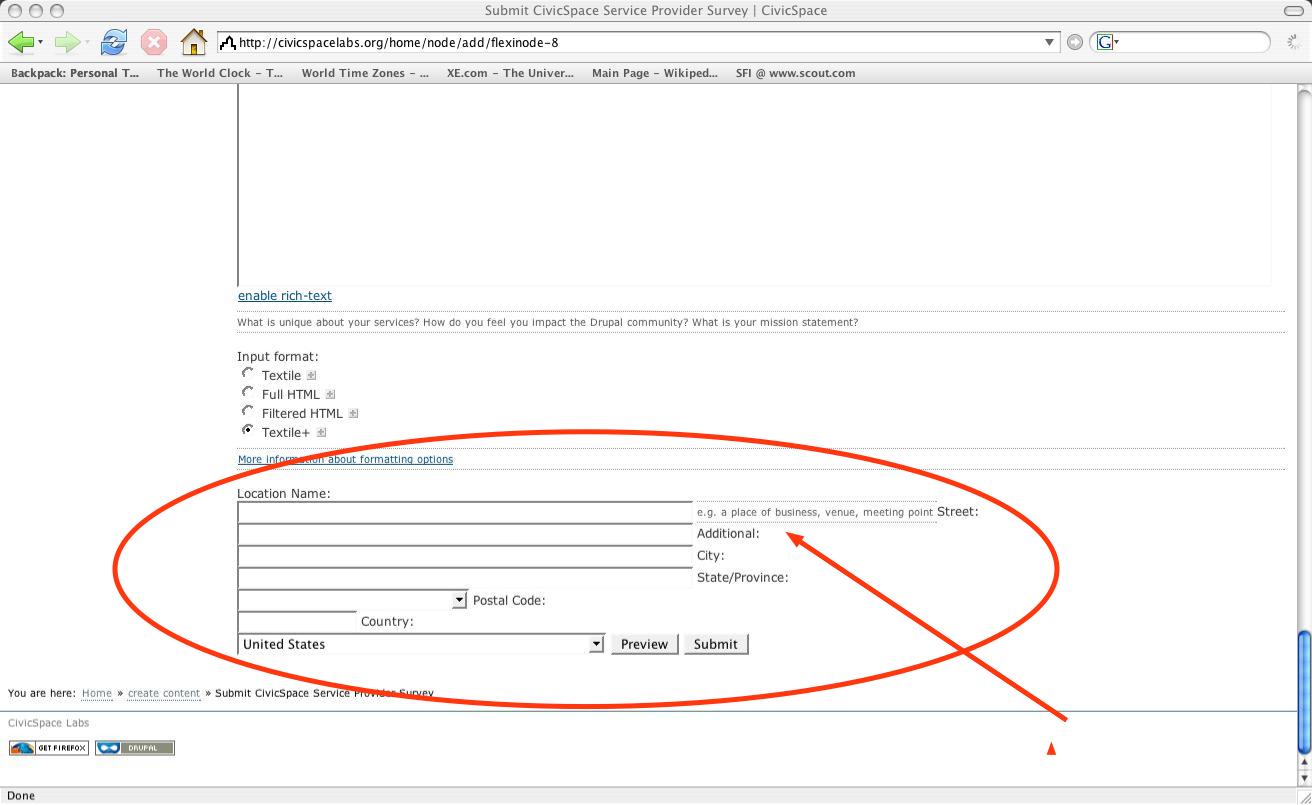
If you enable the location module for a content type like story or survey on your web site and then configure the CivicSpace theme as default, you will see some formatting issues for the location module's title text when entering location information for Location Name:, Street:, Additional:, City:, State/Province:, Postal Code: & Country:. Location Name is fine since it appears top-left of its respective text field, but all of the other titles appear on the right-hand side of the previous text field making it confusing to understand where to enter the street address, City, etc.. See the screenshot attachment theme_bug.jpg.
Initial Conditions
1. Use http://civicspacelabs.org to view this bug since I have already configured the problem here.
2. The civicspace theme must be set to "enabled" & "default" -- admin/themes
3. A content type must be configured to have locative information enabled. -- admin/node/configure/types/[story]
(Story is just one example; in this bug I'm using a flexinode that I have created for a project)
4. Check "Enable for locations" and allow or require "Location names:", "Street locations:", "City names:", "State/Province names:", "Postal codes:"
& "Country names:"
5. Save configuration.
Steps-to-Reproduce
1. Create content -- http://civicspacelabs.org/home/node/add
2. Click CivicSpace Service Provider Survey.
3. Scroll down to the bottom of the screen.
4. View the location text field section.
Results
5. Notice that while "Location Name:" is correctly positioned on top of its text field to the left, all of the other text field titles are formatted
incorrectly to the right-hand side of the previous text field (You're supposed to enter City in the field that has "State/Province:" printed to
the right of it) except "Country:" which is on top of its field but positioned incorrectly more to the right. See the screenshot attachment
theme_bug.jpg.
Notes.
1. This issue is a theme problem and has nothing to do with the web browser. I can see the same issue with Safari.
| Comment | File | Size | Author |
|---|---|---|---|
| theme_bug.jpg | 91.77 KB | sdemps3 |

Comments
Comment #1
traemccombs commentedCan you show me an example of this where it occurs somewhere else other than in the Flexinode module? The page you are on is one with the Flexinode module.
Trae
Comment #2
sdemps3 commentedTrae,
The bug can be seen when location is applied to the Survey module; See this content:
http://civicspacelabs.org/home/node/14800/edit
Also I need to ammend the comment I made about the defect occurring regardless of web browser; this is not true:
On IE on WinXP there is no bug, but Firefox still shows the bug
On IE on Mac OS X I can still see the bug, but I cannot even see any of the left side bar blocks (navigation, CiviCRM, etc..)
The bug is probably dependant on OS and browser version. If you need exact version numbers for all test cases, I will provide them later.
Comment #3
sdemps3 commentedTrae would like to reassign this defect to the location API
Comment #4
ankur commentedThis issue has been fixed in http://drupal.org/node/27221