Hi all,
my PHP memory limit is 48M, which should be quite enough. Nevertheless, couple of days ago I have installed another module and I have started getting that ugly Allowed memory exhausted ... in /data/f/o/folk.sk/web/includes/database.mysql.inc on line 301.
So what I have done was deactivate modules I do not use (via DB command update system set status=0 where type is module and name is module name). I have also deleted appropriate directories from sites/default/modules directory. After this I was able to display admin/build/modules page but only once! Next time I have started getting that error message again. I have also deleted all modules installed recently. The situation now is that I have maybe the half of modules I used to have in my Drupal installation and I am still not able to display admin/build/modules page because of that error. I have been trying to sort this out via Forum on this page but I can not think of anything else but the bug in Drupal. I used to have approx. 20 modules and my admin module page was all right but now it does not work with 10 modules. I know it is too brave to claim this, but I swear I would prefer to get this issue fixed and say sth like "Oh, was my fault, I am so stupid!" :-)
Can anyone think of anything what would help me? Thanks a lot.
Peter.
Here is my phpinfo: http://folk.sk/info.php





Comments
Comment #1
gábor hojtsyI'd suggest you try update.php, which does a menu rebuild and will get you rid of excessive menu items some modules might have added, and which takes up memory to rebuild / clean up. Then you should be able to go back to the modules page. Please get back with results.
Comment #2
petiar commentedHi Gábor,
I have run the update.php - put the site in maintanance mode, login as admin (uid=1), run the update.php and tried reload admin/build/modules several times and I always got the right page. Then I have logged under my account which is allowed to access admin pages (it is actually allowed to access everything) and try to display admin/build/modules page. First time I have got that error. Second and third time I have got the page. Fourth time I have got that error again and fifth time I have got the correct page. So it is much better now, because I can get the page at least sometimes, but I still think I should be able to load that page always.
I have had a look into the code - database.mysql.inc - there is something with BLOB objects on the line 301 - can you tell me exactly what is the purpose of this function? Maybe I could do some debugging...
Thanks for your help anyway!!!
Petiar.
Comment #3
gábor hojtsyThat database include code is just reused from elsewhere, look for where it is called.
Comment #4
petiar commentedHi,
I was not really able to find out where this is being called from. But I did not care too much, because after uninstalling all modules I do not used, removing appropriate directories from server and appropriates records from system db table I was able to get the modules page every third-fourth time I reloaded it. So I was able to install something. However, now I have updated Drupal to 6.9 and I am not able to access modules page at all. The result is:
20 MODULES - EVERYTHING WAS FINE
21 MODULES - OPS, MEMORY EXHAUSTED ERROR
...BIG REDUCTION...
10 MODULES - STILL GETTING "MEMORY EXHAUSTED ERROR"
WTF???
Thanks for your help.
Petiar
Comment #5
Augusto Ellacuriaga commentedI’m having the exact same problems with 6.9. I had about 70+ modules and cut down to 55. A couple of nights ago I updated 8 modules (CCK, Views, etc) and that’s where the problems started without stopping.
I’m running a VPS with 384MB of RAM. The site is still under development with only 5 pages of content. php.ini has register_globals = off and memory_limit=128M.
The server company has checked every possible thing, but nothing seems to be a problem on their end. Yet no matter how many modules I deactivate, remove from the module directory, clean cache, increase memory limit, this error comes back:
Fatal error: Out of memory (allocated 34340864) (tried to allocate 556957 bytes) in /home/bghm0118/public_html/includes/database.mysqli.inc on line 303I read in a different thread that there could be an issue with the admin menu module. After deactivating that mod and others, I was able to access to /admin/build/modules. However, that did not last long. After the 4th time I was able to access the modules page, the same error came back.
All changes have been done manually through MyPHPAdmin . Per recommendations in the first comment above I also run an update, reduced the number of menu items and clear cache several times, but nothing changed. Now this only happens when I log in as an Admin or User 1. The rest seems to be working ok.
I have a different site (6.8) under development with almost the same configuration that is working ok. In the last couple of days I also run into a couple of these same out of memory errors.
Any help will be appreciated.
Thanks
Comment #6
damien tournoud commented@Globalfusion: it's quite clear that your memory limit is set to something like 32M (see the
allocated 34340864in the error message you copy-pasted).Comment #7
Augusto Ellacuriaga commentedNope! The php.ini is definitely higher (128M according to phpinfo.php & the ini file). The apache configuration is set high also. My server guy installed the following restrictions on the Apache process:
StartServers 2
MinSpareServers 2
MaxSpareServers 5
MaxClients 10
MaxRequestsPerChild 0
No matter how many times we change the memory limit to 32, 40, 50, 100, 200M, we still get the same error message with the same allocated memory of 34340864. Somehow the system is getting the idea of 32MB somewhere, but we don't know where. We've researched this site from top to bottom, and the web of course, trying to find a solution but nothing works so far.
Comment #8
Augusto Ellacuriaga commentedMemory limit is still at 128M, and now I am getting this error when deleting views:
Fatal error: Out of memory (allocated 33030144) (tried to allocate 1075353 bytes) in /home/bghm0118/public_html/includes/database.mysqli.inc on line 303Where is that 33M memory allocated coming from? why is the system not using the 128M? Anyone can provide a possible solution please!
Comment #9
damien tournoud commentedThat looks like a configuration issue. Please check phpinfo() for the actual configuration you are running with (this is available in the status report by clicking on link on the PHP version).
Comment #10
Augusto Ellacuriaga commentedAccess to update.php Protected
CAPTCHA Already 9 blocked form submissions
Configuration file Protected
Cron maintenance tasks Last run 3 hours 12 min ago
Database updates Up to date
Drupal core update status No update data available
File system Writable (public download method)
GD library bundled (2.0.34 compatible)
MySQL database 5.0.67
Nodequeue Translation helpers module not found.
PHP 5.2.8
PHP memory limit 128M
PHP register globals Disabled
Unicode library PHP Mbstring Extension
Update notifications Enabled
Web server Apache/2.2.11 (Unix) mod_ssl/2.2.11 OpenSSL/0.9.8b DAV/2 mod_bwlimited/1.4
Comment #11
nk_ commented@GlobalFusion:
I had same issue with D5 on a shared hosting where my memory limit was set to 128MB in php.ini (seems like quite a lot) and after struggling with this for some time server admins informed me that it is matter of exceeding Apache limit. Here is the scenario:
Site was working correct with many many modules, big database, hell-of-a-custom code ( I was waiting to do version upgrade to make all this much optimized along ... ) and than suddenly without single intervention from my side, really not a single line of code, no new module, nothing, one day it started with this memory issue. So I was informed by the admins that they upgraded Apache to the new version which is more accurate in measuring dedicated memory.
I couldn't do anything, they tried to fix it and every time they did it all worked fine until next form submit, any submit in the backed. After all some guy there made some tweaks and was like they will monitor if with those tweaks i am offending their general consumption rules ... after some time he inform me that I am safe. If you ask me what tweaks they did - I don't have a clue, no idea. Now I am in the process of upgrading to D6 (+ optimizing everything) and will see how it will be when I am done transfer site online.
Good luck,
Nenad
Comment #12
rbrt83 commentedHave the same problem
Fatal error: Allowed memory size of 16777216 bytes exhausted (tried to allocate 388125 bytes) in /drupal/includes/database.mysqli.inc on line 303
can't seem to figure out what is doing this...
set the memory to 64M
Installed modules : CCK, Views2, Token, Pathauto, SWF Tools and the JW FLV Player.
Currently only 1 page created
Made a fresh Drupal install yesterday after I figured out that my Drupal workflow was not optimal. Before I created like 10 pages or so and had a few more modules installed. On top of that I set the memory to only 32M and it was working fine. Right now it doesn't matter to what I set the memory to. I keep getting the same error.
Comment #13
Augusto Ellacuriaga commentedHi Nenad,
Thanks for your sharing your experience. There is something with the configuration that is not working well. The problem is that only the 6.9 is giving me the errors. I installed a similar 6.9 version (with mods, content, etc) and gives me the same errors even though it has 45M. I also installed a 6.8 with a lighter version of mods, but 5x more content, and is not giving me the error messages. All 3 sites are in the same VPS, under different DB's and domains. I checked phpinfo() and the information is exactly the same as entered in the ini file.
I'm going to push my server guy again to see if your comments trigger some ideas...
Thanks to both of you, @Damien Tournoud and @Nenad, for providing feedback. I really appreciate your help.
I'll report back later.
Comment #14
petiar commentedHey guys,
any update on this? I have noticed that there are plenty of user experiencing this annoying issue. I have enough of refreshing modules page to get the form at last. It is obvious that there is something wrong with Drupal! So please get busy with this issue and do your work properly. I know you guys are doing this for free in your free time but that is not a reason to produce dodgy code. Do it properly or stop doing that. Thanks.
Pete.
Comment #15
Augusto Ellacuriaga commentedWe changed the memory limit to 96M to see if the system picked up the change. phpinfo shows now 96M, but the errors continue piling up.
We've also tried changing the memory limit in the following ways:
1. Adding ini_set('memory_limit', '96M'); to settings.php
2. Added php_value memory_limit 16M to .htaccess while removing php.ini
3. Place a php.ini with memory_limit=96M at /includes
In spite of all the changes, the errors continue showing up :(
@Nenad, would you mind asking your hosting company about the changes they implemented? Thanks,
Comment #16
Augusto Ellacuriaga commentedPete,
Have you had any other issues in addition to the memory errors? I'm really concern at this point and I am not sure if we should continue developing with Drupal 6.9. It will be too risky for us to even start uploading content when things can crash continuously.
I really like Drupal, but this problem has set us back a lot. Is it safe to continue working under this condition?
Comment #17
nk_ commented@Pete:
Please do keep in mind that this is NOT Drupal itself issue. This first of all.
Whatever php/mysql you abuse will produce the same. If you do read, there's explanations for everything and than it looks quite simple.
Maybe you could fix the core by yourself and give us a sign?
@GlobalFusion:
Please note that any significant change you make, if that concerns Apache, you should probably restart Apache server to register the changes.
On localhost it's easy like this:
sudo apachectl gracefulBut when your site is on the shared account who can 'do you a favour' to restart apache per your request? if you are on vps, maybe you can do that ... don't know.
Anyway, you could maybe try this: http://2bits.com/articles/measuring-memory-consumption-by-drupal-bootstr...
I tried along with the Devel module too ...
This patch will show you how much each module and bootstrap is consuming too. If bootstrap is the issue rather that particular modules than you are f*ed up.
Sorry, right now I can't ask my provider's admins what they did as a tweak with memory. This issue was some time ago, and believe me they were like having me off as soon as possible. Unix gurus or votever, I simply can't reopen the issue ...
Again, good luck !
Nenad
Comment #18
nk_ commentedThey told me also that 'sessions' table got corrupted by all this. If you are able maybe check that also to make sure, don't really know myself...
Comment #19
petiar commented@GlobalFusion, @nk_:
Thanks for the update. Next time without those poor "sarkastic" attempts, please (or whatever it was meant to be...). Be aware, that this issue will always be here and you will need to discuss it again and again with less experienced and sometimes also much more fed-up users. So practise!
Btw.:Maybe you could fix the core by yourself and give us a sign?
This is sooo typical in Open Source communities. :-((( I am not trying to fix anything - why should I??? I do not have to try to fix the issue to be allowed to complain.
I really love Drupal, honestly.
Pete.
Comment #20
damien tournoud commentedAs far as I can tell, this is a support issue, as all this seems to be configuration and/or hosting issues. An issue that only affect your little corner of the world can't be a critical bug of Drupal core. Do you believe it, several big websites run on Drupal 6 flawlessly.
Please do not requalify, unless you have a pretty damn reason to do so.
Stop whining, if you want to be helped, please give us as many details as possible about your particular setup.
Comment #21
ainigma32 commented@petiar: As Damien stated please provide some more info. Especially the amount of memory that is stated in the error message i.e.
Fatal error: Out of memory (allocated nnnnnnnn) (tried to allocate nnnn bytes)Also could you post a screenshot of your phpinfo output? (I noticed you took it down which is the smart thing to do from a security point of view)
@GlobalFusion: Are you having any success in changing the memory setting? If not could you also post the phpinfo output?
- Arie
Comment #22
Augusto Ellacuriaga commentedHi Arie,
Sorry for the late response. I got caught up with other projects.
There was no success in changing the memory setting. I refused to let this issue stop me from moving forward with Drupal 6.9, so I did a fresh install. So far the new install is working with 60 plugins without problems. However, I have to admin that I haven't really tested thoroughly or push the envelope like with the other install. Will report back after Monday when I'll get back to that project.
I do have a copy of the prior version for further research, so I'll reinstall and get the phpinfo for you guys to take a look.
Thanks,
Comment #23
samwarren commentedIs the problem related to sub-domain (sitename.com/subsite)?
I duplicated two DB and two drupal installation. One in the www-root (mysite.com), other is at a subfolder (mysite.com/subsite). The subsite always gives me memory exhausted message. At the same time, the one at root level works fine.
I am using hostmonster. I set memory limit to 50 M in php.ini. It reads that value in Drupal module setting page. But, when the error message comes again with subsite, it still says ~ 32 MB limit exhausted.
I believe there are two issues:
1) at hostmonster, you just cannot change the memory limit larger than 32 MB.
2) Problem with Drupal itself.
Now I have two identical sites with different result. We need look at the Drupal itself. At the same time, is it true the problem only happens when you use sub folder for drupal? It seems to be case for me.
Comment #24
ainigma32 commentedHave you tried copying the php.ini file into the subfolder?
- Arie
Comment #25
samwarren commentedThat is it.
Copying php.ini into sub folder solved the problem with sub domain.
Thanks
Comment #26
mandclu commentedI'm having a similar issue, but only on specific pages. Here's the specific code:
Fatal error: Out of memory (allocated 33030144) (tried to allocate 1684583 bytes) in /homepages/34/d114806464/htdocs/dmx/includes/database.mysql.inc on line 301I too am running on a host where I can up the memory by using a php.ini file. When I change this file and then check a phpinfo() result, it immediately shows the increase, and shows it in admin/reports/status as well. And yet, no matter how high I set the memory this way, I always get this same error (which actually corresponds to exactly 31.5MB). I've tried setting the memory over 500MB, and still no luck, I get this identical message about the 31.5MB memory limit.
It seems in my case that menus in particular are the deal-breaker. If I clear the cache, I'll get a memory error. CSS and template updates will take effect, but changes I try to make to the menu system never do. I suppose it could be something in between as well.
Also, for the sake of comparison I can run the same site locally and do all the same things, with the same modules, with only 80MB of memory without any issue.
Is it possible something is accessing a subsystem within PHP, which in a shared environment has its own memory limit?
I noticed in my case that the issues seem to be related to the following line:
Is there any easy way to find out if a specific module might be trying to push something huge into the database? Even then, why the artificial limit instead what's shown via phpinfo()?
Comment #27
ainigma32 commentedCould you try running phpinfo() from within Drupal? See here http://drupal.org/node/59680 how.
- Arie
Comment #28
mandclu commentedphpinfo runs within Drupal at admin/reports/status/php and when I check there, it shows the value assigned in my php.ini file.
Comment #29
mradamjohn commentedSimilar issue here; 'Fatal error: Out of memory'. I've been able to work-around usually by manual system table turning off views or some other demanding module(s).
This error has persisted with the approx 32M allocated error when phpinfo shows both in drupal reports and directly run well over this amount.
This was not an issue with D5 but now that 80% of our sites are upgraded we find a very significant problem (for our operation).
We have subdomains set up.
Tried the samwarren solution shown above - copy php.ini into sites/anysite.com with reboot and no change.
@GlobalFusion did you ever find a solution? Your posted symptoms mirror ours exactly.
Finally - as our CCK and Views project has grown the error shows up in more places and has begun to present a much more significant problem.
This seems core related - anyone have ideas?
Comment #30
mandclu commentedI still think there's something strange causing PHP to not use the amount of memory it says it should, but given that a number of us have cited errors that in some way relate to mysql_real_escape_string (and based on the line numbers, encoding BLOBs), maybe we should consider if there are ways to lessen the impact of the use of this function. Here's an interesting forum post that suggests use of this function may create its own overhead, and suggests an alternative method:
http://stackoverflow.com/questions/211243/how-to-build-large-mysql-inser...
Unfortunately. their suggested remedy on works on a mysqli connection, but that might be a start. The bigger issue in this case would be that we would be essentially running a separate query specifically for BLOB fields, which might mean that incorporating this would be ambitious.
Comment #31
mandclu commentedInteresting, I was doing some investigation and came across this (my host is 1&1):
http://faq.1and1.com/scripting_languages_supported/php/16.html
Seems strange that phpinfo would be able to report a number other than what is actually available for memory. In any case, I think that probably resolves my issue. Time for a new host!
Comment #32
samwarren commentedI think Drupal 6.9 is the problem. I just upgraded to Drupal 6.10, and this problem seems gone. Did you all try Drupal 6.10? If the problem is only with D6.9, we can just pass it by.
Comment #33
damien tournoud commentedThe true limit is different from what's displayed in phpinfo()? Stop blaming Drupal and blame your hosting provider!
Comment #34
mandclu commentedI agree wholeheartedly that the host is likely the culprit in my case, but I can't say categorically that this is the case for everyone who has posted here. If anyone else who has posted to this thread is on a different host, I would encourage you to talk to them to find out if some kind of hidden limitation is at work (I gather Bluehost may be doing something similar). If your host assures you this is not the case, you should consider re-activating the case, otherwise it's unlikely to receive much attention moving forward. But please, check with your host first.
Comment #35
samwarren commentedHow do we stress the site to induce that error? Adding more modules is probably not a safe way, it may cause the site inaccessible.
Last time I had the "memory exhausted" error with D 6.9 was uploading a large image. Now with D6.10, I cannot recreate the error anymore. I tried to upload a huge 300 MB file, it failed due to other reason after loading for 10 minutes, but, I still didn't get that "momory exhausted" error.
I believe D 6.9 got some problem and somehow fixed with D 6.10. With D6.9, it was just too easy to get that error message.
Can someone suggest a way so that we can safely stress our sites? (Maybe there is no point doing this for normal users, since D6.10 is much better).
Comment #36
mandclu commentedActually, you can probably stress your site by uploading a whole whack of modules but not activating them, and then visiting admin/build/modules.
Inactive modules won't create problems for the live area of the site, but will definitely stress the available memory on the modules page.
Comment #37
petiar commentedThe hosting provider??? So how about two pages running on the SAME provider, one using 30 modules without ANY problem and the second one experiencing that annoying "Memory exhausted" thing using 14 modules! Stop using your ass as a brain replacement! Won't work!
Comment #38
petiar commentedGuys,
I have enough. Couple of days ago I have installed brand new Drupal site with couple of modules:
captcha
cck
date
fbconnect
guestbook
image
link
pathauto
securepages
simplenews
token
ubercart
views
views_rotator
As you can see it is really some basic stuff. However, today I was not able to access the admin module page. Guess why! Exactly! Because of annoying Drupal-specific popular error message "Allowed memory exhausted". I run many pages on the same hosting. Can anybody explain how one page with more than double of mentioned modules can run smoothly and another one (brand new installation) not??? Is anyone now brave (and stupid) enough to say "It is not Drupal problem"??? 14 modules would hardly consume 48MB of memory. This page is even using Garland as default theme.
Please, stop making up pathetic excuses and get this sorted out as soon as possible. Thanks.
Petiar.
Comment #39
Augusto Ellacuriaga commentedI’d like to start by saying that I am looking for solutions to this problem and not pointing out fingers.
I reinstalled a fresh copy of 6.9 with the following configuration:
php.ini
register_globals = off
memory_limit=96M
Settings.php
ini_set('memory_limit', '96M');
Then, the following modules were activated:
Core Required
1 Block 6.9
2 Filter 6.9
3 Node 6.9
4 System 6.9
5 User 6.9
Core Optional
1 Book 6.9
2 Comment 6.9
3 Contact 6.9
4 Database logging 6.9
5 Forum 6.9
6 Help 6.9
7 Menu 6.9
8 OpenID 6.9
9 Path 6.9
10 PHP filter 6.9
11 Ping 6.9
12 Poll 6.9
13 Profile 6.9
14 Search 6.9
15 Statistics 6.9
16 Syslog 6.9
17 Taxonomy 6.9
18 Update status 6.9
19 Upload 6.9
Contributed
1 Administration menu 6.x-1.3
Everything worked fine with this first group. The second group was added with the following modules:
Core Required
1 Aggregator 6.9
Core Optional
CCK
1 Content 6.x-2.x-dev
2 Content Copy 6.x-2.x-dev
3 Content Permissions 6.x-2.x-dev
4 Fieldgroup 6.x-2.x-dev
5 FileField 6.x-3.0-alpha7
6 FileField Tokens 6.x-3.0-alpha5
7 ImageField 6.x-3.0-alpha4
8 Link 6.x-2.5
9 Number 6.x-2.x-dev
10 Option Widgets 6.x-2.x-dev
11 Text 6.x-2.x-dev
ImageCache
12 ImageAPI 6.x-1.3
13 ImageAPI GD2 6.x-1.3
14 ImageCache 6.x-2.0-beta6
15 Menu Attributes 6.x-1.2
16 Avatar Blocks 6.x-1.3-dev
17 Avatar Selection 6.x-1.5
18 Comment Notify 6.x-1.x-dev
19 Global Redirect 6.x-1.2
20 LoginToboggan 6.x-1.3
21 Meta tags 6.x-1.0
22 nofollowlist 6.x-1.0
23 Page Title 6.x-2.0
24 Pathauto 6.x-1.1
25 robots.txt 6.x-1.1
26 Search 404 6.x-1.4
27 Token 6.x-1.11
28 Token actions 6.x-1.11
29 CAPTCHA 6.x-1.0-rc2
30 Text CAPTCHA 6.x-1.0-rc2
Views
31 Views 6.x-2.3
32 Views exporter 6.x-2.3
33 Views Slideshow 6.x-1.0-beta1
34 Views UI 6.x-2.3
35 Views cloud 6.x-1.0
36 Fivestar 6.x-1.13
37 Voting API 6.x-2.0-rc2
The second group also performed apparently well. The site was tested with these active modules for 2-3 days with no problems. In terms of content I only added a couple of pages with 2-3 lines each. Other modules were uploaded but were not activated.
Before adding more modules and taxing the system, I decided to upgrade to 6.10 and to the latest version of each module. I also created a story with a couple of lines for testing purposes.
Webform 6.x-2.6 was installed thereafter. With this module and Views I proceeded to create a sidebar view block form. No error messages appeared at this point.
Right after installing the third group of modules is when the problems began. These were the modules in the 3rd group:
1 Embedded Audio Field 6.x-1.0-beta1
2 Embedded Image Field 6.x-1.0-beta1
3 Embedded Media Field 6.x-1.0-beta1
4 Embedded Video Field 6.x-1.0-beta1
5 Content Profile 6.x-1.0-beta3
6 Content Profile User Registration 6.x-1.0-beta3
7 Advanced Profile Kit 6.x-1.0-alpha1
8 Author Pane 6.x-1.0-beta2
9 Trackback-6.x-1.1.tar
The first error message showed up when I went to /admin/build/modules/list:
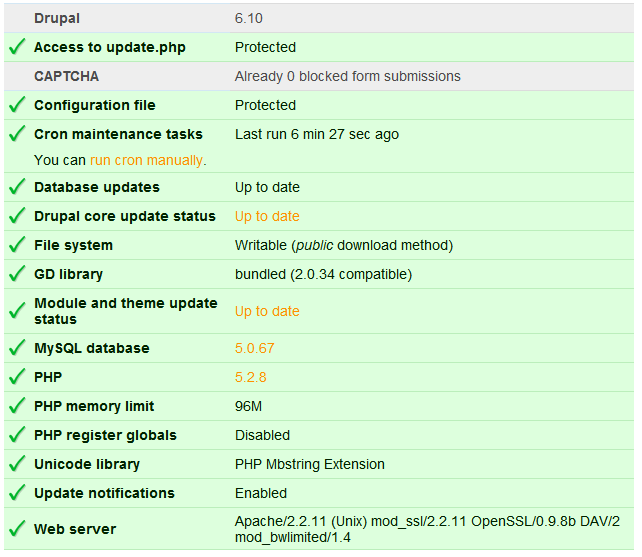
Fatal error: Out of memory (allocated 33292288) (tried to allocate 971136 bytes) in /home/bghm0118/public_html/includes/database.mysql-common.inc on line 41I run a manual cron update, cleared the cache, and checked everything to make sure nothing else was affecting site performance. A copy of the status report can be found in the attached file status-report.gif. A copy of the phpinfo can be found in the file phpinfo.gif.
The image container-manager-before.gif shows the status of the server before restarting the container. As seen in the image, memory used was 191.6MB or 20.13% of the total allocated by the server. That includes two medium trafficked Wordpress blogs, one X-cart ecommerce site, one 6.8 Drupal site (with low traffic with several of the modules cited here, though this site does not present any “out of memory” error messages), and one 6.9 Drupal site in development with most of the modules cited before.
The container was restarted at 3:59 AM on Saturday, March 21, 2009.
The image container-manager-after.gif shows memory usage down to 85.3MB or 8.97% after the container was restarted. At 4:02:00 AM the first error appeared at the module page under /admin/build/modules/list. This time the numbers were slightly different than the prior:
Fatal error: Out of memory (allocated 34078720) (tried to allocate 490709 bytes) in /home/bghm0118/public_html/includes/database.mysqli.inc on line 303The first plugins to get deactivated were:
1 Content Profile 6.x-1.0-beta3
2 Content Profile User Registration 6.x-1.0-beta3
3 Advanced Profile Kit 6.x-1.0-alpha1
4 Author Pane 6.x-1.0-beta2
A similar same error showed up when clearing the cache at /admin/settings/performance:
Fatal error: Out of memory (allocated 33816576) (tried to allocate 490709 bytes) in /home/bghm0118/public_html/includes/database.mysqli.inc on line 303To alleviate the modules page, I decided to manually deactivate the statute of modules via the system table in phpMyAdmin. Also, the following modules were removed from the server:
1 Nodequeue generate 6.x-2.0
2 More Like This
MLT - Flickr 6.x-1.0
MLT - Google Video 6.x-1.0
MLT - Taxonomy 6.x-1.0
MLT - Yahoo! BOSS 6.x-1.0
More Like This 6.x-1.0
3 Advanced Forum 6.x-1.0-rc1"
4 Blog AddOns 6.x-1.1
5 Insert Block 6.x-1.x-dev
6 Smiles
Smileys 6.x-1.0-alpha5
Smileys Import 6.x-1.0-alpha5
7 advanced_profile-6.x-1.0-alpha1.tar
8 content_profile-6.x-1.0-beta3
9 feedburner-6.x-1.0-beta3.tar
10 gravatar-6.x-1.5.tar
11 custom_links-6.x-1.4.tar
After deleting these modules one by one while testing several parts of the backend of the site, error messages kept showing up in the modules page, clear cache section (I had to refresh after the error appeared) and even in the status page.
I also proceeded to manually delete several records in the system table through phpMyAdmin hoping to end the errors, but did not work.
As of this writing, the errors continue appearing at /admin/build/modules/list and /admin/settings/performance even though phpinfo shows 96MB.
The first time that we run into this issue was a little over a month ago. Our hosting company did a thorough investigation, tune up and ensured that everything was working at peak performance. I have been working with them for quite some time and have nothing but the utmost respect for their professionalism, service and problem solving approach. I will let them know that these problems resurfaced again and ask for additional testing.
My impression is that at some point Drupal gets clogged up with modules and framed into the 32MB memory trap. And from that point on, no matter what changes are made the errors will persist and get even worse as mentioned by other people in this thread. I see this worsening happening with the 6.9 site we have installed in the same server, which triggers error messages even in the homepage.
I hope that with all this information someone can take the initiative to do a more thorough investigation and provide a solution to the problem from the Drupal side, if that's where the issue relies. I will be happy to give admin access to our sites and or copy of our files.
Thanks in advance.
P.S. @LiveLoveWorkPlay, as you can see we are still dealing with the same problem. Have you found a solution? How’s your site performing? Would you recommend continuing developing even though errors are poping up everywhere? Send me a private message if you feel more comfortable discussing this in private. Thank you.
Comment #40
ainigma32 commentedTo test the memory settings without using any Drupal code, you can use the following example:
Stick this in a separate file in your Drupal root. Name it something like memtest.php
Now when you run that file you will see at what threshold the memory will be exhausted. If that amount does not match what you see in php.info you need to sort that out with the the hosting provider.
Please post back your findings.
- Arie
P.S. Make sure you remove the file again after testing ;-)
Comment #41
Augusto Ellacuriaga commentedHi Arie,
Thank you so much for your response. I run the test as per your suggestion at domainname.com/memtest.php and results were the following:
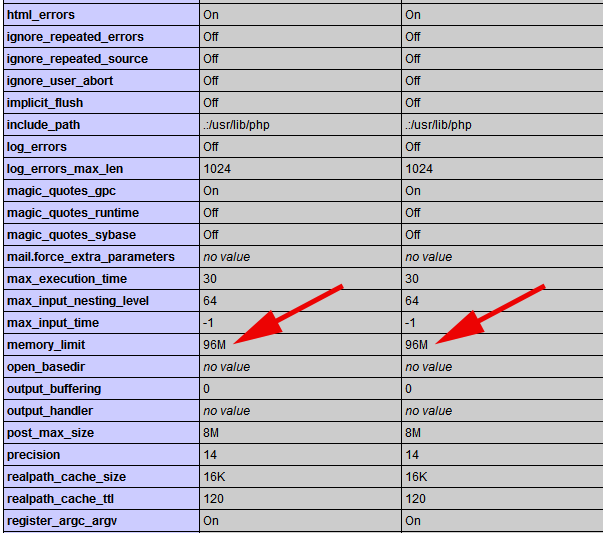
The memory limit still shows at 96MB. I passed along the test results to my hosting provider. Will post back once I get a response.
Again, much appreciated.
Comment #42
Augusto Ellacuriaga commentedI need to bump this, because I'm still having some unresolved issues. The server guys said that everything is fine again and cannot see a misconfig problem.
Could anyone with experience on servers point us on the right direction, please?
4 hours ago I started getting new error messages when updating a view:
I did search this site and tested the following changes:
1. php.ini => max_execution_time = 3000
2. settings.pph => ini_set('max_execution_time', 0);
Now I am getting a beautiful 500.
Or perhaps someone can suggest a hosting company that specializes on Drupal.
Thanks,
Comment #43
ainigma32 commentedLast question first: I think this forum post by NancyDru http://drupal.org/node/202401 is a good read when you are thinking about switching hosts.
About the error: See here http://www.php.net/manual/en/info.configuration.php#ini.max-execution-time for some more input.
Have you tried removing the entry from settings.php ? And what does Apache's logging have to say about the 500 error?
BTW I am a little curious about the earlier problem (i.e. the memory) Does the script now fail at 96 MB? And , if so, do you know what the "server guy" did to change it?
- Arie
Comment #44
Augusto Ellacuriaga commentedI did move the site to a different VPS with a better setup: more RAM, bandwidth, disk space, etc. Last night we started testing and the errors kept coming back for both sites: 6.9 and 6.10. The site running on 6.8 does not show any problems so far.
Fatal error: Allowed memory size of 47185920 bytes exhausted (tried to allocate 72 bytes) in /home/xxxxxxx/public_html/includes/database.mysql-common.inc on line 41UPDATE: A couple of minutes ago my new server guy fixed that memory error and the site running on 6.9 is now working without any problems. I was able to clear the cache and go to the modules page, which by the way has more than 80 modules installed.
I asked Andrew to share the changes he made, so hopefully we'll get an update later.
Comment #45
jurgenhaasI'd be very interested to learn about those changes. Trouble here: on a well working site I installed a very small new module which wanted to install a new database table. Since I installed that I can't access the modules list anymore. Even removing the module physically doesn't help, I still get the error. Clearing cache and sessions doesn't help either, so the modules list is totally unaccesible. Hope we can resolve this as soon as possible.
Comment #46
Augusto Ellacuriaga commentedUpdate: This is the response I received from Andrew:
I have made the changes in settings.php for the domain xxx.com. Also, I have assigned proper permissions of settings.php which was not secure previouslyI checked settings.php and he added the following in line 148:
ini_set('memory_limit', '-1');This is what the status report (/admin/reports/status) is showing:
php.ini has the following setup:
No changes were made to .htaccess.
I hope this helps other people with similar problems.
Comment #47
Augusto Ellacuriaga commentedArie,
I got fed up with the whole thing that decided to pack my bags and leave. Luckily, I found the solution elsewhere.
Thanks for your help.
Comment #48
jurgenhaasDidn't help for me, but that's most vertainly because I'm on a shared and hosted server. And they probably limit memory comsumption per customer on a lower level so that you can't modify that during runtime.
I went to phpmyadmin and disabled all Ubercart modules via SQL and then I was able to access the modules overview. Re-enabled those modules and it just seems to work for now. I'm sure that's only temporary.
Comment #49
sunSorry, but this issue has no way be to be fixed at any time in any place in any way.
Comment #50
petiar commentedThat's the spirit!
Comment #51
richard moger commentedPHP memory limit -1 in settings.php fixed it for me. Maybe this setting prompts drupal to look at the php.ini setting? In my case php.ini was set to 96M but drupal was still bombing saying only 32M available. After I made this change all fine.
Comment #52
timmay commentedJust wanted to add my 2 cents....
I was getting the memory exhausted error when trying to remove a photo from a post and then updating. I added the
ini_set('memory_limit', '-1');
to my settings.php file and all seems fine for now.
Comment #53
Rory commented@GlobalFusion:
A grand result to an epic issue. Thank you so much.
I added the following line to my settings.php file:
ini_set('memory_limit', '96M');
and my memory limit appears well and truly set now.
Previous attempts to set the memory limit by editing my php.ini file were futile. It didn't seem to change. Perhaps my hosting provider isn't inclined to allow me to change my memory limit as easily as that, I don't know. But if they decide to trample on my garden after this I'll pack my bags and leave too. For GlobalFusion. Gracias, compañero!
Comment #54
Augusto Ellacuriaga commentedHola Rory,
Glad to hear it worked for you.
After our traffic outgrew that VPS capacity, we moved to a dedicated server and removed this line from all settings.php files:
ini_set('memory_limit', '-1');
It's been more than a year that we've been working with that dedicated box and never had a memory problem again. So, do NOT hesitate to find a better hosting provider.
No doubt that Drupal is an eating-memory monster...but we love it :)