

Closed (fixed)
Project:
Location
Version:
7.x-3.1
Component:
Code
Priority:
Major
Category:
Feature request
Assigned:
Unassigned
Issue tags:
Reporter:
Created:
26 Jan 2009 at 09:52 UTC
Updated:
25 Nov 2015 at 21:41 UTC
Jump to comment: Most recent, Most recent file

Comments
Comment #1
Anarchtica commentedI would also like to see the state/province as a drop down menu.
Comment #2
jcamfield commentedThis would be great as an option to use instead of the auto-complete, especially with some of the varying ways to enter provinces (e.g., in Jamaica, the standard way to name a province is St. Andrew, but in Locations it's expanded to Saint Andrew -- which I'm sure is conforming to a wise standard, but causes some confusion when the St... doesn't auto-complete.
Comment #3
aaronbauman+1
I'm not a fan of the autocomplete, and many of my clients don't want it.
Comment #4
aaronbaumanmoving this to HEAD
Comment #5
andrewsuth commented+1 for drop-down option
Comment #6
Anonymous (not verified) commentedAfter searching, I don't think there is a module that would enable this feature. Would like to see this integrated.
Comment #7
yesct commentedtagging
Comment #8
khan2ims commentedHi,
Is there any updates on doing drop down for state/ province field?
Comment #9
Xabi commented+1000
Comment #10
mrtoner commentedSee how this works for you.
Comment #11
summit commentedSubscribing, greetings, Martijn
Comment #12
Drupal-Tech commentedPatch only work for first time.. first time it shows state of US what about when we change Country
Comment #13
kvvnn commentedI need this functionality as well. I will post any success I have in implementing / finding it.
Comment #14
summit commentedGreat! Looking forward to it!
Greetings, Martijn
Comment #15
sbydrupal commentedSubscribe +1
Comment #16
nick.harris commentedAgreed and following also.
Comment #17
mcaden commentedSubscribing
Wait...The patch mrtoner made...Is Drupal-Tech saying it works for US and nowhere else, or works for US once and when country gets changed stops working at all?
Comment #18
scottrigbyworks for me (US)
Though this should probably be a configuration?
Comment #19
onesimpleman commentedYes it works only for the default location,
ie if it is UK it shows states in UK same with USA.
Changing the country has no effect on the states. ie if I change country to xyz the states will still be showing the states in the default country.
I think the patch works partially, but think it needs a new location_autocomplete.js to make it work properly.
Comment #20
jcamfield commentedBump
Especially with some of the lacking information about states in a lot of non-Western countries; this would be really helpful.
Also - I've already sunk a lot of time into updating some of the /supported files; should I start submitting them?
Comment #21
ramotowski commentedsubscribing
Comment #22
mcaden commentedBTW the patch in #10 worked for me.
Comment #23
cerup commentedsubscribing.
I think this is an essential feature. I have to make this field required so that I can map correctly, but many of my users can't find their correct state/province through autocomplete. A drop-down is a must.
Comment #24
cerup commentedsubscribing
I agree, this is essential. Like the above, I must require this field for proper mapping, but many of the users can't find their closest state/province which means they can't complete registration.
Comment #25
summit commentedMay be using hierarchical_select for this (www.drupal.org/project/hierarchical_select) ? That works great for taxonomy and nodes, but I do not see a location submodule yet. I am not a programmer, but would test for the builder off course.
Lots of blogging about it, see masterissue: http://drupal.org/node/31609#comment-906923. I think Wim and Bdragon didn't get in touch yet...
greetings, Martijn
Comment #26
jrosen commentedsubscribing
Comment #27
newtonpage commentedMy 2-cents - - I very much need this, too - - in my case, I would love to have the ability to use JS to control specific options within a drop-down if the country has state/province info and a non-autocomplete text box for unsupported countries.
The main issue for our site is that we require the state and country and city for a node (and user) but find it is quite easy to fail validation WRT state-city matching (in the US). (Note that we are using the non-CCK implementation as this worked best for us.
Also, the current autocomplete is insensitive to country, so that a node located in (for example) the UK will auto-suggest US states. (Noting that the default country in our case is set the US) - - apologies if this is contained indifferent thread (I will search this out).
So, my wish-list is as follows - - and I would massively grateful for guidance as to patches and snippets:
1) drop-down for state-provinces that are supported - - use JS to swap in the correct widget or to populate the options within the select (the latter being preferred for obvious reasons).
2) in non-supported countries, use a non-autocomplete text box and allow mistakes (that is, do not validate country vs. province)
Has anyone done this sort of thing before? If so, love to pick your brain (and will certainly return the favor if I can). I am in the process of constructing a module to deal with this sort of thing.
thanks to all
n
Comment #28
newtonpage commentedUpdate to the previous post.
First of all - - apologies for posting before properly researching this (IMHO) excellent module / api (notwithstanding other (not-so-appropriate criticisms I have seen).
So, here is what I am doing:
SUDO:
in the node entry form, substitute a select drop-down for the current text box (not quite how I will do this yet) with the appropriate id and name and so on.
default to the US.
use location_get_provinces() to fetch an array of provinces
populate the box.
When the user changes country, use jQuery to detect the change and use ajax to call a module-based function to return a new select box (via json) to swap in.
submit the country in the ajax data - - seem to be able to use the simple jQuery load function.
I have run preliminary tests on this and it works - - but have not tried to submit it.
The question I am now looking at now is how to make sure the name and id match what the module expects and whether I can pass validation.
Concrete question:
the current text field ids output via my template as follows:
Thus: I will try to substitute something like this?
Does this make sense?
if so, then I will gladly post the php and jQuery snippets.
Goals - -
1) avoid complex client-side tricks
2) avoid validation errors by offering only options that are valid WRT the selected country
3) simple and hard-to-mess-up UI
Thoughts from anyone?
Thanks
S
Comment #29
aaronbaumanThis patch addresses the issue raised in the title.
This patch also addresses some bugs raised in comments #12, 17, 19 that provinces only reflect the default country setting.
Further questions raised within this issue, e.g. "Also how can you add new provinces?", should be addressed in a new issue.
newtonpage raises quite a host of topics in comments #27 and 28, those of which relate to the original intent of this issue are addressed by this patch. I confess I have not spent the time to grasp the full extent of the content of those comments. Please feel free to retool this patch and resubmit if anyone would like to further develop this patch. Please address those concerns only as they are relevant to this issue. Further issues, UI improvements, or more fundamental changes to the system should be raised in new issue(s).
Overview
General:
Admin notes:
User-facing notes:
Developer notes:
location/fetch_provincesto retrieve json'ified list of provinces for the selected countrylocation_invoke_locationapi: for$op = 'field_expand',$a4now expects an array of field-specific settings in the same format returned for $op = 'default', e.g.funciton _location_expand_locationin order to maintain state across form POSTsfunction location_field_widgetsto encourage further extensibilityComment #30
aaronbaumanMoving back to HEAD.
I'm torn between calling this a feature request or bug report.
Since the latest patch doesn't address any of the javascript-based usability concerns, I'll leave it as a feature request.
Again, if you need support relating to this issue, please open a new issue or go to the forums / irc.
Comment #31
newtonpage commentedI apologize to all if I posted comments #27 and #28 within the wrong thread - - by way of explanation, I began with a concrete question but then segued into proposing a solution for my particular requirements - - which are (simply stated): to present the user with a dynamically populated states/provinces select widget keyed to country.
As a note, I have solved my problem and it works well - - and while the referenced patch addresses some of my issues, there are enough things I need that are not addressed that I have implemented a solution that does not require patching.
Note that one reason I needed this is that this site is international and the node form of interest requires correct entry of both country and state/province - - this is, of course, not unusual - - but in our case, we were failing validation under the following (common) user-input cases:
1) users in the US could (and often did) input misspelled/malformed states in spite of the autocomplete text field;
2) non-US users had the same error-possibility as above but were also presented with the US-based states in the autocomplete;
3) further, for some countries, users were entering provinces that they felt were correct but which did not match the DB - - thus, triggering validation errors that they could not understand.
While failing validation is not disaster, it did present challenges in the error-case UI since this is a multi-stage form. Thus, avoiding easy-to-create errors is a priority. In essence, this required a "guided-path" UI that forecloses the possibility of incorrect input (short of hacking the form, an error cases trapped by standard validation provided by the location module).
For those who need something like this (to present a dynamic states/province select widget keyed to country), I am happy to post the code. In my case, I used code in a template for this form, a small js file that uses jQuery and small module for ajax callback. It is not complex and works quite well.
If posting this solution is desirable, where would the issue maintainers prefer I post this? Sorry for my ignorance, but I honestly do not know.
thx
n
Comment #32
summit commented+1 to post your solution!
Greetings, Martijn
Comment #33
newtonpage commentedI am happy to but do not want to "clog-up" this thread - - where should I post? as a reply to this comment?
Comment #34
summit commentedI think so, it has to do with the dropdown, so no clogging up, right?
greetings, Martijn
Comment #35
newtonpage commentedI suspect the moderators may yell at me for this but here goes:
Here is what I did.
Requirements:
- - country default = US;
- - state select box on default contains the US states;
- - location elements are non-CCK;
- - when the country select box changes, the state / province select box is auto-filled when with the provinces supplied by the location module.
In my template that renders this form, I did this:
I create the select box and populate it with the US states - - AND also render the state text fields BUT hide that field in the CSS (I used display: none;).
Thus:
Note again that the text box is hidden via CSS.
Then, in a jQuery file (I created one to go with a module that controls these elements), I did this:
Then in a module:
Next, I discovered that the location module wants the submission for the province field from the text widget only. so, I write the currently selected option text to the hidden text field that was output by the template (the one that I hid with the CSS).
So, after the json object is returned, I do this:
Finally, I detect when a change-of-state occurs in the newly-populated state / province select box and write it the value to the hidden text field:
Note that there are a few supported countries with no provinces (Vatican, for example, as well as a few in the Caribbean).
Since this case will yield an empty array, I trap this in the module-based callback by returning a text string rather than an array. (This logic is not shown in the snippets but is obvious.) The javascript detects this and hides the select box and inserts the phrase. In my case, I used: "This country has no provinces". Other techniques may suit you better.
So, in this case, since the location validator accepts an empty field for these countries, I make certain the hidden text field is empty.
Net-net, this works nicely. Some may view this as a hack, but in my view, it is, rather, a workaround for an excellent module that provides lots of other functionality. Also, in my opinion, it really only requires a few lines of code.
Note that I use a custom throbber while awaiting the json return (which the jQuery "shows and hides" as appropriate) and have other UI features that I have excised from these snippets.
If this were to be generalized and integrated into the module, it could be done in similar fashion to five-star where the admin pages offer the ability to use a js - ajax callback - - and this can be either the pre-canned one or one you supply. The js could be easily rolled in - - but does require at least jQuery 1.2 (I use 1.3 here). But I suspect that this may not be at the top of list for new features.
Questions and critiques welcome.
n
Comment #36
aaronbaumannewtonpage:
There's nothing wrong with posting another solution - that's what this forum is all about.
However, it's very difficult for others to test your solution without a proper patch (see http://drupal.org/patch/create for an explanation).
After reviewing the code you posted I think we're both working towards a similar solution.
I think the best pieces of both could be combined to reach an optimal solution to this issue.
I'll take a stab at rolling a combined patch as soon as I can if no one beats me to it.
Comment #37
newtonpage commentedhello aaron
thx for the reply - - sorry for my long-ish reply here - - net-net I would be happy to help in anyway I can.
As for patching, I am quite inexpert at rolling patches. But . . . I promise to work on this as I want to be useful contributor here.
I suppose that (assuming that I "cure" my patching experience), a patch would 1) create a menu item; 2) create a new callback for this item. I assume this would go into the location module and this seems simple enough.
But in my solution, I assume: 1) that there is "target" select element into which the json returned data is placed. If there is a default country (as in my case), the theme layer populates this select with the default country's provinces /states. If there is no default country, there must be a blank target - - and again, in my case, I made that target a select element. But this may not suit everyone as it assumes my theme layer deals with this.
I looked at creating the select element in the location module but, to honest, I was afraid I would break something - - especially since I had to "workaround" the fact that the module (seemed to) require input from a text element, rather than a select element. But it appears to me that a patch would have to modify (at least): 1) location_settings() (to offer the option of a populated select box); 2) location_locationapi() (case = "field_expand" / case = "province") (where there would have to a logic branch to bypass the existing code in the event that a select is chosen - - and wherein it returns a element with the options supplied by location_get_provinces($default_country).
Again, to be honest, I was afraid of breaking something but - - agin - - I will help in any way I can.
BTW - - in the post that follows is the result of our researching what "provinces" are called in each supported country.
n
Comment #38
newtonpage commentedThis follows up previous comments #35 and #37.
Note : aaron - - I include this if the event that it would be useful - - and again, if I can assist in a patch, I am happy to do so.
I am not certain if this would like to be rolled in the patch discussed in comment #36, but here it is.
In our application, it is desirable to make certain that a "province" was correctly named (and we are looking at the translation aspect, as well but only support English at the moment).
So, if, for example, the country is Slovakia, they call their provinces "Prefectures", whereas, the Cyman Islands have "Districts".
Further, if there are no provinces, we need to display that we cannot find them - - for example, the Vatican may be selected as a country but has nothing like a province.
The implementation is rather simple but detailed:
In the module callback, we first test if the country has provinces in the db - - if not, we return -1 in the JSON. This was developed by trial and error. We took the approach of testing with a case statement but may change this.
Then if the array in non-empty, we do this:
The function that is called above to create is the "insert" phrase (named select_section() ) is as follows:
If this format is not useful, I can supply the raw data.
Finally, in the jQuery that supports this form, we split the first option text and extract the proper phase for form announce section.
Thus, for the Cyman Islands, we output "Please Select District" followed by the dropdown with the districts.
Comment #39
aaronbaumannewtonpage, re #38:
this is great work - looks like you did a lot of research, so thanks for sharing.
I agree that the switch/case is unwieldy. Probably the best way to go would be either a mapping table with this data, or some kind of solution involving Drupal's translation system (I'm not very familiar with i18n support, so I don't know how feasible that would be).
Either way, this discussion is tangential enough to merit its own issue.
Let's try to keep the focus of this issue on the input type of the field.
Comment #40
newtonpage commentedI understand and appreciate the kind response - - as a note, I posted #38 in the event that something like this may be included in a patch since this code is included in the callback in my current solution. The switch/case structure is clunky but was the shortest path for me at the time. There are certainly many better ways to do it.
looking forward to helping with this issue going forward.
n
Comment #41
aaronbaumanOK, I've rerolled the patch to take into account concerns about the handful of countries with no provinces.
After reviewing the comments in this thread, I am fairly certain that all concerns relevant to the original issue have been addressed.
This patch is almost the same as comment #29,
with the following change:
if a country is selected that doesn't have any provinces,
the State/Province <select> element is truncated to a single value:
<option value="">n/a</option>This hopefully eliminates any user confusion about whether to leave the default "Please Select" value, or to choose "NOT LISTED".
This patch does not address #636464: When State/Province is required, cannot validate for countries without States/Provinces
Comment #42
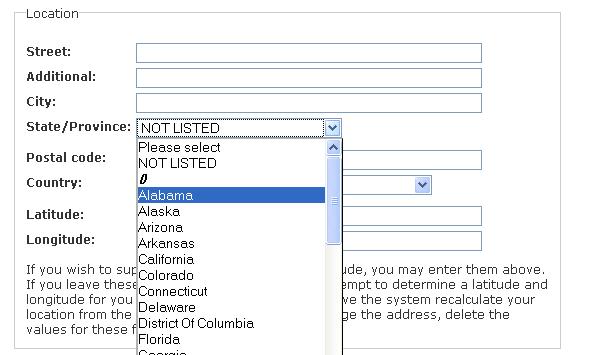
sleestaklightning commentedEither this isn't working properly, or I made a slight mistake when I manually applied the patch. If that's the case, perhaps someone can help me figure out where that was. I was able to toggle the collection widget between autocomplete and dropdown, but the collection form isn't updating the available provinces when I change the country. In the screenshot, I've set the country to Argentina. It's still showing the US provinces, and there's a "()" between "NOT LISTED" and "Alabama", which leads me to suspect I may have broken some syntax. In a view I've created, nothing has changed since I applied the patch, although I've tried removed the provinces filter, saving, and adding it again, as well as clearing both Location caches. The exposed filter continues to display as an autocomplete widget, and only loads US states. When I un-set my default country in the Location settings, the widget fails to load any states/provinces at all.
Ideas?
Comment #43
rubymuse commentedI'm seeing the same exact behavior, and I didn't manually apply the patch. (I used 'patch' -- that's not manual, is it?)
Comment #44
rubymuse commentedI think I have this working after doing the following:
- location_autocomplete.js, line 96 (function location_update_provinces) - needed to remove trailing comma after the last property in the object (causes IE7 to throw an error)
- Several 'console.log' calls needed to be commented out.
I say I "think" it's working because before making these changes I was able to get it to work when I had firebug turned on, so I'm not entirely confident the behavior is consistent. But so far it appears to be.
Note that the top of the list still shows the following:
()
Please select
NOT LISTED
Comment #45
sleestaklightning commentedrubymuse: Can you post an updated patch?
Also, does this work with all geocodable countries? There was a patch to google.inc which enabled the module to map every location that Google can (http://drupal.org/node/584014), but none of the countries for which that added support (France, etc) are working with this dropdown selection patch. The provinces populate and can be selected, but no results are returned.
Comment #46
obiwankaynobi commentedsubscribing :)
Comment #47
hinikato commentedThis patch is fixed version of patch by aaronbauman and should resolve the problems raised in comments #42, #43 and #44.
Comment #48
cerup commentedWhich patch hinikato? You didn't attach a patch.
Comment #49
hinikato commentedSorry, here it is ;)
Comment #50
hinikato commentedIssue reporting system did not accept # char in the patch file name. This is fixed version of the file with accepted file name.
Comment #51
cerup commentedhinikato: which version is this patch against? I was able to patch part of 6x-3.0 but it didn't appear to patch the whole thing since I don't get a dropdown and still get autocomplete. Is this what the patch is for? If you can provide more information, that would help.
Comment #52
sleestaklightning commentedhinikato:
what version is this your patch against? i reverted to the latest dev version (12/16), so my baseline for location.module is:
location.module,v 1.222.2.28 2009/12/16 21:38:06 bdragon Exp $
do i need to go back to an older version? or can you update the patch to work with the latest dev release?
thanks!
Comment #53
hinikato commentedThis patch is for 6.x-3.1-rc1 version. See for version number in location.info file.
This is example of location.info file for 6.x-3.1-rc1 version of the location module:
This version can be found on the CVS repository (http://drupal.org/node/321)
Comment #54
hinikato commentedI have found a small bug in the previous patch: when "State/Province" item is missing, the module will show the error message. This patch fixes this situation.
Comment #55
cerup commentedThanks hinikato.
I applied the patch the rc1. I'm getting an error when I change the Country:
'Error in network connection. Please reload the page and try again (1).'
Comment #56
hinikato commentedcerup, please, use the last patch, that I provided.
If error will still occur, please describe your conditions (which country do you select when error occur and other details). Video with bug will be very helpful ;)
Comment #57
cerup commentedI tried with the latest patch (I tried with both actually).
When I change the 'Country' field and it attempts to load the States/Provinces it gives an alert 'Error in network connection. Please reload the page and try again (1).'
For example, if I change 'United States' to 'Australia' (or any other country) it'll present the above alert as if it's not finding the states from that country. If I change it back to the default country, I also get the error. So essentially changing the Country field to anything presents the alert error.
Comment #58
hinikato commentedcerup, which browser do you use?
I need a dump of some variables to detect the problem. Please change location_update_provinces(countryItem, provinceItem) function in location_autocomplete.js file to this one:
after that try to change country and paste here result.
Comment #59
cerup commentedI appreciate the quick response and helpfulness thus far hinikato
I'm testing on both firefox and IE8. Both have the same results.
Here's the results:
Comment #60
hinikato commentedYou got 404 not found error. This means that url in function location_update_provinces() is invalid.
I think your problem in cache. Please try to clear cache in admin/settings/performance, clicking on the "Clear cached data" button.
Comment #61
cerup commentedYou're right! I should have known. Mistake 101 - always try clearing the cache! :D
Thanks again and great work on the patch. I hope they commit this!
Comment #62
jpshayes commented+1
Comment #63
hinikato commentedI have found that in case of using autocomplete field, the JavaScript error will occur. I have fixed the invalid variable reference and provide the new patch.
This one should fix the problem completely (I hope).
Comment #64
Anonymous (not verified) commentedSorry for the dumb question but do I ONLY need to install the last patch from this post or all of them in order from top to bottom? Great work on getting this done everyone!
Comment #65
hinikato commentedsuperduperdan, you need to install 6.x-3.1-rc1 and apply the last patch which I provided from comment #63.
Comment #66
hinikato commentedComment #67
hinikato commentedComment #68
monotaga commentedsubscribing
Comment #69
RickyS commented@hinikato
I have started testing the patch on comment 63 and found one bug.
When I update a node, it saves different province item from what I chose. It happens when I choose "Japan" from the dropdown menu as a country. For example, when I choose "Tokyo" as province entry, it saves "Iwate". "Saitama" becomes "Hokkaido". It seems like something to do with the numeric array keys in location/supported/location.jp.inc since Tokyo's array key is 13 and Iwate's array key is 03. Saitama's array key is 11 and Hokkaido's array key is 01
P.S.
Thank you for implementing a great patch. This is exactly what I wanted!
Comment #70
RickyS commentedComment #71
jpshayes commentedSomeone correct me if I am wrong, but feature request should never be marked "critical"
Comment #72
mrtoner commented@JPSH: you are correct. And feature requests should always go against dev. Bugs on an attached patch might get marked "needs work" but never change the category.
(Sorry I haven't been around since #10, but I get easily sidetracked.)
Comment #73
yesct commentedRickyS in #69 are you saying that the patch fixes your problem, or that it almost does and there is still a small error even with the patch?
I think this issue needs someone who has been following it to re-read it from the beginning and post a summary to make it easier for a maintainer to get a quick understanding of what the problem is, and whether there is a patch that fixes it (and if the patch might cause any other problems).
Comment #74
jpshayes commentedI am having the same problem as RickyS is having in #63 only I am having the problem on user location. I have not tried it on node locations.
Comment #75
yesct commentedmarked #768832: Provinces & Cities as a drop down in views as a duplicate of this issue
Comment #76
jday commentedhow about adding the state drop down option to the exposed view filter?
Comment #77
marcus178 commentedI'm using 3.1-rc1 and have applied the patch but I get the following errors
Comment #78
khan2ims commentedI am also getting the same error as mentioned by Marcus.
Comment #79
khan2ims commentedPlease try following this post http://drupal.org/node/330066
Comment #80
yesct commentedusing [#nnnnnn] (cool way to link to another issue
#330066: Add option to have the views province filter as a select field
Comment #81
nimek commentedLet someone apply the path from #63 and post patched version or submit as another dev release.
Comment #82
daneyuleb commentedAfter applying patch at #63, the province drop-downs appear fine in the GUI, but when Editing registration, receive: "An illegal choice has been detected. Please contact the site administrator.". Log shows "Illegal choice FL in State/Province element." type errors ocurring.
Assigning: [#validated]="true" fixes the issue for me, but that's a little insecure (though, in a drop-down list of values I supply, not sure how insecure it really is).
Just throwing this out there to see if anyone else has run into it with this patch. If no one else is experiencing similar, I'll consider it something peculiar to my setup.
Comment #83
clashar commentedactually would be better to have both dropdown + autocmoplete field for cities, provinces
Comment #84
goron commenteddaneyuleb:
I've just gotten the same error. I think it's related to the "force default" option for the country field. It stops happening when I switch that to "require"...
Anyone have any idea why that's happening?
Comment #85
raj1111 commentedI have a few issues with the address module. I want show value of state and State / Province with full name
Comment #86
bcmiller0 commentedModified patch from #63 comment above to make it apply cleanly to 6.x-3.1 as #63 only applied to 6.x-3.1-rc1 .
Comment #87
yesct commentedComment #88
recrit commentedpatch needs some small fixes:
line 275 of original module file: for loop end bracket
}should come after the following codeAlso, street is not getting the required set correctly. After patch it is still $a4 == 2 and should be
Comment #89
summit commentedHi, Could you build a new patch with your modifications please?
Thanks a lot in advance!
Greetings, Martijn
Comment #90
recrit commented#88 rolled into patch
Comment #91
khosman commentedApplying the patch listed in #90 brings me the following:
Fatal error: Call to undefined function location_load_locations() in C:\wamp\www\sites\all\modules\location\location_node.module on line 38
Is this possibly caused by something I did whilst installing the patch - or something bizarro with the patch itself?
Comment #92
recrit commented#90 was just some code clean up... did you previously try #86 with no issues?
Comment #93
khosman commentedNo - my mistake was to apply 90 directly to the mod.
However... when I apply 86 to a clean copy of the mod (specifically version 3.1), I get:
Fatal error: Call to undefined function location_load_locations() in C:\wamp\www\sites\all\modules\location\location_node.module on line 38
...again.
The "patching process" seems to go smoothly, printing out
patching file location. module
patching file locationautocomplete.js
I get 0 errors there - but the site has been replaced by the error listed above.
Comment #94
bander2 commentedI applied the patch 86 to 3.1. The patch applied fine, but I get error message:
"warning: Invalid argument supplied for foreach() in D:\www_acc_test\includes\form.inc on line 1430."
on any page with the location form and the state/province drop down is blank.
Patch 90 seems to work better. The State/Province drop down is populated with US states (US being the default). But when I change countries, I get an alert box with:
"Error in network connection. Please reload the page and try again (1)."
and the State/Province drop down says "Loading..."
Comment #95
aaronbauman#94: the patch adds a new menu callback.
you need to clear your site cache in order to rebuild menus. ( admin/settings/performance )
dunno what the form.inc error is about.
Comment #96
damienmckennaThe patch in #90 works fine for me, though I wish it defaulted to use the drop-down rather than the autocomplete :p
+1 for inclusion in the next release.
Comment #97
larskleiner commentedI'm using 6.x-3.x-dev and had problems applying the #90 patch. Attached a re-rolled version I got to work with 6.x-3.x-dev.
Thanks for the great patch, it's exactly the functionality I need. Hope it will find its way into the next release.
Comment #98
damienmckennaI found a problem with the patch in #90 with countries that use numeric province short names, e.g. China. the file location.cn.inc includes the following:
When editing a location and the country is changed to China it loads the correct values into the form:
The problem occurs as follows:
In both cases the values on the form field change to:
As you can see, the values change from the correct values to an integer starting at 1.
Comment #99
damienmckennaFound the problem! If you use the function array_merge() with numerical keys it re-stacks all of the keys starting at 0 - gotta love the consistencies in PHP. This function is used in the following lines in the patch:
Fixed patch on the way..
Comment #100
damienmckennaHere's an updated patch that replaces the array_merge() function with a simple addition.
Comment #101
nunami commentedAlthough it's been more than a month since the last post, is there any chance that this feature or option will be included in the next release of the location module?
Comment #102
monotaga commentedI agree w/nunami. The patch in #100 works fine for me. I'd love to see this committed.
Comment #103
Fidelix commentedWell, #100 is not working for me.
Whenever i submit a node with Dropdown, i get an "Invalid Choice detected" error.
And also, can this be used with the views filter?
Comment #104
clashar commented#100 works well for me in CCK.
I tried submitting, also ok.
Comment #105
clashar commentedby the way is it possible to include this feature also to views location?
here is related issue : #330066: Add option to have the views province filter as a select field
Comment #106
ikeigenwijs commentedsubscribe
Comment #107
mcarbone commentedI'm getting "illegal choice detected" with #100 as well. It seems to be because I have the country set to US by force default, but it's not in the $obj variable in location_locationapi().
Comment #108
bryancasler commentedsubscribe
Comment #109
zeezhao commented+1
Comment #110
Katrina B commentedSubscribing. I'm not a programmer, so this thread is difficult for me to follow completely. I'm mostly interested in seeing if/when this is available in the Location module itself.
Comment #111
damienmckenna@mcarbone: thanks for identifying that, I'll see what I can do.
Comment #112
drecute commentedSubscribing
Comment #113
oscardax888 commentedSubscribing
Comment #114
prabhakarsun commented#100 is for which version?
Comment #115
Stomper commentedA dropdown would be great, especially since I am developing on a localhost (quite laggy) and the autocomplete is quite slow.
On a related topic, would it be possible for us to import (like taxonomy csv) our own created lists into a location drop down. In my case I have taxonomy vocabulary that contains what are technically location values (store franchises). The values are custom and location relevant.
The values are organized by state and city, so basically I'd like the workflow to be as such - User selects state, available city options are based on selected state, after selecting the city the user can select the valid (based on city relationship) store franchise (my custom values).
Is this possible?
Comment #116
ajayg commentedHere is a rerolled patch 100 against the location dev version as of Jan 30, 2010. It doesn't have changes committed
here
#
Commit #494690 by rooby at 17:27
Location: /modules/location/location.module 1.222.2.46 @ DRUPAL-6--3
#931526 by rooby, mikeytown2 - Fixed undefined index notices in template_preprocess_location().
Otherwise it is much current than the previous patch (patch 100). Please review/test.
This is important and long due patch. It creates a new widget type. If you see a particular use case is missing with new widget type (but it works fine with original widget) please still support commiting it since it is not breaking existing functionality. We can then work on another patch to fix what is missing since this is fairly large patch and sooner we can commit the better.
Comment #117
ajayg commentedNo one here to test/review this long due patch? :(
Comment #118
Stomper commentedI've never worked with patches before, how do I add them and use them?
Comment #119
hutch commentedhttp://drupal.org/patch
Comment #120
tibip commentedAn workaround for #107 is to set Country as "Allow" and Default value to "United States" or whatever in "Collection" settings either for user locations in "User settings" or for CCK fields in content types and then hide the Country field by using hook_form_alter and #after_build for that form. For example you could set $form['#after_build'][] = 'my_alter_location_form'; in hook_form_alter and then inside function 'my_alter_location_form':
This worked for me. I hope that helps.
Comment #121
dafeder#116: Still getting illegal choice detected for this patch.
Comment #122
dafederAh, I see... if I enable country, it stops giving the error. OK for now but should be fixed, no ideas at the moment.
Comment #123
alexbk66- commentedSubscribing
Comment #124
k1 commented#116 works for me only on node create. It doesn't when exposing filter by state> There is no dropdown menus on exposed filter and also lost filtering functionality.
Is there a way to make this patch work for provinces of any country? Drop down menu only lists U.S states.
Comment #125
hnln commentedsub
Comment #126
Jerome F commentedsubscribing
Comment #127
urbanbricks commentedSubscribing
Also, confirming error in comments #82 & #83 "An illegal choice has been detected. Please contact the site administrator."
This temporary fix resolved the error.
Comment #128
LGLC commentedAmazing work on this patch! I've applied it by hand to 6.x-3.1 (not dev) and am having a few issues when using the select box. After having a look through the code, it seems that $location['province'] is set to the province code - and this is getting sent through to Google, which then can't geocode it properly. This is in contrast to the autocomplete box, which (if I print out $location['province'] within google.inc) has it set to the text display of the province rather than the code.
Tracing back through the code, it seems inside location_save the provinces are different for the different widgets (province code for the select box vs province name for the autocomplete). _location_geo_logic looks like it expects the province to be set to the full name and then only changes it to the province code once geocoding has occurred.
I couldn't find where the stored value of the autocomplete was different to that of the select box, or where there was a mapping from province code to name (or vice versa). I even tried changing the dropdown javascript to set the values of the option html elements to the province name rather than the province code (i.e. value rather than key), but that caused illegal selection errors.
For now I can just work around the problem by using
$address .= location_province_name($location['country'], $location['province']);rather than just$address .= $location['province'];inside _google_geocode_flatten within google.inc, but that means that I can only use the dropdown and not the autocomplete. That's not really a problem at the moment, but obviously isn't a very good way of doing it!Also, if I use the autocomplete box, when the form first loads the autocomplete doesn't work - it's only after changing the country that the javascript is triggered, causing the autocomplete to then work.
If anyone has any ideas I'd be very grateful! Looking in firebug I couldn't ever see the html that contained the (province name) text of the autocomplete selection (only the value of the input, which was just set to the province code). How does the javascript of an autocomplete change the value of a text box?
Thanks.
Comment #129
spessex commentedNewbie here so not sure if I'm asking the right question. Would this patch work on the latest version? I'd assume that this would have been ported across in the latest release but I do not have the drop-down facility?
Thank you
Comment #130
ajayg commentedThe patch is for 6.x only. Please do not change the version number till this patch is commited or new 7.x version of patch arrives.
Comment #131
spessex commentedsorry about that. hadn't quite realised what I'd done but thanks for the feedback :-)
Comment #132
mototribe commentedsubscribe
Comment #133
djdevinDoes anyone else have a problem with tao-based themes (rubik, cube, etc)? Tao rewrites fieldset as a div with a class fieldset, so the jquery selector doesn't work. I changed the selectors from 'fieldset:first' to '.location' and it fixed the issue for me.
Comment #134
yesct commentedI tried applying patch from #116 to 6.x-3.1 and got:
patch -p0 < 364287-location.module-province-select-in-sign-up-116.patch
patching file location.module
Hunk #3 succeeded at 455 (offset -2 lines).
Hunk #5 succeeded at 500 (offset -2 lines).
Hunk #7 succeeded at 532 (offset -2 lines).
Hunk #9 succeeded at 612 (offset -2 lines).
Hunk #11 succeeded at 666 (offset -2 lines).
Hunk #13 succeeded at 704 with fuzz 2 (offset -2 lines).
Hunk #14 FAILED at 715.
Hunk #15 succeeded at 768 (offset -8 lines).
Hunk #16 succeeded at 788 (offset -2 lines).
Hunk #17 succeeded at 1098 (offset -8 lines).
Hunk #18 succeeded at 1269 (offset -2 lines).
Hunk #19 succeeded at 1550 with fuzz 2 (offset -9 lines).
1 out of 19 hunks FAILED -- saving rejects to file location.module.rej
patching file location_autocomplete.js
Comment #135
yesct commented(I might try it the right way too: changing to dev, and applying it on that.) But for now, I finished the patch manually, tried it, and it worked. I selected dropdown in the content type manage fields field configuration settings.
I was trying this in order to get editablefields to work with location (in Internet Explorer / IE )
#1207506: autocomplete ajax edits but does not save with text allowed values autocomplete in IE and Chrome and initially at least, it seems to work to fix that.
Comment #136
rooby commentedI have had some time to have a little look over the code and test and it looks good. The approach seems fine.
I will give it some extensive testing and a full code review tomorrow and post a new patch.
At first glance it looks like the location_field_widgets() function might be better replaced with a new 'widget' hook_locationapi() op, and in response to the code comment about a javascript t() function there is Drupal.t(). Also, the widget selection would be better as a select instead of radios so it can fit in the table of settings nicer.
So it's too late now but I'll make those changes tomorrow and check everything out in more detail so it can get committed.
Comment #137
rooby commentedHere is what I have.
I have done a small amount of testing but it would be good if some people can do some quick re-tests for their use cases.
Changes are:
* Removed 't_not_applicable' => t('n/a'), from the options send to the javscript as it is never used and was left over from a previous version of the patch.
* Changed from using the already translated t_* options to using Drupal.t() to translate in the javascript.
* Replaced location_field_widgets() with a new location_locationapi() op 'widget'. Seeing as fields, defaults & field_expand are in there it makes sense to also have this in there.
* Changed the widget setting from radios to a select field so it better fits in the table of options.
* Changes the validation logic (almost) back to how it is in the current dev version. This is because the new validate code was the cause of the "An illegal choice has been detected. Please contact the site administrator." error when using force default country (changes to this validation aren't really relevant to this patch anyway and could have their own issue if need be).
Responses to some of the various bug reports:
- It does work for provinces of any country. It shows provinces of whatever country is selected.
If you are using the force country selection option you will only get provinces for the default country.
- Views exposed filters are not handled in the same way, so they stay as autocomplete. That is not part of this patch. Views filtering still works for my testing.
- (When using the force default country option) - This has been fixed.
@LGLC re #128:
Google geocoding should (and does for the couple of quick tests I did) work if the state/province is an abbreviation. All the examples in the google documentation actually send abbreviations and it should work either way (as long as we are using the correct abbreviations). Can you give an example address that doesn't work?
The problem you are seeing with the autocomplete not working properly the first time after a page load - I believe that was a bug that has been fixed and is not present in the latest dev.
Comment #138
alexbk66- commentedGreat job @rooby. I would be glad to test it.
Would it be possible to attached patched files though, I don't know how to apply patches yet.
Comment #139
Sinovchi commentedA manually applied the patch from #137 and tested it. It works for me.
Comment #140
Jerome F commented@alexbk66 : applying patch is not a big deal, just read : http://drupal.org/node/707484 and http://drupal.org/patch if you're unfamilliar with it.
All the instructions you need to do it for location module are there: http://drupal.org/node/18723/git-instructions/6.x-3.x
Basically download and install git: http://git-scm.com/download
Open your terminal, and type
You will find a location module on your root folder
Download the patch in #137, put it in this location folder
then go back to your terminal and type:
And you can replace your old location module folder with this patched version to test it.
Comment #141
alexbk66- commentedThanks @Jerome F, I installed git, applied the patch #137 and it works!
Just a thought, readme should be updated to explain where to change to widget type.
Comment #142
ajayg commentedComment #143
rooby commentedCommitted to 6.x-3.x with a minor fix:
Changed to
http://drupalcode.org/project/location.git/commit/d118bf8
Needs porting to Drupal 7.
If anyone finds any bugs in what was committed please open new issues.
For additional functionality like support for a select field for the views exposed province filter, also open new issues.
This issue is now just for porting the current patch to drupal 7.
Powered by Dreditor.
Comment #144
goron commentedHere is a first attempt at a patch for D7 Location. This is for the 7.x-3.x branch, and can be applied to the latest dev release as of this posting.
This adds a dropdown widget option for the State/Province field, and implements the Location form using the native D7 AJAX framework. Note that the autocomplete widget still works using the older D6 method.
However, it has a serious bug. I'm posting here because after considerable effort I haven't been able to solve it, and I'm hoping someone will be able to help. When a Province is selected, and then the Country field changed, the form returns an error ('An illegal choice has been detected. Please contact the site administrator.')
Here's how to reproduce the error:
Please let me know if you can at least point me in the right direction for fixing this bug. Thanks.
Comment #145
goron commentedchanging to 'needs review' so this might get looked at.
Comment #146
BeaPower commentedsub
Comment #147
inTOOLS commentedFor me the patch works fine. I did not need to change country though, I have only one default.
Comment #148
goron commentedyes, with just one country this should work fine. With more than one country, however, it doesn't work, and I haven't been able to solve the problem.
Comment #149
ankur commentedHere's an updated version of the patch given by goron in #144 that makes it work with multiple locations and cck locations. It doesn't answer the validation issue, though, that gives you the message that says "An illegal choice has been detected...".
Comment #150
ankur commentedSo, here's what I've gathered from testing the most recent patch:
This is the process that causes an error goes as follows:
(1) Make a province selection.
(2) Change the country, triggering a rebuild of the province drop-down via AJAX
(3) Make a province selection on the updated drop-down.
(4) Change the country again.
This results in the province drop-down being returned with the error status message attached to it.
Whether you start with the U.S. as your country or change to it -- it doesn't matter. What seems to be happening, though, is that the form is being validated when the AJAX callback is made to retrieve the HTML for the updated province drop-down.
One thing I do notice, though, is that the drop-down returned when the error message is returned is for the US states. On my install, the US also happens to be the default.
Comment #151
goron commentedThanks for improving the patch ankur.
As for the error - I think that it's related to a note that is made on the Ajax Forms docs page:
The form in Location is built in a few separate functions. What makes me think this may be related is that the changes made to the form by AJAX are not made in the same function that returns the $form. As far as I can tell, that is the definition of the 'form builder function' (though I'm not sure).
That's as far as I've gotten.
Comment #152
puya commentedHi. I get the following errors when I apply the patch on #149
Comment #153
ankur commented@goron in #151:
It looks like the patch is modifying the province drop-down in the Form API "#process" function, whereas the docs suggest this should be done in the function that does the form building.
This means that, in the case of nodes, we'll probably want to do this in some kind of implementation of
hook_form_BASE_FORM_ID_alter. We'll probably want to leave the call to location_get_provinces() in function _location_process_location(), but set the updated "country" value using the form_state array() in the form_alter that intervenes in the main form builder function... if that makes sense.Comment #154
ankur commentedHere's another patch. It moves the rebuild logic to the form building functions in location_node and location_cck (meaning it should work for both location_node and location_cck locations). It adds the 'delta' of a location to the wrapper div's class attribute for the div that wraps the province drop-down being updated when a country selection is updated, so as to make sure the correct province drop-down is updated if there is more than one location form in the current form. It leaves the logic of the province-list generation in the function _location_process_location().
I think it handles all the errors previously mentioned, but I'd like to see some testing to make sure it doesn't cause any other unwanted side-effects.
Comment #155
hyperglide commentedsubscribe.
Comment #156
goron commented@ankur,
Patch looks nice! Thanks for tackling that. I haven't had the chance to test, but I will soon.
Comment #157
orenbus commentedGRRRRRRRRRRRRRRRRRRRRRRRRRRRRRRRRRR
Why is this so difficult? All I want to do is have a drop down for the United States, "states", you know Al. That's all, I don't want to know or have to hack through the inner workings of this module. I just want to be able to add a drop down that allows a user to pick one of the fifty states of the United States for province/state field instead of a autocomplete field that doesn't even work and just allows user error when entering in data that will need to be queried on. Why is it so difficult to just have an option or at least switch a flag that populates a drop down of these values:
http://drupal.org/node/332575
This is so dumb that people have to wade through hours and go through hours of researching this issue on the web and trying different approaches.
Someone that speaks American please help me!!!! Don't make baby jesus cry. Thanks.
Comment #158
djdevin@orenbus, this is what the patch does. It adds an option on the state widget to select autocomplete or dropdown. By default it is set to autocomplete.
It is a little more complicated than just adding a dropdown, since Location also has to support international addresses. We've been using this patch in production to do what you want, so give it a try.
Comment #159
orenbus commented@djdevin, which patch should I apply?
I'm on drupal 7 would the patch still be good for me?
Comment #160
orenbus commentedOk I was able to install patch location_province_dropdown_d7-364287-149.patch that ankur posted up in #149
By just doing a wget and doing
git apply -v location_province_dropdown_d7-364287-149.patch
Now I have the state dropdown on the registration page hurray!
Ok now I go to create an exposed filter and it is still set to autocomplete field for province. I noticed earlier in this thread someone saying that this patch doesn't address views province/state select, is this still the case? If this patch only addresses registration and profile state selection through drop down how can I make the changes to view so that users can select the appropriate state through a exposed filter?
Thanks in advance for any link you can provide or any words of advice.
Comment #161
orenbus commentedOMG Whoever came up with autocomplete for province/state instead of drop down for this module needs to die a violent death.
Still searching for a way to allow users to pick state through a view without the gmap dissapearing soon as I make exposed filter available for province/state which is still set to autocomplete text field.
At this point I would be happy just with one search text box that would go through all my view filters and provide the filtered results.
Comment #162
ankur commentedGlad to see the patch is working for those who applied it. I went ahead and committed it to the 7.x-3.x branch. I'm not sure if this patch applies cleanly to the 7.x-4.x branch or if its obsolete in that branch altogether. However, we'd obviously want to see this functionality passed on to that branch as well. So, I'm changing the version of this to 7.x-4.x
Comment #163
KeyboardCowboyIs there a way to change the Views exposed filter for the Province field to a select list? If anyone has an idea about this I'd love to hear it. I'll try to apply the 7.x-4.x patch above to the views hooks and post it here if I can get it to work.
Comment #164
KeyboardCowboyOops, I think I screwed up the tags on the issue. Fixing...
Comment #165
ankur commentedSince the time of this patch, the 7.x-4.x branch has been abandoned in favor of the 7.x-5.x branch.
The issue of making the state/province selection on a view a select instead of a textfield is a thornier issue that should have it's own ticket. If there's still interest in that, please open a separate ticket, or bump an existing one that specifically addresses that issue.
Comment #166
bryancasler commentedI do and I did #1427986: Making the state/province selection on a view a select instead of a textfield
Comment #167
jeff h commentedI'm sorry, is this issue rectified in the latest 7.x-3.x-dev or not? It doesn't work for me, using the latest of everything available as at 14 March 2012.
I have marked the priority major, since I'm using the only public release for D7, and since it is very broken user-facing functionality i.e. if you choose a country from the select list, an ajax call appears to happen, but nothing changes in the State/Province drop down.
Jeff
Comment #168
clint.beacock commentedAs with Jeff, I'm also using the latest 7.x-3.x-dev and seeing the same things. If I save with a new country selected, and set the province to 'not listed', when I reload the page, the proper provinces are shown, but that's obviously not the intended functionalitly.
I should mention that I'm using the User Locations module, and taking in the location information on registration of new users. When an anonymous user tries to change the country, this error comes up: "An illegal choice has been detected. Please contact the site administrator"
For the time being, I suppose I'm going to just have to manually add the country select list and use the Conditional fields module to show one province list or the other depending on the country selected. (thankfully, I only need Canada/US for the site I'm working on, so this is a pretty easy interim solution)
To all the module contributors: Thanks for all your work so far. I'm sure your focus is on rebuilding for the 7x-5.x version, and I look forward to seeing a release.
Cheers,
Clint
Comment #169
akmalfikri commentedCan someone do this patch for D6?
Comment #170
aze2010 commented+
Comment #171
wemmies commentedAfter implementing the patch in #154 I ran into the following problem:
A location field is setup with city (text), country (dropdown), province (dropdown). A couple of fields further down I have an Image field with setting unlimmited.
on node creation I enter city, select a country and select a province. Then I upload a photo and than a second one that's where I get an error (an illegal choice has been made). The location field is still populated with the city, country I selected and the province I selected (also the dropdown still shows the correct provinces for that country) I'm guessing the validation is getting the initial values for province to check against and forgot I selected another country. This might be due to the use of AJAX for image?
When the images are added first and the location is enterd second, no problem occurs. Due to useability for my users I connot use this option as I would when I would be the only one entering data.
Comment #172
wemmies commentedProxy double post - sorry
Comment #173
wemmies commentedProxy tripple post - sorry
Comment #174
wemmies commentedI'm trying to build in something like this http://drupal.org/node/339730#comment-2871966 or this http://drupal.org/node/339730#comment-4582034 but I have no joy yet
Comment #175
mavaddat commentedI fixed this problem (the country change not being reflected in the province dropdown) by modifying the
_location_country_ajax_callbackfucntion online 1096oflocation.module(7.x-3.0-alpha1) from:to:
Comment #176
fehin commentedHas anyone been able to get this to work?
Comment #177
rooby commentedComment #178
fehin commentedJust upgraded to 7.x-3.0-rc1 and the drop down is working. Thank you!:)
I tried it in views filter but there is no setting to change it to a drop down.
Comment #179
openmode commentedsubscribing, in Better Exposed Filters I can't select a dropdown list on field Provincia
Comment #180
Media Crumb commentedCan we get this in views? Kind of a big deal.
:(
Comment #181
skyredwangThe state dropdown is already avaiable in 7.x-3.1. Also avaiable in Views.
Comment #182
rituraj.gupta commentedHello,
I am using Drupal 7 with location and profile2 modules. When I choose country from dropdown, State / Province drop down changed according to country name. This is working fine on content type rather than profile2.
Can anyone please sort out this issue ? I also checked mavaddat #175 code. but it seems not working.
Thanks
Rituraj
Comment #183
bloomt commentedIs it possible to change the state field for united states back into a text input box that allows the full state name? I am importing real estate data and my import only provides the full state name not the state code.
Any help would be great.
Thanks
Comment #184
rooby commented@bloomt:
You should open a new issue for that as it is a different topic to this issue and this issue is long closed.