I've tried this with the Test Gateway and with the Paypal web services gateway (@sandbox). What happens is that the order/payment complete succesfully and you get the page where it says:
"Your order is complete! Your order number is 67."
But in the orders overview I see all my orders are still at pending. Conditional actions are default, I havent changed them. I've tried updating the code to the latest dev and I get the same behaviour.
Because of this, role access grants and file downloads grants are not firing.
My UC configuration and paypal sandbox configuration seem water tight. The only anomaly on my site is that mail doesn't function, so there are email errors on the page... but if email isn't working on my site I still want to be able to process orders so this would still be a bug if it was due to the email action causing a hold-up.
Email errors:
warning: mail() [function.mail]: Failed to connect to mailserver at "localhost" port 25, verify your "SMTP" and "smtp_port" setting in php.ini or use ini_set() in E:\xampp\htdocs\mysites\cwlabs\d6_alldrupalthemes_v2\includes\mail.inc on line 193.
Unable to send e-mail. Please contact the site admin, if the problem persists.
warning: mail() [function.mail]: Failed to connect to mailserver at "localhost" port 25, verify your "SMTP" and "smtp_port" setting in php.ini or use ini_set() in E:\xampp\htdocs\mysites\cwlabs\d6_alldrupalthemes_v2\includes\mail.inc on line 193.
Unable to send e-mail. Please contact the site admin, if the problem persists.



Comments
Comment #1
cha0s commentedI don't think that any mail error will break the payment workflow, but maybe? You could try turning off the 'notification' Conditional Actions and see if it works, but like I said, I don't see how that would be breakin' payment.
Comment #2
jurriaanroelofs commentedyeah thats what I was thinking, but on the CA page I did see that emails are also triggers, at least that what it seems to be saying:
"Trigger: E-mail for granted files".
Comment #3
cha0s commentedYeah... that is its own trigger. You'll see also that there are separate triggers for the actual file renewing though, so one not working shouldn't affect any others...
Comment #4
frishsticks commentedI have this problem too, only it does not seem to correlate with any mail problem. It appears to be nondeterministic, or at least difficult to predict. It seemed for a while to correlate with the number of items in my cart. I combed through workflow_ng for several hours, and eventually found that _workflow_ng_element_defaults was not getting applied to the uc_order_action_update_status element with payment_received as its status, so it was never actually executed by workflow_ng_execute_action. I didn't get further than this because the problem stopped happening seemingly on its own, though I suppose it could start again. I am using 5.x-1.0.
Comment #5
rszrama commented@frishsticks - you're on an outdated minor version of the previous major version of UC. This one is related to Ubercart on Drupal 6.
I'm going to won't fix this for now, since we didn't hear back from the OP and are not experiencing this bug ourselves.
Comment #6
vitis commentedIn my test site, order status does not get updated and conditional actions do not get fired. I downloaded the latest dev of ubercart today - no improvement.
I configured ubercart about a month ago and was not able to get conditional actions to update the order status. I stopped working on the problem (after a week of troubleshooting) in hopes of having this issue fixed in the latest dev. I have worked with the default conditional actions and tested my own. I can manually change the order status to "payment received." But, the order status never gets automatically updated.
I need to start troubleshooting from scratch since it has been about a month since I've worked with ubercart. As of this week, getting ubercart to work is now at the top of my to do list.
What troubleshooting steps do you recommend?
What information would you need to see if this is priority issue for you?
I have
drupal 6 (july 2009 version)
august dev of ubercart 2
Vitis
Comment #7
brisath commentedsubscribing, same problem.
Comment #8
rszrama commentedSince we're not really sure there's a bug here, this one should be worked out in the support forums. It's likely a configuration issue of some sort, as a majority of users are not reporting a problem (myself included).
Comment #9
brisath commentedCould you clarify which support forum?
Also, I just recently installed Ubercart and this is my first experience with it, so all the settings should be the default from the install, except for adding the extra roles to the sale.
Comment #10
rszrama commentedAhh, sorry - meant the UC forums at http://www.ubercart.org/forum. The quick diagnostic is... are you actually accepting payments? If not, orders should remain in Pending after checkout.
Comment #11
radom commentedsubscribing, same problem
Comment #12
brisath commented@rszrama
Thanks for the forum link. I had searched that forum for the same issue with no luck resolving it. And no, I'm only accepting payments through Paypal sandbox, not actual payments. In Paypal Sandbox they are showing as posting correctly, but Ubercart isn't advancing the checkout status. I'm hesitant to go live with actual payments for fear this issue will continue.
Comment #13
clausbo commentedSubscribing
Comment #14
vitis commentedrszrama said in #10
I have accepted payments in paypal sanbox using ubercart. Since "Paypal Pending" never advanced, I manually changed the order status to "Payment Received." Still, status did not advance to "Complete." I worked with conditional actions - still no movement.
I have posted this in ubercart forums, but no reply.
Because of this issue, I unistalled ubercart and switched to lm_paypal. lm_paypal works beautifully for my needs. But, when customers get sent to the Paypal site (yes, the live site, not sandbox) for processing, the checkout experience is confusing to the point that I think many would give up. So, I'd like to return to ubercart and work with authorize.net or just credit cards - but only if it will work - and I am stumped on this issue.
This issue is a dealbreaker - please help.
vitis
Comment #15
rszrama commented@vitis: Pending is much different than PayPal Pending. You need to adjust your PayPal settings to capture payments instead of just authorizing them.
Comment #16
vitis commentedI believe my issue with order status not advancing is not related to "PayPal Pending."
To test out the functionality of ubercart, I manually updated orders that were stuck in "Pending" to "Payment Received." Still, orders did not proceed to "Completed." I think I have an ubercart problem, since orders do not proceed from "Payment Received" to "Completed."
Am I missing something?
Under what conditions are conditional actions triggered? (Yes, I have tested having conditional actions in the default state, editing existing actions, and made my own) Does the customer need to be online and processing the order for conditional actions to work? Does simply having the order go through paypal affect conditional actions after they have reached "received?"
Comment #17
rszrama commentedConditional Actions respond to events. If a payment gets logged for an order, it will act on that and update the status to Payment received. If an order is paid in full and doesn't need to be shipped, it will update the status to Completed. Whether this happens by the user's direct action or PayPal reporting a payment is inconsequential. However, simply updating the status yourself will have no effect on payment status.
Comment #18
vitis commentedWon't my manual update trigger a conditional action?
i.e. CA says to update order to completed if order = payment received
Comment #19
rszrama commentedNope, look at the conditions. It's actually checking the order balance, not the status.
Comment #20
vitis commentedThe order balance is zero.
Will a manual status update (to received) when the balance is 0 and the product is not shippable trigger a status update (to complete)? i.e. all of the conditions are now true.
I would be embarrassed, but happy, to know that ubercart really is working, but my testing strategy is defective.
Comment #21
brisath commentedI'm following this conversation intently, because I'm getting the same "problems" in testing with paypal sandbox and am reluctant to go live with my site currently.
Comment #22
jami3z commentedSubscribing, same problem
Comment #23
rainerh commentedI'm having the same problem. If you take a look at the users that have already reported the same issue there is OBVIOUSLY SOMETHING WRONG with the PayPal module. It is not very good for Ubercart's reputation if nobody helps us with this matter. Payment is a crucial functionality and not a nice-to-have feature of an online shopping system.
I've already posted my problem along with a detailled description to Ubercart's forum (http://www.ubercart.org/forum/support/13256/paypal_status_pending_order_...) but have not received any answer yet.
Thanks in advance
Comment #24
rfayOK, I had the exact same experience with this, and it has to do with the isolated nature of the sandbox experience.
To use the paypal sandbox you MUST use SANDBOX addresses for both the buyer and the seller. This means you must not only switch to sandbox mode, you must also change the selller address in admin/store/settings/payment/edit/methods to one of the seller addresses in your Paypal sandbox. If you don't have one, you need to generate one.
After much pain, when I used a sandbox seller AND a sandbox buyer, the orders went through.
Assuming that this is the issue for the others, I'm going to set this to fixed. If you disagree, you can reopen it.
Comment #25
Anonymous (not verified) commentedI disagree and re-open this issue !
I am experiencing the same problem !
I checked both Drupal'Ubercart issue page, Ubercart' forum and I still not found any answer.
Testing is done under PayPal sandbox with both specific sandbox buyer and seller.
Examining the report : for each test done I have 2 lines corresponding
The first one is OK : receive IPN à URL for order XXX.
The second's NOT OK : IPN failed with HTTP error , code 0
I've search both Drupal'Ubercart issue page and Ubercart' forum with this string : IPN failed with HTTP error , code 0
I've started search on Paypal site : did not find usefull answer.
Comment #26
Anonymous (not verified) commentedOups !
I previously forgot to re-open it !
Comment #27
marxarelli commentedSorry, I didn't see this ticket previously. I'm experiencing this issue as well, and commented about it in the Ubercart forum.
Following-up to that comment, you can investigate failed IPN requests by logging into your PayPal account, and going to History -> IPN History.
All of my IPN requests are reported as "Sent", meaning that an HTTP response code of 200 was returned when the request to "uc_paypal/ipn" was made, but I know that not all were completely successful. See the PayPal documentation on IPN operations for details on how PayPal interprets the response codes.
The implementation of uc_paypal_ipn() needs to be modified to sent a more accurate HTTP response in cases of verification failure and other errors. The PayPal documentation suggests—but doesn't say explicitly—that the request will be retried up to 15 times: "Retrying indicates that message was resent between 1 and 15 times and PayPal continues to be resend the message". I think a 503 is probably the most accurate code to use.
BTW, this bug applies to the drupal5 branch of Ubercart, which is what I'm running—5.x-1.7 to be exact.
Dan
Comment #28
marxarelli commentedThe ad-hoc HTTP response parsing in the drupal5 branch is all mussed up. It parses and interprets every line of the IPN-verification response as a possible VERIFIED/INVALID PayPal message, headers and all. I'm going to fix this as well—it looks like the drupal6 branch uses drupal_http_request(), so I'll just backport that implementation.
I hope to have a patch available for review some time tomorrow.
Comment #29
Durran commentedOk, Ive battled with this for at least a week and a half! So... I have read almost every page on the internet (damn near) regarding this issue on ubercart and paypal dating back to last year sometime. The problem is within the "seller" site email address vs. the sandbox "seller" site email address.
- Please see this post above:
http://drupal.org/node/372272#comment-2152828 - rfay hit it on the head.
The problem I think (in my case and in most others) is that initially, when you enable your modules, set up your store, etc. is that most everyone is "happy go lucky" (like me) and put in their REAL paypal email address within their store settings under ubercart. This is a major conflict with the way that the conditional actions fire... Well, they (the ones we need) just wont fire. You NEED to set your installed UBERCART sanbox testing account email to match that of the one within the paypal sandbox seller account, or vise versa.
Initially, I created a "Preconfigured" testing account and never even paid attention to the email that paypal assigned to it, other than to say.. hmmm, lookit that email, so there was my problem all along!
-I set the emails to match and walla, magic happened.
So for everyone that is frustrated and at a loss on this issue, I hope this helps.. thanks to Randy.
@ Ryan and the other developers on this project, thank you for setting up this wonderful piece of code. Without ubercart, there just isnt many other options! Thanks guys.
-P.S. Ubercart and Commerceguys, you might want to post this tidbit of information somewhere in your documentation for ppl like me (hehe). I read this exact page several times until randy's post "hit me" tonight.
Comment #30
Durran commentedOne more thing.. I had no problem at all with any default settings that were enabled "out of the box". They all worked great.
Comment #31
Anonymous (not verified) commentedMore configuration data :
I've just notice an Ubercart update : 6.x-2.0 (2009-oct.-21)
@nurrad
For me installed UBERCART sandbox testing account email match the one within the paypal sandbox seller account.
So problem seems to be elsewhere.
I plan to spend the week end on it !
Comment #32
marxarelli commented@nurrad
This isn't our problem either. We've been live for two months and using the live account at the time this happens.
There is definitely a problem in the IPN request handling—just look at the code. At no point and upon no error condition does it send a custom HTTP response, and so it will always be 200. PayPal will assume—rightly so—that the request is successful—even if it's not—and set the value of the IPN request to "Sent". That's what our PayPal IPN History tells us anyway.
Still working on that patch...
Comment #33
marxarelli commentedAnyone who is consistently getting IPN failures while using the SandBox should also check their uc_paypal_wpp_server and uc_paypal_wps_server settings. I found this wonky logic in uc_paypal_ipn() for deciding against which PayPal server the IPN verification should be made.
So if your WPP settings (uc_paypal_wpp_server ) are set to Live IPN verification will also be made against the live server, even if your WPS settings (uc_paypal_wps_server) are set to SandBox and it's a WPS IPN request.
I was consistently getting IPN failures when testing my patch against the SandBox—my WPP settings were set to Live even though WPP isn't even enabled on my system.
I've changed the condition to this:
Comment #34
marxarelli commentedI've attached patches for both the drupal5 (Ubercart 1.x) and drupal6 (Ubercart 2.x) branches, against bazaar revisions 1437 and 2001 respectively. There are a couple of important things to note about my changes.
I think that's it. We'll be doing some final testing and deployment of the drupal5 patch tomorrow, so some live testing will be done on it.
Comment #35
marxarelli commentedComment #36
rszrama commentedBrilliant! I look forward to hearing how it works for you.
Comment #37
Anonymous (not verified) commentedOK, I will have a look at this patch this week end… if I solve problems with IE7 rendering on my website ;-)
Comment #38
damien tournoud commentedA few code-style reviews:
This should be "default:".
Drupal 6 watchdog() calls do not use t(), but have separate $message and $variables parameters.
This review is powered by Dreditor.
Comment #39
marxarelli commentedDone and done. I've fixed the "default" statement in the drupal5 as well, but left the usage of t() with watchdog() as is correct in Drupal 5.x.
Also, since deploying the changeset there have been 145 orders completed with PayPal payment in our store. There are none with pending status, and all with payment_received or completed status have corresponding PayPal Transaction IDs in uc_payment_paypal_ipn with status "Completed".
Comment #40
Anonymous (not verified) commentedHi !
This still not work for me. I give a try on a real Paypal transaction to check whether or not Sandox was guilty. And the answer is : sandbox is innocent.
I add watchdog on payment/uc_paypal/uc_paypal.pages.inc just after the request to Paypal.
And here follow the response :
stdClass Object
(
    [code] => 0
    [error] =>
)
Everything seems to be OK for the parts involved in the procedure :
Order status is : In checkout
Do I miss something ?
Does the rules are different for Paypal France ?
Comment #41
markmck1 commentedI am having this same problem. I am attempting to set up a file download based store, but so far, while in the sandbox, my orders get to the pending stage, and then just stay there. The test 'customer' gets the order number, the e-mail, and the invoice, but not the download. The user profile shows no file downloads, and an order that is still in pending mode. I have tried to adjust everything as this thread seems to indicate, but there is still no improvement. I am not sure where to go next with this problem.
I tested a transaction outside of the sandbox and the same problem occurred.
The ubercart documentation 'selling files' sure makes all of this sound easy, but I guess that was the olden days. Any help is greatly appreciated.
I am running Drupal 6 with Ubercart 2 - all very recent. I am also using the seller and buyer profiles provided by paypal sandbox.
the end result of my test checkout is this page:
Order complete
Operating in off-line mode.
Your order is complete! Your order number is 21.
...and that's it.
Thanks so much in advance - I know that I must be overlooking something somewhere. I know Ubercart is a great module and it is working for tons of people.
Comment #42
holsworth commentedsubscribing
Comment #43
larowlanHi Markmck1
The 'Operating in off-line mode.' in your status messages indicates you have your site in maintenance mode.
Paypal notifies your site of success by navigating to a certain url within your site.
When your site is in maintenance mode, Drupal will not allow paypal to navigate to this url - it will redirect to the site-offline message.
Hope this helps
Comment #44
Bilmar commentedsubscribing
Comment #45
brisath commentedWith my site in online mode (not maintenance) I am getting sandbox to successfully move the order status to payment received. However, the trigger never activates to move the order to completed and grant permissions. Is there any progress on this so an order can go through automatically and grant permission? I've been waiting for months to activate my site and this has been holding me up.
Comment #46
Anonymous (not verified) commentedI give it up and use only Paypal checkout : it works fine now !
Furthermore there is a link on the Paypal page to customer who want to pay with credit card.
Ok it's not a direct way to access credit card paiement but it works !
And now the customer I am working for is happy because it's shop have both "Paypal account owner" and "Credit Card" paiements.
Comment #47
torgospizzamarkmck1: Are you using a logged-in customer or an anonymous? The only time I've ever seen the event trigger not fire was when the user was anonymous, although this has hopefully been fixed in the latest version of UC2.x.
Comment #48
Anonymous (not verified) commentedAs for me all the tries were done using Anonymous user.
Comment #49
brisath commentedIn my case (#45) this is with an authenticated user.
Comment #50
tr commentedI can't stand it any longer :-)
Comment #51
torgospizzaNice, TR :)
I had this same problem happen with our site that we upgraded from D5 to D6. As always the issue had to do with the way the Conditional Actions were handling our orders.
Basically I just created a bunch of new ones that Check the order balance when a payment gets entered, and then changes the status. From there, any other Conditional Actions I setup will look for an "Order status gets updated" to provide any secondary actions. So far this seems to work well.
Anyone still having this issue should check their CA settings (and compare them to your order logs) to see what you might need to change.
Comment #52
mmatouse commentedHey!!! I need help! I am new at all this and I am trying to learn as I go but I own a website called flashnotes.biz! I have a big problem that i think is like this. My website allows studnets to buy and sell class notes. However, when they buy something their notes are sent in the email that wont send until the order is labeled complete! So if thjey pay with their pay pal account it wont register and they wont receive their product! Please let me know what to do thank you sooo much!
I have to sit their and go in and change it each time! It would help me out so much!
Comment #53
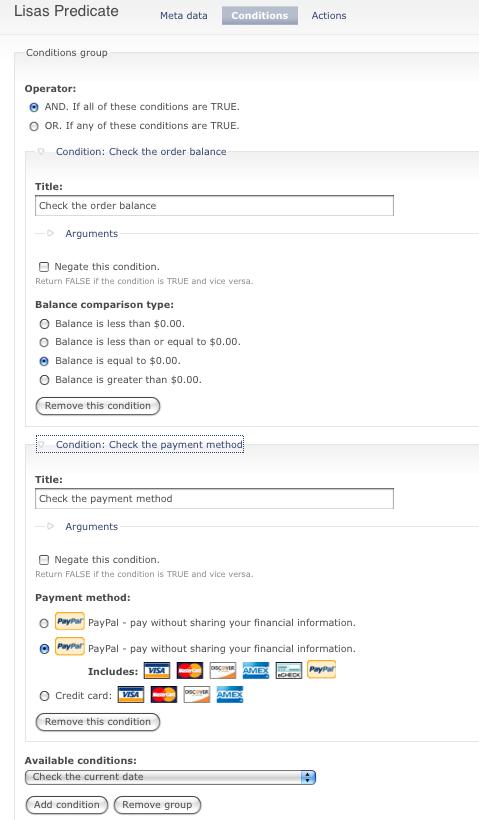
torgospizzaYes, this is a related issue. Go to yoursite.com/admin/store/ca and click "Add a new predicate." Under "Trigger" click on "A payment gets entered for an order" and click save.
Under Conditions, select "check the order balance" and make sure it's equal to 0.00. Add a new condition for "Check the payment method" and choose the PayPal method (it will say "Includes [Visa], [Mastercard], etc." Select that and click Save again.
Under Actions, click "Update the order status" and choose Completed. Save again.
You should now be able to have all your PayPal orders move directly to Completed. I'm still not 100% sure why this doesn't work out of the box, but it has something to do with a race condition and how the orders themselves (especially the ones from PayPal) are saved.
Hope this helps!
Comment #54
mmatouse commentedthank you so much! I am going to make those changes now! You helped me out soo much!
Comment #55
mmatouse commentedHey This is Mike Matousek again. I had posted comment 52! What you said worked perfectly! The only problem is I need it to send out the verification email with bc the way my website works is that where the information they buy is imbedded! I hope this is possible! Thank you so much for your help! I dont know if you are allowed to post your cell and stuff on this bc I am still new at all of this but my number is 4405706453! If someone would prefer to call me! It will make my life so much easier if I can get this done!
Thank you again!
Comment #56
torgospizzaThat should work by default. Look for the "customer notification" email Conditional Action and make sure it's enabled. It should be... but if not you could make one for that as well. You could set it to be triggered by "Customer Completes Checkout" or by "Payment gets entered for an order" and balance is $0.00.
Comment #57
jurriaanroelofs commented@#50
Sorry mate, in my native we only use one word, "dan"... I get it wrong in english quiet often. Then is used to connect moments in time right? (First this then that?)
Comment #58
robby.smith commentedsubscribing
Comment #59
ron williams commentedI was having this issue and checked my log entries, for simplicity filter for "uc_paypal." The first notice for items I had was "Receiving IPN at URL for order 10." Then it would have an error stating "IPN failed with HTTP error Unable to find the socket transport "ssl" - did you forget to enable it when you configured PHP?, code -[timestamp]." Turns out I did not enable OpenSSL for php when setting up my site; therefore the transaction details failed to be received by ubercart.
Once I installed OpenSSL the details were received and properly written.
Comment #61
Fibonacci commentedThe solution given in the post #53 by torgosPizza didn't work for me.
Although PayPal Sandbox clearly sends out the completion, as the redirected page from Ubercart has the following lines:
, the status of the order remains "pending". I tried twice to make the suggested conditional (in case I did something wrong first time), but it does not work.
Comment #62
tr commentedI'm going to leave this open as a support request. Aside from #39, it's still not clear that there's a bug, and most of the posters seem to be describing different configuration problems.
Comment #63
TWD commentedIf you are using PayPal Standard (Website Payments Standard) you need to make sure your PAYPAL account settings are correct.
Login to Paypal.
Go to Profile / Payment Receiving Preferences.
You will see the following options:
Block payments sent to me in a currency I do not hold:
Yes
No, accept them and convert them to [whatever currency is your account default]
Ask Me
If you leave it on "Ask me" the payment will still go into your account
but you will have to manually click the ACCEPT button on your PayPal account overview screen
for each payment. When you do so, the status of the payment in Ubercart gets updated
from "PayPal Pending" to "Completed".
For most people the better option is to change the setting from "Ask Me" to "No"
in which case the payment should go straight to "Completed" in Ubercart.
Hope that helps someone.
Comment #64
idcm commentedhi torgosPizza,
I thought I had a similar problem and was excited to see that a conditional could solve the problem. However, when I checked the balance for my orders, payments aren't shown. My sandbox is hosed up (long story) so I am using my live acct with a test product set to a dollar. Anyway, when I process the payment of the $1 with a creditcard (so no e-check delay), my order on my site still shows a balance of $1. I get the emails saying I have received payment. Paypal shows all paid up but ubercart isn't getting the message.
Thoughts?
Comment #65
cha0s commentedidcm, are you receiving your IPN?
Comment #66
idcm commentedi don't know. what do i look at to tell if i am?
c
Comment #67
arski commentedsub
Comment #68
arski commentedMy situation is as follows: I see there is an IPN incoming in the logs, it has the following key-value pairs though:
[payment_status] => Pending
[pending_reason] => paymentreview
And indeed if I go to the biz account in my sandbox, I see the payments in there but they're all "Under Review".. any idea why? I removed the "ask" stuff for incoming payments in a non-USD currency (using EUR here) and now I don't have to click on "Accept" anymore for each payment, but they're still under review..
Oh, and following the IPN log entry, I also get another entry with a "IPN failed with HTTP error Connection timed out, code -110." message.. so maybe there are two problems there..
Thanks in advance for any suggestions!
Comment #69
arski commentedDuh duh.. I had "payment review" enabled for my biz account in the sandbox.. Having disabled that option I now get an IPN array with
[payment_status] => Completed
[txn_id] => 4F6119897Y3517118
but still get the connection timed out stuff and the order is still not being switched to "completed" or anything other than "pending" :(
Comment #70
arski commentedbump :( any suggestions? :(( the IPN issue is so saad :((
Comment #71
torgospizzaAre you running secure pages on that site? You might make sure you are, and also make sure these URLs are listed in your "Secure" field:
uc_paypal/ipn/*
uc_paypal/wps/*
Comment #72
arski commentedHmm.. I didn't think SP was required to make this work.. but I'll try anything at this point.. thanks for the suggestion!
Comment #73
torgospizzaI'm not sure that it is, but IIRC, I think PayPal only connects to the originating site via https... which might explain your connection time out errors. That's about the only thing I can think of that might cause that other than an actual server error. Good luck!
Comment #74
arski commentedhmm actually no. the issue here is completely different. As I mentioned before, I'm getting the IPN from Paypal, so that part is fine. However, when Ubercart processes the received IPN, it sends a request back to the Paypal server to verify the data it just got, see line 66, function uc_paypal_ipn, in uc_paypal.pages.inc.
What happens there is that some servers don't support SSL fsockopen connections which are used by drupal_http_request, or they time out, or they are blocked by some firewall.. Figuring out which exactly is pretty much a pain in the ass..
One "weak" solution that might help you in the short run is to make sure these requests are sent to the Paypal server over http, instead of https, which shouldn't be too much of a security risk I suppose..
Comment #75
torgospizzaSo it is a server issue? Does your server not correctly handle the fsock connection? You might check out this patch: http://drupal.org/files/issues/156582-29.patch (from #156582-29: drupal_http_request() should support timeout setting) although I think more work needs to be done on the Ubercart side to handle a timeout error, although I'm somewhat surprised Ubercart doesn't already handle it.
Are you your own server admin? If not, can you get in touch with them? It'd be interesting to look at your server logs- that would provide a lot of helpful info.
Comment #76
arski commentedIt seems to be a server issue, yea.. it doesn't seem to be a timeout issue though, I've tried adding the ini_set socket timeout thingy and also just manually changing the timeout in drupal_http_request to some big value, but all that didn't help.. so I assume the outgoing request is really being blocked completely by the server or something.
Unfortunately, I'm not my own server admin and asking for logs involves starting an expensive support ticket.. I'll see what I can do.
Comment #77
torgospizzaYeah, there is a good possibility that a port is being blocked / firewalled or something. Sucks that it's expensive to open a support ticket... let me know if they are able to give you some answers!
Comment #78
pstead commentedI am getting the same issue from a site that was functioning perfectly until October.
My paypal payments go through fine, but they show as "pending" in my orders list.
Other users are still marked as "in checkout". Anecdotal evidence suggests that these users may be the ones who chose to pay paypal by credit card rather than their paypal account.
I am able to manually update the orders.
The client's paypal address is different from the default site email address. I understand that may be the issue here, but am unable to change either for a few weeks at least.
Comment #79
the fatman commentedI've just installed the UberDrupal installation profile , Drupal 6.19 and Ubercart 6.2.4, and am getting this error both with paypal sandbox, setting up the email addresses as suggested, and with a credit card transaction using the test gateway.
I checked 'Show debug info in the logs for Instant Payment Notifications.' in the Ubercart paypal settings and got an extra message in the logs headed 'Receiving IPN at URL for order 14'. Following this was an array, one element of which is [payment_status] => Pending, and another is [pending_reason] => paymentreview.
Following with interest. Thanks.
Comment #80
the fatman commentedToo much New Years cheer it seems.
I had my seller account in the sandbox set to Payment Review enabled which is why it was returning a pending status. All's good now.
Comment #81
tike012 commentedI've read through this entire thread with interest and am awaiting a solution. October seems to be the time that many of us started having these problems, so perhaps it's due to an Ubercart update that occurred around that time?
I am running a live site with Paypal Website Payments Standard as the only enabled checkout method. Payments seem to transfer through Paypal fine, but orders still get stuck at "pending" status. I believe this is the issue affecting a bug with the uc_signup module, which is waiting on order completion to update Signup information.
Comment #82
longwaveIf the Pending reason is "paymentreview", this means PayPal has put a hold on your order so it can be manually checked before shipping. See https://www.paypal.com/my/cgi-bin/webscr?cmd=xpt/Marketing/securitycente...
Comment #83
torgospizzaIf the order is stuck in a "Pending" status in Ubercart, check your Conditional Actions. I had to create one (a while back) that works on when an order is updated, if the updated status is Pending, and the payment method is PayPal, to update the order status back to Completed. Worked out the issue for me. (Probably not a permanent solution, but it works for me..)
Comment #84
virtualgirl commentedCannot get the file download to work in uc2.4dev or uc2.4 usinf cc processing though wps website payments standard for cc processing and pp transactions
1. "in checkout" means user did not return to the site even though they paid at paypal
2. do come back , i.e.clicked the return to site linkat paypal , but now registered as "pending" status
*****************BUT
4. doesnt matter b/c payment is not getting entered in uc order system
5. no triggers can work to the file dl because the balance is still >0
Any assistance is quite welcome and is time sensitive. I hope this post assists
dear torgos pizza, were you able to write a conditional to override this?
A conditional action was added and ten removed do to not working to the file downloads trigger but it wont take anyway because of the payment not being entered.
Comment #85
virtualgirl commentedhttp://www.ubercart.org/docs/user/3356/configuring_paypal_website_paymen...
Update: Thank YOU Ryan srzama! IT MAY BE THAT THE CLIENT HAS NOT SET HIS PAYPAL IPN FOR UC- This may be the case, under sellers profile to be disabled.
ok Here was the HACK solution for people to get their file downloads!
I DO NOT RECOMMEND THIS version because it is not entering in any payments! this kinda suks but it least they get their product. It does insure that the customer is coming back from pay pal though thanks to torgos Pizza's condition the configuration is here attached.
I falsified the oder balance to be grater than zero so there is still a balance in the customers account but for good measure with WPS at least they are getting their product.
This was not tested if a customer did not click submit order but you have to just hope they do i guess, this also is with anonymous checkout I might add and this could have something to do with adding this work around also.
Any support and/or comments issues welcome,
Comment #86
longwaveA complex issue regarding PayPal and checkout completion was fixed in #1192018: Duplicate order notification e-mail, and duplicate stock decrement, so upgrading to 6.x-2.x-dev should help if you are experiencing issues here.
Otherwise, if you are still having PayPal problems please open a new issue with detailed information about your Conditional Actions configuration and any information from your logs regarding IPN notifications. This issue is otherwise too long and has too many conflicting issues for anyone to usefully follow.
Comment #87
wstein commentedI believe I found a cause for this problem when testing using the credit card "test_gateway":
The function test_gateway_charge does not include "log_payment" in its return result... (or the "data" value).
Therefore, when uc_payment_process calls it, it either gives a "Variable not found" error or it simply skips calling uc_payment_enter (depending on your error_reporting setting).
Since uc_payment_enter never is called, the record is never entered into the uc_payment_receipts table, even though the payment DOES show in the order itself in the "Admin comments" table as "Credit card charged: $(price here)"
This patch fixes text_gateway so that it works correctly
Comment #89
tr commented@wstein: Please open a new issue, as what you found is not related to this long-closed, complex issue.
Comment #90
jacobstella commentedAfter trying everything else here, this is what finally did it for me. Thanks so much for this post!