

Closed (fixed)
Project:
Location
Version:
6.x-3.0
Component:
User interface
Priority:
Normal
Category:
Support request
Assigned:
Unassigned
Reporter:
Created:
20 Feb 2009 at 06:55 UTC
Updated:
20 Mar 2009 at 19:00 UTC
Jump to comment: Most recent file



Comments
Comment #1
dragonwize commentedAre you still experiencing this? I am not able to confirm these errors. Can you provide more information?
Comment #2
mattyoung commentedI see the same and I found the problem is. You **only see this problem when you have fields set to "Required".
The problem is in "location.module", line 1466:
$required is false, so this is executed, after this, all the fields with 'collect' key value == 'Required' (value 2) become '0'. So the end result is for 'Required' fields become disabled.
This is the call stack:
sites/drupal_devel/modules/location/location.module.location_normalize_settings : lineno 1469
sites/drupal_devel/modules/location/location.module._location_expand_location : lineno 233
includes/form.inc._form_builder_handle_input_element : lineno 1047
includes/form.inc.form_builder : lineno 873
includes/form.inc.form_builder : lineno 914
includes/form.inc.form_builder : lineno 914
includes/form.inc.drupal_process_form : lineno 394
includes/form.inc.drupal_get_form : lineno 119
modules/node/node.pages.inc.node_add : lineno 58
includes/menu.inc.call_user_func_array : lineno 0
includes/menu.inc.menu_execute_active_handler : lineno 348
index.php.{main} : lineno 18
the $required value was originally set to FALSE in form.inc line 1335:
at the end of this function, $cache['form']['#required'] == FALSE.
Again, to see this problem, set some of the location fields to "Required".
Comment #3
orces commentedthank you for your responds.
I checked my settings (see attached screenshot 00.png) and it's set to required. I still don't see the fields (see attached screenshot 01.png)
The odd thing is on some content type's I do see all fields this happens only on some content typs.
Appreciate any help on this.
Comment #4
mattyoung commentedSince you said this:
>Also when adding the field location to my content type I can't select any options under -Collection settings- Nothing shows up there.
something else is wrong with yours.
The problem I see is different and I now understand the logic: if the global 'Required' is not set, then any 'Required' fields are set to "Do not collect". I think this is a problem. User don't expect "Required" field to be disabled because the global "Required" was not checked. I think it should be the reverse: if any field is set to "Required", the global Required flag should automatically set to "Required". The form validation logic should check for this and warn the user: "You have some field set the required, so the global required must be set."
Attached is what the config screen looks like for me. If you don't see anything in the "Collection settings", something is wrong.
Comment #5
orces commentedI did have the same problem under "Collection settings" like you described -did not see anything there but it's fixed after I updated to 6.x-3.0
Comment #6
orces commentedYes I do. here is more info http://drupal.org/node/377822#comment-1292030 and in addition to that I have also following problem http://drupal.org/node/381498 after upgrading to 6.x-3.0
Comment #7
mattyoung commentedI forgot the attachment. Here it is.
Comment #8
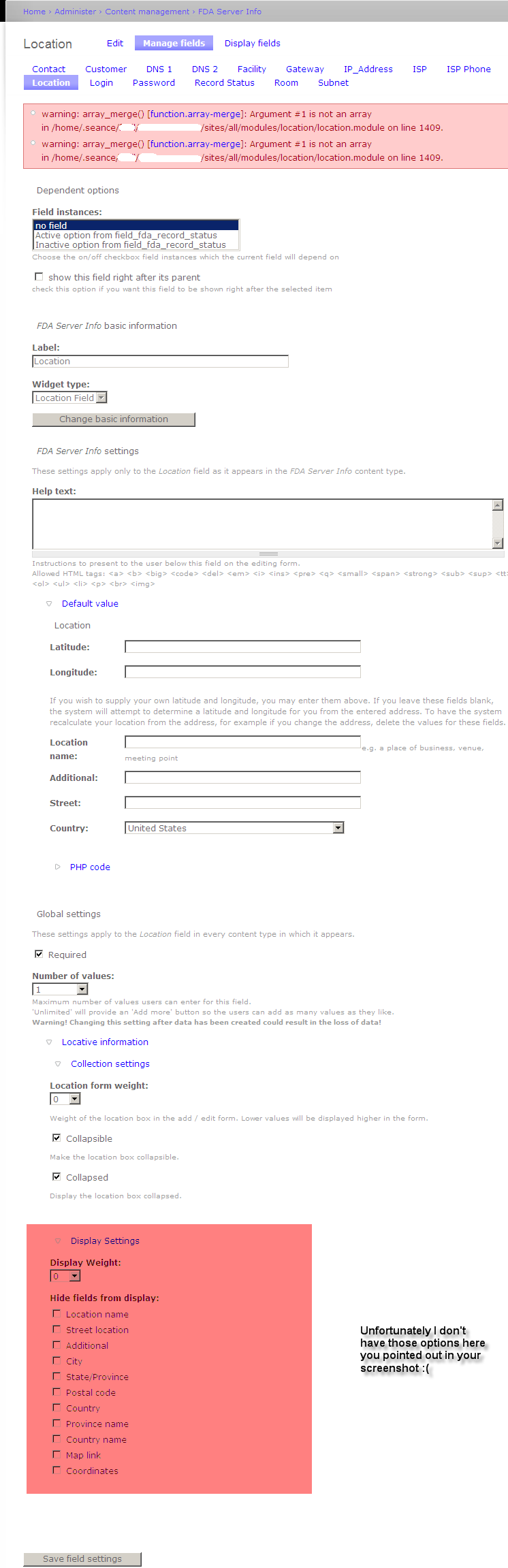
orces commentedThank you so much for helping me out here. Unfortunately I do not have the same options. Pleas have a look at my attached screenshot. Also at the top you will see the error I mentioned earlier.
Comment #9
orces commentedNever mind. I found out that this is an IE issue. The fields show up using Firefox. Very odd. Again thank you for your help. Only the error message is left to solve for me now: http://drupal.org/node/381498 Any ideas?
Comment #10
orces commented