Closed (fixed)
Project:
Date
Version:
6.x-2.2
Component:
Code
Priority:
Critical
Category:
Bug report
Assigned:
Unassigned
Reporter:
Created:
24 Feb 2009 at 20:21 UTC
Updated:
2 May 2012 at 11:23 UTC
Jump to comment: Most recent file


I just upgraded it from date-6.x-2.0-rc6.tar
and I have cleaned my cache and ran update.php. but the error remains.
| Comment | File | Size | Author |
|---|---|---|---|
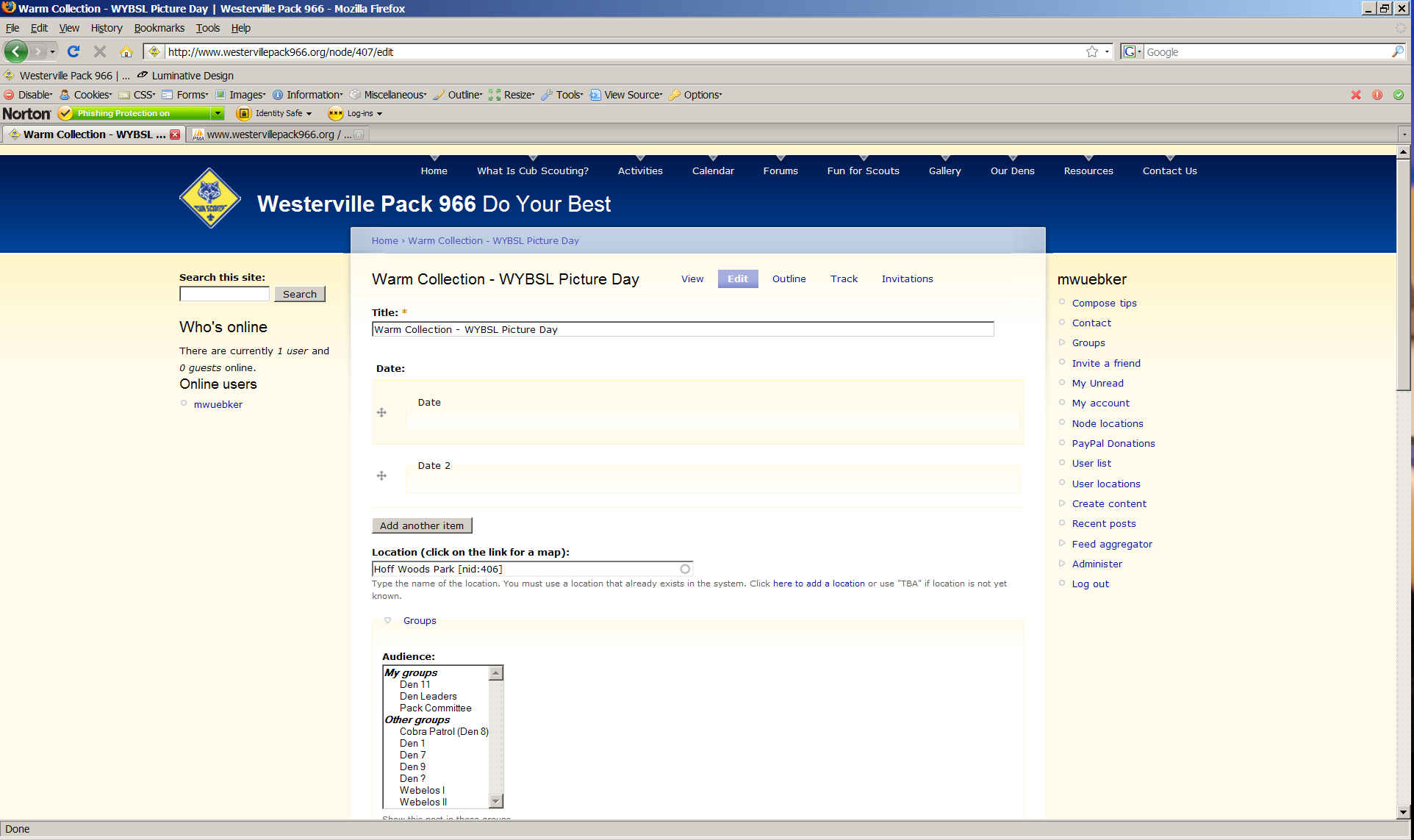
| #3 | Untitled-1.jpg | 797.03 KB | Wuekkie |

Comments
Comment #1
webwriter commentedSubscribing. I have this error and cannot add any content that includes a date field.
Comment #2
karens commentedI can't replicate any problem in the latest code. Update to the very latest -dev and try again.
Comment #3
Wuekkie commentedI get the same error in the may 12 dev: Fatal error: Cannot unset string offsets in /var/www/www.westervillepack966.org/sites/default/modules/date/date/date_elements... on line 279
Was on 6.x -2.1 when trying to fix a "now" views filter then updated to this dev. Tried everything in KarenS' "do these things first" ie; clear all caches, latest dev etc... both before and after the dev upgrade. Same result in two envirnoments, NO LOVE:
Dev site:
Wamp Server 2.0
Appache 2.2.11
PHP 5.2.8
MySQL 5.1.30
Production site:
Ubuntu 6.4
Appache 2.2.4
PHP 5.2.3-1
MySQL 5.0.45
Attached is a screen cap of what I see when trying to edit a node with my CCK date field.
Other Modules:
Views 6.x - 2.5
Calendar 6.x - 2.x dev 2009 May 11
CCK 6.x - 2.x dev 2009 May 11
Thanks for the help,
Wuekkie
Comment #4
pvanderspek commentedI just installed the new 6.x-2.2 and now I'm getting the same error.
I want to create a new content item having a CCK Date field and it opens the page with this error
For existing nodes, it's possible to edit the node, but the CCK Date field is gone.
I also have the date popup calendar enabled.
Comment #5
pvanderspek commentedI've been looking around a bit more and when clicking on the modify-link for the cck field I get a similar error
Comment #6
pvanderspek commentedComment #7
pvanderspek commentedI'm currently doing some debugging. So I printed all the contents of $elements and this is it:
However, in the code a reference is being made to $element['#default_value'][$to_field] which doesn't even seem to exist. I hope this helps in solving the problem, because currently I cannot create any new content items which have a date field.
If I just comment out line 282, I don't get any error messages anymore. However, the date field is not visible on the form.
Comment #8
pvanderspek commentedI just tested if I could add new date fields to existing content types. The new field does show up, but the existing one doesn't. I have no clue yet what might cause the problem with existing date field, but at least I know it can work. Below the database settings for the date field. Perhaps it helps±
And also the database settings for a field instance:
I thought "2ow" might be a result of parsing "now" and then replacing the "n" by a "2", but at least in the database the default value is correct.
Comment #9
pvanderspek commentedOk, well it seems I've found the cause of the problem. Somehow, Date Popup (as well as some other, unrelated modules) had been disabled. This caused the problem described above.
Comment #10
karens commentedI can't tell if the problem in #9 was the original problem, but you should certainly check that your modules are still enabled. I have been seeing sporadic reports of them getting disabled during updates, so that's the first thing to check.
Comment #12
texas-bronius commentedThanks @KarenS-- enabling date popup fixed it for me too.
Anyone else stumbling across this googe hit: Going from dev to staging my remote site exhibited the same issue;
drush en date_popup -yto enable the calendar popup module (like it is in dev) did it for me. Guess I need to add this to my Feature.Comment #13
soundboy89 commentedThank you, had this same problem and #9 solved it for me.
Comment #14
somersoft commentedThank you, had this same problem and #9 solved it for me.
Where it goes wrong, if you have this problem and date_popup is disabled, is with the following code in _date_widget() in date/date/date_elements.inc (6.x-2.9)
$items[$delta] is a string 'now' and not an array. $processed then evalutes to zero index and as PHP treats the string as an array of characters, it replaces the single character 'n' with the first character returned by date_format() which currently is a '2' as the year is 2012.