

Closed (fixed)
Project:
Drupal core
Version:
7.x-dev
Component:
theme system
Priority:
Normal
Category:
Feature request
Assigned:
Unassigned
Reporter:
Created:
28 Feb 2009 at 03:08 UTC
Updated:
3 Jun 2010 at 17:52 UTC
Jump to comment: Most recent, Most recent file


Comments
Comment #1
dave reidTake a look at navigatio......n:
print t('Skip navigatio n'):)
Comment #2
mgiffordI had entered some content here. Not sure why it's blank.
Thanks for noticing this Dave. I've fixed it up.
This is the patch it depends on to actually be off-screen.
Comment #3
dave reidComment #4
alexanderpas commentedplease, use
height:0px; overflow: hidden;instead of positioning offscreen.Comment #5
mgiffordI am curious why you are suggesting this version. W3C's example:
http://www.w3.org/TR/WCAG20-TECHS/C7.html
I've outlined quite a few options for hiding text in an accessible manner here:
http://groups.drupal.org/node/18563
Simpler is usually better, but would like to know why you prefer this version rather than any of the others.
My main goal is to have a version that works to hide some elements to sighted people, but not to people using screen-readers. I'd also like to have a version in core that hides it for everyone using CSS.
Mike
Comment #6
alexanderpas commentedi've prefer this approach for a couple of reasons.
1) it is the easiest to override by (sub)themes (think of WAP, WII, NDS, iPhone etc...), simply by setting
height: auto;or by explicitly setting height and overflow to auto or scroll.2) the problem with the w3c example is that it actually does take space, therefor possibly confusing CSS developpers that wonder where that pixel went.
3) this method doesn't touch width, thereby allowing this to adhere to it's context.
4) usably in any design, floating, absolute or any other you can think off.
5) already proven track record, as part of unobtrusive javascript.
6) this is drupal core, so we should cater the unexpected ;)
BTW: any design using
!importantshould be forbidden, as this is reserved for user-side implementation. (not client-side but USER-side)Comment #7
mgiffordHey Alex,
Not sure if you're a member of the Accessibility Group, but would be good to have your 2c here:
http://groups.drupal.org/node/18563#comment-67813
Do you have any examples of someone recommending this approach? Particularly anyone who has experience with accessibility issues.
Mike
Comment #8
johnbarclay commentedThis is just the thing for me. I have to add offscreen classes in all my sites and my coworkers that use out of the box core themes don't end up with skip nav links.
Comment #9
mgiffordNotice the plone's got the skip navigation - http://juicystudio.com/article/choosing-an-accessible-cms.php
Comment #10
annmcmeekin commentedI've been following the various threads about hiding and showing content and after feeling a bit like I was trying to get on an speeded-up escalator I thought this might be a good place to start.
I think having some kind of skip link as part of core themes is a good idea (on the assumption that all core themes have the navigation first in the source code order), but it shouldn't be entirely hidden because it tends to benefit keyboard only users who don't use any kind of assistive technology more than users who have benefits that come with using screen readers or voice recognition packages.
My preference from an accessibility/usability point of view would always be to have it visible because it not only lets people know immediately that it's there but it can also give a very quick impression that accessibility has been thought of and integrated. That said, I know that some people don't like it on the grounds that they think it's messy. It is possible to integrate it into a site's design so it doesn't stick out like a sore thumb - as Carsonified have done at http://events.carsonified.com/ - but it isn't always easy so a good compromise is to have it hidden from view initially but becoming visible on focus.
If I was to have a wishlist for a skip link it'd be:
- it being the first or second link on the page (where the first link is to the home page)
- it becomes visible on focus (with the :active state included in the CSS declaration, to make sure it works in IE)
- it doesn't use display: none or visibility: hidden to hide
- it is phrased "skip to main content" because that's clearer about where you're going than "skip navigation" and because "skip to content" is read out badly by screen readers because of lack of context (skip to conTENT rather than skip to CONtent)
- it appears in a logical place (i.e., top left or along the top like on http://www.molly.com) so users don't miss it
In terms of how this could be integrated into drupal (and keeping all the various discussions on conventions for hiding content in mind) I'm not sure that there's a one size fits all hide/show class that could be used here, because of it's differing behaviour, so maybe it'd be better to just give it a class of skipnav (or something) and then define the link states based on that, which should also mean there isn't any javascript required to change the class.
Ann
Comment #11
mgiffordSounds very logical and well thought out to me. I like the visuals for how http://www.molly.com did this. Their CSS is:
We're doing a lot of work for government recently and came across this compromise for that was recommended for seniors:
http://www.seniors.gc.ca/c.4nt.2nt@.jsp?cid=153&pf=1
It's not visible there, but shows up from the home link.
Think with adding this into the core themes is if folks don't like how it looks they can just delete one line in the page.tpl.php file.
Thanks a lot Ann!
Comment #12
webchickYay, Ann! Excited to see you in our issue queue. :)
Comment #13
Jeff Burnz commentedI recently came up with a way that may suit Garland quite well. Basically it positions the link absolutely, then on :focus/:active it re-sets the position to fixed. Using position:fixed mitigates any scrolling issues; the link just appears *over* the content in its own layer.
This is rock solid in all A grade browsers including IE6. This code is actually from the Genesis theme (my starter theme) and is an option users of that theme can enable. Not all these declarations would be needed for Garland because in Genesis I need to override a couple of other default styles, but you'll get the picture:
Comment #14
annmcmeekin commented@webchick: thank you :) I'm still trying to get a handle on the way all this works but it's good to be here (even if I fall down rabbit holes of interlinked issues when trying to figure out where best to contribute).
I think I figured out email notifications earlier so hopefully I'll now be able to get updates rather than have to manually check for updates. :)
Comment #15
Jeff Burnz commentedOk, here's an updated patch for Garland, think we should do Garland and Stark seperatly since Garland needs a specific implementation.
This is my own idea and is not widely known (I probably invented it) so needs some testing as per usual. It follows the concept in #13 and degrades gracefully in IE6.
Changed link text to "Skip to main content", and inserted a named anchor because I think we need to skip over the breadcrumb and highlight and there's no id on the $content wrapper.
Comment #16
Jeff Burnz commentedPretty much the same deal with Stark/system page.tpl.php, except no CSS. Used a named anchor again, could have hooked in the the id on the h1 page title but that seems a bit hacky.
Comment #17
Jeff Burnz commentedtagging
Comment #18
Jeff Burnz commentedRe-roll, failure with Garland patch after #306358: Add $classes to templates with new theme_process_hook functions was committed.
Comment #19
dries commentedI support this but we need to document it better; e.g. add a reference to the accessibility standard so we don't forget what this is about.
Normally, we don't abbreviate things to 'skip-nav' -- we'd use 'skip' or 'skip-block' or 'skip-navigation' but no 'nav'.
Comment #20
Jeff Burnz commentedOk, good points, I'm thinking this falls under:
http://www.w3.org/TR/WCAG10-HTML-TECHS/#group-bypass
Checkpoint 13.6 http://www.w3.org/TR/WCAG10-TECHS/#tech-group-links
Someone want to confer on that, then we re-roll with a new class, thinking "skip-link", its not abbreviated and says what it is.
Comment #21
Jeff Burnz commentedChange status
Comment #22
mgiffordLooks good. skip-link seems is a good solution for the CSS description. Thought it would be useful to provide some WCAG 2.0 links regarding skip navigation elements. But also the WebAim article is a good breakdown of how to apply this in WCAG 2.0.
+1
Comment #23
Everett Zufelt commentedI like Ann's recommendations in comment 10.
As for offscreen / inline hiding of content for screen-reader users http://webaim.org/techniques/css/invisiblecontent/
explains that some screen-readers do not handle "height:0; overflow:hidden;" well. Unfortunately the article gives no examples. Testing with three modern
screen-readers, (Voiceover, JAWS and NVDA) this class successfully hides content visually, while displaying it to a screen-reader. Can more examples and
clarification be given on the pros and cons of using this vs. the absolute offscreen positioning solution? These are really the only two options and one
will need to be chosen over the other.
Finally, I am not sure that skip-link is the semantically best description for the class, as there are likely alternative uses for the class and not all implementations of skip links will use this class. Off the top of my head I cannot think of better wording.
Comment #24
johnalbinsubscribe
Comment #25
Everett Zufelt commentedCurious if we are still going to attempt to implement skip links for the three core themes (garland, stark and seven). If so.
1. Will the link be "Skip to content" or "Skip navigation"?
2. Will the links be hidden off-screen unless focus, active or hover? Or, will the links always be visible on-screen?
Comment #26
Jeff Burnz commentedIMO:
Yes, lets do it.
Garland - hidden
Stark - showing
Seven - dont know, probably showing
Text should be "Skip to main content".
Comment #27
cliffAgreed. Tell where the link goes, not what it avoids. So, "Skip to main content."
I have had a chance to read through. This is very good discussion. Also, it's important to note that we should code to WCAG 2.0. Some (most?) regulations still refer to WCAG 1.0, but anything that passes WCAG 2.0 in this regard will also pass WCAG 1.0.
Another relevant section of WCAG 2.0 is Guideline 2.4 Navigable: Provide ways to help users navigate, find content, and determine where they are.
In this issue, to meet that guideline, we are specifically implementing Success Criterion 2.4.1 Bypass Blocks: A mechanism is available to bypass blocks of content that are repeated on multiple Web pages. (Level A) But skip links are only one way to achieve this. Take a look at the sufficient techniques listed on that page, and you will see that the second class of techniques involves proper use of headings.
I have seen elegant accessible designs that require no skip links. The main content is the first part of the body of the html, even though CSS may position it elsewhere in the visual display. I'm not saying we should give up on skip links; instead, I'm noting that we should recognize that there are other ways to achieve this goal. In a way, you have done that by using a small fix that a designer who is intent on using a different valid approach can easily find and remove. I hope our documentation for this will recognize this possibility.
Great work! (Ann, your input was especially valuable. If you haven't joined the Accessibility Group, please do!)
Comment #28
mgiffordNot sure where it would go in Seven. Would make the most sense to put it in the toolbar if it's in Seven. Could even make it a nice option that users could set.
Comment #29
Everett Zufelt commentedAfter re-reading through How to Meet WCAG 2.0 (2.4.1) it would seem to me that providing skip links is not * necessary * for WCAG 2.0 compliance, as core themes use headings to mark the beginning of content. Changing issue status.
Comment #30
cliff@Everett, just to clarify, you're changing the category of this issue (from "bug report" to "feature request"), not its status (which remains "needs work"), right?
Comment #31
mgiffordOk, I've re-rolled Jeff's patch in #18 as there have been a lot of changes to the themes. I also brought in Dries' request in #19 for a more standard use of CSS names. Finally I applied this to Seven.
Now I'm really not sure how well this will work practically with the toolbar. That's certainly an area that needs more consideration & testing.
I'm not sure about the use of skip-link but it's an easy change (which I just decided to include here too though who knows what will happen with the bot on that one).
I still need to go through the other items that have touched on this issue as there is still a bunch of topics which have been brought up and not rolled into a patch.
Comment #33
mgiffordLet's try with just one file. With skip-link
Comment #34
cliff@Mike, regarding "skip-link," I wonder if we should play off the title of the related WCAG 2.0 success criterion. That would give us "bypass-block." And actually, that's the function: The link bypasses a block of content (although not necessarily in the Drupal sense of "block"); it doesn't skip a link.
Just a thought.
Comment #35
Jeff Burnz commented@Mike et al, doesnt look like anything there for Stark / Drupal core page.tpl.php, are we holding off on that?
@Cliff, I'm kind a liking that idea, could be tad confusing with Drupal "blocks" and all.
Comment #36
mgiffordSome advantages to working with WCAG's name spaces. I don't much care either way but would rather not have a long discussion about it.
As far as adding stuff to stark, I nixed the directory and reloaded it, but I'm not seeing any way to involve it in stark:
cvs update: Updating themes/stark
U themes/stark/README.txt
U themes/stark/layout.css
U themes/stark/logo.png
U themes/stark/screenshot.png
U themes/stark/stark.info
Would also be great to have this visible on focus/hover for folks with mobility limitations. Having some difficult figuring out how to best do that though.
Comment #37
Jeff Burnz commentedStark uses the core tpl files:
/modules/system/page.tpl.php
Comment #38
cliffI agree about not dragging out a conversation on this, Mike. I wonder if simply "bypass" or "bypass-for-accessibility" would be better. But so we can avoid dragging it out here, I've created a new discussion in the Accessibility group.
Let's figure out the best name for the class there and save this space for patches that get us closer to fixing the technical issues. Sound good?
Comment #39
Jeff Burnz commented@Cliff, actually I don't agree about moving the converstion over there, skip-link or skip-navigation is well understood by everyone and the vast majority of themes (drupal or not) use something like that - the end game of getting this into core is more important right now than some semantic back and fourth over class naming.
Just google both terms - "bypass block" will earn you nothing about accessibility, whereas googling "skip link"...
Sorry to be so blunt Cliff but this has been dragging on for 8 months to get basic skip links into core, lets move on.
Comment #40
mgiffordOk, this one covers stark. I added it to the system.css as I'm assuming we want to hide it by default.
It's behaving for me how I want in FF, but don't think I've got the other browsers set up for tabbed browsing well. Basically I wanted to ensure that if you're tabbing through a site that a person with mobility issues will be able to see the link. I don't really need others to see it. If you're mousing over the link you can go right to the content anyways.
I modified the way that the css is done because it was bothering me that the code I worked with in version 4 was using a very different model than that we are using in general:
http://drupal.org/node/473396#comment-1897900
I'd be interested in hearing if there's any reason to use the CSS in version 4.
I was also trying to be sensitive to making it visible while not changing the look/feel of the themes. It needs more testing. I do like what they've done with - http://www.molly.com/
And appreciate Anne's comments in #10 http://drupal.org/node/386462#comment-1611534
Just trying to find a nice universal balance.
Comment #41
Jeff Burnz commentedI dont see any reason to stick to the version 4 CSS, if something better comes along or different then great, the molly method looks solid.
Why CSS for system.css - I mean why are we hiding this in Stark? I really think this should show.
Mike, I have some time this evening and can test out the molly method.
Comment #42
Jeff Burnz commentedOK, so looks like I've been away from D7 dev for a while... and it kind of slipped my mind about html.tpl.php and $page_top, so first off I would contend that the skip link no longer belongs in page tpl but must go in html.tpl.php so that it comes before the new dashboard for logged in users.
This would actually simplify things since all 3 core themes pull the default html.tpl.php from the systems modules directory.
The second thing is that it could be very tricky to support hover and tab/focus in the existing themes, Seven I think we can forge a change for but Garland I am less sure about.
Comment #43
cliff@Jeff: First, I must admit that I hadn't thought of searching the Web for "skip link." Perhaps if the person who first proposed the term had pointed out that a search for "skip link" (in quotes) produces 527,000 hits, the overwhelming majority of which deal with precisely this matter, neither Everett nor I nor anyone else would have given a second to trying to come up with an alternative. Both of us could have used that time to reflect on better answers for vertical tabs.
But I have to take a minute here to say something else.
<venting>It's odd: Developers and reviewers get grouchy when people who have an interest in an issue but can't contribute to the code add their concerns about semantics, their "+1s," their insight into usability issues, and similar comments here in the issue queue. It raises a flag that there is a new comment on the issue, and reviewers and developers alike burn precious minutes finding and reading a comment that turns out to be of little interest to them.
But we also can't discuss these concerns elsewhere. So how, then, are the non–propeller heads among us to offer our expertise — which would cover the stuff that doesn't affect the tags so much as it affects what goes between the tags?
I know a lot of people are burning a lot of free time trying to get things done before freeze. I myself have been getting far too little sleep the last two weeks and using my lunch break to stay involved during the day.
But telling people not to have discussions that interest them is not a way to ensure that Drupal is more usable. And it's certainly not a way to encourage more and broader participation in keeping the community plumbing working. ;-)
And if the semantics can be addressed after code freeze, what does it hurt for those of us who are deeply interested in semantic issues to hash things out a bit so we can have a more well-formed idea ready for the rest of you to review when time comes to think about (if only as a final check) these matters? You don't have time to talk about it now, but perhaps we won't have time to contribute our thoughts later.
</venting>Comment #44
Jeff Burnz commentedOk, heres a first crack at moving the skip link to html.tpl.php. We need to do this so its the first link on the page no matter what, otherwise the dashboard is above it in the source order.
I kept the v4 styling for Garland as this seems to work, if we have a suggestion for a method that can support hover/focus that would be great.
For Seven I went a different route and made this is permanent visible link, like a button.
Stark/default gets no CSS.
From what I can recall of my earlier testing with the Garland method it was solid across browsers, bu the Seven stuff is all brand new and I have only used this theme for about 2 hours, so we really need some browser testing.
Comment #45
Jeff Burnz commentedDang nabbit, the above patch (v6), I forgot to add in the name anchors for page.tpl.php.
V7 is the one:
Comment #46
mgiffordThis applies nicely. I like this approach.
The button you added to Seven looks good. Although it would be good to see an option that works with hover in Garland I think that this is a significant enhancement as it is.
I think this is RTBC, but would like another review of it.
Mike
Comment #47
cliffI like it. (In other words, it does everything it should.)
Great work, Jeff!
Unless someone can really quickly code the option Mike mentioned (the one that would work with hover in Garland), I say we move this on to RTBC.
Comment #48
Everett Zufelt commentedTested the skip to main content link in stark, garland and seven. Appears to be positioned and working correctly.
I have a strong preference that the link remain visible on all themes, it absolutely must remain visible on stark, as this shows themers the most appropriate implementation.
Comment #49
bowersox commentedsubscribing
Comment #50
mgiffordRight now it is visible in Stark & Seven all the time. It's only visible in Garland on focus.
I think if we can get this in with core it will be good and we can then engage the Garland folks to make it visible all the time.
Comment #51
cliffVisible on focus is acceptable. It's also accessible.
Comment #52
mgiffordFew notes that are ultimately from Jared Smith that I think are relevant:
Wouldn't it be great if Drupal 7 could meet Section 508 requirements like this out of the box:
This is going to be a requirement for quite a while because:
Opera's making some good advances here. Hopefully Firefox follows suit. However, I think that for the lifespan of Drupal 7 we need to accommodate keyboard users with the skip links. Hopefully there's been more progress with all browsers (including IE) to support ARIA standards and provide better keyboard support in the browser before we get to a D8 feature freeze!
Comment #53
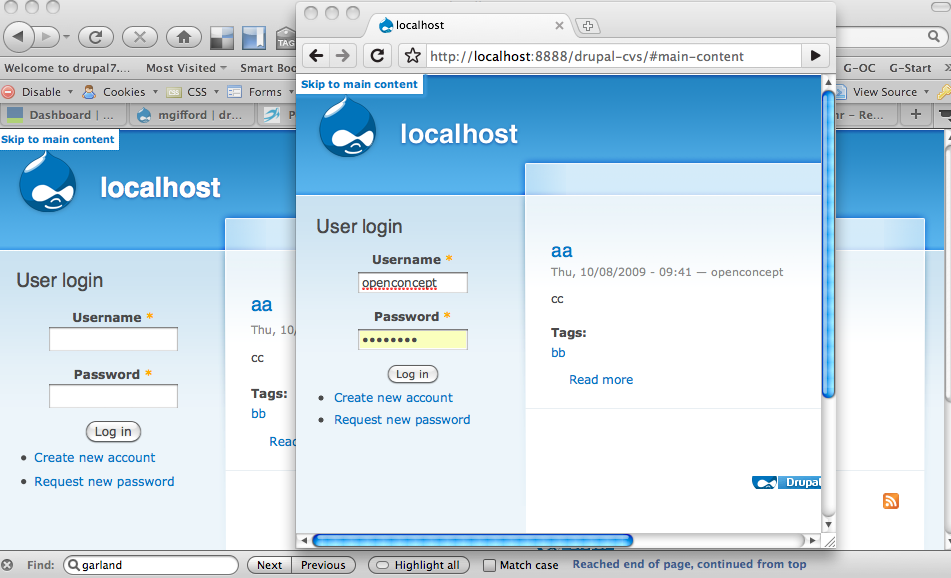
webchickFor the more visually inclined, here are some screenshots:
Seven:

Stark:

Garland: N/A. It's invisible by default, and although the replies here seem to imply that it should become visible when it gains focus, that doesn't appear to ever happen for me in Safari when I'm Opt+Clicking around the page. What am I missing?
I'm curious what was the justification for having the skip link visible in Seven? This comes from the source code of the great W3C.org itself:
And on canada.gc.ca, it's styled to be invisible (by making the font the same colour as the background).
It seems like it adds more visual clutter to the page, and pushes the contents down unnaturally for the 90%+ of users who will never use it.
Feel free to point me at specific replies that cover this, but I scanned through and only saw what looked like some personal preferences from Ann and Everett.
Comment #54
Jeff Burnz commentedI messed about with Chrome and came up with a variation that works, at least, in Chrome, appears that if an element is height:0; webkit cant focus it.
Keeping links on the screen is the best possible scenario for users who do not use screen-readers but rely on skip links to bypass navigation blocks. There are many issues that surround this, far to many to debate here in this queue.
On the http://www.w3.org/WAI/ site skip links are shown by default, but in the test procedure for passing WCAG 2.0, Bypass Blocks 2.4.1 the wording tells us skip links should either be visible all the time or at least visible on focus. http://www.w3.org/TR/2008/NOTE-WCAG20-TECHS-20081211/G124.html
The thinking to show by default is why not - showing by default can be a great help to many disabled users. As for visual clutter - well, the skip link is lot smaller than the dashboard, which I would assert, for this user at least, is little more than visual clutter ;)
Comment #55
Jeff Burnz commentedDang, I was banging on so much I forgot to attach the new patch...
Fixed for Chrome (hidden link in Garland wouldnt take focus). Need to test in Safari and Opera.
Comment #56
mgiffordI applied it here:
http://drupal7.dev.openconcept.ca/
There was some fuzz, but it all applied nicely enough.
Unfortunately I think someone else's CVS patch introduced some php notice errors in modules/field/field.info.inc
These will be fixed shortly I'm sure.
Mike
Comment #57
cliff@webchick, the rationale for making the skip links visible is to make them available to sighted people with mobility impairments and people who simply prefer to navigate with the tab key. That is an often overlooked population when people think of accessible design. I could go on, but perhaps these synopses (on 456 Berea Street) with links to other discussions will enlighten better than I could:
Or for even more, Google "visible skip link".
Bottom line: Everett and Ann aren't expressing personal preferences; they're encouraging us to go where few have, but all should. By the way, this layer of accessibility will in and of itself make a site work better for people viewing it on mobile phones and other small-screen devices. That's more than a small percentage of users these days, right?
Comment #58
Jeff Burnz commentedI like the way you put it there Cliff - "they're encouraging us to go where few have, but all should", that is what I tried to say with "why not", that is what I mean.
My approach in Seven was to incorporate the skip navigation as a design element, as an intrinsic part of the overall design, to not relegate it offscreen because it doesn't fit our sense of divine aesthetics. It should be, and needs to be, part of the new aesthetic.
Comment #59
webchickCool, thanks for the resources behind the decision. That's what I was missing.
I'm fine committing this when it's back to RTBC (assuming that Garland issue is fixed).
Comment #60
mgiffordI'm using FF 3.5.3 and don't have a problem with this. Tested it in Chrome as well, but was having trouble getting the tabbed browsing working in Opera & Safari unfortunately.
Included a screen-shot and set it back to RTBC. It looks exactly the same when the focus isn't on the link and you can only focus on the link by tabbing through to it or "seeing" it in a screen reader.
EDIT: Just for clarification the trouble I was having was on the browser side not on the Drupal side.
Comment #61
Jeff Burnz commentedI'd just like the reiterate that the issue raised in #60 is a browser issue not easily solved in Drupal if at all, the same thing happens when you click the comments link in node teasers - the page will "jump" to the comments but tabbing thereafter begins at the top of the document, this is a webkit flaw which Chrome has not yet fixed.
Comment #62
mgiffordThis was first RTBC now almost a month ago. - Bump!
Comment #63
webchickHuh. I totally forgot I'd said I would commit this before. ;P The screenshot at #60 scared me because that looks oog-lay, but I just checked and after clearing the cache the link remains visible. I did confirm that it shows up with CSS disabled though, which I presume should be good as far as screen readers are concerned.
Committed to HEAD. Great work, all!
This should be documented in the theme upgrade guide: http://drupal.org/update/theme/6/7
Comment #64
mgiffordThis is great news! Having this in core will be one of the most visible changes that Drupal has taken accessibility seriously.
Comment #65
mgiffordI added some documentation with links here - http://drupal.org/update/theme/6/7#skip-link
Review/enhancements/suggestions are appreciated.
Comment #66
Jeff Burnz commentedI added a link to http://drupal.org/update/theme/6/7#element-hidden
Comment #67
Bojhan commentedI am somewhat dazzled by this commit. It seems like even the resources, point out that its an unpopular design decision. Why would core enforce such a standard, if we already are already aware that many people won't like it at all? The resources are worse, in the perspective that none of them seem to actually implement their own suggestions? I am really not getting this patch, the actual usability argument is very questionable..
I am really getting worried by large visual patches, getting only accessibility feedback and none whatsoever on the large ascetic changes that are made.
Comment #68
mgiffordI'd really like some references here. What resources? We've explained why this should be in core many times. What people won't like it? Most people won't see it at all.
Garland & Seven have different implementations. Which one don't you like?
If you have suggestions for how to improve the visuals, would be happy to hear it, but that's about adding or modifying the patch to fit with existing themes rather suggesting that this whole patch should be reversed.
There are lots of ways to make accessibility enhancements fit in better to an overall aesthetic and I'd love to discuss them with you.
Comment #69
kika commented> Most people won't see it at all.
- I's part of Seven, so you will see it in all admin pages
I really do not want to duck accessibility issues here: not-visible anchor link is great to have in core and it helps to follow best practices (and it makes sense in Stark), but I really doubt introducing a visible skip link in Seven is making us a favour here. Extra confusion for mayority of users and visual/ux noise imho does not justify the decision. I tested 2 users (not visually impaired though) and confirmed every time the case 'Clicking it on "skip to main content" does not "do" anything'. It is definitely not representative enough but I'd strongly suggest to remove the visible link from Stark. D7 looks and feels complicated enough, every new UI element introduced makes things worse.
Comment #70
webchickI think kika means Seven and not Stark. I'd like to keep it in Stark, so it's in themers' faces as something to care about.
However, I'm inclined to agree. We probably do indeed need to hide this link by default with Seven's CSS. :\ Esp. with the Overlay this gets really confusing.
Comment #71
Jeff Burnz commentedI tend to agree with Webchick et al regarding Seven - the original patch (from my point of view) was a demonstration and was meant to spark discussion and debate, and I am glad it was committed as it has had the desired effect.
For Stark I'd like to see it stay as is, but I have opened a new issue/feature request to add a new theme setting to show/hide skip nav like the other UI elements (site name, slogan etc) - #639460: Evaluate CSS of #skip-link, .element-focusable, and upcoming "disable overlay" links for their impact on contrib/custom themes
Comment #72
Bojhan commented@mcgifford The resources pointed out in #57 and this part "Bottom line: Everett and Ann aren't expressing personal preferences; they're encouraging us to go where few have, but all should. By the way, this layer of accessibility will in and of itself make a site work better for people viewing it on mobile phones and other small-screen devices. That's more than a small percentage of users these days, right?"
I think that kind of paints what I want to say, its going somewhere few designers go - for good reasons. And the usability standpoint, fails mostly on the assumption we need to explicitly optimize core themes to mobile devices.
For Seven I think thats the implementation I don't like, I just saw the screenshot for Garland in #60 wasn't actually implemented. We are adding to much in the header.
Comment #73
mgifford@webchick there are going to be accessibility issues if Overlay gets adopted. I've outlined them here http://drupal.org/node/610234#comment-2282334
Ultimately, there needs to be a way to turn off Overlay on a per user basis. Whether for performance or accessibility, Overlays aren't for everyone. Within Overlays, Skip to Main Content makes absolutely no sense. I don't know if there is a way to disable the Skip to Main Content link if it is within an overlay. Gets more complicated though for sure.
@Jeff Burnz - For a keyboard only user it's going to be important to be able to Skip to the Main Content to start adding text. I counted right now in Seven how many times a keyboard only user would have to tab to get to the Title text. 20X logged in as user/1. Seems to me that someone isn't using Overlay that it does still have value to keyboard only users. I also think it fits in nicely visually to have it appear there in Seven. Nice reminder for folks about the accessibility enhancements that have gone into Drupal 7.
@Bojhan - There are lots of reasons why both developers and designers haven't adopted accessibility issues, but usually it's a matter of lack of knowledge, time or resources. Not that I agree with all of their implementations Google outlines the need pretty well. Most people don't think about how others will be using a tool. standards are often an afterthought. More and more people are realizing the importance of accessibility, just because the majority of designers & developers don't yet isn't a reason not to implement best practices with Drupal.
Now this is very useful, "For Seven I think that's the implementation I don't like, I just saw the screen-shot for Garland in #60 wasn't actually implemented. We are adding to much in the header."
1) With Garland please propose a patch to make it look as you want it to.
2) Hearing that the header is too busy for your linking in Seven is useful. Certainly cluttering up the interface isn't good for anyone. It could be hidden like it is in Garland. Could also be disabled as per #639460: Evaluate CSS of #skip-link, .element-focusable, and upcoming "disable overlay" links for their impact on contrib/custom themes. If it's hidden it also would resolve issues with the Overlay.
Maybe that's the best approach then. Make the Skip to Main Content visible only on focus as per Garland.
Comment #74
webchickYep, that's what I'd recommend. I do definitely like that it's visible by default in the core page.tpl.php file, because that means that themers will take it into account. But I agree with Bojhan on the clutter aspect, as well as kika in that most users will click it and experience "the link didn't do anything." The usability trade-off is not good.
For the Overlay accessibility issues, we can discuss that in the other issue.
Comment #75
bowersox commented+1 for @mgifford's suggestion to make 'Skip to Main Content' invisible until it receives keyboard focus.
The concerns about cluttering Seven's interface are valid. If we adopt this suggestion, keyboard-only users who tab onto this link are the only ones who will likely see it appear, and they will greatly appreciate a link to jump right to the content. The visual appearance and location look good as-is, so long as it starts out invisible.
Comment #76
kika commentedGood, so can we remove it from Seven header then? Is it complicated?
Comment #77
mgifford@kika It's not difficult to bring it into Seven as we've implemented it for Garland.
I'd just like to hear back from @Bojhan if this meets his concerns.
Comment #78
Bojhan commentedYes, that addresses my concerns.
Comment #79
Jeff Burnz commentedExample patch to hide skip link in Seven, might want to wait on #639460: Evaluate CSS of #skip-link, .element-focusable, and upcoming "disable overlay" links for their impact on contrib/custom themes possibly.
I knocked it up in Fx3 in 1 minute so needs rigorous testing in browsers, loath to post another failing patch today as Eclipse has decided to go nuts on me and use win line endings...
Comment #80
webchick@Jeff: Could you screenshot that please?
Comment #81
webchickAlso, needs review.
Comment #82
Jeff Burnz commentedAttached screenshot.
This is a rough idea really, just a proof of concept and needs discussion.
Another concept would be to do a more "floating" type link such as Garland has now, and position this center top (mabey 100px or so from the top) so it appears to float over the over content, I will write a patch for this second concept as I think it looks better and is more usable.
For now heres a screeshot that shows the effect of the code in #79
Comment #83
mgiffordJust re-rolling this for the bots. This applies nicely in my environment. I think this is a good enhancement for Seven that addresses the valid concerns about the clutter in the header. Thanks everyone!
Comment #84
pwolanin commentedusing FF 3.5, the link does not show on hover for me, nor do I see any way to get it to appear by tabbing. It does, of course, hide the link.
Comment #85
johnalbinBTW, I have no idea how to get Firefox to navigate to all links while using the tab key. And a google search failed to find anything useful for me.
However, using Safari you can Option-Tab to navigate all links on a webpage. The first link that you tab to should be the skip link.
Unfortunately, something about overflow:hidden, I think, was totally preventing Safari to navigate to that link. It would skip straight to the toolbar links.
If I use the CSS from Zen 6.x-2.0-beta1 for the skip-link-focus effect, Safari can navigate to the link. I haven't tested in IE/win.
Comment #86
mgiffordAppreciate the testing John. A good place to learn how to enable keyboard browsing on the Mac.
I tested it here in our D7 sandbox and it worked fine, although using the rather annoying Option-Tab combination to navigate. Shift-Option-Tab goes the other direction.
I attached a screen shot.
@pwolanin you can't over over it to make the link appear. You need to navigate using the keyboard as per the link at the top.
Comment #87
mgiffordI'd like to mark #83 as RTBC as soon as possible so we can deal with @Bojhan's usability concerns. I'd also like to point out related code here:
http://drupal.org/node/639460#comment-2294966
Which will make the visibility in other themes much easier for admins to control and will encourage themers to leave a Skip to Main link visible in their themes that can be easily hidden by the users.
With both Garland & Seven they will be hidden by default.
@JohnAlbin - were you able to replicate the results I had? Were you testing in Safari in Windows?
Comment #88
mgiffordAre we going to take Skip to Main Content out of the core theme for Seven? If so, someone has to roll the patch today.
Comment #89
Jeff Burnz commentedHere is re-roll of Johns patch,
just a few minor changes:
1 - centered the link in the middle (see screenshot below)
2 - added width: auto to #skip-link {}, which gives better support to IE6, which aint that good to be frank
Otherwise its pretty much the same, I did use left: -999px instead of top negative margin to hide it, but not sure if it really makes any difference, I cant see horizontal scrollbars in any browser.
I'm stumped as to how to keyboard navigate Safari in windows, cant find anything on it at all.
Let the bot god be with me...
Comment #91
mgiffordre-rolled. Same code.
Comment #92
Jeff Burnz commentedThanks Mike, just to be clear here (for webchick et al) this patch hides the skip link in Seven by default and then it shows on tab/focus
Works perfectly as is in Firefox and IE7/8, works sort of in IE6, Safari (windows) I cant work out how to tab anything, Opera's shift + arrow navigation fails.
Comment #93
mgiffordWorks fine on the Mac in FF, Safari & Chrome.
Opera didn't work on the Mac either.
Setting this patch back to RTBC as I believe it captures the concerns of the community.
Comment #94
webchickCommitted to HEAD. Thanks!
Comment #95
mgiffordThat's great! Nice usability improvement.
Comment #96
mgiffordI just want to open this up due to the validation issue that came up when I ran this by http://validator.w3.org/
Error Line 145, Column 39: Attribute "name" exists, but can not be used for this element.There certainly are others too, but definitely want to eliminate these errors and produce a site out of the box with xHTML Strict code.
Comment #97
Jeff Burnz commentedHeres my blurb from Skype...
modern browsers can use the ID, so if theres an ID on the wrapper div we need to jump to you can use that, I think Garland did not have an ID, such as #content, which is what the dedicated anchor was added
[04:30:48] Jeff Burnz: which is why..
[04:30:51] Jeff Burnz: sorry, its late
[04:31:44] Jeff Burnz: eg in Genesis theres no named anchor, it uses the ID on the wrapper div around content
[04:33:57] Jeff Burnz: at a pinch in Garland we could use id="center"
[04:34:27] Jeff Burnz: which is pretty close, although the breadcrumb is below that in the souce which may not be a bad thing
[04:35:30] Jeff Burnz: in core page tpl its easier - use id="content"
[04:35:51] Jeff Burnz: so what I am saying is simply remove
<a name="main-content" id="main-content"></a>[04:37:53] Jeff Burnz: the problem here is Garland is inconsistent with the core page tpl id naming and does not have a html.tpl.php file to special case in...
[04:39:48] Jeff Burnz: let me try another work-around...
[04:43:18] Jeff Burnz: well this seems to work in Firefox at least and validate...
[04:43:20] Jeff Burnz:
<p class="element-invisible"><a id="main-content"></a></p>Comment #98
mgiffordOk, Jeff can you look at and confirm this?
To validate Garland
http://drupal7.dev.openconcept.ca
To validate Seven:
http://drupal7.dev.openconcept.ca/node/add/article
Sorry for not validating this earlier! Not sure how that slipped past me.
There are a couple errors in the form I need to check out too.
Comment #99
Frando commentedYou forgot the link in modules/system/page.tpl.php, attached patch fixes it. RTBC, IMO.
Comment #100
Frando commentedComment #101
cliffChecked this out on @mgifford's test site. The patch solves the problem it's intended to solve. That the page fails W3C validation turns out to be an unrelated issue, http://drupal.org/node/655306. @Frando, thanks for pointing out this new issue.
Restoring name and category of this issue and setting to RTBC.
Comment #102
dries commentedCommitted to CVS HEAD. Thanks.
Comment #103
sunWhy a paragraph? And not a DIV container?
I'm on crack. Are you, too?
Comment #104
mgiffordA div could certainly work too. Since it's hidden and validated I thought that a
would work, but could easily re-roll it with a div container instead. Suppose it would be better.
Comment #105
sunPlease do :)
Comment #106
Jeff Burnz commentedA DIV will be better since its unlikely to require any special CSS to override a global margin or padding applied to paragraphs, which is pretty normal to do. My original P was just a quick test to see if the named anchor would still work with element invisible applied to its wrapper (it needed to be a block level element and P sprang to mind at the time). Apologies I cant write a patch at this moment.
Comment #107
mgiffordJust the one file to modify to bring over the better structure.
Comment #108
dries commentedCommitted to CVS HEAD. Thanks.
Comment #110
mgiffordI need to open up this patch as there's a Safari bug that's stopping this from working.
Adding tabindex="-1" resolves the problem so am suggesting this patch.
It seems to work fine in Safari in Garland so I'm not proposing to add this change here. Still, would be useful to test this more though.
It's captured on a screen capture here:
http://screenr.com/ppg
And more details about it are posted here:
http://jimthatcher.com/skipnav.htm
Thanks for http://twitter.com/JKiss for the tip!
Comment #112
Jeff Burnz commentedLooks like this needs a review.
Comment #113
mgiffordI'm trying to figure out if it is still needed or not. I should ask Jim...
Comment #114
mgiffordI can't duplicate it so am closing this issue again for now.
I'll re-open it if I'm able to nail this down any further.