Hi Guys,
I'm sure it's me and I'm just missing something ... but ...
I'm trying to get a GMAP to display in a block for a node that is using Location CCK but its just not happening.
So, I have a node type Business, with a CCK Field called Address of Type Location. That parts works well, the address details are collected on entry and appear to be being geocoded.
But, then I want to show a Block with a GMAP in it for the CCK Field called Address.
I thought that the "Location map" block would answer my needs but is doesn't - I'm guessing its only intended for the non-cck Location stuff.
So, how should I be trying to get a GMAP to display for my Location CCK Field ?
Jason



Comments
Comment #1
jasontanner commentedMoving this to the location project as I had no response from the gmap one, bumping version as well.
Comment #2
michaelfavia commentedWe are still working on views support for the cck field based locations. Help is welcome. You can see our efforts in the issue queue. Alternatively you can use the location_node.module for your locations if you dont want to wait/help and you can still use views.
Comment #3
jasontanner commentedHi,
Thanks for the speedy response. So, I take it from your reply that the way to display a GMAP for Location CCK will be via a View but currently thats not available. I'm happy to help with any testing. I'll have a hunt for the issues thread and keep an eye on it. I'd prefer to go the cck route so will hang on for location cck / views integration to be come along.
Thanks again.
Jason
Comment #4
andybounce commentedI might be in over my head here, but I have something setup on a current project that appears to be exactly what you're talking about. Currently it's a mix of GMap + Location cck + content profile + Views.
Currently the goal of the map is to display all of the dealers for a certain company on a map. These dealers enter their addresses at registration, and the info is automatically ported into a new 'Dealer' node (via content profile). This information includes the dealer's address in Location cck form.
Assuming that all of your cck stuff is setup properly, here's the views scheme:
(Assume all items not listed are defaults)
View Type - NODE.
Style - GMap (defaults are fine, welcome to set your own macro)
Relationships - Content: Location (the one from the Dealer node)
Fields:
- Content: Dealership Name (the name of the dealer, to be displayed in GMap bubble)
- (Location) Location: Latitude (must set relationship to "Location". This yanks the info from the Dealer nodes. Also check "Exclude from Display" to hide it in the bubble).
- (Location) Location: Longitude (again, must set relationship to "Location").
- I also have added Address and Phone number, with relationships set to "Location" for inclusion in the GMap bubbles.
Filter:
- Node: Type = Dealer (Relationship not required).
And that's it! Aside from adding a Page view to display the map, I didn't do anything extra. Apologies if all of this is rather obvious and I just missed the point of the question :)
Comment #5
yesct commentedAre you sure you are using the location cck field in your dealer node? Could you post a screen shot of the node edit fields so we can see the settings there?
Also, maybe you could "export" the view you created and post it here too?
Thanks a ton.
Comment #6
HelluvaEngineer commentedWhat do you mean by the last part - add a page view to display the map. Is another view required or is this something we wire up in the content type? Sorry if this is a stupid question.
Comment #7
tonycpsu commentedSubscribe
Comment #8
orianasarac commented#4 thanks for spelling it out! your steps were very useful. there is one more thing i needed to do, so i am adding it here:
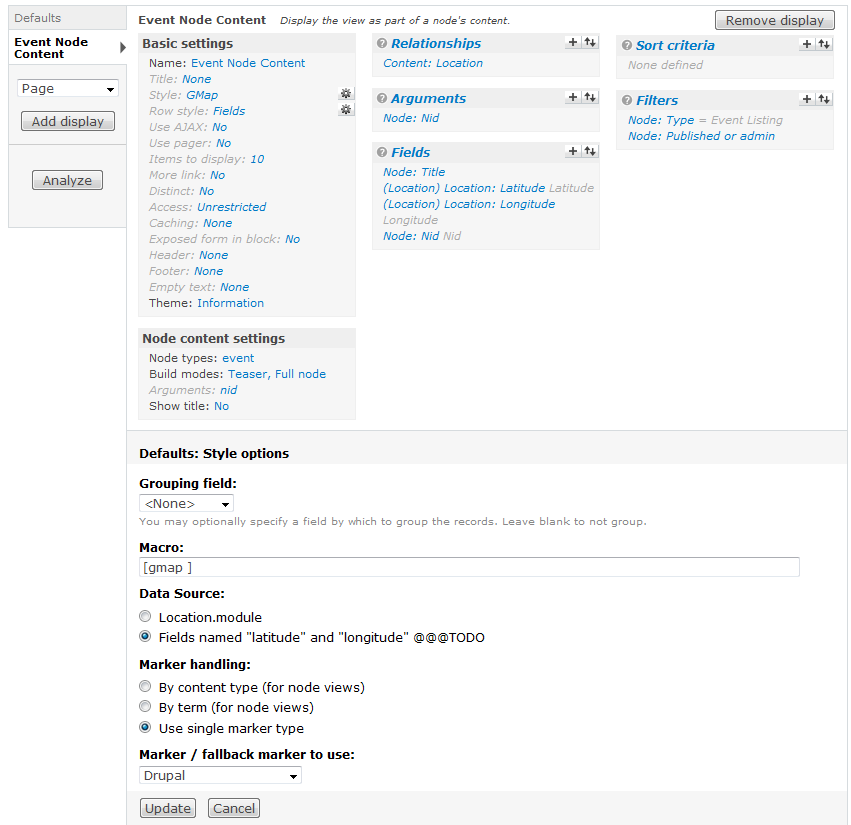
style GMap: make sure you select "choose long/lat fields" for data source under style options, and select latitude and longitude fields bellow. (my default was Location.module)
i spent *endless* hours trying to figure it out, and i finally got it to work. hope this helps others.
Comment #9
mrgoltra commentedsubscribing
Is it possible to filter by NID just to show the address associated with that node? I have added a NID filter and tried is equal to $NID and %NID but can't get it to work. I am I doing it correctly?
Thank you,
Mark
Comment #10
drew reece commentedI think you need to use an argument mrgoltra.
I'm trying to achieve the same using the Views attach module. But I can't figure it out. I have a node displaying all the other cck_locations that exist for that content type, attached to the node view. I just want the one location that is assigned for that node.
You may find something that helps in the 'advanced help' for views, you'll need the advanced help module.
Comment #11
mrgoltra commentedThanks Drew,
No problems showing all the cck_location but in this case I just like you I just want to show one location. I assumed that if you filter it by Node ID, it should work but when I do, the map doesn't show up at all. I read about Views attach and tried it, but no luck as well.. I did look at the advance help and not much info.
Not much familiar with arguments. Will read up on it.
Back to the drawing board.
Thanks,
Mark
Comment #12
drew reece commentedMark,
I seem to have managed to get it to work. I now have the standard node view with an attached Google map.
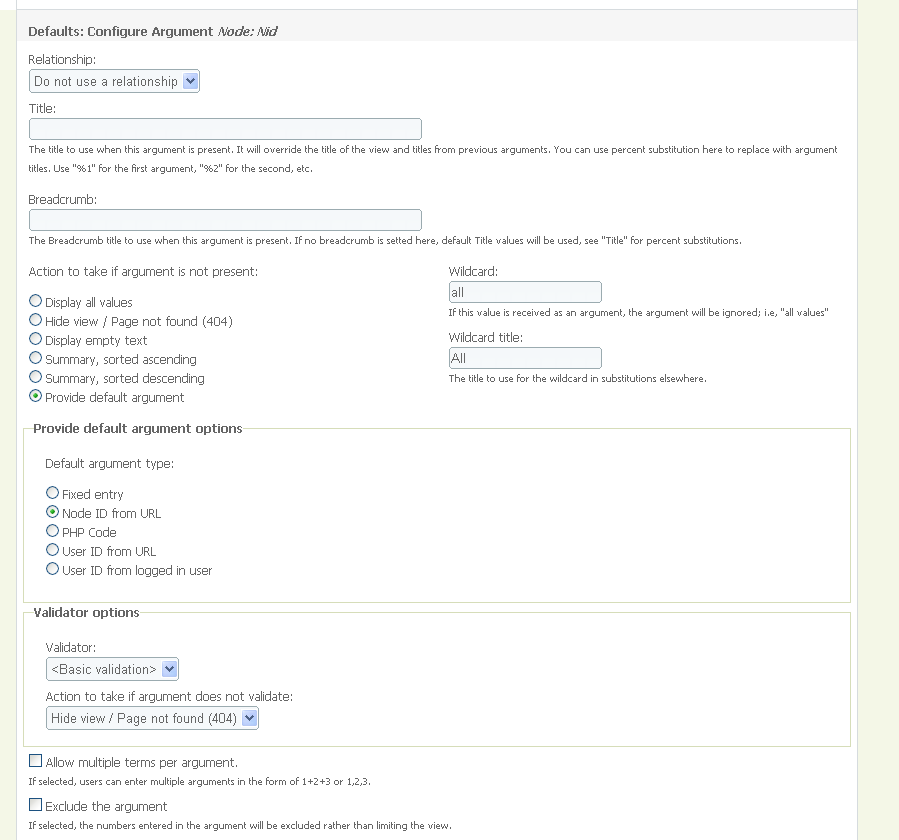
I added an argument to the view, selected Node:Nid as the argument type.
Change the following settings for the argument.
Action to take if argument is not present: Provide default argument
Provide default argument options: Node ID from URL
Everything else as default.
I don't know how you are trying to get the map to show on a node, I guess you are using a view with some attached views? I suspect we have a lot of different methods to achieve this, I can post a views dump if you require it.
I did need to use 2 patches because views_attach wouldn't read the NID correctly -
Token data not passed to argument comment #60
and location made errors when the display was shown -
Array errors in location_cck module comment #5
It was this post that got me to try views attach
http://groups.drupal.org/node/23030#comment-80112
I think it was this screencast that got me to understand views attach
http://www.lullabot.com/articles/photo-galleries-views-attach
Comment #13
mrgoltra commentedDrew,
That is great to hear. Thanks for the heads up. I did apply the location_cck patch but not the token data. Yes I am trying to get a map to show that is associated with that node.
If you don't mind I would appreciate a view dump.
thank you,
Mark
Comment #14
drew reece commentedI have attached the view…
I don't know how well the import sets up the required content types & fields so here is an outline of my setup.
'Event' content type with a Location CCK field called field_location_event. The type is not from Calendar or Event module.
Modules (names taken from admin/build/modules)
Gmap 6.x-1.1-rc1
Gmap Location 6.x-1.1-rc1
Location 6.x-3.1-rc1
Location CCK 6.x-3.1-rc1
Views attach 6.x-2.0
The patches mentioned above.
I think you will need to check in the 'Node content' view the type to set it to use the cck type you have setup with location_cck. Try cloning & tweaking from the import.
If it works you should end up with a title 'Attached VieW' at the bottom of the node page. Try changing the default view to a table to see fields that should be passed to the gmap plugin. I think the key part is that the GMap style gets it settings via the relationship to the location_cck field.
I wish I understood it better :)
Drew
Comment #15
mrgoltra commentedThank you. Very grateful for this will give it a shot.
Comment #16
mrgoltra commentedDrew,
Thank you very much, that really helped. What I did wrong was not including the NID in the Fields.
Mark
Comment #17
drew reece commentedGreat, I wasn't sure I needed the NID in the fields :^)
Comment #18
macuhail commentedGreat info. Thanks for sharing this.
Comment #19
izmeez commentedThanks very much for sharing these thoughts. On re-reading this thread I can see it's all laid out and I was just restating the problem, unnecessarily.
Izzy
Comment #20
mrgoltra commentedIzzy,
It will work using views. Follow # 4 . You will need to create a page view and set the style to gmap. Then you will need to add the location (lat and long) in the field and set the filter to publish yes and select the node type. You will need to add the relationship described in this post.
Hope that helps. You might need to play around with the settings to get it to work. Good Luck
Mark
Comment #21
izmeez commentedThanks. I used comment #4 and #8. Worked great.
Now, is there a way for views to determine gmap settings, such as dimensions, auto zoom or not, and possibly the other gmap default settings then the gmap display would be unique for the view and it would be possible to also create a block view and different views for different group types? This would be really cool.
Thanks,
Izzy
Comment #22
drew reece commented@ izmeez,
Edit the view, select the Gmap style settings by clicking the 'gear' next to where it says Style:Gmap in the Basic settings.
Add whatever you want to the macro, turn on the builder module to get an idea of possible values, & output options.
eg [gmap zoom=16 |behavior=+autozoom]
Rinse & repeat for other views.
Comment #23
izmeez commentedThanks very much, I'll give that a try.
Meanwhile, I decided to add a block view anyway to display the map on the front page or any other page.
The items to display is unlimited to show all points on the map thus the more link for the block view is not visible.
So I used a tip shared elsewhere in this amazing Drupal community to use the Views header or footer and entered a simple html link. It could be a link to the page view or a link to something related.
Thanks,
Izzy
Comment #24
drew reece commentedIzmeez,
You probably know this already, but it's worth repeating.
If you are showing all nodes in a view, add a filter to prevent unpublished nodes showing up to anon users. I think views 2 may warn you if this is not the case. The 'admin or published' filter option is handy to let the admins see the unpublished & published stuff in a view.
Comment #25
izmeez commentedYes, I've been using the 'admin or published' filter option. It is a good reminder for those new to using Views.
Izzy
Comment #26
izmeez commentedDrew,
Thanks very much. Works great for creating different views. I now have a mini block for the sidebar and a larger block for the content area of specific pages, be it the front page or something else.
Unfortunately, all the settings are not available yet. Maybe this is a function of the Gmap macro builder, maybe I should add this to the GMap issue queue as a feature request.
The settings for auto zoom are not available.
It also looks as though the options for the size of google maps menu items is limited to small where something even smaller would be handy for a sidebar map.
Thanks so much, all of you.
Izzy
Comment #27
izmeez commentedNow, everything seems fine but some of the content being created is not showing up on my views maps while others are. There even seems to be a difference in which one's are showing when logged in or not and the nodes are all published. I'm not sure if it's a buffer thing or some error.
When I look at the nodes they have an address and they show a Google map link which works.
Interestingly, the ones that show on my views map are only showing on the linked google map as one pin which when I click gives just the street, city, postal code; whereas one that doesn't show on my views map the google map link shows many pins and clicking on each gives more info as if it is part of google's own database. So, I'd like to be able to solve this.
I would also like to be able to find a setting to make the info show when the mouse hovers over a pin, if that is possible.
Sorry, to be asking so many questions here. I hope it's okay, please let me know.
Thanks,
Izzy
Comment #28
drew reece commentedIzzy,
You should be able to add the automatic zooming feature by adding this to the macro used by the Gmap style view…
behavior=+autozoom
Add a pipe "|" between each setting.
I can't remember where I saw it, I think I found that the node locations map did it & then copied it from the macro it used. Gmap is not too well documented, I think it is partly the immensity of the options that causes it, combined with everyones idea of 'how it should work'. Try installing the advanced help module, it may help give you an idea what to try.
You can configure the markers in a similar way, but you need to add one to get the macro builder to create the code for it.
markers=small red or markers=alt small red
Make sure you search the issue queue if you do post, the developers seem quite busy on it. There is also this http://groups.drupal.org/mapping if you want to contribute in some way.
Good luck with it.
Comment #29
izmeez commentedDrew,
Thanks again for all the help.
Now I may have an issue worth putting forward, but I'm not really sure which module issue queue it belongs in.
The Views, style, gmap, settings, macro field has a limited number of characters so I cannot add the extra settings I would like to.
Any thoughts on where I should place this issue?
Thanks,
Izzy
Comment #30
drew reece commentedMy best guess is Gmap, it seems to have views code within it's module. You could turn of the module to see if the views 'Gmap style' goes away, don't do it on a live site :) and have a DB backup just incase.
The visibility issue you mentioned could be permissions, make sure anon users can access the content type & the view.
The address in popup could be due to the fields in your view. I think you may not be referencing the Location field as a relationship in the view that has no (Googles own) address data, but I could be wrong. I found that temporarily turning the Gmap view style into a table helped to debug what fields were being found.
You could maybe clone the good view, then tweak that to show all the nodes and see if the popups remain as you want.
No idea about how to make it show info on hover, check the issue queue & post if it doesn't exist.
Comment #31
izmeez commentedDrew,
The visibility issues turned out to be of three types:
1. User permissions needed to be better configured related to OG. Works fine.
2. Occasional points had incorrect postal code which did not match with the street address.
3. One point was clashing with other points in the Google database for that address with different postal codes. A different nearby address was needed.
Thanks for the tip to try a Views table view to debug. This was useful for a check but I think the Gmap macro is lost when you return to that style and look at it's settings so you may want to copy the macro to your clipboard first.
I am not understanding your suggestions regarding popup of info on mouse hover.
I do have a views relationship to the cck location field and I have specified under fields, "(Location) Location: Address" as well as latitude and longitude.
The items display fine on the map and the info shows up great when clicking the item on the map, it just doesn't automatically display if the mouse hovers over the pin. I'm wondering if this is a macro issue, a feature of Google maps 2 or 3-beta, or a feature request for the gmap module. Not clear yet.
Thanks very much.
Izzy
Comment #32
kvvnn commentedCheers to you all for getting this info public.
I'm having an error when selecting Style - GMap in Basic Settings
Anyone have any ideas on how to troubleshoot this?
*EDIT*
When I turn off Javascript on my firefox 3 browser, I get the following error when selecting 'GMap' and then 'Update'
*EDIT*
Here is line 68 of that file :
*EDIT*
Here is the whole entry related to line 68
SOLVED
Switching form PHP 4 to PHP 5 solved my issues.
Comment #33
drew reece commentedDo you have fields set up for the latitude & longitude? Are they fields that use a relationship to the location CCK field?
Can you try working from the view in #14, it can be imported as a basis to tweak. It seems to work for others.
Comment #34
kvvnn commentedYes I had the latitude & longitude fields set up, and all other instructions from #4.
When importing the view in #14, I get the same error :
I have Javascript turned off under "Views - Tools" to rule out any possible issues that may cause.
SOLVED
Switching form PHP 4 to PHP 5 solved my issues.
Comment #35
kvvnn commentedSOLVED
Switching from PHP 4 to PHP 5 solved my issues.
Thank you Drew Reece. I'll probably be back ; )
Comment #36
drew reece commentedSomeone will probably experience this again, post an issue in the gmap queue, it should be mentioned as a requirement of Gmap in the README.txt.
Comment #37
kvvnn commenteddone
Comment #38
izmeez commentedRegarding the limited fixed field for entering the gmap macro in the Views>style>gmap>gears I did go ahead an post an issue, http://drupal.org/node/499136
Just in case it gets legs.
Thanks
Izzy
Comment #39
merilainen commentedI cannot get this to work.
Everything works fine before I enable argument. After adding Node: Nid as argument, the map doesn't load at all. I have tried including Node:Nid in Fields also. I'm using panels to build a profile page with map block in it, but it shouldn't make a difference.
Edit:
Uuups, forgot to choose relationship in the panel. Now I chose Node ID and it works like a charm.
Comment #40
mrgoltra commentedfrom my understanding at this point, dev version should contain fixes.
I was using views attach but for some reason it stopped showing the map. Not sure what I did. Maybe an update caused my issue.
Comment #41
rucx commentednice, but how do i display only the marker of the current node instead of all nodes if using attach view?
Comment #42
mrgoltra commentedI had to add NID in the fields section
Comment #43
Golem07 commented@#39
I am stuck at this part as well: As soon as I try to add an argument, the map will not show up anymore (views preview says: "no query was run"). Does somebody have a solution to this?
Furthermore I am not sure what you mean by setting the relationship in panels. I did add a relationship to my content profile. However, this alone doesn't seem to prevent that all markers are being shown on the content profile. When I try to solve this via the arguments setting in views the above happens.
Comment #44
mrgoltra commentedhope this helps.
please see attached.
This is my current setup for AD content type.
Comment #45
bartezz commentedThanx andybounce but especially orianasarac (for that last hint I needed).
Think I'm going to dump my girlfriend and marry this node/386848.... I love it SO much ;)
Cheers all!
Comment #46
mrgoltra commentedthumbs up. I wish the site had the thumbs up icon put in.
Comment #47
thekayra commentedThanks all. It really eased the implementation.
Comment #48
rc2020 commentedHey,
Wondering: Is there any way to show both location.module locations AND cck locations in the same view?
Thanks,
CR
Comment #49
drew reece commentedI don't think location.module is exposed to views. I haven't seen a module to do this either, but you could skim the Drupal 6 location modules.
The location & mapping group may have more help.
Comment #50
damienmckennaThis is probably partly related to #391160: CCK/Views: location_instance fix.
Comment #51
nirbhasa commentedLocation CCK is updated to include Gmaps views, without need to install Views or Gmap field
http://drupal.org/node/511378
Comment #52
joey santiago commentedcool!
it was quite hard for me to set it up properly, so i add a couple hints:
first of all, go to views, add a new one.
at first, create the relationship and choose the Content: Map field you want to use
Then, create the fields Location: Latitude and Location: Longitude choosing for both the Location relationship you created before.
At this point you can edit the view style under the Basic Settings section, choose GMap, Choosing "Choose lat/long fields" and choose the fields you created.
Then you can use a block to display the map in directly in the node... at least, i think :)
#4 and #8 are very good hints... thanks everyone!
Comment #53
El Bandito commentedHi
What about if I want to output the GMAP from a theme template file ? I can't find any examples of doing this when the latitude and logitude are stored as CCK rather than using the straight location module stuff. This code below worked before, but now I would rather work with the CCK version but don't know how to extract the the lat/long from the location CCK fields ?
Any pointers appreciated.
Cheers
Dave
P.S. This specific example was cut and pasted from http://www.helpfultalk.com/cms-wikis/mashup-of-gmap-into-your-drupal-web....
Comment #54
nickl commentedMoving this to the documentation project documentation/faq/help so that we don't loose any vital information collected here.
There are fixes in place for the cck views fields ready for review CCK/Views: location_instance fix
A few dublicate node view gmap - feature requests:
node view gmap: block fix
node view gmap: themeing fix
I still believe this feature will be best enabled with location_cck.
Here is the issue for this now: node view gmap: location cck fix which will make cck handle the node view with map included and enable theme support.
Comment #55
ChrisRut commentedsubscribe (for reference)
Comment #56
Marco Palmero commentedI'm stuck!
I've been fiddling around for hours now and its still not working.
My goal is simple: User input via Location CCK then output a map of the coordinates on a map. This is just one set of coordinates only plotted on a map. Not a collection of nodes.
Module packages installed:
views_attach-6.x-2.2
location-6.x-3.x-dev (I initially used the official release but found that the dev version gave me the ability to assign a relationship)
views-6.x-2.8
gmap-6.x-1.0
I've attached my View settings in the png file below.
When I check the node I see nothing. But...
The funny thing is that when I set the view to HTML list or Grid view I can see the Long/Lat coordinates. So everything else works...
So I'm stuck. I can't get the Google map to display in my node.
Help please?
Comment #57
merilainen commentedI would try with the dev-version of Gmap, the 1.0 is over a year old.
Comment #58
Marco Palmero commentedThanks mErilainen.
Still having the same problem though.
This time the map is showing up but no markers. However like before, if I switch the Style of view from GMap to Grid the node would display the correct coordinates. But once I switched it back to GMap style it would show only the default map which is set in GMap settings.
--
I think I have the same problems as they are talking about here:
http://drupal.org/node/371335
But their solution is different - the video that is posted at the end of the discussion talks about changing the theme and having the theme make some calls to the Gmap API...
But I'm still wondering how it is done via the views + views attach + gmap + location + cck process...
Suggestions?
---
Update: I got it to work using the quick and dirty simple gmap and pulling the lat and long via the theme.
Comment #59
polThis is how I do with CCK field called: 'localisation'.
Hope this helps ;)
Comment #60
Anonymous (not verified) commentedFirst, andybounce great write-up and easy to follow instruction, thanks!
To get multiple nodes to show up on a gmap, use the instructions at comment #4
However, I had trouble getting this to work, because the CCK Location fields were not accessible when I was building my View. Seems there was/is a bug.
To get around that and get it to work do the following:
1- using the dev location module (6.x-3.x-dev)
2- applying the patch found at this comment: http://drupal.org/node/391160#comment-2553064
Comment #61
mariohmol commentedGuys,
using drupal 6, Gmap 6.x-1.0, Views 6.x-2.6, Location 6.x-3.1-rc1, over linux/apache.
I've tryied the Event view as a example, it just dont show anything. If i change this view to show as a table, appears my Event node.
I built a view with Location on the node (not using CCK), and it shows the gmap but with no markers! When i change it to table, it shows the nodes with locations (long and lats).
My site is in portuguese, i dont know if it is any bug on portugues or something else.
I really dont know what else i should do!
Cheers,
Comment #62
rnjthkmr88 commentedim very thankfull to u drew..this comment saved me a lot time. im just wondering how can we edit fields in that marker bubble?? i added picture(from content: picture) in thumbnail view and node:title, node:body as fields in view settings. Now when i click the marker they appearing in a row. what i want is in that picture should come on left side, title and body on right, like we see in most of the sites. How can we do that??
Thanks
Comment #63
drew reece commentedIt should be a case of applying CSS rules to the output of GMAP. Take a look at the source code (Firefox & the Firebug addon works really well) and you should find a class called gmap-popup. Inside there will be classes & spans wrapped around the fields.
You should be able to apply rules to style those items.
There is also an option to turn fields into 'inline fields' for views, check that is disabled in the view > row style > settings > inline fields.
Also take a look at the 'theming information' for the view it may be another option, if you need to add classes or markup to the output.
Comment #64
prabhakarsun commentedThank you for all the information.
In case you use it on search [exposed filters] adjust maximum initial zoom settings at admin/settings/gmap so that it doesn't zoom too high when there is only 1 result.
Comment #65
Anonymous (not verified) commentedWow this is a beast of a thread. And it is over a year old! Never-the-less I found it when trying to solve the same problem, and others might too, so I just wanted to add my solution to the original problem.
Disclaimer: I'm very aware that there may now be other better modules / techniques to do this, but this is what worked for me:
*** YOU DON'T NEED TO USE VIEWS ***
Drupal v6.16
Modules: Location v6.x-3.x-dev, GMap v6.x-1.1-rc1, Location CCK
Content types > Edit Page > Manage fields > Add a new Location field
Content types > Edit Page > Display fields > Set the Location field's Full node display to Map only
Site configuration > Location > Check "use a gmap to set lat and long"
That's it! Now you can edit a page, click on the map to set the location, save, and voila: a beautiful GMap on your page!
ps. this looks rather relevant: http://drupal.org/project/gmapfield
Comment #66
heacu commentedthis is useful, thanks
Comment #67
bryancasler commentedsubscribe
Comment #68
cyberwolf commentedSubscribing.
Comment #69
arsunyiu commentedsubscribe
Comment #70
ron_sparks commentedThanks #8 -- this helped a lot, the map now shows up on my view but the points are not mapped, I am guess I am collecting the address but not the coordinates, so its trying to grab local from the locations cck field i have and not having any luck.
Thanks for helping with this step if I dont figure this out soon ill just switch to node locations not that big of a deal and i know it works.
Comment #71
jrivelli commentedI still cannot get this to display. I have read every single post on this thread and follow all the instructions. Here is my current view, any helps is awesome as I have spent too many hours getting nowhere on this :\
Comment #72
thelionkingraja commentedHello,
I am presenting what i need.
Modules used
CCK
Content profile
Location CCK
Gmap
Gmap Locations
Location
User Locations
I have used this modules and created a content type with only one field of tyoe location CCK and used this in user registration.
I did this in my localhost and viewed the node locations page map/node its working.
The same think is not working in server.
Anybody has the answer ?
Thanks in Advance
Comment #73
tommeir commentedtry getting a new google map api, I believe it is domain specific. Also cross checking your settings between the 2 enviroments is a good idea.
For a more specific solution more info is needed.