Closed (fixed)
Project:
Calendar
Version:
6.x-2.0
Component:
Code
Priority:
Major
Category:
Bug report
Assigned:
Reporter:
Created:
3 Mar 2009 at 04:27 UTC
Updated:
17 Jan 2011 at 21:36 UTC
Jump to comment: Most recent, Most recent file


A New Calendar View fails to display events with both Date 6.x-2.0 & 6.x-2.0-dev (March 2, 2009 - 00:04) modules.
After updating from 6.x-2.0-rc6, NEW calendar views do not work properly. After I edit the argument to point to the right date field (instead of the default created date), nothing is shown in the calendar page views.
I verified the problem on a clean install of Drupal 6.10
Other Modules installed: Calendar 6.x-2.0, Poormanscron 6.x-1.0, Views 6.x-2.3
Steps to recreate/verify problem:
THAT'S IT, the event created for 2009-03-15 does not display on http://localhost/calendar
Here is the query built (copied from the views page preview):
SELECT node.nid AS nid,
   node.title AS node_title,
   node.changed AS node_changed,
   node.type AS node_type
 FROM node node
 LEFT JOIN content_field_date node_data_field_date ON node.vid = node_data_field_date.vid
 WHERE (node.status <> 0)
    AND ((DATE_FORMAT(ADDTIME(STR_TO_DATE(node_data_field_date.field_date_value, '%Y-%m-%%dT%T'), SEC_TO_TIME(-21600)), '%Y-%m') <= '2009-03' AND DATE_FORMAT(ADDTIME(STR_TO_DATE(node_data_field_date.field_date_value2, '%Y-%m-%%dT%T'), SEC_TO_TIME(-21600)), '%Y-%m') >= '2009-03'))
   ORDER BY node_changed ASC
If you repeat the above steps with Date 6.x-2.0-rc6, the Calendar view works properly.
If you begin with a Date 6.x-2.0-rc6 install, setup the calendar as in the above steps, and THEN upgrade to Date 6.x-2.0 the calendar will work properly, until the argument is edited, breaking the view.
I marked this as critical because this COMPLETELY breaks the calendar functionality (at least when creating a new calendar).
| Comment | File | Size | Author |
|---|---|---|---|
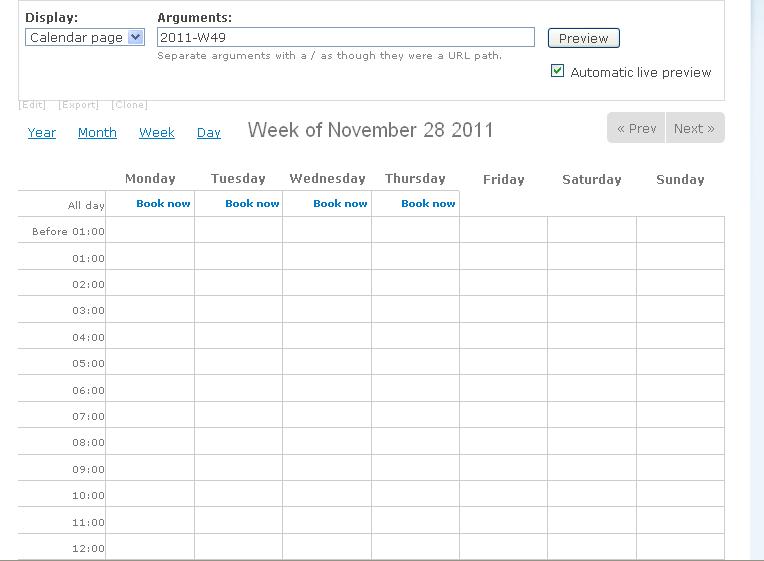
| #30 | week.JPG | 45.29 KB | sachin475 |
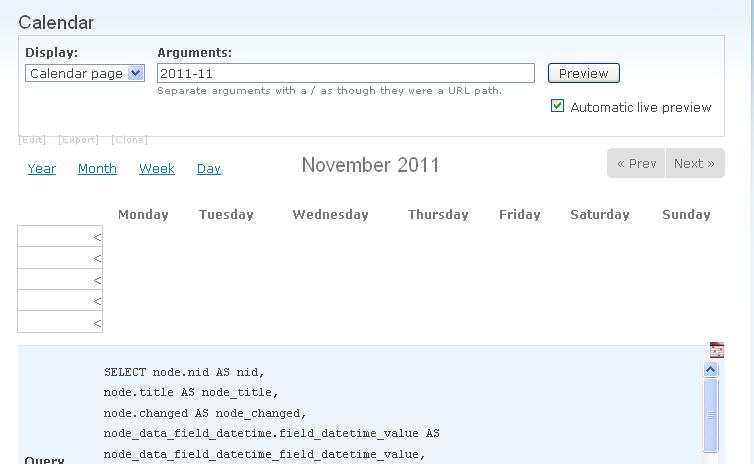
| #30 | month.JPG | 33.48 KB | sachin475 |
| #24 | calendarview.txt | 18.15 KB | Toddv |
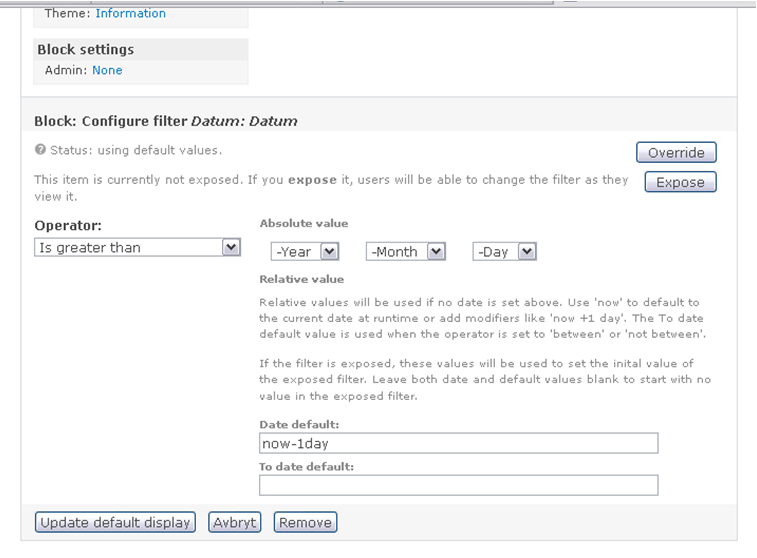
| #7 | Attach1.png | 90.95 KB | Teobald |
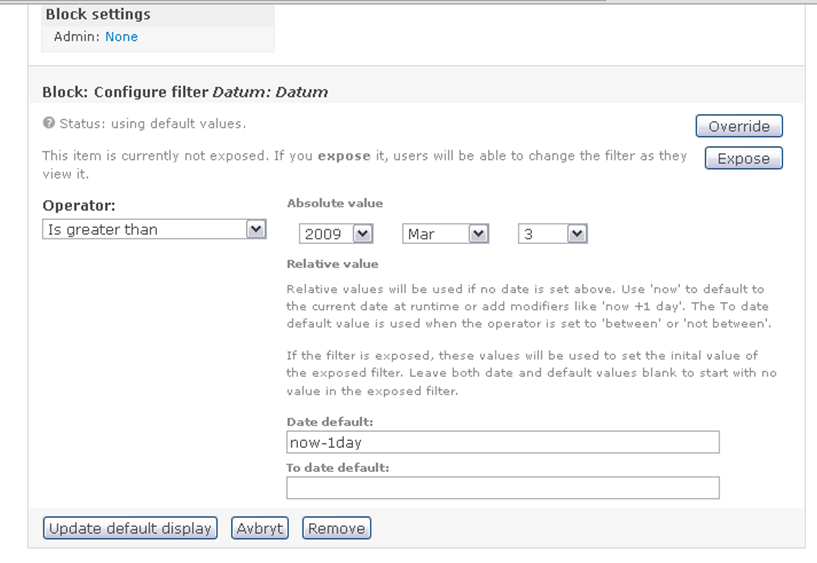
| #7 | Attach2.png | 95.99 KB | Teobald |

Comments
Comment #1
arlinsandbulte commentedClarified Title
Comment #2
les limYou changed the argument to reflect your Date CCK; did you also change the field?
Comment #3
arlinsandbulte commentedOK, I changed the field to reflect my Date CCK, and it then works... thanks for the tip.
BUT...
Using Date 6.x-2.0-rc6, the field did not need to be altered to display properly in the calendar.
Is this a regression, or intended functionality?
Why does the field have an effect on where the event is displayed?
I thought the field settings would only change WHAT was displayed, not where and if it is displayed.
What if I don't want to show the date field in the calendar view?
Comment #4
arlinsandbulte commentedSetting Priority to Minor as there is a workaround available (or is it intended functionality?).
Comment #5
karens commentedYou should not have to add the field to the view, so that is a bug. The different behavior between rc6 and 2.0 is that rc6 added a field in the background, but that creates problems when you try to combine multiple values so that had to be changed.
This is a good report that provides a lot of info that will help me debug this, but I also need to know more info about the date field you created -- what is the granularity and what timezone settings are you using?
Comment #6
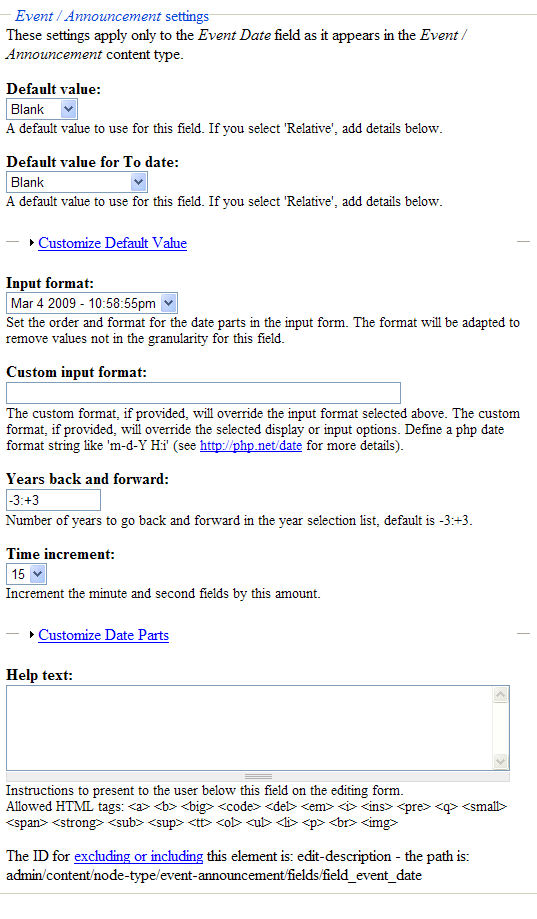
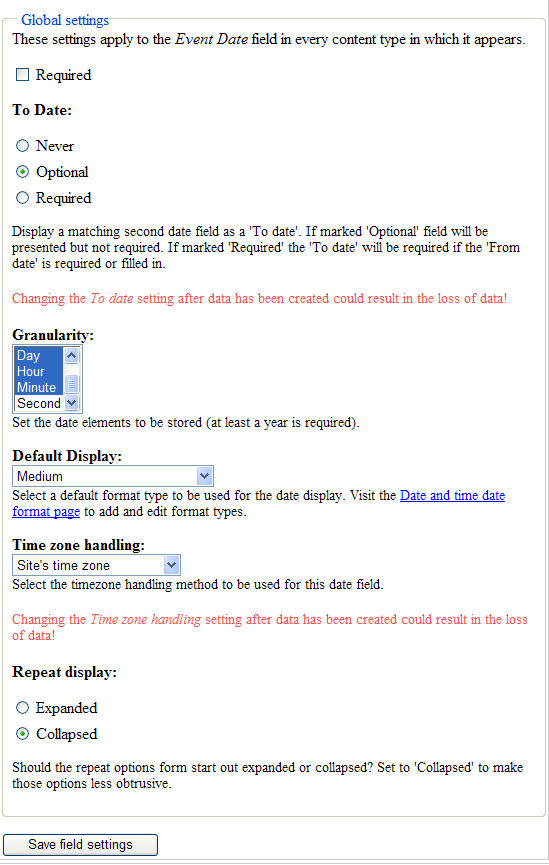
arlinsandbulte commentedAttached is a couple of screenshots showing the date field settings.
(granularity is down to Minute, Timezone is set to 'Site's time zone')
NOTE: this screenshot is not a fresh install, but a site I have access to right now.
Let me know if you need any more.
BTW, thanks for all your contributions, Karen! GREAT JOB!
Comment #7
Teobald commentedMy View with upcomming dates is not working anymore.
Settings see Attach1
Output of the query
Note that the now-1day gets '2009-01-01'
Changing the settings to a fixed date: Attach2
Now the query look like:
The date is now correct.
It looks like some problem with the Relative value is not used.
Hope this helps
BTW: I'm on PHP 5.2.8
/B
Comment #8
arlinsandbulte commented@Teobald: Your issue is a different issue from the one being discussed here.
Your has been fixed in the latest -dev. See 'official' issue post here: #386406: After module upgrade, Views filter value "now" incorrectly outputs 2009-01-01
Comment #9
Teobald commented@arlinsandbulte: Sorry if I made a mix-up. I posted here because http://drupal.org/node/386296 (calendar events disappear after upgrade) #30 by KarenS referrer to this node. Thank you for the link!
/B
Comment #10
AaronCollier commentedI also have this problem with very similar settings.
Also, I have two different date fields, but there is no way for me to differentiate them in Views - they both appear as Content: -value, so I don't know which one I choose.
Comment #11
arlinsandbulte commented@Aaron: your problem with the date labels has been fixed in the latest -dev. See this issue post: #376224: 'From' and 'To' field titles get lost when provided to Views
Comment #12
arlinsandbulte commentedUpdated title to make it more clear... still not happy with the title...
Anyone have a better one?
Comment #13
Toddv commentedConfirming the bug and the fix and that the issue's title as of March 11 "The argument date field must also be added to View Fields or Calendar does not work" was easy for me to find and enabled me to work around the bug.
Comment #14
mgiffordThanks, this worked for us!
Comment #15
Ed Ropple commentedNo offense intended or implied, KarenS, but should this really be flagged a ".0" release? I'm getting lots of emails from clients of mine who are breaking sites because Drupal recommends an upgrade to this release, and their websites are getting killed because of it.
Is it possible to roll back a release and have Drupal not suggest an upgrade? It seems like that might be prudent.
Comment #16
arlinsandbulte commentedSeems to be fixed now using:
Date 6.x-2.x-dev (2009-Apr-01)
Calendar 6.x-2.1
Content Construction Kit (CCK) 6.x-2.2
Views 6.x-2.3
It might even be fixed with Date 6.x-2.1 but I have not tested that...
Comment #17
seaneffel commentedDoesn't look fixed yet, so changed back to active.
I ran into this trouble just now during an upgrade. I am using the current versions of CCK and Views, and dev versions of Date and Calendar as of today, and I am still required to both change the date argument to key from the CCK date value AND add the same CCk date field to the view itself (and of course tell the view to omit this from the display).
It's not a lot of trouble to apply this workaround, but it would be unfair to call it fixed. This is where the update module is actually hurting Date module users as Ed Ropple pointed out.
When this actually gets resolved, I'll update my screencast to reflect any changes.
Comment #18
bcobin commentedI was going nuts until I found this post. The documentation should definitely be updated to reflect this until it gets resolved... thanks, all.
Comment #19
niklp commentedThat fixes the calendar/date problems I had before. I still have "Content: Error: missing title" in my views tho :(
The fact you have to add the date as a field at all is frankly unbelievable. Not trying to point fingers at all; if it's necessary, that's fine - but the logic behind it totally escapes me as a user. I would never in a million years thought to do that, and I wasted a lot of hours trying to fix it yesterday.
On the positive side, I can now go and close another issue that I opened yesterday which definitely relates directly to this problem. IMO though, this should be flagged up BIG TIME in a readme or on the calendar project page until it's fixed.
Thanks.
Comment #20
karens commentedI could not reproduce the problem in this issue but I can't tell if anyone reporting this had the problem in -dev or just in 2.0. I did run into an error if the field was missing and committed a fix for that and with that change I see no problems in the latest -dev code.
As to the questions about rolling back releases, that would re-introduce other bugs that the release fixed, that makes no sense. I had a lot of people pressuring me to get a release out to fix their problems in the previous code, but every release potentially opens up new, different problems. So now you guys want me to get a new release out to fix *your* problem, which will possibly introduce other new issues, and I will get a new slew of complaints about releasing it.
Never the less I am planning a new release after I make some passes through the latest issues because there are a couple significant bug fixes that need to get into an official release.
Comment #21
Anonymous (not verified) commentedI am still having this problem. I have updated to the -dev version and done all the basic troubleshooting steps.
1. I created an event with a from and to date
2. Updated the default calendar view to use the argument content: field_date To Date
After doing so I couldn't find the event on my calendar but after I added the content: field_date To Date to my fields list it then showed up on my calendar correctly.
Comment #22
seaneffel commentedComment #23
Anonymous (not verified) commentedThrough some experimenting I have found an odd case.
This is the sql that is generated by the view
SELECT node.nid AS nid,
node.title AS node_title,
node.type AS node_type
FROM node node
LEFT JOIN content_field_date node_data_field_date ON node.vid = node_data_field_date.vid
WHERE (node.status <> 0)
AND ((DATE_FORMAT(STR_TO_DATE(node_data_field_date.field_date_value, '%Y-%m-%%dT%T'), '%Y-%m') <= '2009-10' AND DATE_FORMAT(STR_TO_DATE(node_data_field_date.field_date_value2, '%Y-%m-%%dT%T'), '%Y-%m') >= '2009-10'))
If I take out the extra percent sign in the str_to_date the query returns values back like I assume it should. I don't know if this will help you at all.
AND ((DATE_FORMAT(STR_TO_DATE(node_data_field_date.field_date_value, '%Y-%m-%dT%T'), '%Y-%m') <= '2009-10' AND DATE_FORMAT(STR_TO_DATE(node_data_field_date.field_date_value2, '%Y-%m-%dT%T'), '%Y-%m') >= '2009-10'))
So basically at the '%Y-%m-%%dT%T' I replace the %%dT with just %dT and ran it manually on my database and it returns results.
Comment #24
Toddv commentedI am still having this problem - however the work around still "works" - reluctantly change the setting to "Active".
I'm not sure if the issue was set to "fixed" because there's a good work around, anyway, I just wanted to report that the issue is still occurring.
In my setup, Calendar events spanning multiple days will only appear on the start date unless I add a date field to the view. When I add a date field the event will appear on the calendar as expected (except now I've got the extra text of the date from/to information showing).
I have been through all the troubleshooting steps and have read the full thread.
Fresh installs of:
Using:
cck 6.x-3.1-rc1
calendar 6.x-2.x-dev
date 6.x-2.x-dev
and
Views 6.x-2.5
Cache's emptied
In my calendar view the settings are:
Argument: date: granularity of Month, date field: start date From date, method "or"
Export of view attached.
Thank you!
Comment #25
karens commentedAlright, here is what is going on and why. When you create a calendar view without a date field, the date value is not added to the query. The only values that are available to the calendar are the fields you add, like the node title. The calendar picks up the list of nodes that matched the query and has to figure out which 'date' cell to put them in. At that point it has to know the event date to do its calculations. Without that information it has no way to know where the node belongs.
The reason this is a change from the earlier version is that in the earlier version the calendar automatically added the date field to the view. That was removed because it wasn't needed in every view (list views didn't need that info, for instance) and having the field there all the time could create unwanted duplicate values. I didn't notice that when I fixed that problem I introduced the possibility of having a calendar item that was missing any date value.
But it is now obvious that the calendar style will have to either require or supply the date field. I think it is better for you to add the date field so that you can see it and decide if you want to display it or not, instead of the old method of silently adding a field you didn't put there.
This is only needed in the calendar styles because the calendar style has to sub-allocate the values by date.
So I need to add some documentation and a validation test to be sure it's there.
Comment #26
karens commentedActually, this is a Calendar issue anyway.
Comment #27
karens commentedI tried two different paths, going back to silently adding the field and adding a validation error and explanation if it was missing, and the second option is much cleaner and more bug-free. So that is committed.
Comment #28
burningdog commentedThanks KarenS - the explanation (in an error message) to add the date field to the field list helped me fix my view - good solution :)
Comment #30
sachin475 commentedwhen i copy booking_timeslots/theme/ to my theme directory then calender month view is not shown and week view contain "book now option" for only 4 days. day view option is working properly. i am trying it from last 3 days please anybody help me.
i have attached screenshot with my issue.
Comment #31
karens commentedPlease don't re-open old closed issues with new problems, especially when you already posted another issue about the same thing.
Comment #32
karens commented