 Come together with the global Drupal community in Rotterdam, 28 Sept – 1 Oct 2026. Sessions, contribution, connection, and Early Bird savings until 8 June.
 Come together with the global Drupal community in Rotterdam, 28 Sept – 1 Oct 2026. Sessions, contribution, connection, and Early Bird savings until 8 June.
Comments
Comment #1
hass commentedYou can find this authentication string inside the piwik administration UI... (not the Drupal module). I hope this haven't changed in the latest piwik version, but it was there in past.
Comment #2
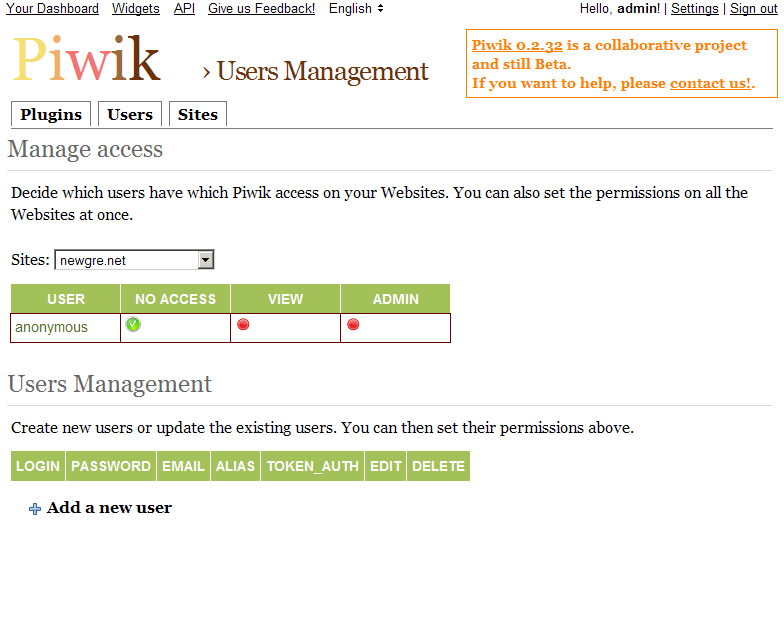
memger commentedI've attached a screen shot my piwik interface. I guess that's the location you a re referring to?
Any hints on where to find that string?
I can however add additional users and i can see their respective authentication strings, but which should I choose and how does the plugin know which user it should use to authenticate against piwik?
Comment #3
hass commentedI have installed the latest version today and checked out. You are one the right page. Create a user on the bottom and use the
token_authvalue in the drupal module.Comment #4
hass commentedUps - No it think it's a different value... click in your piwik the "API" link... than you see the auth key... not sure if the other will work... I need to test myself
Comment #5
memger commentedIt still doesn't seem to work (couldn't locate the piwik jscript in the page source), although I've now found the token string thanks to your help. Is there a way to check functionality or diagnose the plugin? Logging or something?
thx
Comment #6
memger commentedComment #7
memger commentedComment #8
hass commentedLook inside a node, it is there, but not in the filtered pages like "admin"
Comment #9
memger commentedI found the error: piwik just didn't work with my custom theme. As soon as I switched back to one of the default themes, everything worked.
Do you have any good guess what might cause this?
Comment #10
memger commentedMy best guess so far is, that the fact that piwik js doesn't show up when my custom theme is enabled, has something to do with drupal_add_js not working correctly. Do I need to modify my theme anyway to deal with this? thx!
Comment #11
memger commentedI've finally tracked down the error. It was indeed my custom theme. Appending a
print $closureto the end of the page.tpl.php file solved it.cheers!
Comment #12
hass commentedWell, buggy theme... this is the fix
Comment #14
MtRoxx commentedIn case someone else finds this post, I was having the same issue... I was having some challenges setting up the General Settings.
1. I installed Piwik on my server. After logging into their software, click on Websites, a tab at the top of the page. If your site is added, great, get the ID number (the row number) there. If the site you want to monitor is not there add it, then get the row number.
2. Copy the Piwik HTTP URL and paste that inot the Piwik HTTP URL field.
3. I did not use the HTTPS, but I am sure you can figure that out.
4. Piwik authentication token
- This is the one that confused me. Basically you have to add a new user to the Piwik software. Then you will see the Auth Code. Under the User tab, add a new user. Copy the Auth code.
I hope this saves someone else some time.
MtRoxx
Comment #15
grosbedo commentedI was also stuck with this $token_auth thing (they really should highlight the procedure better), but I've finally found how to do it.
You indeed can create a new user, but this is not necessary. An API key (the infamous $token_auth) is automatically created for the Super User and can be found directly by going into your Piwik interface, on the homepage go to the API link (at the top of the page), and then you will find there your API key (super user $token_auth).
This information was found in the Piwik FAQ under General Concepts:
http://piwik.org/faq/general/#faq_114
Also for a concrete example of how to use the Piwik tracking API with PHP, see this informative page:
http://piwik.org/docs/tracking-api/#toc-how-to-use-the-php-tracker-api-e...
And two plugins that might be interesting:
https://github.com/VisualAppeal/Piwik-PHP-API
http://dev.piwik.org/trac/ticket/2768
(Disclaimer: I am not affiliated at all to any of these links)