

 Come together with the global Drupal community in Rotterdam, 28 Sept – 1 Oct 2026. Sessions, contribution, connection, and Early Bird savings until 8 June.
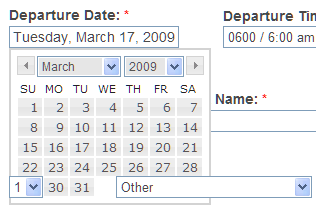
In IE6, the popup is appearing beneath other drop down fields that it should be overlapping. I don't believe this is a theme issue as I tested in Garland as well. Same problem using Date versions 6.x-2.0 and the earlier 2/18/09 dev version. (Of course, it works like a champ in FF.)
I have spent several hours trying to troubleshoot this and have run out of ideas. I know this was a documented problem with datepicker and was resolved through ie6 css hack (datepicker.css). Any thoughts greatly appreciated....I really need to make this work in ie6.
Thanks!
| Comment | File | Size | Author |
|---|---|---|---|
| #4 | datepicker_bug_ie6.JPG | 20.04 KB | begona |
| datepicker.png | 12.04 KB | jdm843 |


Comments
Comment #1
jdm843 commentedAny suggestions on some possible fixes for my problem? I must be the only one experiencing this issue.
Shouldn't the css in datepicker.css in date/date_popup/themes/ fix this problem?
I have tried setting my drop down fields to a high negative z-index with absolute position but that makes no difference.
Have looked at the jquery plugin "bgiframe" but have no idea how to go about configuring it for date popup.
Thanks
Comment #2
karens commentedSorry, I don't have access to any computer that still uses IE6 so have no way to tell what it would take to get this working or to test it. You're welcome to play with the css to find something that works and report back, and that is likely the only way it can get fixed.
Try adding !important to the end of some of those values.
Comment #3
jaisenan commentedHey, I have the same issue with the Date popup. Is this issue related to css? or need to update any js file?
Comment #4
begona commentedI have the same issue but worst because in my case appears a field like a input form with a false. see pic
Someone has any idea how fix this???
I really need to make this work in ie6.
Comment #5
begona commentedWell, It was very easy to fix this, just I put the following code:
/* ___________ IE6 IFRAME FIX ________ */
.ui-datepicker-cover {
  display: none; /*sorry for IE5*/
  display/**/: block; /*sorry for IE5*/
  position: absolute; /*must have*/
  z-index: -1; /*must have*/
  filter: mask(); /*must have*/
  top: -4px; /*must have*/
  left: -4px; /*must have*/ /* LTR */
  width: 200px; /*must have*/
  height: 200px; /*must have*/
}
In the files named:
fix-ie.css
fix-ie-rtl.css
of my theme garland
voil'a
and all is ok now!!
Comment #6
arlinsandbulte commentedWork around provided in #5.
I don't think IE6 is worth supporting any more, so I will mark as won't fix.
(If you disagree, provide a patch)
Comment #7
rajesh007bond commentedThanx begona. Your fix is working like a charm. We need to support IE6 and its giving us nightmares all along.