

 The 2026 Drupal Business Survey is open. Your response will help shape the future of the Drupal business ecosystem.
We have found a strange issue with AM in Drupal 6 when viewing it under IE7 (seems to work fine when viewed under Safari or Firefox).
When you first navigate to our site (www.churchofepiphany.com), the primary links toolbar is rendered up too high and to the right (it's partially over our logo). If you move the mouse the near menu bar (i.e., where it is incorrectly rendered), the while menu bar jumps down and re-renders where it should be -- slightly lower and to the left.
This only seems to happen on IE. Is this a known issue? Or is it because we have our own custom image banner? It sounds almost like the menu bar chooses to render too early and guesses its location incorrectly. Later, when the whole page has been rendered, and the menu bar needs to re-render (e.g., you mouse-over and something needs to be re-drawn), it knows the correct location to render itself.
I'm not enough of a javascript monkey to even know where to begin...
| Comment | File | Size | Author |
|---|---|---|---|
| #30 | portalsite.jpg | 130.47 KB | tdh |
| #26 | float_log_in.JPG | 143.37 KB | tdh |
| #22 | Float_after_1.6.JPG | 109.13 KB | tdh |
| #14 | style.css patch file | 579 bytes | saviles |
| #12 | shootag_1.JPG | 206.5 KB | tdh |



Comments
Comment #1
jwolf commentedI'm sorry, but I am unable to duplicate this. I spent some time browsing your site with IE7 and could not duplicate what you describe. I don't doubt that it is happening, I just need to see it happen to offer a solution.
Does this happen all the time for you?
Is it just a problem with IE7?
What pages does it happen on? Only specific pages or random?
Comment #2
mswaringen commentedI am having the exact same problem as jsquyres. I also think the menu bar renders too early but after further testing I've found some other weird behavior.
This issue only happens in IE7 (I haven't tested other versions of IE) and always happens on the first page load. It doesn't have to be the home page, any page that loads first experiences this issue. After I move the mouse over the menu, it moves down to the correct location. I can refresh the page several times and the menu will stay in place but every once in a while a refresh will move the menu up again to the incorrect location. Again, this can happen on any page.
Also, the height of the menu bar will differ occasionally, as in it will render too high and then sometimes way too high on the page.
Let me know if you need anymore info or testing.
You can see the issue on my site, www.shootag.com
Thank you very much for maintaining this theme!
Mark
Comment #3
damianbrown commentedI too am experiencing this same problem with IE (Firefox OK)
www.damianbrown.com/drupal
Comment #4
keith.smith commentedYes, this is the bug I reported in #353056: Primary menu does not load properly on front-page, IE. but could never reproduce. At the time I thought it only happened on the site's front page, but perhaps it does happen on the first page loaded, as reported above. I think I have a user that this still happens to regularly; I'll see if I can get additional information.
Comment #5
keith.smith commentedMy brother can reproduce this bug almost every time on his setup; I'm attaching a screenshot he grabbed, and will get system and browser specs.
UPDATE: This was taken on a Windows Vista system using IE version 7.0.6001.18000.
Comment #6
keith.smith commentedMarked http://drupal.org/node/411684 as a duplicate.
jwolf: What information can I help gather for you to help debug this issue?
Comment #7
tdh commentedI have seen this happen on Acquia Marina sites when using IE7. As soon as you hover the mouse over the primary links, the bar jumps down to where it is supposed to be.
Comment #8
tdh commentedI set up a fresh drupal install to show what happens in IE7 with the floating primary links. If you look at float1.jpg you will see that the primary links are floating above where they actually should be. As soon as you hover over a primary tab, things look how they should be (float2.jpg). Subsequent loads of the page seem to load fine, it only happens the first time the page is encountered.
Comment #9
methetweb commentedPosted this in some other issue before I was pointed to this issue:
"Hi, I'm having a similar kind of isue. My site gets messed up in IE7, this does not happen all of the time, but every once in a while. Hitting the refreshbutton solves it but it's still very anoying for the users. The problem only appears in IE, FF and Chrome don't seem to generate the faulty page lay-out. My site can be found at www.npva.nl
What seems to happen on screen is that the menu's get shifted upwards, into the blue bar on top. This started when I installed version 6.x-1.5 to replace 6.x-1.0. As I kept a copy of the previous version I'm considering to revert back."
Comment #10
Vially commentedI can confirm the same issue with my site www.blogrfid.ro, and I have also checked the other two sites above. The churchofepiphany didn't show any issues, but damianbrown.com/drupal had the primary menu higher than normal on the first load. All of these happen in IE7.
Comment #11
wildpoppy commentedI could only reproduce the issue one time with the http://www.shootag.com/ link and the first time (as tdh mentioned above) with a fresh install of the theme on the first page load.
If I could reproduce the issue this may have been just a one line answer. As I can't, one, all or none of the following may fix the problem. I'd be interested to know which.
The following jumps out at me from the style.css file.
The floats in the header section are only cleared using a pseudo selector .clearfix:after. Try removing the :after so it is just .clearfix.
If the clearfix change still doesn't have ie recognizing the clear properly try adding overflow: hidden; (and for good measure) clear: both; to the header-wrapper style.
Then I would try adding a set height to the header-wrapper style of at least the height of your header images.
If that didn't work I would repeat the styles suggested on the individual elements within the header-wrapper. (header-first, header-middle and header-last) and would also try adding display: block.
I would then move on to the header-bottom styes and add the same as above (starting with clear: both; and display: block).
(As an aside - at first I thought it was related to the sites that are reporting this issue have all replaced the header logo images with images wider than the container element's css width specifies. But the fresh install doing it too negated that idea (I'd change those widths once the content jumping issue is solved however).
Comment #12
tdh commentedHere are some screenshots of the shootag site. Number 1 shows how the site first loaded, and number 2 shows how it looks after you hover the mouse over the navigation bar. As I show above, this is exactly what happens on a bone stock site using the Acquia Marina theme.
Comment #13
wildpoppy commentedHi tdh,
this is what I saw for this site too. The fixes I suggested above are still what i think will work.
Comment #14
saviles commentedWe made the following changes to the style.css file (see attachment) and it appears to have fixed our problem as I've been unable to reproduce it.
Comment #15
bitshift commentedI am also experiencing this. I'm glad I found this thread as I was about to open a new issue. Just to add, maybe this helps - It only seems to happen on the first request with IE7. Further requests (after mousing over the toolbar/tabs), everything displays correctly. Maybe thats because its being cached. Not sure, but after clearing cache, closing browser and revisiting, it happens again. Also, I can verify that it does not happen with firefox, opera (ver9) nor Google Chrome. Hmmm, another IE-specific stylesheet hack needed? Thanks Billy Microsuck!
Comment #16
jwolf commentedComment #17
jwolf commentedCan anyone confirm the fix submitted by saviles works??
Add the following to ie7-fixes.css:
Comment #18
jwolf commentedI made some changes to style.css and ie7-fixes.css which I hope fixes this. Since I can not reproduce this I'm marking this as fixed and hope it is indeed fixed.
Fixes added to latest dev snapshot and release 6.x-1.6
Comment #19
wildpoppy commentedjwolf I can't seem to reproduce the bug with or without the fix but I think it makes sense that it would fix it.
Comment #20
methetweb commentedAdded the code at the bottom of ie7-fixes.css. It seems to work for me on www.npva.nl, will be keeping an eye out to see if it works persistent. A very big THANKS!!
Comment #21
mswaringen commentedI cant recreate the issue either. I did update the views module since my last comment and I believe that may have fixed it. Anyway thank you to the maintainers for working on this and for todays update.
Mark
Comment #22
tdh commentedThis doesn't seem to be fixed in version 1.6. I downloaded version 1.6 and tried it on one computer and the menu did not float, so I thought it was fixed, but when I went to the next computer (one that I have never used before) I got the floating menu bar, as you can see in the attachment.
Comment #23
tdh commentedComment #24
jwolf commented@tdh - link to your site please.
Comment #25
tdh commentedIt is actually a local site and not online. I haven't done anything to it yet except add a primary link and then put this 1.6 version on it. Is there anything that I can get to you by attachment maybe?
Comment #26
tdh commentedI also noticed that sometimes there is a white bar at the top of the green part of the login block. Sometimes the primary link will be in place and this white part will show (look at attached screenshot for details). They seem to be connected, because when I hover over the primary link, this white piece turns the normal green.
Comment #27
jwolf commented@tdh - I have not and can not reproduce this floating issue. If there was a site that consistently displayed this issue that I can look at then I'd have a better chance of troubleshooting this issue. So far every site that is posted in this thread has not displayed this issue for me. I have used browser cams and local installs of IE6, IE7, and IE8. None have shown this problem.
I have to move on. I've tried to deal with this issue and have not been able to reproduce it. I'm marking this as fixed. If other people are still having this floating issue with the 6.x-1.6 release please open this issue back up and post a link to the site where the floating is happening consistently.
Please try the fix posted at http://drupal.org/node/405882#comment-1492824 - if you can confirm that that fix solves the floating issue I will create a new release with that fix.
In regard to this other issue w/ a white bar , please file a separate issue for that.
Comment #28
tdh commentedI tried the code from comment #17 above and I have not been able to reproduce the floating issue after adding the code.
Comment #29
bitshift commentedjwolf - try this with IE7 http://www.portalsitellc.com/
Comment #30
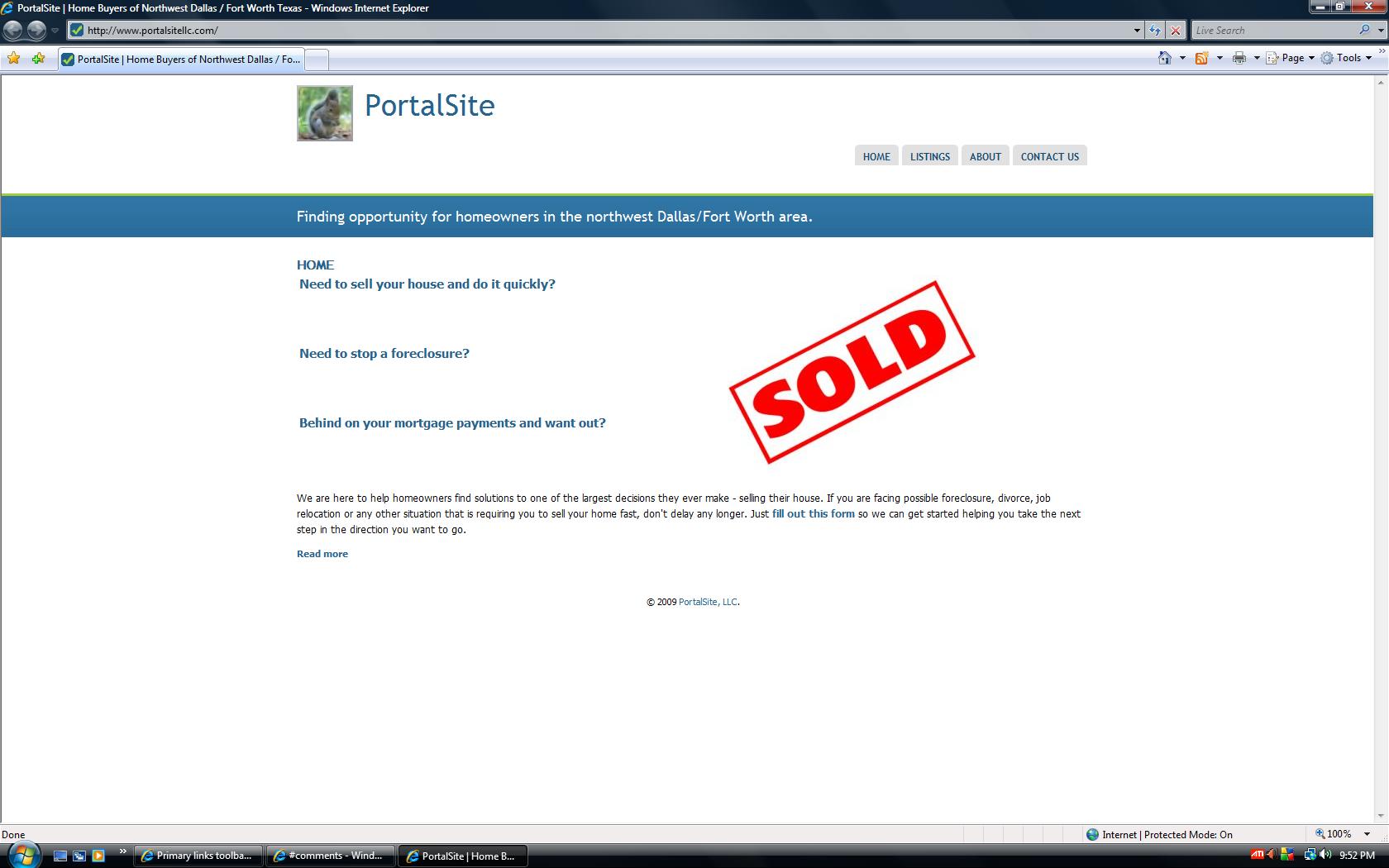
tdh commentedHere is what I see at portalsitellc.com in the attached picture. The tabs are floating. Are you using 1.6? Did you try the above code from comment #17?
Comment #31
bitshift commentedNo, sorry havent tried the code fix yet, but I will this evening. Thanks for the help!
Comment #32
ronalg commentedtry manually set height in header-wrapper
#header-wrapper {
margin: 0 auto;
padding: 0;
width: 960px;
height:132px; <-- i.e. 132 or other
}
Comment #33
bitshift commentedThanks ronalg, can you test this site www.dfwnorthwest.com
I applied this change there, but cant get it to happen again but im not sure if its fixed or not.
Comment #34
bitshift commentedI think this might have fixed it, but I need to try it on a few machines that have never visited the site(www.dfwnorthwest.com) before. This brings up another question however. Why the heck could it not be reproduced after clearing all cache/temp files? Even before I applied the fix, it would only happen on the first request with IE7, then even after clearning my cache and all temp files, it would not happen again. Maybe a reboot?
Comment #35
jwolf commentedOk. I figured out a way to reproduce this problem consistently. Reproducing the problem allowed me to effectively troubleshoot; no more guessing.
I rearranged some markup:
- moved primary-menu out of header
- replaced #header-bottom with #primary-menu-wrapper
I committed the fix/changes and they will be available in the latest dev-snapshot and new release > 6.x-1.8
Thanks everyone for your help and patience with this issue.
Comment #36
bitshift commentedjwolf - just curious, but how were you able to reproduce it on a regular basis?
Comment #37
tomsm commentedIf the primary menu is moved out the header, how can I change its background color for the entire header width?
I have submitted an issue about this: http://drupal.org/node/462352
Comment #38
marty.true commentedI have a new install of 6.x-1.9 and I notice the problem still exists in IE7. However when you click on one of the primary links, the whole block snaps down to where it is supposed to be.