Closed (fixed)
Project:
Viewfield
Version:
6.x-1.x-dev
Component:
Code
Priority:
Normal
Category:
Bug report
Assigned:
Reporter:
Created:
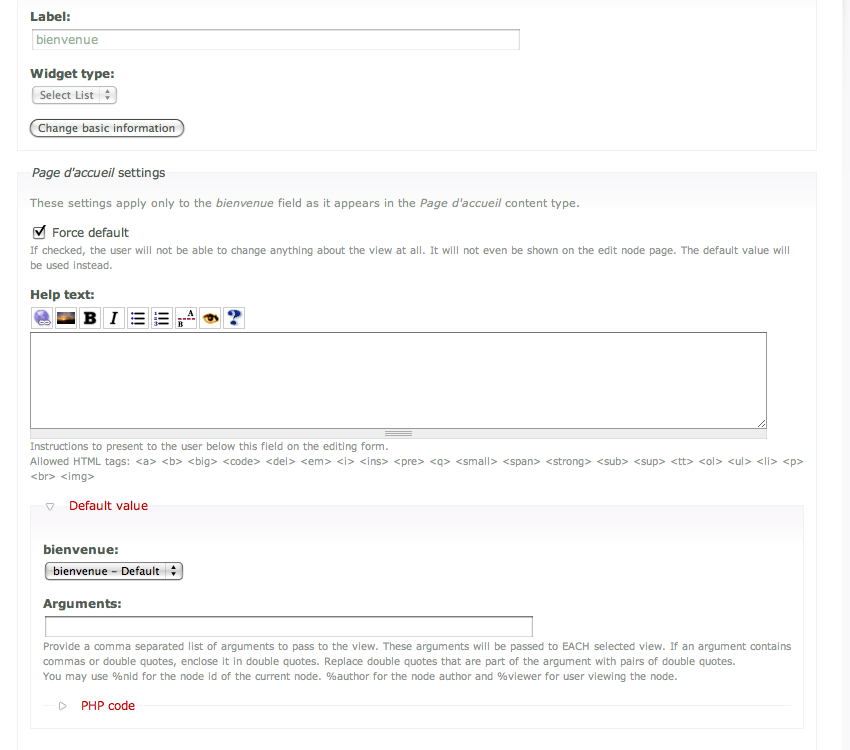
28 Mar 2009 at 21:44 UTC
Updated:
6 May 2011 at 19:15 UTC
Jump to comment: Most recent file


Hello, all my viewfields are reset to none, I don't know when it happened... It's very frustrating lol. How could to have my settings back? I've got more than 500 nodes affected...
| Comment | File | Size | Author |
|---|---|---|---|
| #62 | fixed-update-to-call-update-sql-416922-62.patch | 1.47 KB | keithm |
| #55 | fixed-vname-too-short-416922-55.patch | 2.07 KB | keithm |
| #51 | 416922-fixed-vname-too-short-51.patch | 2.74 KB | keithm |
| #43 | viewfield_vname_length_416922_43.patch | 2.59 KB | frjo |
| #37 | viewfield_vname_length.patch | 9.48 KB | frjo |


Comments
Comment #1
junro commentedSorry, How could I have my settings back? I've got more than 500 nodes affected..
ps: only nodes created before February 12th are affected.
I really need to find a way to put back all my original settings.
Comment #2
libeco commentedI just updated my to 6.x-1.x-dev (2009-Mar-27) and saw all the viewfield-fields were not displaying. I decided to place back the old (dev-version) viewfield module and it worked again. It's a good thing I always first back-up the whole site (and database) before updating modules...
Comment #3
junro commentedYes you're right, place back the old (dev-version) viewfield module works.
It's not the first time it's happen.
Comment #4
jerdavisI find this curious as I tested this against multiple sites with different viewfield configurations and did not have any issues such as this. I'm wondering which version you're currently using. Can you post a tarball of the copy you're using on your site currently?
Jer
Comment #5
jerdavisComment #6
Rosamunda commented+1 to this. It happened the same thing to me.
I´ve used the last dev 6.x version. Now it only appears the last one the one updated to march 27.
But the older one (one that isn´t appearing in the releases list) worked ok.
Comment #7
jerdavisCan you provide the requested information? I need to confirm the code you're using which works to verify what the problem might be. I have a good guess, and I'm working to account for it right now.
Jer
Comment #8
Rosamunda commentedThis is what I´ve been using. (Attached). Thanks for your help!
Comment #9
junro commentedHello;
As we can update a dev. version, I update it.
So I update the new dev. version from the old dev. version.
For me it was default view display who was missing.
cck viewfield settings:
number of values: 5
hum tarball I don't really know what is it but I think it's the viewfield.info.
; Information added by drupal.org packaging script on 2009-03-10
version = "6.x-1.x-dev"
core = "6.x"
project = "viewfield"
datestamp = "1236644597"
This is the version before the latest dev. version (I'm quite sure).
Comment #10
jerdavisThat's helpful, thanks for the info.
What versions of Drupal Core and CCK are you using on this site? Can you take some screenshots of your viewfield configuration on both the content type and node level?
Thanks!
Jer
Comment #11
junro commentedDrupal 6.3 (I know I should update the last version)
Content Construction Kit (CCK) 6.x-2.x-dev (2009-mars-27)
Comment #12
Rosamunda commentedI´m using Drupal 6.10, and same CCK version as Junro.
Comment #13
jparets commentedMore details about the problem:
- When you enter an override default option in the definition and select OVERRIDE DEFAULT in the submitting form, it does not work.
- When you do not enter an override deafult in definition, the default value is set to 'none' in the creation time and re-reset to 'none' when you edit the node (no matter how view was selected). The arguments are respected.
Probably it is a problem in the way default values are treated. It seems that the default value override the current value. When you edit a node all is reset to something unpredictable. But the viewfields with force default works fine.
For me is a big problem because I have a lot of nodes which works with the older versions .
I am using the last version (27-3)
I re-installed 2009-feb-20 version and after deactivating and re-activating the module thinghs works as expected, i.e.:
- OVERRIDEN fields maintain the overriding view
- NOT overrrided fields maintain the default view.
More information: 2009-mar-2 version respected the selected view but changed it when editing, i.e. you have to manually change the view each time the node was edited. The override default option did not work at all (i had to deactivate it)
I hope this information will be useful.
Comment #14
prunelle commentedMy site runs Drupal 6.10; CCK 6.x-2.2; Viewfield 6.x-1.x-dev (03/27). Fields configured as shown in the two attached screenshots are no more output. Those fields use forced default values. I have to mention, that, unlike for the 5.x viewfield version, I was obliged to check the "Use a common default value ..." during the port of my site from D5 to D6, in order to have the "forced default value" option working correctly. I hope that will help ....
Thanks for your work.
Regards.
Comment #15
petrd commentedNot sure if this is related to this issue, if it is not, please let me know and I'll submit another one.
I have a content type named "Page with view" and had the same problem with "disappearing" views from viewfields. After re-entering them manually I realized that most nodes have their views back but some of them still have them set as "none" and this cannot be changed (edit a node -> select a view for the viewfield -> save the node -> no view is displayed -> edit the node again -> viewfield is set to "none" -> unable to do anything with it).
I realized that the problem lies in the content_type_page_with_view table. The field_view_vname column in this table can hold a varchar(32), which is the maximum allowed length of a view identifier. But this column contains not just the view identifier but also an appended "|default" string (at least in my case). So, if the view identifier is longer than 24 characters, the total length of the string is higher than 32 and the string is truncated (only e.g. "trips_in_the_czech_republic|defa") is saved into the table.
By extending the column to hold a varchar(48) I was able to temporarily solve the problem on my site (dirty and nasty hack, I know).
Hope this is somehow helpful...
Comment #16
Rosamunda commentedFor now, I´ve changed up my version from latest dev, and replaced it from the oldest one posted in #8, which seems to work. (It works for me at least :).
Comment #17
jerdavisThese are the known cases for disappearing viewfield views:
The last 2 issues have not been fixed yet. The field length issue is straight forward and will be fixed shortly. The last issue is a bit trickier. In the 02/10/09 snapshot I added support to select individual displays in Views 2. This meant that you could drill into your view and pick a specific display rather than having to create a new default display for each viewfield. When this was implemented, an upgrade path was not added. Up until the 3/27 snapshot, the default display was generally still used - so the issue went somewhat un-noticed. With the changes in 3/27 that corrected the first 3 issues listed above, this behavior went away and all old viewfields that hand not been updated to select a display stopped working.
In the next snapshot of Viewfield I'll add the upgrade hook which will go back and select the default display for existing viewfields if a display is not already selected. This will require a run of update.php to execute.
If anyone has found any other issues with vanishing views that I have not listed above, please let me know so I can investigate further.
Thanks!
Jer
Comment #18
darren ohFixed in CVS commit 193572. The fix will be applied when you run update.php.
Comment #19
junro commentedFixed with Viewfield 6.x-1.x-dev (2009-avr.-08) ?
The new dev version doesn't fix the problem for me.
Comment #20
darren ohDid you run update.php?
Comment #21
junro commentedI did...
But I try again and it's working now.
I think it's with the new recommended version of Views (2.5) that it's still don't work.
I've got lot of problems with Views 2.5, I have to put back the 2.3 version.
last minnute: I didn't check my nodes created before February 12th (see next post below).
Comment #22
junro commentedComment #23
junro commentedHum no, the problem still exist.
All nodes created before February 12th are affected. Stil the same problem.
And now, I can't put back my old version.
I've gott this:
Fatal error: Cannot redeclare theme_viewfield_formatter() (previously declared in /home/pariscin/www/sites/all/modules/viewfield/viewfield.module:185) in /home/pariscin/www/sites/all/modules/viewfield/theme/viewfield.theme.inc on line 25
But I run again update.php with my old version, and yess! my viewfields are back!
Funny because running update.php don't change anything in my tables...
So, BUG NOT FIXE, sorry.... :)
Comment #24
rwd commentedA similar problem was encountered on a Drupal site I maintain after upgrading to Views 2.5, i.e. viewfields on existing nodes were no longer displayed in the node output.
I found that editing the node (not actually making any changes) and saving it would fix the problem. This proved to be a feasible solution on this particular site as there were only a small number of nodes with viewfields.
In hindsight, perhaps this would have been remedied by clearing Drupal's cache tables...?
Comment #25
libeco commentedI tried clearing the cache from the Performance section and it didn't work. I also tried the editing and saving method but the viewfields still don't show up. This is all with the latest dev version of viewfield, the latest stable version of Views (2.5) and the latest stable CCK (2.2).
*edit* nearly forgot: Drupal version 6.11, although 6.10 had the same problem...
Comment #26
darren ohDuplicate issue 460900.
Comment #27
darren ohThe cause of this issue is that for Views 1 we used the display format to choose a Views display style plugin. In Views 2, some of those plugins no longer exist, so there is no matching display format. As a result, the viewfield is not displayed.
We now use the view selection list to choose the display. I will write an update to map the old display formats to displays. In the mean time, saving both field settings and the display settings for your content type should cause it to display, unless you are experiencing the problem described in issue 434920.
Comment #28
darren ohComment #29
darren ohFixed in CVS commit 215694.
Comment #31
libeco commentedI can confirm that the latest dev verson works without a problem for me. No more views disappearing...
Comment #32
antiorario commentedI can confirm it doesn't work. Actually, the other time it happened I was able to restore it by bulk saving nodes. Now I've done all that and the view just doesn't show up in the nodes. I'm confused.
Comment #33
antiorario commentedAlright, I take it back. It also seems I was suffering from #434920: Arguments not saved or passed.. It should be working now.
Comment #34
mhunt commentedThis seems to still be an issue and should be re-opened.
I am Using:
Problem: When going into the node edit form, the viewsfield cck reset to none.
Solution:View Names ( machine -readable) over 26 characters seem to trigger this problem,
Comment #35
eidolon nightI have views with names clocking in at 21 and 25 characters in length, and they're suffering from this issue as well.
Comment #36
junro commentedIs there a query we could use to set the view display in the edit node page?
I've still got hundred of nodes where viewfield display are empty...
I would like a query where I could tell "use this one!"
Any idea?
Comment #37
frjo commentedThe *vname field is a varchar set to the length 32. This is the also max for Views name so at first glance it should work well.
The *vname field however stores not simply the name of the view, it stores "[name]|[display]". When that combination gets to more than 32 characters the bug is triggered.
My solution is to increase the length to 127.
The biggest part of the patch is the update function that fixes this for all existing fields instances.
P.S. It may look like I rewrote the whole viewfield.install but that because it used to have Windows line breaks and I changes it to standard Unix.
Comment #38
frjo commentedThe patch in #37 have now been tested by a customer and was pushed out to production this morning. Seems to be working as it should, including the update function.
Comment #39
frjo commentedThe patch in #37 is now running in production on three different customers sites. No problems so far.
Comment #40
frjo commentedComment #41
libeco commentedI can also confirm that #37 fixed my problems with viewfield not displaying properly. I did have to change all the names in the database manually.
Comment #42
sunSorry, #37 no longer applies, so I'm unable to figure out the actual changes.
I've fixed the character encoding + line endings of all files in the meantime.
Comment #43
frjo commentedUpdated my patch against HEAD. Thanks for taking a look at it!
Comment #44
sunHm. Is there a reason for why we have to query everything on our own? Updates in content.install happily use CCK API functions content_fields() and content_database_info().
This should not happen.
The number 127 needs to be explained in an inline comment above 'vname' line. Why exactly 127 and not 255 or 128?
Powered by Dreditor.
Comment #45
frjo commentedI copied most of viewfield_update_6001() from viewfield_update_6000() as I assumed it follow best practice. I also saw some mention in content.install not to use content_fields() but now that I look more closely it only applies to hook_install(). Do you want me to rewrite the update function using content_fields() etc.?
The view name can be 32 characters and the display name 64, 32+64 = 96. (2^n)-1 then gives 127.
CCK seems to use that formula as well, but we could as well make it 128 as many other modules do.
Comment #46
sunIdeally yes, please. Also, I suck at maths (and so do other readers), so I'm not sure why it's not 96, but 127, i.e., requires an inline comment.
Comment #47
keithm commentedDuplicate issue at #1096718: field_attached_view_vname too short.
See also #942986: Viewfield Override Defaults does not remain ticked after resaving.
Comment #48
nancydruI don't suppose someone is actually going to fix this?
Comment #49
keithm commentedI'll fix it if I get access: #1105646: Applying to be co-maintainer of the Viewfield module.
Comment #50
nancydruFabulous.
Comment #51
keithm commentedUpdated #43 to make viewfield_update_6001() use more of the content API. Please review and test.
Comment #52
keithm commentedComment #53
keithm commentedhttp://drupalcode.org/project/viewfield.git/commit/9c1a16c
Comment #54
sun1) The changelog is reverse chronological. New entries are added to the top.
2) No "Issue" prefix in the changelog, please. Only required for the commit message (in git).
1) phpDoc of update functions should be the summary only; no "Implements ..."
2) There should be a blank phpDoc line between the summary and any other phpDoc description or directive. Please read http://drupal.org/node/1354 for details.
The "array(" should be part of the db_change_field() line; likewise, the closing parenthesis of the two stacked together on the same line (
));), consequently decreasing the indent of the inner array keys.Powered by Dreditor.
Comment #55
keithm commentedCHANGELOG.txt
1) Changed.
2) Changed, though http://drupal.org/node/52287 shows changelog entries that include 'Issue' and emphasizes re-using commit messages. Does http://drupal.org/node/52287 need to be updated? Related to this, this document describes longer changelog entries having a blank line between the main entry and 'more description' but I don't see any examples of this in other modules. Is http://drupal.org/node/52287 correct in calling for this blank line in the changelog and commit message?
viewfield.install
1) Changed.
2) Changed.
Patch attached, using newer naming convention than #51 :-/ Up until a couple days ago, http://drupal.org/node/1054616 used to read
Comment #56
suns/Fix/Fixed/ - can be adjusted prior to commit.
Thanks! I'll take care of the handbook page.
Comment #57
keithm commentedhttp://drupalcode.org/project/viewfield.git/commit/69374de
Comment #58
sunWhy isn't this (and a later added update query) not using update_sql()?
Powered by Dreditor.
Comment #59
keithm commentedupdate_6000() was written a long time ago, before my time, so I'm not sure. I wrote update_6001() (later renamed as update_6003()) patterned after update_6000() before I knew about update_sql(). I used update_sql() in later updates such as update_6004(). Do you recommend going back and changing the ones that aren't using update_sql()?
Comment #60
sunYeah, ideally we use update_sql(). It should only not be used when selecting/preparing data for an update, or when a single module update would potentially lead to hundreds of individual update queries being logged to the update.php screen.
Comment #61
nancydruKeith, remember that there are still 754 D5 users left. When they upgrade, they will go through all the available updates.
Comment #62
keithm commentedPatch attached.
Comment #63
sunOUCH. Ok, I forgot to mention that serialized values are the only other exception, which actually disallows use of update_sql(), since the SQL string is handed over to db_query(), and db_query() stupidly tries to perform database table escaping on all {values}.
Blindly assuming that this applies to both update_sql()s in that update, reverting issue status.
Sorry for the noise (and wasting your valuable time). :-/
Powered by Dreditor.