

 Come together with the global Drupal community in Rotterdam, 28 Sept – 1 Oct 2026. Sessions, contribution, connection, and Early Bird savings until 8 June.
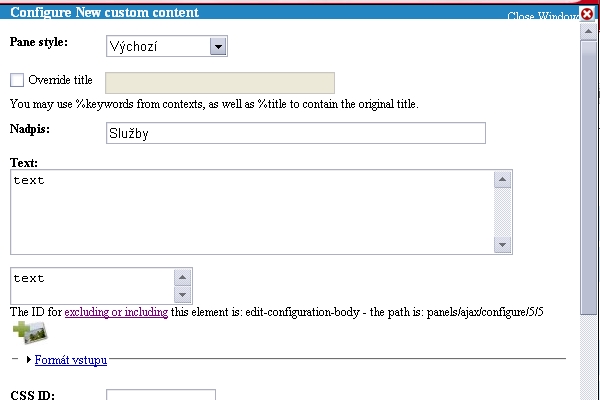
I use FCKeditor and Panels. When I want to create New Custom Content in Panels, I cannot see FCKeditor toolbar (it should appear in every field greater than 1 row in my configuration). I tried also to include the element accorging to instructions in the form ("The ID for excluding or including this element is: edit-configuration-body - the path is: panels/ajax/configure/4/3"), but without success. In addition, I see 2 textareas in the panels content-editing form, when the FCKeditor module is active (see screenshot). Thanks in advance for help.
| Comment | File | Size | Author |
|---|---|---|---|
| #10 | panels-fckeditor.jpg | 56.9 KB | crutch |
| FCK_and_panels.jpg | 80.46 KB | my-family |


Comments
Comment #1
Dubber Dan commentedI've got the same problem as I want to add FCKeditor to the custom content field for the editors on a site, but not for myself.
I've set the editor profile to include edit-configuration-body but nothing is showing up there.
Comment #2
Dubber Dan commentedAnything folks?
Comment #3
Dubber Dan commentedStill no response at all?
I guess I'm going to have to look for a different editor as the site has a lot of panels that the client will need to edit and not having an editor isn't an option really.
Comment #4
mrgoltra commentedsubscribing
Comment #5
Jorrit commentedFCKeditor does not work for dynamically created fields. This is something that should be looked into in a later version.
Comment #6
Jorrit commentedComment #7
jessefulton commented+1
Comment #8
FreeFox commented+1
Comment #9
summit commentedHi,
I think this is still the case with fckeditor.
I know there is a solution using ckeditor, see: http://drupal.org/node/905546 thread, and Earl's reply on: http://drupal.org/node/934356
Does anyone have a solution for fckeditor (I am not able to update to ckeditor yet..)
Thanks a lot in advance for your reply!
greetings,
Martijn
Comment #10
crutch commentedIn mine, not seeing 2 text areas
- the editor link is clickable within panels (using as a popup)
- the fckeditor dialog box comes up
- but it is an uneditable blank window. It looks like a blank window but cannot click cursor inside of white box.
- see screenshot
Comment #11
Dubber Dan commentedI've now migrated the site to using ckeditor which solved it. Plus a much slicker version all round. If you can, I'd definitely suggest it as worthy looking into
Comment #12
Jorrit commented