

Closed (duplicate)
Project:
FileField Sources
Version:
7.x-1.x-dev
Component:
Source: IMCE
Priority:
Normal
Category:
Feature request
Assigned:
Reporter:
Created:
17 Apr 2009 at 00:56 UTC
Updated:
3 Sep 2012 at 21:30 UTC
Jump to comment: Most recent file

Comments
Comment #1
frega commentedcaveat: i am no cck-ninja at all and the file-stuff seems pretty hard-core (so many use cases and dependencies to consider) ...
That said - would it maybe make sense to create the "file"-entries in the database "on-the-fly" if needed as they are selected rather than filter them in the IMCE module?
I created a small patch for the filefield_source_imce_value()-function that handles "The selected file could not be used because the file does not exist in the database."-error by creating file-objects/db-entries on the fly and assigning them to cck-filefield / imagefield.
It does not work flawlessly yet (the filefield validation is kinda tricky to work around) and I currently end up creating to entries in the database for each file twice, which is sub-optimal ... but could probably be resolved with a little more hacking ....
If you think this a worthwhile path to pursue, I'd work on that (maybe open a new issue) and attach the patch ... but maybe that's a totally the wrong way to go about things ... e.g. mixing files handled by "filefield"/file and non-filefield files in one folder on the server could not be looked well upon etc.
Best,
fredrik
Comment #2
quicksketchHa, I just suggested the same thing in #438940: Add ability to use file uploaded via FTP. That's definitely something to consider, I just need to figure out how this should be done properly. I think a better approach would be some kind of file scan during cron, and we'd need to maintain a database table of which files are being managed by by this automatic file scan. This way we could prevent the files from being deleted when their parent nodes are deleted. See my explanation in #438940.
Comment #3
frega commentedthanks for the reply. reading that thread i also understand why the filefield validation was doing ref-counting :) - i'd still prefer to be able to do this on-the-fly (using maybe the same "protect"-these-files-from-being-removed-table), as i have a project where several thousands of files would need to be sync'd ... I'll see whether i can hack on that, and post the stuff in the other issue which seems a little more on-topic for that :)
best,f.
Comment #4
momper commentedsubscribe
Comment #5
mani.atico commentedsubscribe
Comment #6
geerlingguy commentedSubscribe.
Comment #7
emptyvoid commentedAlthough the blog post exclusively uses Drush, could we pull some knowledge from the technique used and build a simple settings page using the FORM API for administrators to:
a) Register the path
b) Run an audit
c) Run an update adding all files not found in the DB?
d) Run an update to clean files that are referenced in the db but point to a missing file?
http://www.freelock.com/blog/john-locke/2010-02/using-file-field-importe...
Comment #8
quicksketchI should note that this is decreasing in importance now that IMCE registers its files upon upload in IMCE 2. This means that all future files uploaded by IMCE are now all usable through FileField, since they are now in the database. We're discussing options for better IMCE integration in #877452: Enable uploading and deletion through IMCE.
Comment #9
danny englanderSubscribing
Comment #10
acondiff commentedany update on this issue? I am actually trying to do the same thing. I too had the same idea to write selected files to the database on-the-fly. Any updates would be appriciated. frega, you said you had a patch for this. if it is working I would definitely be interested in it.
If not I can give it a shot myself although I am not too experienced in this.
Thanks.
Comment #11
acondiff commentedSo I found a solution. In imce.inc in the filefield_sources module, instead of this:
put this:
So this basically creates a database entry for new files that are not in the database. So now when I click insert it inserts the image, although, whenever I go to save my node I get this error: "Referencing to the file used in the field is not allowed."
Does anyone know what is wrong here?
Thanks.
Comment #12
acondiff commentedOk I found a solution for that as well so it does not throw the error. In the filefield module, I just commented out this block of code and it works like a charm.
Comment #13
nuthman commentedThe code mod works for me to list and insert the file, but when I hit save, I get the following error:
Referencing to the file used in the About Image field is not allowed.
(About is the name of my filefield)... Is something left of of the database? Is this a permissions issue?
Comment #14
acondiff commentedYou need to comment the following code out in the filefield module:
I have heard this is the code to comment out in other versions:
This will get rid of that message and allow you to continue without error. Hope that works out for you.
Comment #15
quicksketchPlease stop suggesting changes that open up security vulnerabilities in FileField module. IMCE (1.x) as it is a security risk by itself (at least that it allows deleting of any file on your Drupal site), this change would allow a malicious user to delete any file within your Drupal site by attaching it and then deleting the node.
Comment #16
acondiff commentedOh, I'm sorry. =)
I was just trying to help. This worked for me. I am actually pretty new to Drupal and I was totally unaware. What would be a better solution?
Comment #17
baff commentedsubscribe
Comment #18
RavenHursT commentedHere's a patch for filefield_sources.
Please Review.
Need something better than just commenting out that line in filefied.
Comment #19
jeffwidman commentedsubscribe
Comment #20
TripX commented+1
Happens here too for D7 version (1.3)
Comment #21
TripX commentedHappens in 7.x-1.4 when I want to add a picture through IMCE - following message appears: "The selected file could not be used because the file does not exist in the database."
Comment #22
quicksketchUpdating the title for other users hitting this.
Comment #23
_petja commented+1
IMCE is totally unusable in D7 version because of this.
edit. Spoke too soon... seems that this happens with image field. Haven't had probs with file field so far. It would be nice if IMCE browse worked with image field type too though.
Comment #24
quicksketch_petja: So far you can only reference files within the same field. So if you uploaded all your files into the image field, they'd all work there but not in the file field. Files right now are field-specific.
Comment #25
_petja commentedDidn't know that. Thanks!
Comment #26
paskainos commentedsubscribing
EDIT: The security issue notwithstanding, @RavenHursT's patch here combined with @ufku's patch here seems to present an ideals solution.
Comment #27
ItangSanjana commentedThe problem still persist with image files (7.x-1.4 version).
Comment #28
anthonyR commentedI'm also experiencing this problem with image files in combination with Filefield Sources 7.x-1.3
Comment #29
dwalker51 commented+1
Comment #30
dbusu commented+1
Comment #31
serialbob commentedHi,
It's the same think for me.
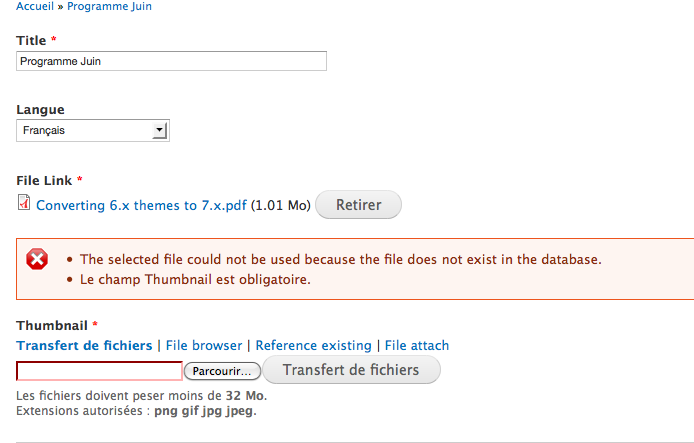
I had created a content type, with 2 additional fields (file, and image_thumb). When i browse server, and when i select the image, the error appear (cf image capture).
I tried to use different file manager, such as elfinder, imce,... and the same problem is here !
I use the Drupal V7.2.
Thanks in advance.
Comment #32
deshiknaves commentedsubscribing
Comment #33
deshiknaves commentedI'm getting the same error message, but these files do exists in my database. All of these images are stored in files_managed. Yet when I add them, I get an error. I can see that the images uploaded with IMCE are not in the database, but the files that I'm trying to reference are one that I have uploaded through Drupal 7 file uploader itself. Yet, I'm getting an error for the file not exisiting. Auto complete method works fine, but not through IMCE file browser. Why would this be?
Comment #34
deshiknaves commentedCorrection to my last post. Actually IMCE is adding the entries to files_managed and files_used for its images.
Comment #35
deshiknaves commentedI found that my issue was that function filefield_source_imce_value($element, &$item)
Was defining the uri by:
$uri = preg_replace('/^' . preg_quote('/' . $file_directory_prefix . '/', '/') . '/', $scheme . '://', $item['filefield_imce']['file_path']);But the preg_replace would not happen because the base path is /site_name/ then $file_directory_prefix.
So to make it work, I added global $base_path; and replaced the preg_replace with:
$uri = preg_replace('/^' . preg_quote($base_path . $file_directory_prefix . '/', '/') . '/', $scheme . '://', $item['filefield_imce']['file_path']);Has to be defined as
global $base_path;at the top of the functionWith IMCE 7.x.1.4 all the images uploaded with IMCE is stored in files_managed and so they can all be used. With the addition of $base_path, it is completely usable and works as expected.
Comment #36
dbusu commentedcomment #35 solved the problem for me. Thx :)
Comment #37
ShadowMonster commentedIn my case I found that $uri is wrong and i was something like /system/files/3/photos/somefile.jpg so i make small fix:
just add after uri pre_replace:
Comment #38
ShadowMonster commentedAnyway I do not know if this is right because system is using file directly from /system/files/3/photos/somefile.jpg and not from predefined by filepath
Comment #39
deshiknaves commented$file_directory_prefix should add in /system/files/ there. What does just $file_directory_prefix output for you?
Comment #40
ShadowMonster commentedIt return root path to files folder as ex:
My files are outside public_html and set as private.
Comment #41
Cebra commentedAre there any new fixes? I got the same problem and I need a solution.... it is urgent. :-(
Comment #42
svendecabooterAttached is a patch for the solution proposed in #35 by deshiknaves, which works fine for us.
Comment #43
ts145nera commentedsubscribe
#42 work for me
Thank you
Comment #44
deshiknaves commentedThanks for making the patch, I should read up on how to make patches. Cheers.
Comment #45
thekevinjones commented#42 worked for me
thanks
Comment #46
hepabolu commented#42 works if (a) there are no language prefixes between the $base_path and the $file_directory_prefix and (b) IMCE needs to serve up public files. Somehow I have a language prefix in the path and the $file_directory_prefix doesn't take into account that private files have a path containing 'system/files' as 'root' of the file directory.
I'm not sure how to create a patch, so I'll explain below. I've replaced the line
with
Comment #47
forexpivots commentedHi guys,
I don't know how to apply a patch, I've tried to do it manually but I've just made bullocks of the file...
Could some of the gents (lasses) here post the modified imce.inc file?
I'd really appreciate...this would same me a few more grey hairs.....
Thanks!
Comment #48
forexpivots commentedI've applied the changes that Helma has mentioned at #46
It worked perfectly.
I've found it first on his blog here:http://www.sourcefusion.nl/cms/content/imce-filefield-sources-private-an...
Thanks
Comment #49
quicksketch#42 (and subsequent comments) are referring to a separate problem with IMCE that should be discussed/fixed in #1183866: IMCE integration doesn't work when Drupal is installed in a subdirectory.
Comment #50
kerios83 commented- subscribe +1
Comment #51
ufku commentedI've created a sandbox project to solve all IMCE-filefield issues. It's a standalone module independent of filefield sources. I may promote it to a full project if it gets enough attention.
Comment #52
donquixote commentedSee also
#1392438: file_managed or not?
(imce queue)
Comment #53
amaisano commentedI have this issue with my D6.2x site. Is there a patch for D6? The code is a bit different for the 6x version of this module... Thanks.
Comment #54
dimitriseng commentedI have tried the imce_filefield module and it looks like it is fixing the issues reported in this issue. Are you considering in using that module or planning to fix this within FileField sources?
Comment #55
BioALIEN commentedI came across this thread when searching for a similar issue. I believe the priority here should be raised to put this on the radar. Here's my feedback:
imce_filefield.module does indeed fix the issues reported here. After extensive testing on D6, here are my thoughts:
+1 to renaming 'IMCE file browser' to 'Filtered IMCE file browser' (Enabled sources).
+1 to porting imce_filefield patches to filefield_sources under 'Full IMCE file browser' (Enabled sources).
+1 to limiting IMCE to the 'File path' (Path settings) in 'Filtered IMCE file browser'.
+1 to remove the ability for add/remove files in IMCE in line with existing implementation in 'Filtered IMCE file browser'.
The above will give the community the functionality they need with the least amount of refactoring. This will make filefield_sources feature complete with regards to integration with IMCE and we'll have one less module to install. I recommend ufku be made a co-maintainer of filefield_sources to help with the above.
Comment #56
grabby commentedI was experiencing this with the private file system in 7.12. I tried #46, though the line that’s supposed to be replaced,
$uri = $uri = preg_replace('/^' . preg_quote($base_path ...........
is
$uri = preg_replace('/^' . preg_quote('/' . $file_directory_prefix . '/', '/') . '/', $scheme . '://', $item['filefield_imce']['file_path']);
in my instance (imce.inc of FileField Sources 7.x-1.4). Anyway, it works despite getting
Notice: Undefined variable: base_path in filefield_source_imce_value() (line 135 of \sites\all\modules\filefield_sources\sources\imce.inc).
each time I insert a file. Did I do something wring? My Drupal is not in a subdirectory.
Comment #57
mattlc commentedHi all,
I want to be able to dynamically add files (images) to managed_files.These files come from an FTP repository in sites/default/files/[repository].
After having applied "patch" proposed here, I ran into present bug troubles.
I finally got throuh it by hacking "imce.inc" file :
I replaced the line
form_error($element, t('The selected file could not be used because the file does not exist in the database.'));by :
This code comes from attach.inc.
The resulting behavior is : when the selected file isn't a drupal managed file, it saves the file as it in the right target directory and attaches it to the node.
I now have to improve it so that the file won't be located both in the repository and in the "field targeted" directory while allowing other fields in other content types referencing it.
This could be done by a good files directories architecture in fields like this one :
- image_repo
- bikes (fields related to bikes)
- boats (fields related to boats)
- cars (fields related to cars)
Forcing user to lookup files in "field directories" could be done by deleting the original file in "image_repo".
More feedback soon.
Comment #58
quicksketchThis is pretty well all covered by #877452: Enable uploading and deletion through IMCE, which will be in 1.5. It adds the ability to attach files that are in different fields and to use the global IMCE preferences instead of the ones FileField Sources provides. This never was a "bug", it's functioning the way it was written to function, however that didn't line up real well with people's expectations of IMCE. In any case, please try out the 1.5 version when it's available (or try the dev version now), and open a new issue with any further requests.