

 Come together with the global Drupal community in Rotterdam, 28 Sept – 1 Oct 2026. Sessions, contribution, connection, and Early Bird savings until 8 June.
I have a strange problem where "Prev" and "Next" links are not appearing in the date browser. It's strange because I have one installation locally for development, and one on a production server (currently testing before launch). They appear to have all the same versions of all the same modules, the view settings for the calendar page are exactly the same (I did a view export and compared them with diff), the templates are the same, etc. But on the local version, the links appear, and on the soon-to-be production server they do not. The divs and "a" tags are there, but no text for the links.
The versions are:
PHP 5.2.6 (local), PHP 5.2.9 (production)
Drupal 6.10
Views 6.x-2.5
Calendar 6.x-2.1
Date 6.x-2.x-dev (downloaded yesterday, both installs running the same version)
I reviewed the template files, the variables set (through the devel module), and everything seems the same. If anyone could tell me what else I might look at, I would appreciate it.
| Comment | File | Size | Author |
|---|---|---|---|
| #24 | calendar-view-export.txt | 6.33 KB | crosshairs |
| #20 | calendar_view_export.txt | 13.34 KB | Milkrow |
| #13 | date-browser-block.png | 22.41 KB | justyn |
| #13 | date-browser-config.png | 37.13 KB | justyn |
| #9 | view-export.txt | 5.84 KB | yan |


Comments
Comment #1
handsofaten commentedIs no one else having this issue? I know I've seen similar problems in other threads...
Comment #2
yan commentedSame issue here with the calendar/date module:
#399972: <prev and next> links in Month view?
So far I couldn't figure out what's the problem. I don't even now if this is a date or a calendar issue.
Comment #3
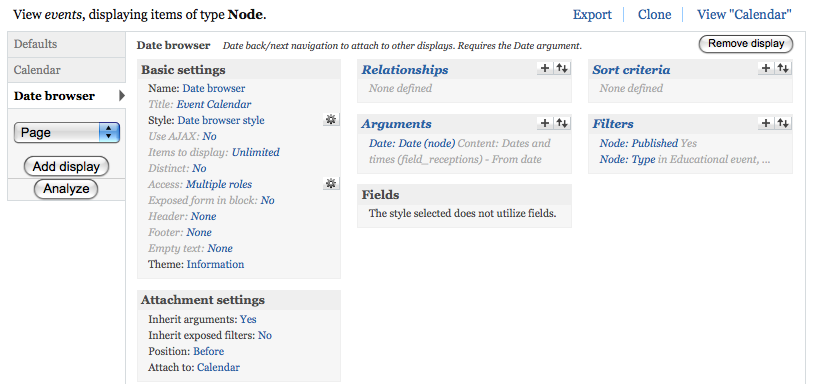
handsofaten commentedHmm... in that thread, people are talking about using "Calendar Navigation" style. I'm not using that, and I don't see a setting for it in my install. I have a view display called "Date browser" which has a group of settings called "Attachment settings." So in the view displays list, I have "Defaults," "Calendar," and "Date browser," which is set to attach to the "Calendar" display (image of the view pane attached). This "Date browser" display type is part of the Date module -- it is formatted by the date-navigation.tpl.php template in the Date module theme folder.
Maybe this is a different issue than the one being discussed in the Calendar issues thread?
Comment #4
PetrL commentedHi has anybody found solution for this missing navigation problem? I just have the same problem and I am not able to solve it. I will very appreciate any hint.
Comment #5
handsofaten commentedWell I just tried performing the following steps to try to uncover the source of the problem: I dumped the entire database from the production site (where the Prev and Next links do not appear) and imported to the testing server (where the links work). The links kept working on the testing server. Then I FTPed the entire Drupal folder from the production server down to the testing server to make sure nothing had gotten out of sync. The links still work on the testing server.
So now I have two installs where I've made sure every file and every setting saved in the database are exactly the same. And on one the links work, and on the other they don't. The only difference I can see is the version of PHP, which when I posted this was 5.2.6 on the testing server and 5.2.9 on the production server. Since I originally posted the problem, the testing server has been upgraded to 5.2.8.
Is it possible that this slight difference in PHP version is causing the problem somehow? Or maybe it is a difference in PHP settings? Can others with this problem post their PHP versions?
I'm really baffled...
Comment #6
yan commentedFor me, both on my production server with PHP 5.2.0 (5.2.0-8+etch15) and on my testing server with PHP 5.2.6 (5.2.6-3ubuntu4.1) the links don't show up.
Comment #7
karens commentedFirst of all, if you're using 6.x-2.1 you're not using the latest code and there is no point doing anything else until you get current.
Second, there is debugging information on the Date project page. You should try those steps on the latest code (and note the definition of what the latest code is) to see if your problem is fixed by getting current.
If you still have problems after that we need more information. There are back/next links in more than one place: the Date Browser attachment and the calendar. If you're using the calendar, you need to be sure you're using the latest version of that module, too.
If you still have problems after trying all these things out, you need to make it very clear where you are not seeing these links, which means, at a minimum, providing an export of your view and information about what kind of date field you are using.
Comment #8
handsofaten commentedSorry for the hassle KarenS, but when I first posted this I was using the latest version. Anyway, I just upgraded to the latest stable release (6.x-2.2) and it fixed the problem for me.
Comment #9
yan commentedOk, so I followed the steps mentioned on the date page (clearing caches, saving fields, running update etc.), but the problem persists. I updated to the dev versions both of the date and the calendar module, the problem persists.
The prev/next links I am talking about are the ones created by the calendar module in the month view. I can manually navigate to the different months (like /2009-05, /2009-06, /2009-07) and the events show up correctly. The problem is just that the prev/next links and the name of the actual month do not show up.
Attached you can see the export of the view I am using. Maybe I just used a wrong setting somewhere, but I really tried and read a lot to make the links show up.
I don't really know how to describe the type of date field I'm using. It's a "normal" CCK date field. What differences can there be?
Thanks for your help.
Comment #10
handsofaten commentedDid you attach a date browser view? In the displays side bar on the left you would have "Defaults" - "Calendar" - "Date browser" (see the PNG image I attached to comment #3 in this thread). I scanned over your text file and didn't see the date browser attachment, but maybe I missed it.
Comment #11
yan commentedOk, I could just solve the problem. The problem was that I created a view on my own because, following Sean Eiffel's screencast I didn't notice that I was supposed to activate an existing view provided by the calendar module. Instead, I created one on my own which didn't allow me to select some options (I don't know why, actually). Anyways, now the links show up and everything seems to work as intended, also with Date 6.x-2.2 and Calendar 6.x-2.1.
Thanks a lot for the help!
I mark this issue as fixed since I was the only one left with that problem, iirc.
Comment #13
justyn commentedSorry for bumping this, but I can't get the Prev/Next links to show in a calendar block. I've tried using ajax, non-ajax, recreating the view several ways, etc. The calendar page works fine but when I add a block to it, I get no header at all (6.x-2.2). I apologize if this is solved somewhere else, but I've been searching the forums all day for a solution and can't find one!
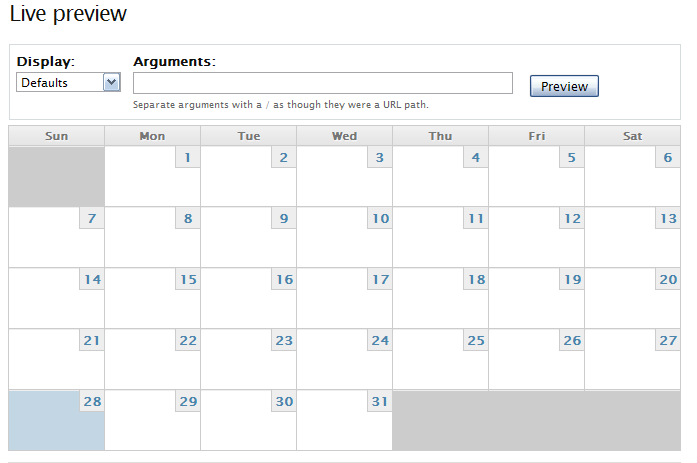
I'm basically creating a calendar to be embedded in a bunch of pages in the main content section. I attached a preview of the rendered calendar and the configuration. Thanks!
Comment #14
arlinsandbulte commentedjustyn:
How are you creating your calendar view? The only REAL way to create a new calendar view is to clone the default calendar view that comes with the calendar module and modify that for your needs.
IT IS NOT POSSIBLE TO CREATE A FULLY FUNCTIONAL CALENDAR VIEW FROM SCRATCH. There are lots of things that calendar does behind the scenes that do not have a configuration UI.
Also, the calendar is actually configured as two view displays. The main view only shows the top navigation portion of the calendar. The year, month, week, & day grids are actually an ATTACHMENT view display attached to the navigation. I suspect that is the crux of your issue above.
Comment #15
yan commentedJust to be sure: Did you read my comment and are you using the default calendar view?
Comment #16
justyn commented1. Cloned Calendar View
2. In Clone, Added a custom block display
3. Overrode the Style because the default "Calendar Navigation" just shows links to Day, Month, Year, etc. Set style to Calendar.
Calendar shows no month title or Prev/Next.
Incidentally, I did the same thing with the default calendar - same results. There was a post that said using the default (not a clone) was the solution.
Sorry, I'm unclear as to what the ATTACHMENT language refers to. Is there a template that needs to be edited or something?
Thanks!
Justyn
Comment #17
arlinsandbulte commented"2. In Clone, Added a custom block display"
That is your problem. You must add a custom ATTACHMENT display and set 'Attach to' to the calendar block.
Comment #18
justyn commentedWorked! Thanks!
1. Cloned Calendar View
2. In Clone, Added a custom block display
3. Overrode the Style because the default "Calendar Navigation" just shows links to Day, Month, Year, etc. Set style to Calendar.
4. Added Attachment display, then attached it to my custom block.
5. Saved, enabled the block in Block Admin, and voila!
Thanks arlin, I never would have figured this out. Needs documentation - I would think this setup would be pretty common...
Justyn
*EDITED*
Is there a simpler way to accomplish this? I noticed that Ajax does not work this way. I just need a calendar block that I can embed in a bunch of pages that won't reload its parent page. I got the calendar_ajax_add.js and it doesn't seem to affect this. I have the feeling that I'm barking up the wrong tree with this configuration.
Comment #19
arlinsandbulte commentedNot exactly sure how it relates, but here is another issue discussing ajax navigation:
#339279: [calandar] AJAX navigation in month view
Also, the attachement stuff is docuemented here: http://drupal.org/node/262064
Comment #20
Milkrow commentedI'm using Date 6.x-2.6 and Calendar 6.x-2.2 and having this same issue. I started over with a clone of the view "Calendar" and made edits to the default arguments/fields until I saw the events I wanted and then tried to adjust the styles of Calendar Page and Month and no matter what configuration I chose, the prev/next links DO NOT show up. I tried creating a new attachment as well and that didnt' work either. I also tried using Date Tools which left me without prev/next links as well. I've tried following directions on two separate strings regarding this issue, and I really could use some advice. I've attached the views export. Please pardon if I'm misunderstanding something simple...I'm really befuddled on this.
I went back and re-read instructions, debugging info on Date and Calendar. I checked my version of PHP (5.2.10) and so I'm assuming I do not have to have the php4 module enabled. I updated to dev versions, ran update.php, cleared performance cache, views cache, ran cron, flushed all other caches, opend and resaved my fields, checked the field display values, edited my views and resaved it and still no prev/next links. The template is NOT loading the end of the link ("prev").
I tried a fresh install of Date, Calendare and CCK on another server and used Date Tools to generate the view and that too had no back/next or prev/next links.
Any help?
Comment #21
arlinsandbulte commentedHow is it working before you do this? I think that might be part of the problem here.
Also, keep in mind that each calendar view is made of two parts: either the Calendar Page or Calendar Block, which only supplies the header (with the title & prev/next links).
The rest of the calendar grid is rendered by the attachment displays below (Year View, Month View, Week View, Day View, & Block View).
Comment #22
Milkrow commentedBefore I make any changes...when I first get the default calendar view, I simply save it and navigate to the path to see if those links are there and they are not. Here is what gets output:
Note that there is no "previous" or
</a>shown.Comment #23
arlinsandbulte commentedWhat theme are you using?
If you switch theme to Garland, is the problem still present?
Comment #24
crosshairs commentedI am not seeing current month heading (ie October 2010) and next and previous links in the block view. They do however appear on the regular page view.
The view started as a clone of the date_browser view. (implementation of date and calendar as described in the Drupal Therapy tutorial here:http://www.drupaltherapy.com/node/76)
I'm using latest dev versions of Calendar Module (6.x-2.x-dev) and Date Module (6.x-2.x-dev) on Drupal 6.18, running on MAMP with PHP 5.3.2.
I've gone through all the debugging tips and also followed advice in #17 above, to create an attachment display and attach it to the block view. Problem persists also when viewing in Garland theme. I've also tried both with pager style set to both full and mini.
The view export is attached.
Any advice much appreciated!
Comment #25
crosshairs commentedOk, I came back to this after some sleep, and had it sorted in 2 mins! The date browser simply needs to be attached to BOTH the page and the block. Just goes to show it's not really best trying to solve issues at 2 in the morning, especially when the solution is staring you in the face! ;)
Comment #26
yan commentedI think this has been fixed since Milkrow (#22) isn't responding anymore.