

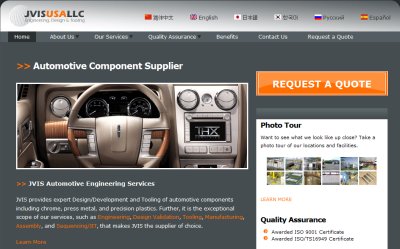
 JVIS USA LLC is an international supplier for automotive components and tooling with facilities in 6 countries and customers all over the world. Their website helps them introduce their products to auto makers.
Going multilingual
When JVIS commissioned their website, they requested just a few static pages. It was built as a simple static HTML site (no CMS) and in English. Very soon after launching their new site JVIS decided to localize to Japanese, Chinese, Korean, Russian and Spanish. These are the languages spoken by their larger clients.
At that point Jason Marshall contacted us about translating JVIS' website. It was already built (as a collection of 23 HTML files), ready to be translated. Our translation service would have produced another 92 static HTML files which JVIS would have uploaded to their server. It was clear that JVIS was going to be adding new content on a regular basis and maintaining it all in several languages without using a content management system would have been a very unwelcome task.
The likely possibility of turning a client from being happy to frustrated, due to this manual content management, concerned us very much.
We suggested to Jason Marshall, the web designer who built JVIS website, to first migrate it all to a CMS and only then begin the translation process. The first choice was Drupal, given its powerful multilingual capabilities. Maintaining a multilingual Drupal site would be much simpler, not just for us, but mostly for the client. From the client's point of view, only English texts would need to be managed. Drupal would automatically handle everything else.
Migrating to Drupal
The existing static site was already online and migrating to Drupal had to be transparent. The original design was converted into a Drupal theme. Then, we used the paths module to replicate the exact URL structure so that pages that are already indexed by search engines, remain the same.
All the site's navigation was originally implemented as a top bar with drop down items, so Drupal's menus fitted that exactly. Blocks placed in the sidebar implemented the rest of the functionality and the site's migration to Drupal was complete in about a week. We were now ready to begin the work we were hired to do - translate JVIS site.
Adventures in translation
Translating the content in JVIS was straight forward, but as soon as most of it was complete, the real problems began appearing. Problems included broken links between translated pages, missing images and Flash and missing translation for block contents.
The translators working on this project don't know anything about how Drupal works and how nodes, menus and blocks are built, so they are not able to fix technical problems (like changing links from /services/engineering.php to /ko/node/59). The web designer doesn't understand Korean so doing those fixes manually would have been a rigorous task.
Instead, the translation module took over all the technical issues in this project. The web designer migrated the English pages to Drupal, the translators translated, and the translation module placed everything where it needs to go.
Drupal proves very reliable for delivering multilingual contents. The node translation, along with Drupal's string translation render the correct text for every element in the page. We found it much easier to use with Drupal's standard elements than with custom PHP functions.
As soon as we tried implementing custom PHP functions in the theme, rendering the correct language became a challenge. We discovered it's much easier to customize the theme's CSS in order to get the desired results and keep using Drupal's standard elements than to write our own.

Communicating with visitors in 6 languages
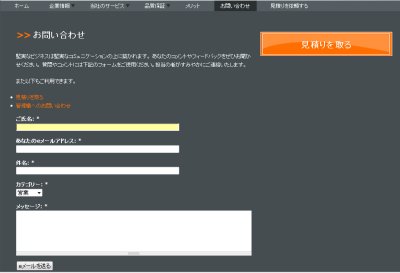 JVIS global website now welcomes visitors from different countries speaking different languages. All, pages, including the contact form are fully localized.
The next step for JVIS website is adding a support ticket system with built in back and forth translation. This would allow visitors to communicate with JVIS in their own languages. Each visitor to JVIS site may be an important decision maker in the automotive industry and it's crucial to reduce communication barriers to a minimum.
We'll be happy to tell more about that when it's ready.
Modules
This project uses only existing contributed modules. The major modules used are:
- Internationalization (i18n) - used to turn the site multilingual.
- Path - used to keep the exact same URL of pages as in the previous implementation.
- Language icons - used to display country flags next to language names.
- ICanLocalize - used to translate the contents from English to the rest of the languages.
Who did what
Jason Marshall created the theme for the new JVIS site and rebuilt the entire site on Drupal. Amir Helzer and Bruce Pearson of OnTheGoSystems,Inc. are responsible for the ICanLocalize translation module.

Comments
Interesting choice to go with
Interesting choice to go with ICanLocalize. I recently built a back end system for our team of translators, but I guess this could be more efficient if you're comfortable outsourcing content translation.
The site looks excellent, congrats on a job well done.
--
John Forsythe
Need reliable Drupal hosting?
It's better to add path alias
It's better to add path alias for other languages instead of just /lang/node/nid
The User Login block is not translated
The User Login block is not translated, the others are great!
I noticed that as well
I noticed that as well
ICanLocalize Translator vesus Translation Overview?
Never heard before about "ICanLocalize Translator"... have this compared with "Translation Overview" (http://drupal.org/project/translation_overview)? What are the differences?
I'll cover that in our blog
I'm going to write a features comparison between the Translation Overview / Translation Table and ICanLocalize Translator in our blog:
http://drupal-translation.com/blog
Also, I'll be in DrupalCon 2009 in Paris and will hold a BoF session about it there:
http://paris2009.drupalcon.org/forum/delivering-multilingual-sites-icanl...
Cheers,
Amir
From the client's point of
I hope you had translators to post translation of each english content. Drupal probably does not do the translation of content on its own. You need to create a node for every language.
Great work!!
cool
this looks great. I can think of heaps of times i could have used this. i think I'll be a user of this very shortly. cheers. Phil. http://philstevens.ning.com/
Page not found
http://www.jvisusallc.com/get-a-quote/index.php :(
works now. Nice site and good
works now.
Nice site and good work :)
not works now.
and this menu is not good: http://picbite.com/image/59882lbhga/
Cool, but...
my language selection doesn't stick. If I select a language, the page switches to that language. When I click to get a quote, it switches back to English. However, it renders in the language when I select the desired language again. Awkward? As a user, I'm expecting that the site remembers which language I chose while I'm still in the same session.
Otherwise, cool site. Clean and concise.
Need to redirect back to the correct language page
You're right about this. We need to change the RFQ and contact form so that after contacting, it redirects you back to the page in the correct language.
We've neglected this a little as we're busy on a major addition to the contact system. Instead of a simple email contact, we're pushing this more towards a multilingual support ticket system.
__________________________
Nice site I like the language change options, as above posters have mentioned the “get a quote’ page is in English. Might be good to fix that for potential clients.
awesome work....
awesome work....
I work at Drupar.com
beautiful work! congrats! i
beautiful work! congrats!
i crashed and burned in my feeble attempt to do a multilingual site.
ps the word 'espanol' is under the japan icon on my computer, i am using chrome browser.
The site still has some display issues
Yup, the site has some irritating display issues. These problems are examples of too tightly designed layout. When you do layout with fixed widths or assume certain elements will have certain sizes, you get overflows when translating.
display issues
Yeah when doing a multi-lingual site I either did two things:
use a body id (supplied by the back-end) to have different widths per language, or often I could stuff the longest language in something like a button, and size for that.
The worst is things like floated horizontal menus where if every menu item gets longer due to a language, your floats start to wrap, even if the page is flex-width or liquid— because someone will have a small monitor anyway. A designer working in that language would have used a completely different style/layout if lengths were longer at the start.
A good example of why designers need to be very aware of content when designing. It's actually pretty hard to separate "design" (colors, placement) from "design" (usability, information architecture, navigation).