

Closed (fixed)
Project:
Administration menu
Version:
7.x-3.x-dev
Component:
Code
Priority:
Normal
Category:
Feature request
Assigned:
Unassigned
Reporter:
Created:
2 May 2009 at 02:21 UTC
Updated:
13 Aug 2009 at 03:12 UTC
Jump to comment: Most recent file


Comments
Comment #1
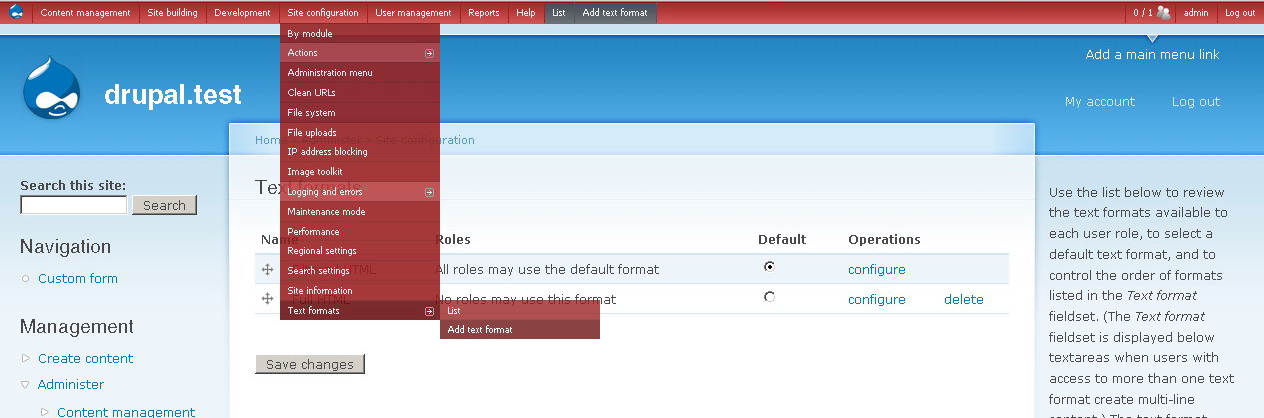
gddActually, not to get into scope screep mode, but what could be really useful would be one color per role, plus one more for uid 1. This would be really useful when jumping around testing on various roles, since I'm sure we've all had the experience of accidentally being confused because of forgetting to rest back to admin or whatever. It would be a nice visual indicator.
uid 1 should def. be red though. DANGER.
Comment #2
sunHeh. The hover "effect" is actually nice...
Comment #3
gddFinally got to this. The patch is actually against HEAD. I like having the visual indicator of user 1, this is a good addition.
Comment #4
sunWell. I'm not really satisfied with those quick-n-dirty applied colors (too "neon"/aggressive), so thanks for your feedback - I'll revamp the colors a bit and commit afterwards.
When this has been committed, it also serves as good example/template for advancing on Color module integration. I like your idea in #1 to be able to setup different colors per role. :)
Comment #5
sunCommitted to all 3.x branches.
Comment #6
sunComment #7
niklp commentedIs there any chance this could be made optional? I generally only *ever* use this module for uid 1, and I really don't like the new look! [Edit: compared to the sexy, sexy black ;) ]
Just a simple "enable highlight for uid 1" checkbox in the settings would be great - when in production, or if development is being done by various roles, then this could be checked.
Please? :)
Comment #8
dave reidYeah, the red is very grating when working in development sites, but I can see how it could be useful in production. +1 to making this optional (enabled by default). I'll try and get a patch on this today.
Comment #9
marcvangendSubscribe, I too find the red background too pronounced while developing.
Comment #10
sunHeheh.... hey, why haven't you all been here when I asked for reviews? ;) :P
I'll wait for some more subscribers and will post revised colors then.
Comment #11
smk-ka commentedSubscribe :)
Instead of a setting, I wonder if it would be enough to just make the username appear in red, instead of the whole admin menu bar?
EDIT: Scratch that, I forgot that the user switcher is tied to the devel module.
Comment #12
marcvangendHere is a simple patch to make the red bar dependent on a setting.
Comment #13
miklMay I suggest that we introduce a new icon instead of recolouring the entire menu? Perhaps a small lightning with "logged in as superuser" title-attribute (that appears on hover on proper webbrowsers ;)
The toggling of the red colour is an okay compromise, but I'd like the ability to see when I'm logged in as super-user without the colour clashing with my design, and black works almost anywhere :)
Comment #14
niklp commentedNow now Mikl ;) The icon would not be so obvious - if you were flitting between uid x and uid 1, you would easily overlook the icon. The idea of the red background is to make your presence as uid 1 VERY obvious. You even have an option to turn it off!
Fussier people can always override the css... :)
Comment #15
AmrMostafa commentedDo I hear someone saying let's use Farbastic for that? :P
Comment #16
smk-ka commentedI just learned from sun that the username shown in DAM actually is *not* depending on the devel module. Therefore, I'd like to renew my proposal (see #11) of coloring the background for just the username bit of DAM, decreasing the otherwise strong visual impact (see attached screenshot).
Comment #17
michellePut me in for a +1 to make it optional. I commented out the bit of code in the module and so can see that it could be wrapped in a simple option check. I don't think you need to get fancy like color pickers or anything. Just feature on or off.
FWIW, I decided I actually like having this on one mostly finished site where I'm _not_ usually in as UID 1 and I switch between the two in the same browser. But most sites I'd like to turn it off for since I actively work on them in UID 1 and the red is too much.
Michelle
Comment #18
psynaptic commented+1 for making this optional. The red is really putting me off.
I'd like to see other options for the CSS too. I said I was going to look into this but not had time to blink lately.
I'd like to be able to select options for the following:
Of course, this can all be done in the theme so if you think that's better than built-in options then fair enough.
Comment #19
grendzy commented+1 for optional. The red hurts.
Comment #20
marcvangendGood to see all your +1's... why not test the patch from #451270-12: Add visual indication when working as uid 1 so we can set this to RTBC?
Comment #21
psynaptic commentedI studied the patch and there is nothing in there even remotely non-standard. All it does is add a form item and variable condition. Not really worth testing to be honest as there is nothing that could go wrong with this patch.
Needs committing though so marking as reviewed and tested to flag to maintainer.
Comment #22
marcvangend@#21: My thoughts exactly, but still: thanks for reviewing.
Comment #23
seanrI just reviewed it as well and see no problem with it either. Let's get this committed, please.
Comment #24
jensimmons commentedI hate this red color. As a designer, it really screws up my ability to see what I am doing. Please yes, let's make it optional.
And let me get the black back for user 1.
It is a good idea to be able to mark user 1 v. other users, and production v. staging v. dev installations (#461264: Add visual indication when working in development/staging environment). I think the best solution would be to create a way to set the color for a site globally, and/or for certain users... and then include in the module 5-8 different colors. Make black the default, and then we can use the color-markings in any way we wish.
I might mark production green, and staging blue, while dev is black. I might make it black for my clients' login, but blue for me so I know which experience I'm working on at that moment. Etc.
It seems the Drupal-way to provide the tools, and then let each developer set it up as we wish for the situation we are in at that moment.
Jen
Comment #25
marcvangendJen, I agree that different (configurable) visual indicators can be really useful, but I think that we have to watch out that we don't drift away from what admin_menu is. To me, the sophisticated system you describe sounds more like an add-on than something that should be incorporated in admin menu by default. I am certain that something like this would get bigger and bigger: other users will ask for coloring based on content type, taxonomy term, organic group etc. etc. (Hey, why not create a module that generates CSS on-the-fly based on all kinds of criteria, allowing you to change the color of anything, instead of just the admin menu? But on the other hand: that's what body classes are for.)
By the way, I think that 'the drupal way' is more than just a lot of options for the developer to choose from. Looking at the D7UX principles (http://www.d7ux.org/), changes like this should try to 'make default settings smart'.
Comment #26
sunI have to insist on feedback on #16.
Comment #27
dave reid+1 for making it just the username section *and* +1 to making it a CSS class so it can be changed. I can live with seeing a part of the menu bar I don't look at during development being red.
Comment #28
michelleI'm with Dave on that. I don't mind a tiny bit of red. I just don't want the whole thing read. Ironically, though, as jarring as it is, it's actually easier to read the menu items on the red. Still, though, I'd rather squint a bit and keep the black background.
Michelle
Comment #29
marcvangend+1 for Dave in #27.
What do you think, would there still be a need for the optional setting from #12? I don't think so.
Comment #30
Jorge Campo commentedufff, for a while I thought there was something wrong with my database or something else. ;)
I rather have the black too...
A non technical reviewer...and a lover of this fantastic module. Great job!
Comment #31
szczym commentedhelo
just my 2 cents: +1 for getting rid of red color from admin menu, black was sexy and non intrusive. but +1 for highlight admin user name in red.
btw: thanx for genius module!
Comment #32
finedesign commented+1 to make the red optional
Comment #33
Docc commented+1 on the optional red. Black is much better.
Comment #34
niklp commentedDon't miss the point of this issue. The red is only there when you're logged in as uid 1, and the conversation is really about how best to enable this "notification".
Comment #35
markus_petrux commentedhaha... we thought in the office the new look of the admin menu was so sexy that everyone wanted to tweak the color of its own menu. But only mine is red sexy. lol
So maybe there could be a CSS class wrapping the whole admin menu that carries the user id, so that anything can be themed at will using the proper selector.
Comment #36
guillaumeduveauI like it :)
Comment #37
psynaptic commented+1 for themable admin_menu!
We should really have a skins feature. I started to work on one but didn't have time to get anywhere decent with it. Would be super simple to implement.
Comment #38
marcvangend(no offense, psynaptic...)
-1 for skinning and other cosmetic enhancements. Admin Menu is a tool and IMHO it should be as lightweight as possible and never conflict with my site's design. A visual indication for user #1 is a useful feature, skinning is not.
Comment #39
wanjee commentedI totally agree with idea of #16 and I also think there should not be any skinning feature or option as told by #38.
Just a small visual indicator is enough and will avoid the need of a configuration variable to color admin_menu or not.
Comment #40
niklp commentedThat is all.
Comment #41
psynaptic commentedI'd rather set a variable in an install profile than add CSS to the theme each time to control the opacity, colour, etc.
Comment #42
Christopher Herberte commented+1 optional red
Comment #43
seanrROFL at #40 - that may be the best suggestion yet. How about wrapping that in marquee tags, though? ;-)
Comment #44
choster commentedFrom a usability standpoint, may I +1 for #16. Red, in the West, signifies danger or error. When I first installed the dev and saw the red, I assumed it meant there was a problem with the site, and scrambled around the logs looking for errors or how I might have borked my installation. In fact, I think this might be worthy as a future feature, to indicate when the db schema is out of date, or a security upgrade is necessary, or other problems occur.
There's nothing inherently erroneous about handling administration tasks as user 1, however, so I wouldn't consider it appropriate to highlight the entire bar when logged in as such, perhaps only the username. Thus the alternative proposal to let the color of the bar be adjustable— but only in its entirety— leaves me cold. That can be accomplished by editing the CSS easily enough.
Comment #45
sunThanks for reporting, reviewing, and testing! Committed attached patch to all 3.x branches.
A new development snapshot will be available within the next 12 hours. This improvement will be available in the next official release.
Comment #47
niklp commentedY'know... now it's gone back to black... I kinda miss the red...!
Comment #48
guillaumeduveau+1 @ #47 but well...