

Closed (fixed)
Project:
Taxonomy CSV import/export
Version:
6.x-4.3
Component:
Code
Priority:
Normal
Category:
Feature request
Assigned:
Unassigned
Reporter:
Created:
6 May 2009 at 18:25 UTC
Updated:
25 Jan 2013 at 17:55 UTC
Jump to comment: Most recent file


Comments
Comment #1
Daniel_KM commentedHi,
The size of your file is not very big, so it can be an Apache / php memory error or hosting issue. To be sure origin of problem (if it's your file, your installation, your server or the module), you can test your file on a virtual server as xampp, or send me the file in order to I try it.
As there is currently some issues on memory, I'll work on ways to reduce the use of memory in a future release.
Regards,
Daniel Berthereau
Knowledge manager
Comment #2
francewhoaI can confirm this issue. Mine return the following error message
My CSV file is about 1MB. And 3 levels depth. UTF-8
If I split the 1MB CSV file in five files of 200KB no error message is return. In other words a CSV file with 3516 lines works but a CSV file with 17580 lines doesn't.
According to my network monitor and logs the issue is during the uploading process.
Steps to reproduce the issue:
-Upload a CSV file over 1MB
-The error will be return after a few secondes. During the upload process. And before the Drupal importing progress bar.
Comment #3
francewhoaMaybe with the following new feature request we could import larger files. That is if the CSV file is hosted on the same server as your Drupal though http://drupal.org/node/529480
Comment #4
Daniel_KM commentedHi Onopoc,
Thanks for your idea. I add it later. Currently, i rewrite code in order to make it less memory intensive. I prepare also a multi-step import mechanism in order to divide automatically big files and import them without memory error.
Sincerely,
Daniel Berthereau
Knowledge manager
Comment #5
francewhoaBonjour Daniel. Sounds great. I'll be happy to contribute testing with large CSV files.
Comment #6
slandry-2 commentedDoes anyone have any thoughts on how to get around this problem? I have a 3 level taxonomy with over 35,000 terms and it would take me a long time to copy and paste all those lines.
I get a fatal error in "taxonomy_csv.module"
Can I bump that number up to something like 100000?
Comment #7
francewhoa@slandry: Same thing here. I have a vocabulary with over 800,000+ on three levels. Future version of taxonomy_csv module will be able to import large file with a multistep process. Read more at http://drupal.org/node/455506#comment-1847136
In the meantime the following workaround worked for me. It's a pain but it does work:
1-Increasing your PHP limit settings on your local computer. (RAM, execution time etc)
2-Importing your vocabulary on your local computer. Using the 'taxonomy_csv' module.
3-Exporting your local site vocabulary table. Using 'backup_migrate' module, phpMyAdmin or MySQL Admin.
4-Importing the vocabulary table in your remote site. Using 'backup_migrate' module, phpMyAdmin or MySQL Admin.
Comment #8
Daniel_KM commentedHi,
Slandry, you can increase the size of 4096 (it's the size of one line), but it will not help you to import a very big file. So use Onopoc's idea. Next version will be released next week for testing and will divide automatically big files.
Sincerely,
Daniel Berthereau
Knowledge manager
Comment #9
slandry-2 commentedI jacked the RAM to 1.2GB and the execution time to 100minutes and it still runs out of memory. The taxonomy is 3 levels deep and contains 35,000 rows. I still get an Out of memory Fatal error.
I'm thinking about using this method next: http://drupal.org/project/taxonomy_xml
Any thoughts on whether I will run into similar problems? Sounds like a crowbar workaround.
Comment #10
francewhoaIf #7 doesn't work another option is to split your CSV file in smaller chunks. For example if your CSV file is 2,000KB then split it in 10 smaller chunks of 200KB. If 200KB is to big then try smaller. And so on. This will work 100% sure. But creating 10 chunks and importing them one by one is a pain.
Splitting you CSV file can be done with a simple text editor. Make sure the CSV files format stay UTF 8.
Comment #11
Daniel_KM commentedHi,
The new release 6.x-4.1 of Taxonomy csv improves the use of memory by the import batch.
Now, it's less memory intensive and you can import 1000 lines and more with a base xampp install and 10000 and more if you use Linux and have access to Apache and Php memory, depending of your other installed modules.
Furthermore, this release adds a multiple steps import: you only have to click several times a button to import automatically divided parts of a taxonomy.
So it's now possible to use taxonomy_csv even with big taxonomies or little memory server.
Regards,
Daniel Berthereau
Knowledge Manager
Comment #12
francewhoaAwesome. Thanks Daniel. I'm mouth watering ;) I'll test. Then post result here.
Comment #13
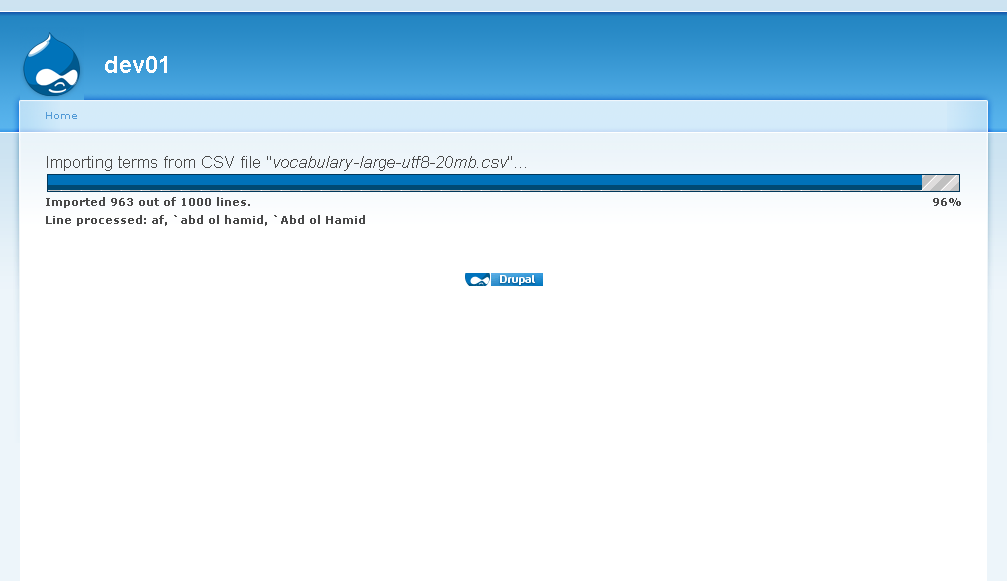
francewhoaIt works :)
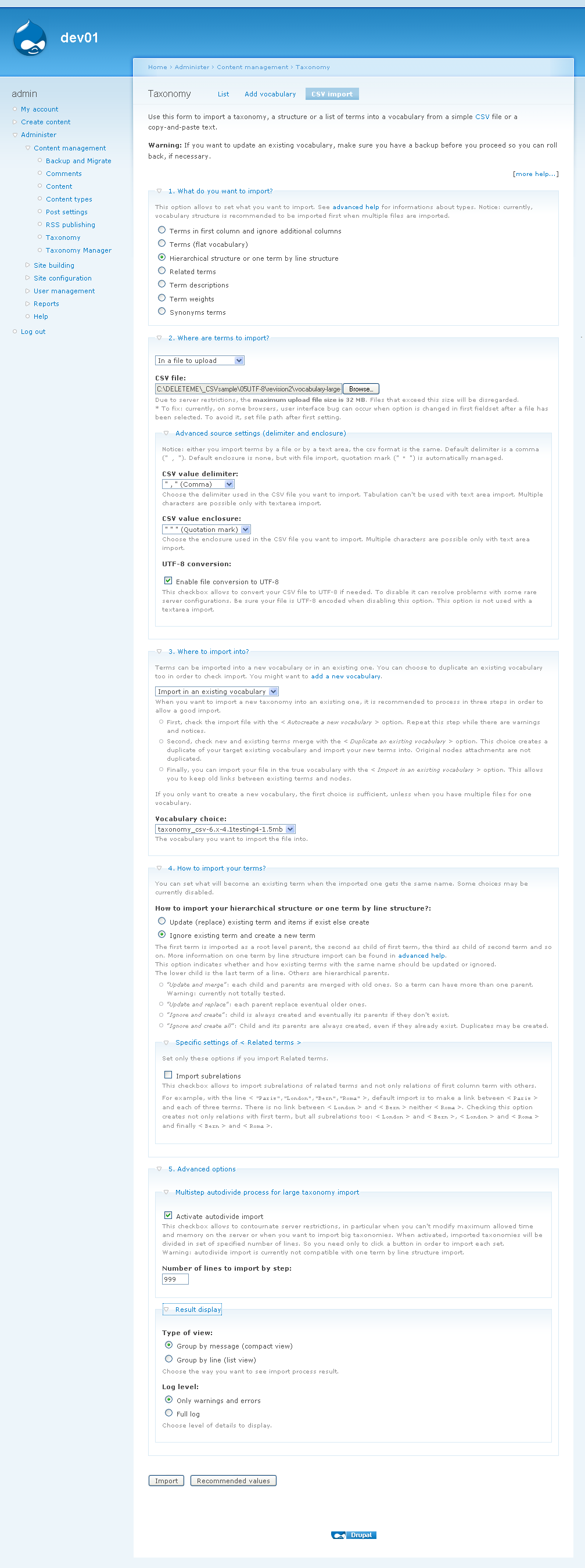
I like the message after step 1: "Ready to import terms in 7 steps (666139 lines to process / 99999 lines by step)." A great time saver because if there're to many steps such as 600+ steps then I can cancel the current batch and setup another one.
Tested with:
-taxonomy_csv-6.x-4.1
-1.5MB .csv file
-20MB .csv file
-Drupal 6.13 fresh install
-Server with 32MB RAM limit on shared hosting
-PHP 5, MySQL 5
-Find bellow attached settings for detail
-Windows XP
-Firefox 3
Comment #14
francewhoa@all: If someone else wants to contribute memory usage testing here are 2 large taxonomy files. And a small one for quick test. To download right click on below link then select
Save Link Asoption.href="http://ccsbcy.ca/_drupal_org_forums/large-taxonomy/vocabulary-large-utf8..."
target="_blank">vocabulary-large-utf8-1.5mb.csv
href="http://ccsbcy.ca/_drupal_org_forums/large-taxonomy/vocabulary-large-utf8..."
target="_blank">vocabulary-large-utf8-20mb.csv
href="http://ccsbcy.ca/_drupal_org_forums/large-taxonomy/vocabulary-small-utf8..."
target="_blank">vocabulary-small-utf8-2kb.csv
File format is UTF-8
3 levels deep
Note that those links aren't permanent. So if they don't work that's normal.
Comment #15
Daniel_KM commentedHi,
Onopoc, thank you for your test and comment. I'll change the code to allow more than 99,999, I do not think such large taxonomies!
That's why I'm going to add an option to delete all the messages log, which is why memory errors occured (already in development snapshot). For my part, I use this module to import bad writed files and Taxonomy CSV allows to check it before import. With the new option, checks are always realized, but the use of memory decreases largely. So now, on a good configured server, your 20 Mb file can be imported in one step...
Daniel Berthereau
Knowledge manager
Comment #16
francewhoaThanks Daniel for increasing the 99,999 limit. The module is now super scalable :)
The 20MB taxonomy is indeed very large. This is actually a fraction of a taxonomy that I use. The full .csv file size is 82MB. It contains all Countries, Cities & Accent Cities of the world. Very handy for address form with a autocompleted widget. Such as http://drupal.org/project/taxiselect Another large taxonomy is about 15MB containing book id numbers.
Comment #17
alan d. commentedA duel batch process would be nice. Using Onopoc vocab with a 1000 line per import requires hitting "next 1000" 667 times.
Comment #18
Daniel_KM commentedHi,
Next version (4.3) will remove any size limit and memory congestion. Currently, all lines (or partial in case of multistep import) are loaded into memory. Next version will import lines directly from uploaded file.
Regards,
Daniel Berthereau
Knowledge manager
Comment #19
francewhoaSounds great. I'll be happy to contribute testing for 4.3.
Comment #20
Daniel_KM commentedComment #21
truyenle commentedHow about drupal 7.x-5.10? I have the same issue on this for a csv file of 83MB.