

Closed (fixed)
Project:
Web Links
Version:
6.x-2.x-dev
Component:
User interface
Priority:
Normal
Category:
Support request
Assigned:
Unassigned
Reporter:
Created:
23 May 2009 at 19:07 UTC
Updated:
1 Jun 2009 at 18:04 UTC
Jump to comment: Most recent file


Comments
Comment #1
rmiddle commentedWe had a bug around when RC-1 was released that caused none of the group listings to show. but that should be fixed in the latest version. Please check and make sure "Blocks by group" is either check or not checked in all groups that can though things off.
Thanks
Robert
Comment #2
jupiterchild commentedThanks. I can see the settings now.
I'm sure in previous dev releases this was just one setting i.e.:
1 block was created for All
Recent weblinks
Random weblinks
Popular weblinks
Now I have
Recent weblinks
Random weblinks
Popular weblinks
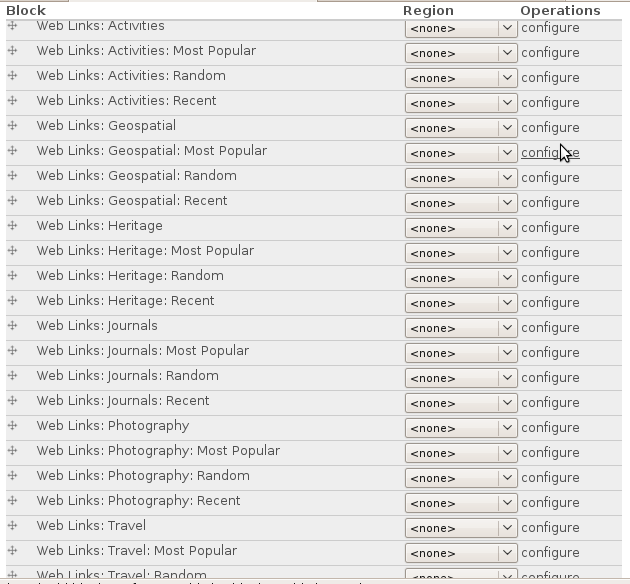
blocks for ALL GROUPS. See screenshot. Is this change by design?
Comment #3
nancydruThat's what the "Blocks by Group" option does. Yes, it is by request. If you turn off all those checkboxes, it will go back to one block for all. If you only turn on some of them, you will only get blocks for the groups you select.
Comment #4
jupiterchild commentedWhich takes me back to my original problem.
With the group block settings unchecked I am still missing Recent weblinks, Random weblinks and Popular weblinks.
Unlesss I am missing something these 3 blocks are no longer available.
Comment #5
rmiddle commentedJupiterchild,
I can't duplicate this issue. I went in and selected 3 groups and put a check next "Blocks by Group" The All groups disappeared as expects. I then went in and removed all checks next to "Blocks by Group" and although there was an error then were it is telling me the group by for every category was not getting created the all blocks reappeared.
Thanks
Robert
Update: Dang that was a sucky typo. I can't duplicate what jupiterchild is reporting as happening. Sorry Nancy.
Comment #6
nancydruHmm, I did what you said and it doesn't happen for me...
Comment #7
nancydruFinally got a picture
Comment #8
nancydruI just rolled 6.x-2.0-rc2 so you don't have to use the -dev version.
Comment #9
jupiterchild commentedNow updated to 6.x-2.0-rc2
Despite checking all the settings and following what Robert described at #5, the Random, Popular and Recent blocks still do not show.
Comment #10
nancydruTurn off all "Blocks by group." It shouldn't matter but make sure "Create block" is checked for at least one group.
Comment #11
nancydruThere was a misplaced } when not using blocks per group. I just committed a fix to the -dev version.
In the mean time, turning on any group's "Create block" will bypass this problem.
Comment #12
jupiterchild commentedNancy
#10 works. I now have the Random, Popular and Recent blocks showing again.
This is what I did:
1) In Weblinks Groups settings I unchecked all 'Blocks by group'
2) In Weblinks Group settings I checked 'Create a block' for 1 group
3) In Drupal Blocks - The Random, Popular and Recent blocks now show in 'Disabled blocks' and can be enabled.
Just as a test, I tried un-checking the single 'Create a block'. Once again the Random, Popular and Recent blocks were missing. So checking 1 'Create a block' in Weblink Group settings does matter. This does not seem very intuitive.
Thanks Robert and Nancy for all your help.
Update: #11 was posted while I was writing #12. This confirms what I had noted.
Comment #13
nancydruYes, it is fixed now, and we decided to create a related issue.
Comment #14
nancydrucleaning the queue