

 Come together with the global Drupal community in Rotterdam, 28 Sept – 1 Oct 2026. Sessions, contribution, connection, and Early Bird savings until 8 June.
Firstly, I love this module! Setting it up was a breeze and so was theming it. It works beautifully.
But it would be nice if the inline fields portion of Views could be supported (Row Style->Fields->Options->Inline Fields). When you choose to display fields inline, they are output in spans rather than divs. The spans have to be manually styled to line up with the rest of the divs in the accordion. Also, if you use the separator option provided in the inline fields section, the rendering totally breaks down.
I think I'll be able to work around all this in my stylesheet but it would be nice for newbies if the module didn't fight with other Views options.
Thanks again for a great module
| Comment | File | Size | Author |
|---|---|---|---|
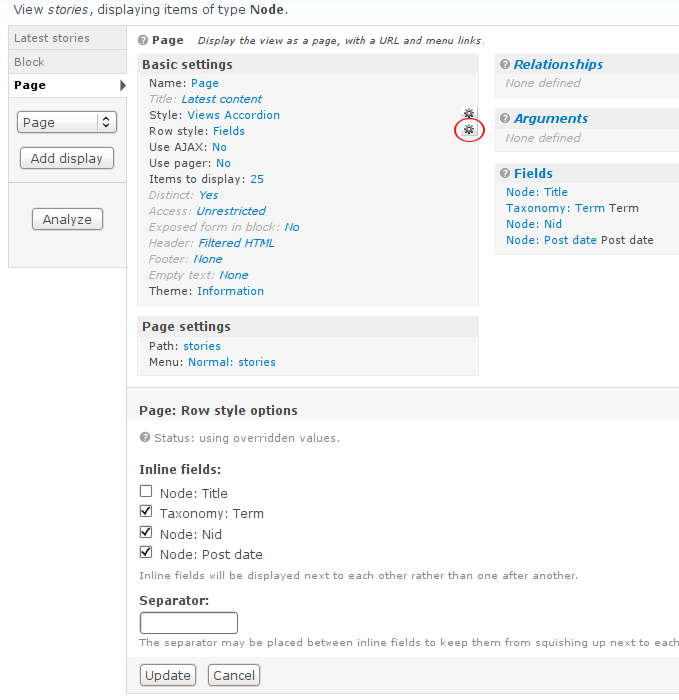
| #2 | inline-fields-settings.png | 67.66 KB | manuel garcia |
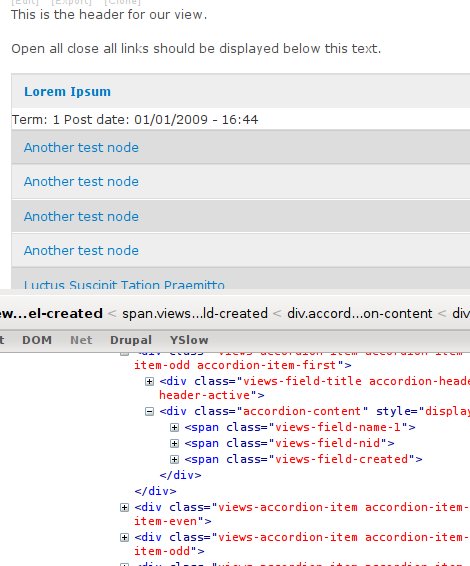
| #2 | inline-fields.jpg | 53.25 KB | manuel garcia |

Comments
Comment #1
manuel garcia commentedI see what you mean melmore,
Easy to fix just float whatever fields to the left as you need, but it'd be nice to have that i guess.
Only problem is the first field should not get this behavior, or it will complicate the js a bit.
I'll look into it ... if you have any pointers as to why it isn't inheriting those options they'd be very welcome!
Comment #2
manuel garcia commentedActualy, I've just found out that it does work with inline fields.
All you have to do is click on the options for the 'Row style', and select which fields you want inline. See attached screenshots.
edit: and if you select the first field to be inline, the js stil works properly thank god, only you have a span instead of a div, but it makes no difference visually in this case.
Comment #3
melmore commentedHi Manuel,
Thanks for looking into this. Actually, it does make a difference in display (at least in my case it did). I had to add the following to my stylesheet to get the spans to line up properly with the divs:
.views-accordion-item .accordion-content > span {
padding: 0.5em 1em;
margin-right: -2em;
}
I used the negative right margin to get around the problem you mention with the first span needing to be treated differently (there's still something weird going on with the text-decoration in ie7 that I need to look into).