

Closed (fixed)
Project:
Filebrowser
Version:
6.x-2.0-rc10
Component:
Administrative Interface
Priority:
Critical
Category:
Bug report
Assigned:
Unassigned
Reporter:
Created:
3 Jun 2009 at 07:33 UTC
Updated:
26 Mar 2010 at 06:26 UTC
Jump to comment: Most recent file

Comments
Comment #1
Yoran commentedAre you sure you didn't check "Leave node permissions to an external module" in module settings ?
Comment #2
ralessi commentedI couldn't find this particular option. Could you give me the path so I can check this out?
Thanks!
Robert
Comment #3
ralessi commentedOk. I found the path (admin/settings/filebrowser).
Box is unchecked, and I don't use nodeaccess module.
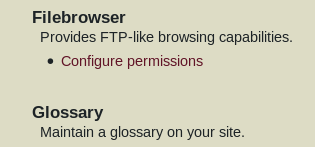
The curious thing is that I can't see any link leading to filebrowser admin page, either in the admin/settings page or in the admin/by-module page, as you can see in the attached screenshot.
Any suggestion about that?
Many thanks again,
Robert
Comment #4
Yoran commentedIf you can see this, you should have something wrong with your Drupal as this menu is directly managed by Drupal and permission are correctly defined :
Comment #5
ralessi commentedYes, I can see this, but the problem remains the same.
To check this out, I started over with a fresh drupal installation and only installed Filebrowser as a third party module. The problem is still the same: I can't see any filebrowser admin link in the admin/settings page, but I nevertheless can access the Filebrowser admin page by typing its url...
If I can do anything to help you further, just let me know.
Thx,
Robert
Comment #6
pthompsen commentedI have noticed the same behavior, with both the current rc10 release and the dev release. Users of any role can see directory listings (and download files) by going directly to the URL, regardless of permissions. This problem has been reported before... I'm curious as to whether ANYONE has actually gotten this module to respect permissions, and how.
Comment #7
SeahamPaul commentedI've had exactly the same problem (pthompsen) when I 'upgraded' from rc4 - no permissions were honoured.
So, I completely uninstalled filebrowser and ensured its mysql table & folders had gone. I also deleted all the content that used it. Then installed nodeaccess to allocate the permissions I wanted. Then installed rc10, created the content from scratch and everything works.
I was even able to allocate difference access permissions to different filelisting pages. - Result.
Congrats to all involved, Paul
Comment #8
Breakerandi commentedI had the same problem (even anonymous can view the directory listings when this is unchecked in the permissions), but I don't want to use nodeaccess module.. Is there any solution?
Comment #9
Yoran commentedCould you give a try at the last dev (as soon as package is built or by using CVS) ?.
Comment #10
Breakerandi commentedSorry, I got no idea how csv works, but of course I will try the next release as soon as it is available.
Comment #11
stefan vaduva commentedI have the same problem. If i'll have some time, I'll try to debug the module to see what's happening. For now I use this hack:
- duplicate node.tpl.php and rename it to node-dir_listing.tpl.php
- at the top of node-dir_listing.tpl.php add
- clear your cache
--
http://vamist.ro
Comment #12
Yoran commentedNormally fixed in dev version if you can give it a try.
Comment #14
jenyum commentedJust a note to say using the dev. version fixed this issue for me, but now I notice there is no admin/settings/filebrowser at all. (Takes me to the main site configuration admin page.) I'm having some other issues and wondering if there's a setting I need to change, but there's no setting page.
Comment #15
dead_account_kill_it_please commentedNo, that's normal, there is no settings for this module, everything is in the node form when creating a directory listing.