Closed (fixed)
Project:
Glossary
Version:
5.x-1.x-dev
Component:
Code
Priority:
Normal
Category:
Support request
Assigned:
Reporter:
Created:
11 Feb 2006 at 22:38 UTC
Updated:
4 Mar 2008 at 22:51 UTC
Jump to comment: Most recent file


Most of my glossary terms are in Hebrew and I would like an alphabar to display Hebrew characters. Currently it is set to display letters 'a'->'z'. How do I change this?
| Comment | File | Size | Author |
|---|---|---|---|
| #54 | glossarymenu.png | 129.92 KB | andrés chandía |
| #48 | glossary-5.x-1.x-dev.png | 134.52 KB | andrés chandía |
| #28 | glossary-5.x-1.x-dev.png | 311.86 KB | andrés chandía |
| #28 | glossary-5.x-1.x-dev-i18n_patched.png | 158.59 KB | andrés chandía |
| #24 | glossary-5.x-2.0.png | 145.78 KB | andrés chandía |



Comments
Comment #1
Ignas commentedFind string
$firstletter = strtolower($term->name[0]);in line 337. Change it to UTF8 version:
$firstletter = mb_strtolower(mb_substr($term->name,0,1, 'UTF-8'),'UTF-8');Comment #2
andrés chandía commentedFollowing up your instructions i could display latin characters like "ñ", thanks a lot, the question now is if you know how to give the desired order, i mean latin characters appear at the end of the alphabet instead of their known position, i mean ñ appearst efter z and should appear after n.
Thanks again if you can help with this.
Comment #3
kubrt commentedHi,
I have added the multibyte and locale support for glossary. So it solves both the issue mentioned above with ( accented characters at the end ) and actually handles the UTF-8 strings properly. Note that you have to add something like
$conf['i18n_languages']['locales'] = array (
"pt-br" => "pt_BR.UTF8",
"fr" => "fr_FR.UTF8",
"en" => "en_US.UTF8",
"es" => "es_ES.UTF8");
into your settings.php (the actual content depends on the languages you use and locales you have installed) to get the locale dependent sorting to work.
Attached glossary-5.x-1.x-dev-i18n_patched.tar.gz is the module tarball containing the patched module, original module and the patch itself.
The code may need more testing...
Best
Marek Tichy
Comment #4
majsan commentedGreat! Fixed my Swedish å.ä,ö too ;-)
Works so far...
Comment #5
martig commentedThe patch won't work for users without php multibyte support. The
mb_prefix should be replaced with adrupal_prefix. Otherwise great work.Comment #6
martig commentedSeems it isn't so simple. I'll try to make a patch.
Comment #7
andrés chandía commentedSorry, i've been working arround, i didn't have enough time to chek this again, but today i did it and i want to thank you "kubrt", because it is working perfectly, as you said the functioning depends on the locales you have on the system, i had to do next extra steps to have your patched version working: (my system is ubuntu server 6.06)
thanks again i'm happy now ;-)
Comment #8
andrés chandía commentedfollowing up with a new question, do you know if its posible to create a custom alphabet, i'm working with a language that for instance does not have "b" as sound nor as grapheme, but for instance it has a sound similar to "tr" that i would like to represent with this same digraph (two letters to represent one single sound) "tr", i mean "tr" would be one of the alphabet letters.
Thanks in advance.
Comment #9
andrés chandía commentedAnother thing, I don't know if the problem I posted in here http://drupal.org/node/159504 is related to the patch, can you check it please, i can not find a solution to te broken related terms in the glossary, thanks again.
Comment #10
andrés chandía commentedAnother thing, I don't know if the problem I posted in here http://drupal.org/node/159504 is related to the patch, can you check it please, i can not find a solution to te broken related terms in the glossary, thanks again.
Comment #11
nancydruComment #12
nancydruCan someone reformat the patch in #3 that a Windows person can use?
Comment #13
gábor hojtsyWow, I was just wondering in http://drupal.org/node/202087#comment-667852 on how the alphabar is constructed, and here I am. Hehe. So reading up quickly on nancyw's request again.
Basically, you can have the first chars of strings with drupal_substr(). What you cannot do in PHP as far as I know is to have a proper ordering function for UTF-8 chars. Actually Drupal uses the backend database, as it has better support for UTF-8 data. So what you can do is to get a sorted glossary term list from the database and then get their first chars (either directly in SQL or in PHP). If missing chars need to be displyed, then all you can do is to put up a setting on the config form where users can specify their alphabet. For easy splitting, you can ask for a comma separated list, as comma is not part of any letter in any alphabet I could think of :) So you explode() on the comma and you get the list of letters. This is for configs. If you need to do the alphabar without config, you'r best bet is IMHO to order in SQL.
Comment #14
nancydruSee also http://drupal.org/node/202087
Comment #15
andrés chandía commentedSo long...
well here i'm again with some problems, once i solved the order of characters, do you remember ñ appearing after z instead of after n, well i have upgrated to drupal 5.6 and the problem reappears, i installed again your patched version but nothing, do you think you can check what is going on with version 5.6
thanks very much again.
Comment #16
nancydruThis is happening with the 5.x-1.x-dev version? That should have all the updates that I know about. I have never been able to open kubrt's patch above because I'm on Windows. Did I miss a part of it?
I'd really like to have this issue fixed before I start on converting to D6.
Comment #17
andrés chandía commentedDo you mean there is no tool in windows to open tar.gz....
well i attach the zip version, may this help?
Comment #18
nancydruYes, Winzip works just fine on all the other tarballs I have tried; it's just that particular one - it looks like a tarball within a tarball. I'll try yours.
Comment #19
nancydruComment #20
nancydruAndrés, can you try out the attached patch, please?
Comment #21
andrés chandía commentedif i apply it to the glossary-5.x-1.7 version nothing happens even though the patch applies well.
if i apply it to the glossary-5.x-1.x-dev version i got this errors on the patch applying:
if i apply it to the glossary-5.x-1.x-dev-i18n_patched version i got this errors on the patch applying:
Thanks for your interest
Comment #22
nancydruHmm. It was built on the 5.x-1.x-dev code, so it should apply. I guess I'll just go ahead and commit it to -dev; it doesn't break anything on my test site.
Please try the new -dev version when it rolls up this evening.
Comment #23
andrés chandía commentedI've downloaded "5.x-1.x-dev 2008-Jan-25" result: the same, if i apply patch i got this message:
if i assume no and i apply the patch i got this:
Comment #24
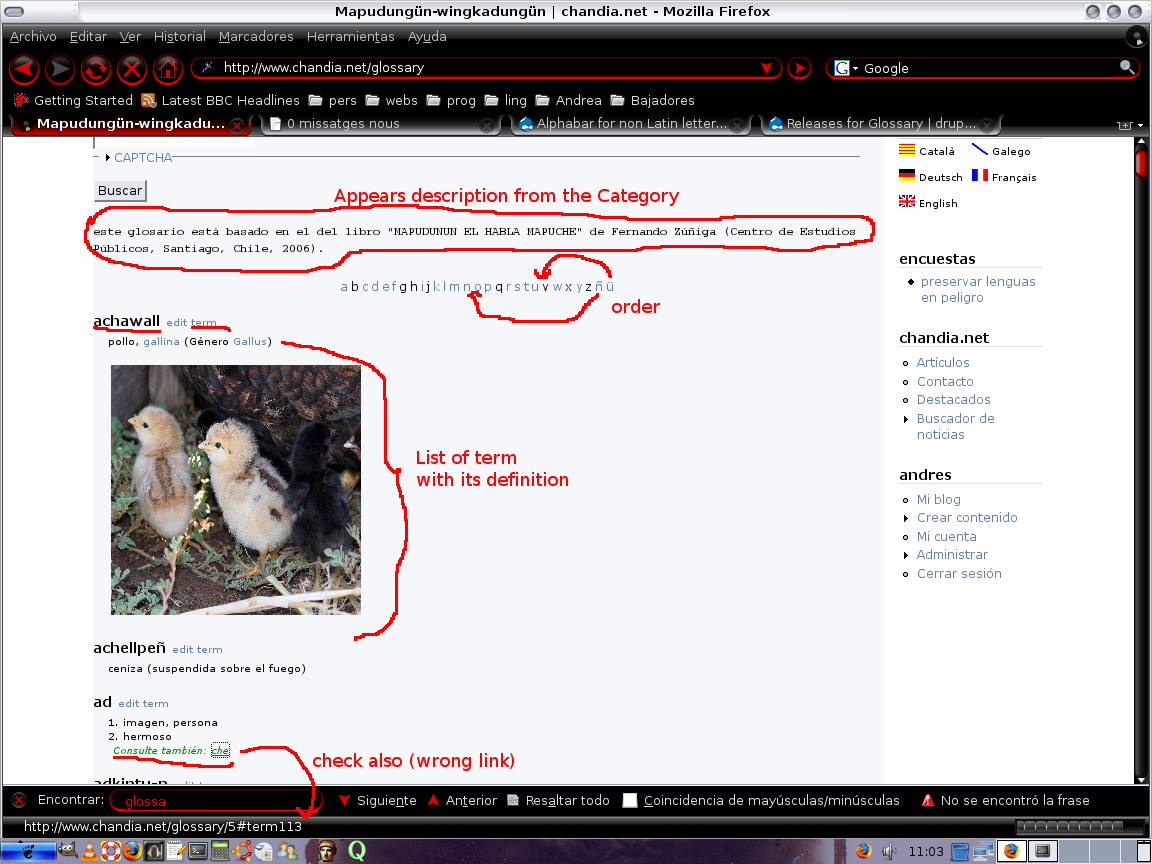
andrés chandía commentedMaking some tests with glossary-5.x-2.... i have found some differences that you can see easily at the images:
glossary-5.x-2.0
glossary-5.x-2.x-dev
...glossary/5#term113when it should be
...glossary/term/113I have found these same differences between some others versions. I hope this helps.
Comment #25
nancydruThe patch is already in 5.x-1.x-dev and does not need to be reapplied. The release notes for 5.2xxx say not to use it. (It was a bad attempt to get the releases problem straightened out.)
Please try the 5.x-1.x-dev version as it is downloaded and see if the problems are fixed.
Comment #26
andrés chandía commentedI explain you: i've downloaded version 5.x-1.x-dev and problems weren't fixed, that's why i did try the patch (on this version), and it gave me the messages i've shown.
Later on further tests i did try version 5.2xxx (without patching) and i gave you a kind of report of what happens with 5.2xxx versions.
But one thing is not directly related to the other.
Comment #27
nancydruThe 5.2 versions are rather behind on updates, so I can't tell much from those descriptions. The 5.x-1.x-dev is the most recent attempt to fix this and should have all the updates from the patch above. A more detailed description of problems with that version (and maybe some screenshots) would help. Obviously I don't have these problems in English and that's the only language I can speak (although I can read a bit of German, French, and Italian). So I have to rely on those who are trying to adopt this module to provide as much detail as possible.
Comment #28
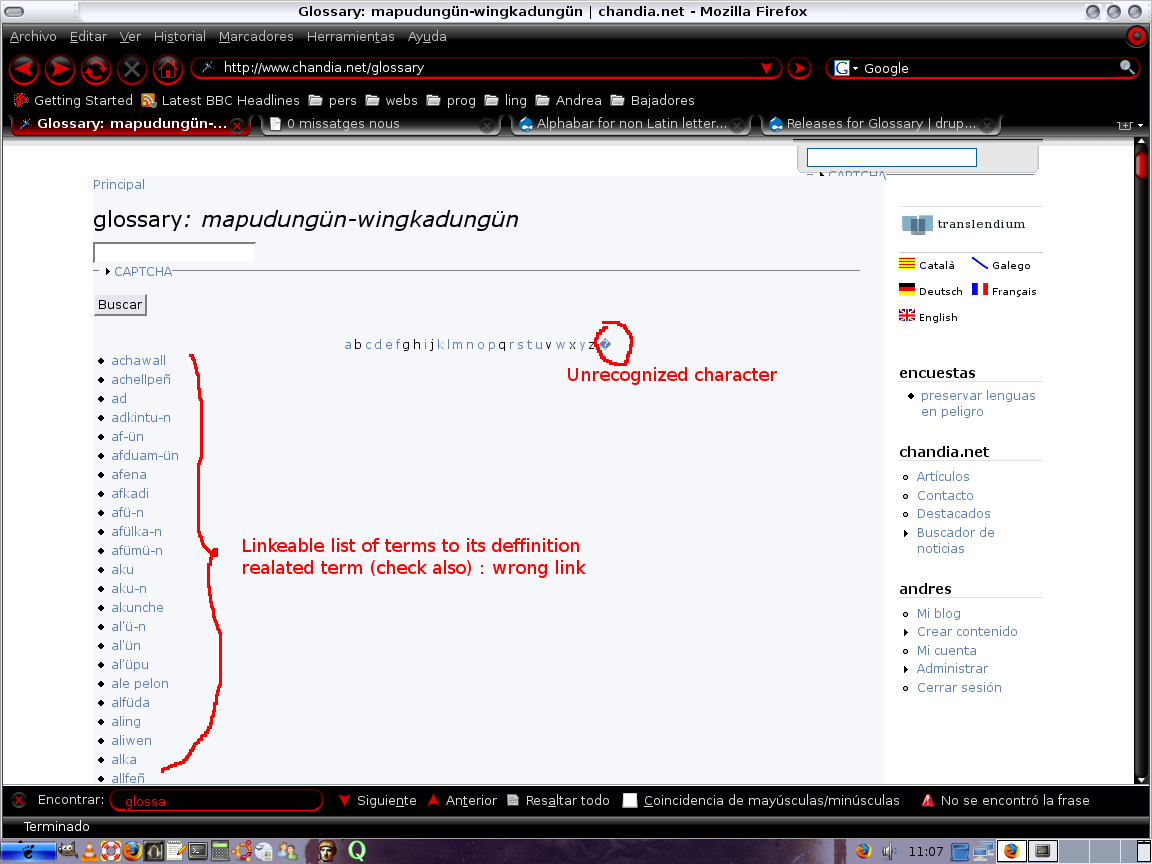
andrés chandía commentedOk, i've understand it, so there we go...
glossary-5.x-1.x-dev
...glossary/5#term113when it should be
...glossary/term/113glossary-5.x-1.x-dev-i18n_patched
...glossary/#term113when it should be
...glossary/term/113(notice there is no "5" in this case)glossary-5.x-1.7
I hope this really helps now
Comment #29
nancydruI am only concerned about glossary-5.x-1.x-dev. 1.7 does not, and will not, have the changes in it. As for the i18n patch version, I don't know what release it was based on. I did use it as a model for the language changes.
# at the top of the terms list you got the description you've made when creating the category ...
Yes, that's the way it's supposed to be. Did you want that to be an option?
# the non english characters are recognized but they are located at the end of the alfabar, instead of at their known position
I think this is what Gábor mentioned - we're probably going to have to have you enter your alphabet on the settings page unless someone can come up with a better idea. I'm not sure what impact that will have on a multi-lingual site.
# Instead of a single list of terms you get the terms with their definition and related terms in one page
Yes, you get the whole Glossary to show up with a linked alphabar at the top that will either go to the first entry with that first letter or to a page with only terms with that first letter, depending on the page-per-letter setting. Were you expecting something different?
# related terms (check also) are wrongly linked, you got ...glossary/5#term113
That is the correct link to take the user to the referenced term. Does it not work that way in your language?
It sounds like we are down to just the alphabar ordering and maybe some additional settings.
Comment #30
nancydruI was looking at your site again. First, I like that bit about showing the icon above the alphabar. I may incorporate that - I just don't know what to do about the other formats yet.
I see how your glossary page is formatted - a simple unordered list with only the term when using page-per-letter. That's not my cup-of-tea, but I don't see that adding an option for that would be hard.
Comment #31
andrés chandía commentedActually the term list is ordered in a diferent way than the alfabar, i mean in the alfabar you have "ñ" and "ü" at the end, but in the term list you have the terms begining with "ñ" in between the terms begining with "n", i mean it is treated as if it where a kind of "n", the same happens with the "ü"
Comment #32
andrés chandía commentedthe first time i installed glossary was on a 4.x version of drupal, its functioning was like this:
..glossary/term/112and they worked...glossary/5#term113and they don't work (at least for me)i can adapt myself to the changes, i only would like that the module were functioning as good as possible, and you've gave me a good clue with the "per page" comment, i'll try to find it and make it work.
the glossary i'm working on is from a south american aborigin language, actually from Chile, and in the alfabet this language does not have a "b" for instance and some other "letters", but instead has some digraphs ("letters" compounds by two letters, actually two letters representing a single sound) like "ch", "tr", and also has some different "letters" like "ü", " n' ", " t' " or "ñ", they have an order that i would like to define, as i would like to define the "letters" i need to use, and discart the ones i don't use
my perfect alfabar woul be like
a - ch - d - d' - e - f - g - i - k - l - l' - ll - m - n - n' - ng - ñ - o - p - r - s - sh - t - t' - tr - u - ü - w - y
Sorry for this long explanation.
Comment #33
nancydruSo would I, Andrés. Maybe together we can improve it. I have some ideas on what to do about the alphabar; I'm not crazy about making you enter your whole alphabet, but may have to.
The word "Glossary" was removed from the title because several people said that their glossary vocabulary was named "glossary" or "dictionary" and "Glossary: Glossary" or "Glossary: Dictionary" looked bad.
The vocabulary description was added also at user requests. If you would prefer, it can be made an option - or you could just delete the description.
Related link: Hmm. There is a recent setting change for "Clicking on a term link will:", which way do you have that set? I will look at changing the related link to use that same setting.
I can see a small value in reducing the space the simple list takes up when the list is as long as yours. Would you like a setting to go back to doing it that way?
As long as I have your attention, I have a question. How do you feel about modules having dependencies? There are some functions in the Helpers module that would make life easier (especially for the list change) but that would mean you'd have to download it too.
Comment #34
andrés chandía commentedIf i can collaborate with you, for me is wonderfull. Let me tell you about the two first improvements (glossary title and description), those are ok for me, actually when i saw them i thought they were grate changes (i was only giving you a background about changes).
About the other things you comment, can you explain me a little bit better, i can not get your idea on the three last paragraphs.
By the way, whatever you like from my site you just take it.
And last thing, i could not find the "per page" setting.
Comment #35
nancydruI did not write Glossary. I came to it because I had a need to use something like it. I saw a need to improve it too. Moshe was too busy to maintain it so I asked for the ability to fix it and he granted it. However, when you take on a module, that comes with the responsibility (IMO) to listen to all the users and to try to incorporate their ideas as well. Some of the things people have asked for don't suit my needs but obviously are what they want. That's why we include various settings - so everyone can have it work they way they want. Sometimes it is not totally possible and we have to explain why at the risk of losing a potential "customer."
Language support is something that is of high importance to Drupal; so even though I personally have no use for it, I recognize that it is critical for the adoption of this module. Because I don't speak other languages, I need the help of those who want to use it to develop that support. Without willing and helpful users like you, it couldn't and wouldn't get done. So thank you for working on this.
One other thing I hope I try to do a bit more than many developers is to realize that English is not the first language of many of the users (like you) and that means we can have communication problems. So I will try to be a bit more clear in my explanations of things even if some people might think me too verbose.
The "page per letter" setting is on the General settings tab and is labelled "Show glossary across many smaller pages." If you check that box, you are asking for what is called internally "page per letter."
Now that I understand your comments about the format of the list (i.e. no description or links), I realize that I also misunderstood a couple of other people. I think it would not be hard to add a setting to control the format of that list so you can have it without descriptions, and I can have it with them. My glossaries, so far, have been relatively short and there is no value to me to leave them off. Having looked at your much larger glossary, I see that it could be easier for the end user to find items in a list that is shorter because the descriptions are not there to take up space.
Recently a setting ("Clicking on a term link will:") was added to give some people an option of showing only a single term when they clicked on it or the whole glossary page with the cursor moved ("advanced") to the selected term. I think the latter was the original developer's intention although it did not work correctly. It does now - at least in English.
The idea of advancing the whole glossary to the selected term is the way the related term ("see also...") was always supposed to done, I think. I certainly prefer it that way. Unfortunately, there were some problems with the actual code that I believe I have fixed. But I can see that you would prefer that it show only the single term, so I will look at the code and if I can use that same setting to control the related term linking.
I hope I've clarified what I was trying to say in the previous note. So now on the last question.
I recently "discovered" the Helpers module which has some useful functions for developers. (BTW, that module also needed some attention, so I now maintain it too.) Amongst those are functions that would make developing Glossary easier and the code smaller. However, as a Drupal user myself, I have mixed feelings about one module requiring another. I don't know how others feel about this. How would you react if Glossary suddenly required Helpers to be installed?
Comment #36
andrés chandía commentedI found "page per letter" setting and i had it enabled but does not work for my list of terms. I will try it with de glossary version that shows the terms with its definitions. If it works this way, for me is ok, i mean if i have to get the terms this way but i can separate the definitions by pages depending on beginning letter it wouldn't take so long in displaying the page.
On related terms, I think that if you get a link to a related term you should be able to see that term instead of the whole list of terms, i mean if you give the link just as an information, at least for me, is useless because you get the info and you can get back to the glossary if you want, but if you feel courious about the information that is been given there i would preffer to go directly over it.
Helpers Module: I've downloaded and installed the helpers module, now i have to learn how to use it, i would appreciate some clues. About my reaction, i'm sure that people developing modules, like yourself, knows what they are doing, i mean i'm far away from their knowledge about this kind of things, so if suddenly i have to install this module, well, i trust that there is some good reason behind.
Comment #37
andrés chandía commentedTesting with glossary-5.x-1.x-dev the "per page" setting does not work at all, at least for me, but surpise surprise!!, the "related term" is working, i think it works because the kind of link that the module builds it takes its refference from the same page, that's why looks like
#term113Comment #38
nancydruPage-per-letter only does something when you click on the letter in the alphabar. Then you should get only the terms that start with the letter. It is working correctly (at least as intended) on your site at the moment.
The Helpers module doesn't do much by itself; it is intended for developers. It provides common functions that developers can call and not have to code themselves. Think of it sort of like all the form code in core - it does nothing until a developer builds a form and says to display it.
Comment #39
nancydruI guess I need to stop working on this for a week or so: http://drupal.org/node/208217#comment-706509
Comment #40
andrés chandía commentedMmm, i see your point now in per-page-letter, for me it is not good becaus of my large list of terms and images included, if when you clik glossary link you would get "lettera" directly instead the whole bunch of terms....
I've seen there's some other stuff going round glossary, take your time, i'll do some other job, today was implementation of lams with moodle...
Good luck, and many thanks again.
Comment #41
nancydruYou could do that just by changing the menu item.
I probably should describe how to do that in the documentation even though it is a pretty standard Drupal process.http://drupal.org/node/201763I will add an option to not show the description on the main list. I just need to figure out what to call it and how to describe it.
Comment #42
andrés chandía commentedYes, actually just after sending you the post, i thought about it, and i tried it; at the secondary link i've got created i could do it, but not at the menu created by the module, the one i have at the right side of the page.
Comment #43
nancydruYes, I should probably have fully described what I had to do but I wasn't sure how much was my site and how much was normal.
I have two Glossary vocabularies: Glossary (3) and Dictionary (5). I already had added a menu item for glossary/3 called "Glossary," which had required me to disable the original menu item (I don't know why yet). When I changed my new menu item to glossary/3/lettera it worked. Then I decided to "reset" the original menu item (created by the module) and there was only one "Glossary" entry left, but it lost the changed path. I then changed the path again and it worked as expected and I only had the single menu entry. So maybe the "trick" is to reset it to begin with.
Comment #44
nancydruBTW, I was contacted by a new Glossary user and his site is in Cyrillic, so I invited him to add his input to this thread.
Comment #45
nancydruOkay, the new setting has been committed. The default will be no descriptions.
Also, the guy who write the escape mechanism code found a bug in the multi-byte stuff, so that is now fixed.
Comment #46
andrés chandía commentedis this one? "Last updated: January 26, 2008 - 14:03" or should be from january 28 or 29
Comment #47
nancydruNo, it is dated Jan 29. It just rolled up a very short time ago. I think it rolls releases every Noon and Midnight, GMT.
Comment #48
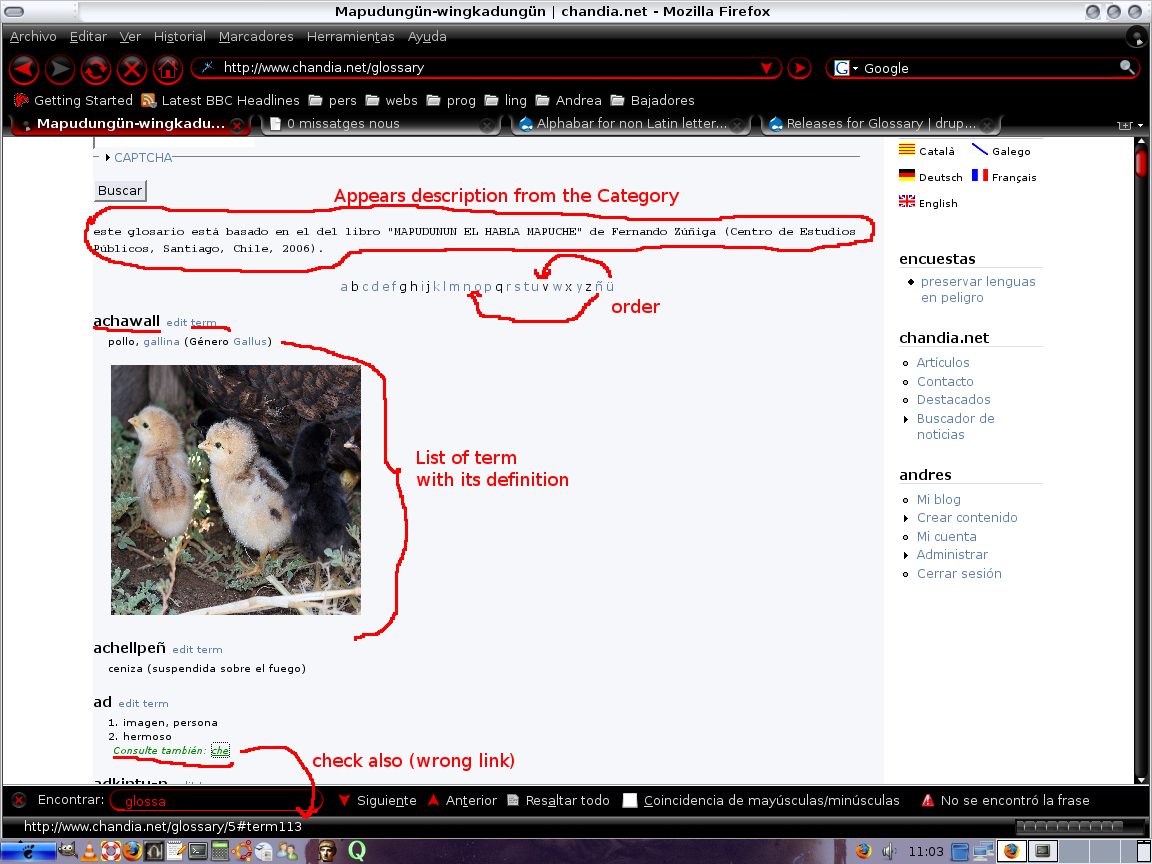
andrés chandía commentedglossary-5.x-1.x-dev from Jan 29
Well, i see more options, what is great, but i better tell you what does not work yet:
I attach you an image
Comment #49
nancydru1. Yes, I have not made any more progress on the alphabar itself yet. Now that the GHOP task is done, I can spend more time on it. I may need you to try a few things out for me. (I'll probably ask for that in private email.)
2. DUH! Why didn't I notice that? You are absolutely right. It should be easy to fix. Sorry.
Comment #50
andrés chandía commentedOK, i'm waiting and ready to do my homeworks ;-)
Comment #51
nancydruOkay, there should be a new -dev release rolling up in an hour or so. I tested a lot more this time. I think it should be handling the overview list correctly. If you have the "show description" setting on then you will get the description. If you use page-per-letter and choose the single letter page you should also get the descriptions. If the "show" option is off, then each term should be a link to show the term.
I still have to fix the related links. And, of course, the alphabar still needs work.
Comment #52
andrés chandía commentedOk, repporting results: i will put the setting i have enabled and the effect they do on my glossary.
enabled settings
On the glossary you get the single list of terms,
if you go to a letter through the alfabar then you get the first term beginning with that letter on the list at the top of your screen,
if you click on the related term you get the term within a sigle list of terms, so you can click the term your interested in and get the definition
enabled settings
the only difference with description above is that you get the list of terms with its deffinition on the same page (images included) if you go to a letter through the alfabar
enabled settings
well, in here the behaviour is the espected one, i mean, the same as before but the list of terms with its definitions
the only thing i see it wouln't be is that when you don't have the "Show glossary term descriptions on the Glossary page" enabled, the displaying of terms through selection of letters on the alfabar, shouldn't show you the terms of tha letter with its descriptions. All the rest is working as espected, you are doing an admirable work.
another thing i still can not do is change the link in the glossary menu made by the module, i can not send it to the letter i want, actually i don't get that option at all, i have gone to the menu setting to try to change it but it is not possible.
Comment #53
nancydru1) As I said, I still have to fix related and alphabar. So this looks correct so far.
2) That is how I intended it. Is this not what you want?
3) Okay
I did make the conscious decision that I would show the description on the page-per-letter page even if it was not selected for the full glossary page. Was that a bad decision?
On the menu problem, try the "reset" link and see if that helps. The menu item is created only as a "suggested" item, not a full menu entry.
Comment #54
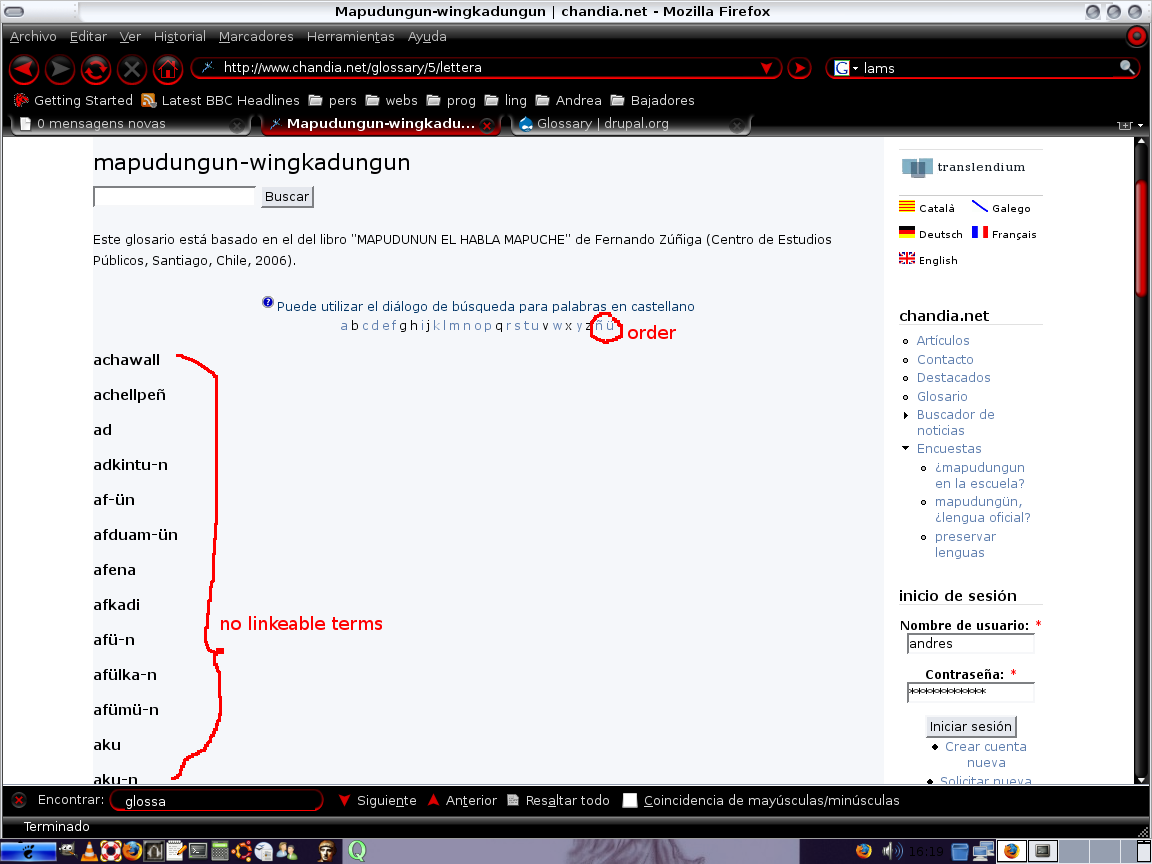
andrés chandía commentedFor me is prefereable to have a sigle list of terms when you go to the letter through the alfabar, because, in my case, i have letters with a lot of terms some of them containing images.
About the menu, in my case i have no suggestion but an imposition, the first time you toldme i tried reseting the menu, but it didn't help, i send you an image for yout to check it.
Comment #55
nancydruOkay. I may need to remove the current code and devise a new solution then. I'll work on it.
What I did was to just disable the original item and create a new one, but then I did the reset and was able to get it down to a single item.
But thanks for the picture for a different reason. I've been to you site several times and see "Chandia.net" on the right side and even realized it was a menu of sorts. But now that I saw that picture and realized that you have you menu titled "Chandia.net" I had one of those "Duh" moments. What a wonderful way to do the menu!
Comment #56
andrés chandía commentedWell, finally what i did was desable the default glossary menu and create my own.
The way i present my personalized menu i use it also in some others sites like http://www.koyaktumepauche.net , http://www.corporacionkoyaktu.net y http://parles.upf.es well in the last one you only get this menu if you log in.
thanks for your work
Comment #57
nancydruOkay, Andrés, after the Noon GMT roll-up, check the related links and page-per-letter.
And a bonus point if you notice what else I did (mostly for me).
Comment #58
andrés chandía commentedThanks a lot, i really apreciate all that you have done to improve this module.
Sorry for not answereing before, but i've been away in some research about morphological analizers and regular expresions.
Of course i noticed you've included the question icon, i feel great to give at least this little contribution, you also inlcuded a direct link from the glossary to the "Glossary Settings"; by the way, never doubt to ask me some tasks to test this or another module, i will feel happy to help improving drupal.
Thanks again.
Comment #59
nancydruNope, that icon has been there since before I started on this module. Look at the bottom of the glossary overview page, assuming that you're logged in as user/1.
Comment #60
andrés chandía commentedWell then, if are not the direct links to the "add term • edit glossary • glossary settings", then i don't know.
Comment #61
nancydruThe glossary settings link was not there before. But someone has been keeping me busy changing settings lately, so I added that to help.
Comment #62
nancydruOkay, with Andrés' help, I have the code to fix the alphabar ordering; the bad news is that it requires new settings by the admin.
However, it turns out that there are two more associated problems: 1) his language uses digraphs (double-letters) as letters; 2) the database seems to not correctly honor collation. Does anyone else have any suggestions on handling these problems?
Comment #63
nancydruI just committed the change to the settings to accept an alphabet for your language.
#62 - 1) @Andrés, please open this as a new feature request.
#62 - 2) this is a collation problem, but easily fixed.
Comment #64
Anonymous (not verified) commentedAutomatically closed -- issue fixed for two weeks with no activity.