Closed (fixed)
Project:
Workflow
Version:
6.x-1.x-dev
Component:
Code
Priority:
Normal
Category:
Bug report
Assigned:
Reporter:
Created:
17 Feb 2006 at 09:14 UTC
Updated:
1 Aug 2006 at 00:37 UTC
Jump to comment: Most recent file


Mmmm I don't know how to explain it... would be fine when we create a story with a workflow associated, that the workflow menu would be expanded.
For now it is collapsed by default, so the user has to click on it to see possible states.
| Comment | File | Size | Author |
|---|---|---|---|
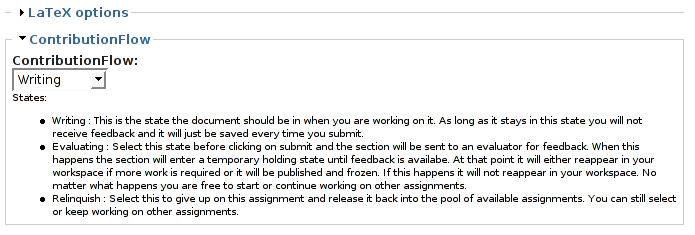
| #7 | StatesWithDesc.png | 21.21 KB | marknewlyn |

Comments
Comment #1
jvandyk commentedThe workflow fieldset now defaults to the expanded state.
Comment #2
Julien PHAM commentedWhere to download the new cvs version? On project cvs webpage it is still the 1.30 version...
// $Id: workflow.module,v 1.30 2006/02/16 18:27:15 merlinofchaos Exp $
Comment #3
Julien PHAM commentedOk I found...
http://cvs.drupal.org/viewcvs/drupal/contributions/modules/workflow/work...
Comment #4
Julien PHAM commentedMmmm there's a little problem with your fix, it is that no radiobutton are selected by default... with the previous dropdown box, the first item is selected by default. And I need this, because I need to trigger at least one action when my user posts an article.
And... errr... why did you put radio buttons? I liked the dropdown box... perhaps an ideal solution would be to be able to setup the workflow to either use radio buttons or dropdown box, and also to setup for radio button if the first item should be selected or not by default. (of course for dropdown box we have no choice)
Thanks
Comment #5
Julien PHAM commentedbtw there's a bug now. because if we submit an article without checking a radio button, and as none is checked by default, we have an error message : an illegal choice has been detected.
So really there should be a default choice...
And really I preferred the dropdown box...
Comment #6
marknewlyn commentedHi
The discussion that led to the bullets instead of drop down menus can be found here:
node/46977
I asked for a description of each state to be added to the module so that users can see the list of descriptions
when changing the state. For my site I cannot guarantee that volunteers will read the manual or realise the implications of their actions so I really need to have a list on the page. All the information users require must be available at all times. I also think that having state descriptions is a good idea in general for a user friendliness point of view.
I use the states to trigger a number of actions which affect documents other than the one the user may have access to directly and I need this to be clear to the user and its hard to make the state name contain this information without making state names very long.
In general you'll need to describe the states somewhere for your users and the most natural place is to include this in the workflow module which defines the states.
Its more work for other people (or me but not this week) :-/ but all of these things could be options:
-> collapsed or not
-> radios with descriptions OR list with or without descriptions
Just my two cents worth ... I am not very good yet with Drupal and PHP but I am prepared to help out as much as I can.
Mark
Comment #7
marknewlyn commentedI should have thought about my other message and made it clearer. The workflow is very important for my site to work and I agree that I want my workflow fieldset expanded by default but I can imagine that other people would like to hide it more and would want it collapsed by default.
My current workflow usage can be seen in the attached png file. I have LaTeX options which are only for advanced users and I want to discourage people from bothering with any of those options but the workflow is important so I want it open to start.
I think that whether or not you want it collapsed by default will either depend on the workflow or which node type you are working on. Its simple to have a per workflow setting for collapsed or not to start off with but I guess the most general case would be to have a per node type setting.
Mark
Comment #8
Julien PHAM commentedAs for myself I use workflows for publishing articles.
My workflow name is : "this article is"
And my states are:
- in draft
- in moderation queue
- published
So, a basic user can compose an article and put it as a draft or in moderation queue, but cannot publish it.
What's still missing though is a way to prevent a user to edit a published article, but I don't think it is workflow side... but once the article is published, with workflow he can edit it, and then put it back in moderation queue or in composing mode, as the publish mode is not available to him... only problem then is that he can destroy it... and I don't like this...
And other problem too is that there is no radio button checked by default...
Comment #9
jvandyk commentedAnd other problem too is that there is no radio button checked by default...
This is fixed. When a user creates a node, the radio for the first state available to the user is selected.
Regarding a user being able to edit a node that he has created, even though it is in the published state: use the action in actions.module to change node ownership when the workflow enters the published state, or implement an action for a node access module and fire that.
Comment #10
Julien PHAM commentedBut if I change node ownership, then the article will be displayed as "published by" and another one isn't it?
I don't want that, I would like people to sign their own articles...
Comment #11
Kieg Khan commentedHello,
Could you use Taxonomy and taxonomy_access, then get the workflow module to move the content into the published taxonomy, which the author cannot edit? This way the content is still available for viewing and shows the correct author information, it is just in a different taxonomy area.
Cheerio
Comment #12
Julien PHAM commentedMmm why not, thanks, I'll try this...
Comment #13
Julien PHAM commentedA little issue though... how can I change the taxonomy term? There is no such option in the action... Only actions I can create are "change node author" and "send email".
Or there's something else I do not know?
Comment #14
jvandyk commentedAnyone can write an action. Look at actions.inc for inspiration. An action to assign a taxonomy term for a node would be simple. If I weren't so pressed for time, I'd write it today.
Comment #15
Julien PHAM commentedOk, I can wait until tomorrow then ;) I'm joking of course...
I know nothing about php, and moreover I have no idea of the variables involved to do this...
But I'll try... what I would like is an action who does not change the taxonomy term, but the taxonomy word, this way I can have the same terms in two different words, one beeing open for editing, the other not...
Comment #16
merlinofchaos commentedBTW, use the na_arbitrator module and enable workflow_access to get this functionality.
Comment #17
moshe weitzman commentedalso, 'edit own story', and such are permissions now that should not be granted with this workflow. i think we have this functionality now
Comment #18
(not verified) commentedComment #19
marcoBauli commentedHello Julien,
did you got that "taxonomy term" action at #13 to work in the end?..i am looking for the exact same thing!
Thank you in advance