Closed (fixed)
Project:
Image Assist
Version:
5.x-3.x-dev
Component:
User interface
Priority:
Normal
Category:
Support request
Assigned:
Unassigned
Reporter:
Created:
23 Jun 2009 at 15:38 UTC
Updated:
15 Jul 2009 at 09:50 UTC


Hello! Even if there exists an issue ( http://drupal.org/node/432124 ) which perhaps is related to mine I create a new one, because I am working with Drupal 5 (I am using WYSIWYG 5.x-2.x-dev and IMG_ASSIST 5.x-3.x-dev).
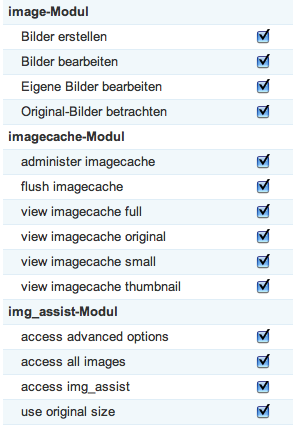
In my case, after the upgrade to the latest dev.-version of WYSIWYG, the images in the popup don't show up any more and the button to create/upload a new image is also gone, even if I am logged in as "super user"... All rights are granted as shown in the attached file. Any suggestions how to solve that?
Thanks in advance, Freddy
| Comment | File | Size | Author |
|---|---|---|---|
| granted rights | 34.56 KB | freddyseubert | |
| popup without images and upload link | 65.73 KB | freddyseubert |


Comments
Comment #1
jorgedec commentedYou might have to roll back Image Assist back to 5.x-2.0-alpha3. How I got my images to appear again is to also place the tinymce folder in the WYSIWYG folder (ie in addition to /sites/all/libraries). I was getting a "tinyMCEPopup is not defined" error.
Comment #2
freddyseubert commentedThanks for your reply, but if I switch to img_assist 5.x-2.0-alpha3, the button in tinymce is gone. Like written here http://drupal.org/node/358296 - the recommended version for passive and active users is 3.x-dev...
I also tried with the mentioned copy of tinymce in the modules/wysiwyg folder, but that doesn't change anything either.
This is somehow weird, am I the only one with that problem? Gonna check this on a fresh install this afternoon.
Comment #3
freddyseubert commentedHa! The missing upload-button was an issue with betterselect ( http://drupal.org/project/betterselect ) - even if "missing" is not the correct word ( see here: http://www.seubert-design.de/uploads/2009/07/image_assist_betterselect_i... )... Also the problem with the missing images is solved after I deleted and recreated them (that was only possible because the system is not live and there were just 10 images or so) ...
thanks
Comment #4
freddyseubert commented