Closed (fixed)
Project:
Acidfree Albums
Version:
4.7.x-1.x-dev
Component:
Code
Priority:
Minor
Category:
Bug report
Assigned:
Reporter:
Created:
21 Feb 2006 at 13:52 UTC
Updated:
22 Sep 2006 at 20:03 UTC
Jump to comment: Most recent file


I just happened to view my site with Internet Explorer
and notices that there are some formatting issues with
the acidfree nodes. I wouldn't worry about it, but
many of my users use IE.
When using IE
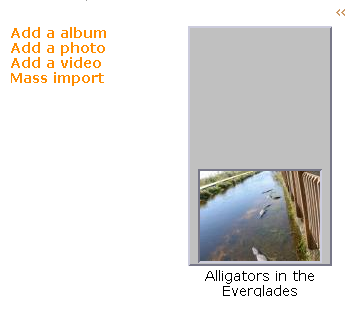
1) the grey area behind the thumbnail is much taller than
the image (see attached screenshot)
2) On the front page, the photos do not get put inline
with the text description - they are forced onto
separate horizontal areas, making for a less attractive
page layout.
I fixed the second item by modifying acidfree.css as follows:
div.fullslide {
margin: 0px; /* Changed from 'auto' */
Whatever I do to the stylesheets, I cannot seem to fix
item 1 above.
This happens with both the pushbutton and bluemarine themes.
| Comment | File | Size | Author |
|---|---|---|---|
| #2 | ieproblem.jpg | 167.36 KB | mudanoman |
| acidfree.bmp | 315.91 KB | kayfish |


Comments
Comment #1
lucky a commentedI have a variation of this issue:
I have two themes available on my site - one pushbutton based , and one bluemarine based (just changes the colors on both, really). With bluemarine theme, everything works great! But with pushbutton, it works fine in Firefox, but in Opera and Explorer the grey tiles behind thumbnails are twice the length they should be, and the mini-thumbs are not aligned properly on the folder icon (firefox - left; explorer - bottom; opera - left-bottom).
Comment #2
mudanoman commentedHave a similar problem. See attached. Will try to fixed the second problem with your method.
Thanks,
Ivan
Comment #3
vhmauery commentedSorry, I have neither the time, resources nor CSS knowledge to be able to fix your IE problems. I don't own a computer with IE installed. I can't test acidfree with every theme. Sorry it doesn't work with yours.
If you want to help out, you can help design a classy looking theme that could ship as the default theme for Acidfree. I have offered this to many users, but so far, I have no takers.
Comment #4
nevan commentedFixed adding
display: inline-block;
to "div.outer span" and "div.folder span" in acidfree.css
These lines were present in acidfree.css 4.6 but not in acidfree.css 4.7
Comment #5
vhmauery commentedI removed the lines because inline-block is not a valid CSS display value; It is a hack to make IE work. I am not sure which is worse: including invalid CSS or breaking IE.
The best fix would be one that involved writing a new default acidfree thumbnail theme. Perhaps someone would like to do that.
Comment #6
(not verified) commented