

 The 2026 Drupal Business Survey is open. Your response will help shape the future of the Drupal business ecosystem.
Hello!
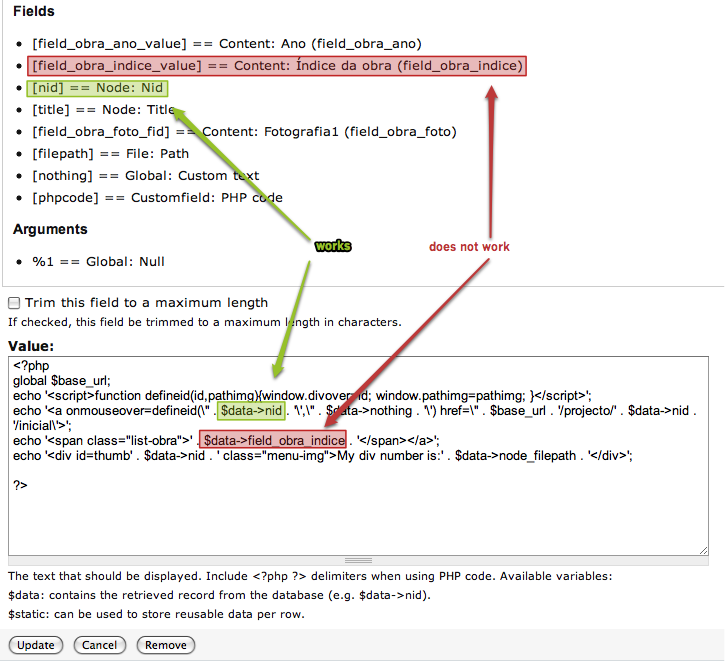
I am trying hard at this for two days now, and I think the time has come to ask for support! I think the image is quite self explanatory, but I will explain in verbally, if not only to make it accessible to search engines.
I am having real difficulty passing the values normaly output by Replacement Patterns such as [filepath] (which work fine in normal Views2 fields) to a Custom Field using PHP. Documentantion tells me $data: contains the retrieved record from the database (e.g. $data->nid). so I assumed replacing the "nid" by whichever Replacement Pattern I had summoned in fields above. It is not working.
I am afraid that maybe this is a deeper lack of knowledge about Drupal/PHP, but I can't even tell that. I have managed to write something in PHP and Javascript. and things have been working... but this one I cannot figure out.
Thank you for any help.
| Comment | File | Size | Author |
|---|---|---|---|
| Edit view projectlistcronologia | NGM alpha.png | 111.61 KB | rucativava |

Comments
Comment #1
casey commentedTry using print_r($data) first.
Comment #2
rucativava commentedThank you so much!
I've been usng that tip, but for some stupid reason, i put a php command in my template, and now I understand: it printed variables that had to do with the template. Now that I wrote
echo '<span class="list-obra">' . print_r($data) . '</span>'I see all the beautiful variables I needed, with strange names I would never guess.Thank you again for your reply. :)
Comment #3
casey commentedComment #5
bkyan commentedIn order to use the "Replacement Pattern Variables" instead of the database field names, I used the following PHP Code.
Using the "Replacement Pattern Variables" allows for the custom formatting of the prior fields to be incorporated,
as opposed to having to manually format the raw database field entry.
$static = $this->view->display_handler->get_handlers('field');
echo $static['field_photo_fid']->last_render;
In this example, field_photo_fid is the "Replacement Pattern Variable".
Comment #6
Jerome F commentedkeeping #5 in mind
Comment #7
lpalgarvio commentedif clause to conditionally output image #2 instead of image #1 in a multi-value image field:
it works =)
where is this useful?
say, for some content you have two pictures (teaser and full or original and alternate), while for some other you only have one picture - and you only want to output one of those.
Comment #8
vegantriathlete@bkyan and @LPCA you rock!!!
This is exactly what I needed. My use case is that a thumbnail (which has a default image assigned) and a video can be attached to the node. My client wanted me to display just the video if it was attached and display the thumbnail iff (if and only if) the video was not attached.
So, this is how I solved it:
@casey Thanks for the awesome module! I'm so glad that I won't have to mess around in a custom views-view--Resources--block-4.tpl file.
Here are some keywords for search engine spiders to find: Views Custom Field, PHP Code, Replacement Patterns
Comment #9
mollyavalon commentedI have tried a million ways to use this code, which would help me out enormously, but I'm apparently doing something wrong because it is returning nothing at all. I'm using the tokens that are in my list of replacement patterns exactly. Any more ideas? Is there some simple thing I'm missing?
This code is modeled on #5 and #7,
Comment #10
lpalgarvio commentedmake sure the names are correct. look up with devel module and on views own help/tips.
in my example, where the imagefield is named image (internal: field_image) and FID = Field or File IDentification:
field_image_fid -> first image field instance (index 0)
field_image_fid_1 -> second image field instance (index 1)
try something like:
Comment #11
mollyavalon commentedThe replacement patterns (tokens) are copied directly from the view (visible in the field configuration when you click "Replace the output of this field").
I thought 'fid' means file id, and is used for fields that contain files such as image files, not relevant for my example.
I went to http://drupal.org/node/467190#comment-3338650 and got the patch and made it work just fine. I was hoping not to have to do that, because I don't want to have to worry about losing the patch when modules are updated. Oh well, it's working and I am happy.
Comment #12
timtunbridge commentedIn case this helps anyone, I found that using $static = $this->view->display_handler->get_handlers('field'); didn't work.
Instead just $static = $view->display_handler->get_handlers('field'); worked.
Code goes in the Output code field, for example:
Comment #13
manoloka commentedWhen I try to use any of these I get this error.