The problem is probably that I'm assuming this module does something that it wasn't designed to do, but it would really help if you could write a couple of sentences explaining just exactly how this works.
I've installed the module and activated it. Isn't something supposed to happen now? I guess I expected to see some new options in the Views workflow. Specifically, I was hoping that the Fields I selected for display would have input options that allowed me to enter additonal PHP or HTML and thus alter what is generated for display by the view.
But I don't see anything different in my Views interface. Can you clarify how this works? Is there some additional configuration I need to do?


Comments
Comment #1
cbroberts26 commentedOk, I think I get it now. As I suspected, the problem was that I was expecting something different from what the module provides.
The custom fields appear on the list of Fields to add to your view. They are not added as new input options for existing Fields. You can create a new, custom Field and put your PHP code in it, but you can't take an existing Field, like Node:Teaser, and throw in some PHP code to modify what is displayed.
Or can you? Ah ha! If you add the custom PHP field after, say, the teaser field, then set the teaser field not to display, you can grab the teaser text from the SQL results using $data->node_revisions_teaser and embed the teaser text in your PHP and go to town! Great! This works a little differently than I expected, but it does what I need.
For anyone struggling as I was:
1. When creating a view and adding Fields to the view, the Fields available will include custom fields like Customfield: PHP Code. Add one of these fields after you've added the regular content fields like Node:Teaser (if you want to modify the way the teaser text is displayed by embedding PHP in the view output).
2. Set the Node:Teaser field to Exclude from Display if you want to display the teaser text only in the custom field where it is modified with PHP code (or HTML code if using Customfield: Markup).
3. To grab the teaser text and display it in the custom field, use $data->node_revisions_teaser in your PHP code. So it would look something like this:
You can see what data is being returned from the SQL query and what the variables are being named by looking at the SQL string displayed at the bottom of the Views > Edit page after you've updated after adding a Field. You'll see variable names like node_title and node_created depending on what fields you added to the view.
And now I imagine you can do almost anything to the display.
Obviously most of you understood all of this from the beginning and didn't need anybody to spell it out, but I assume I'm not the only one struggling to figure out how all of this Drupal stuff fits together while still trying to meet deadlines. Hopefully some will find this helpful.
Comment #2
whan commentedThanks, the information helped me a lot.
Comment #3
rashad612 commentedHow can I override the Views Custom Field in tpl page ?
Comment #4
kvvnn commentedTo find out what fields are accessible you can use:
Comment #5
ecksley commentedGreat module!
I wanted to use it as a means to strip the "The" from the front of some node titles so that my Views page can sort them alphabetically without it.
However, I don't see a way that a View Custom field can be used as a sort criteria? Is that correct?
Comment #6
kvvnn commentedecksley - http://drupal.org/node/336014
Comment #7
Polo-2 commentedYou are my savior!
Comment #8
nadav commentedhello :)
First of all, like all the others, but still, in a very spacial way, thank you for this amazing module, I just found it and I'm thrilled about it. So thank you!
I'm working on this view now that has three fields as grouping field and I'm using Custom Field for merging them to the same field. First two are text fields and work very good,
the third field is image_field and for some reason it is not showing. I am not so good with php yet (and I wonder if this is why it's not working.. hmm ;) ).
this is my code
this is the fields information that I get:
thank you upfront :)
Comment #9
jcroft commentedThis worked for me.
Note in my case the cck field was named "image_1"
Comment #10
colemanw commentedJust wanted to say thanks for an invaluable little module. Using the custom php field you provided is the only way I have been able to include comments in a view of nodes with row-style: fields. Here's how I did it:
Substitute the actual name of your comment view for 'comment_view' if you named it something else
And viola, you now have a display of both nodes and comments that is 100% customizable using the power of views.
PS. I was surprised there wasn't a more straightforward way to do this. If anyone knows of one, please feel free to enlighten me.
PPS. Of course, if you don't require the 'fields' row-style, there are many more options for achieving this, including just clicking the "show comments" box in views or (if you want to customize the comments, i.e. by limiting the number shown, fields, etc) doing step 2 above and then embedding that view in the template file of the node-type in question. You can get around having it show up in the actual node page by using the teaser view instead of the full view.
Comment #11
benjah commented#9 above worked like a charm!!!!
Thanks jcroft!
Comment #12
Feonyx commentedThank you so much for this! I was racking my brain as to how I would convert a profile variable stored in the database to a different value.
I simply added the filter for the profile refid. Made it "Exclude from display" and then added a "Customfield: PHP code" as such:
And voila it converted the string to hex. Thanks again.
Comment #13
ealtman commentedJust want to say, this is my favorite module at the moment. Thank you!
Comment #14
Jerome F commented@cbroberts26 in #1
you can't take an existing Field, like Node:Teaser, and throw in some PHP code to modify what is displayed
I think that's more what custom formatters does. http://drupal.org/project/custom_formatters
Comment #15
Jerome F commentedHi,
I have nearly the same question as in #8,
the code in #9 returns the path to the original file, how is it possible to get the path to one specific imagecache preset image ?
Comment #16
benleivian commentedAmazing, thank you!
I was able to get gravatars to display in a recent comments view like so"
Comment #17
this_is_it commentedgreat module.
Comment #18
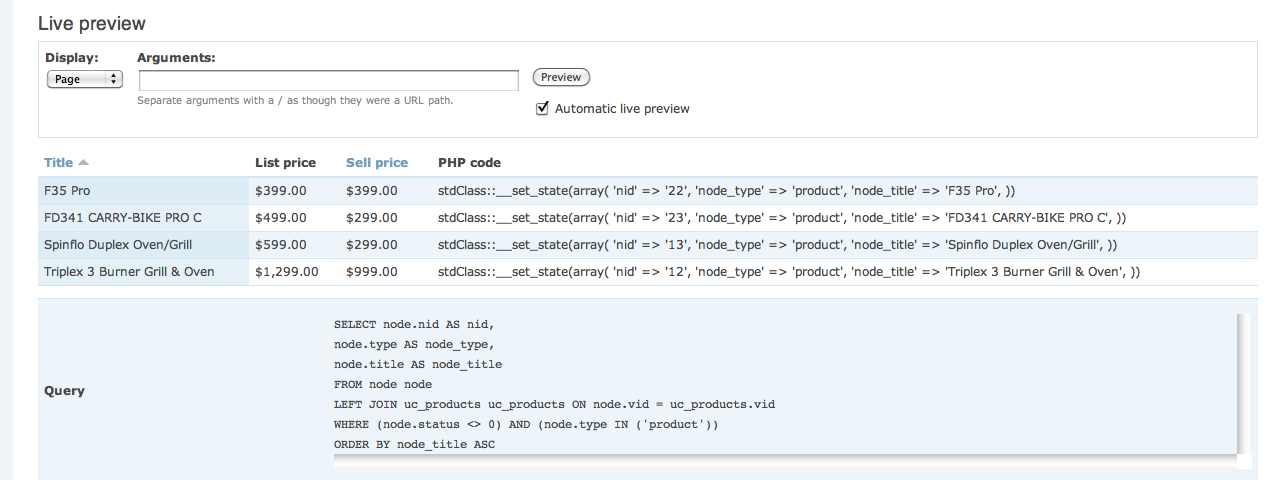
timtunbridge commentedCould someone give me a pointer on how to access a field outside of node please. The only fields that I see returned by print var_export($data, TRUE) are those contained in node, but I want to access fields from other tables that are within the view.
In the attached screenshot I want to be able to access selling_price and list_price. I know these are in the uc_product table but as you can see these are not listed in the select statement, hence I do not know how to refer to them.
Cheers
Comment #19
colemanw commented@Tim
In my experience, any field you add to the "fields" list will become available in $data. If you do not wish the field to print, you can choose the "exclude from display" option.
Comment #20
timtunbridge commentedThanks for coming back to me colemanw.
I still cannot get the product fields to list (I want to be able to reference them in order to create my custom field). However I have found a workaround by explicitly loading the product node first in my custom field and then extracting them from there.
Cheers Tim
Comment #21
captaindav commentedSee this post in the View Slideshow Issue Queue for an example of how to use Views Custom Field to conditionally combine two View fields into one: http://drupal.org/node/847594.
Comment #22
matt2000 commentedReverting back to a descriptive title. Thanks, cbroberts26 for documenting your experience.
Comment #23
Drupal webdesigner commentedGreat post thanks helpt me a lot.
Comment #24
alanom commentedre. "@Tim
In my experience, any field you add to the "fields" list will become available in $data..."
Several types of field, including Global Custom Text and Lightbox triggers, don't show up in a print var_export($data, TRUE); - nor do they show up in a var_dump or even a print var_dump(get_defined_vars()); - How do we find out how to call these?
It seems the various $data->... exports show fields taken straight from node or CCK fields, and don't include fields generated entirely by Views itself. Googling just gives the fields in other contexts (e.g. $handler->display->display_options['fields']['nothing'] - not appropriate here)
Being able to use PHP on fields that have already been combined the normal way would be brilliant, and would make lots of sophisticated operations simple. But how do we find out how they are named? This would be massively valuable reference information.
They must be retrievable in there somewhere, else the replacement patterns wouldn't be able to access them. But where, and how do we find out? I've even tried looking back through Views code to see how the replacement patterns are implemented, looking for a PHP variable to call - no joy.
Thanks in advance!
Comment #25
alanom commentedChanging to 'active' as this thread seems to have become the main basic documentation for the module, not just a support request.
If we can clear up ways to load data that isn't obviously available in the $data object, such as the fields mentioned above, that would be good documentation, since standard Drupal methods like using arrays in the $node object don't work here.
http://drupal.org/node/616122 has some info on how tokens could potentially be used, but this seems a very heavy and limited work-around - particularly as token filter doesn't currently work with node tokens. Perhaps more crucially, it has the same problem - there doesn't seem to be any way to access Global Custom Text fields with tokens, either, since they don't exist outside of views.
Comment #26
alanom commentedFound it! The best way to get field data into PHP customfields when $data isn't appropriate is:
1) On Views Custom Fields 6.1, hand-patch the file views_customfield\includes\views_customfield_handler_field_phpcode.inc replacing the method function render($values) from line 55 using the bartclarkson's code snippet in http://drupal.org/node/810190#comment-3109330
2) Use the replacement token as you would in other Views fields, as a php string. For example, to print a typical lightbox trigger field, you'd use
print '[lightbox2]';As well as making it possible to use Views-generate fields, this method also preserves Views formatting and processing for various fields, particularly filefield FID based fields, such as imagefield images complete with alt text, and embedded video. This ensures neat integration with Views-integrated modules.
Comment #27
JimNastic commentedHi,
Is it possible to use views_embed_view() within a custom field as a means of achieving sub-views? I'd like to create a list of "children links" which appears when the user hovers over any of the teaser images returned by my view.
If this doesnt work with custom fields, can anyone suggest another approach?
Jim
Comment #28
soulston commentedyou can also use:
to output the available fields in a nicer way.
(Thanks for spotting the typo juanlacueva)
Comment #29
colemanw commented@JimNastic Please see comment #10
Comment #30
juanlacueva commentedyou missed the "$" before data
Comment #31
juanlacueva commentedCan I make mysql queries within a Custom PHP field?
What would be the appropriate way?
I guess putting mysql_connect(...) and mysql_query(SELECT...) wouldn't be best practice at all.
I have a multiple item field in content. This multiple items in one field are nids. I want to get the titles of those nids inside a field.
Using arguments I managed to get the nids (excluded from display) but the only way I can think to retrieve their titles is to query the db. IS there any other way?
Thanks
Comment #32
kvvnn commentedJust use db_query and its friends in your php statement.
Comment #33
kunago commentedI thought I could share a node counter for taxonomy terms. Might be of some use for somebody.
Comment #34
jrivelli commentedI created a custom node.tpl.php page and am displaying cck fields with
print $node->field_extras[0]['view']and works just fine. However, I have a cck field that is checkboxes with users able to select multiple values and the above php only displays the first value. I can do
print $node->field_extras[2]['view'](notice number change) and it will display different fields in the checkbox list. However, I know there is a better way than to lis tout all these, especially since it leaves blank spots if the user hasn't checked one of the options. Any tips? or should I use this module?
Comment #35
cccarlington commentedWhy not just loop through the array and only print the values that exist.
I am not much of a php coder but something like this.
There is probably a more elegant way to do this
Comment #36
kunago commentedWhat about this one? Feels to be a little bit more automatic to me as there is no need to set the "max" value.
I am not sure what values the "$node->field_extras" could have therefore what could also work for line 5 is
or as suggested
Comment #37
jrivelli commentedThanks for those suggestions! I got it working, the code is VERY similar if not the same, as your second example. :)
Comment #38
shriji commentedSubscribing....helpful post
Comment #39
msjones design commentedthank you, subscribe.
Comment #40
HippoOnDiet commentedHi Guys,
I need a hand on how do I pull Location (module) information from a view?
At the moment my current view have field: Location and related to content: home address.
When I run
print var_export($data, TRUE);I get this info:'location_node_data_field_member_profile_resaddress_lid' => '9',
On d6_location tid 9 - it contains the address for this employee
However I don't have much clue what query or what php line do I need to write so it will show the address.
Your help is much appreciated :)
UPDATED:
I found my alternative workaround by using Bert's code on: http://drupal.org/node/810190#comment-3109330
Comment #41
charles.holtzkampf commentedWondered if someone could assist me, I have no PHP knowledge so im struggling a bit.
I have installed the - To Do List Module - http://drupal.org/project/to_do
I created a view with the following fields:
User: Uid (excluded from display)
Node: Title
To do list: Deadline
To do list: Priority
To do list: Start date
To do list: Status
To do assigned users: Assigned user ID (excluded from display)
To do list: Buttons (excluded from display)
Customfield: PHP code
The following Tokens/Replacement Patterns are available based on the above fields
* [uid] == User: Uid
* [title] == Node: Title
* [deadline] == To do list: Deadline
* [priority] == To do list: Priority
* [start_date] == To do list: Start date
* [item_status] == To do list: Status
* [uid_field] == To do assigned users: Assigned user ID
* [buttons] == To do list: Buttons
* [phpcode] == Customfield: PHP code
* [markup] == Customfield: Markup
What I would like to accomplish is:
As, the button field has been excluded, I am trying to use the Customfield, to display that button. But only display that button if the current user is the author of the To Do node.
What ive aded to Customfield PHP code
What's happening
Nothing displays using the above code.
I know the [buttons] token works because when I use the following code, it displays the button.
So I assume something needs to be added so that the system can decide whether the current logged in user is the author of the node. Both the [UID] & [UID_FIELD] always display the same value if I ouput it, so I thuogh that would work but it doesn't.
Any help would be very much appreciated.
Charles
Comment #42
sanguis commentedthis made my life really easy: I needed to make a custom display using other $data values
so the first thing I did was make a custom php field with the label 'views data' as a value I gave it
(one could also use dprint_r(), but I prefer to have my data per recored with the record)
Then I started adding the other fields that needed. as I populated the view my dump populated with data that I could use in my custom field.
it looked like.
Just a thought,hope it helps
Comment #43
charles.holtzkampf commentedComment #44
zkrebs commentedIs there any way to use this to show if an Ubercart product sizes are in or out of stock?
On my view i want it to have a field - in stock, or out of stock.
Then, the calculation is - if size a, b, or c have anything in stock say "In stock", and if they are all 0 then say "Out of stock".
OR
If it just could output a list of sizes with in/out of stock under the product that would be fine too.
Product name
picture
description
size 1 - in/out stock
size 2 - in/out stock
size 3 - in/out stock
uc_views gives me a row for each SKU and its stock, so if I set that to "not display" but use views_customfield, I was hoping I could work with the data.
Comment #45
hozt commentedSlavojzizek, what if you set the view to output as a node type and then create a theme override the node probably using node-product.tpl.php. Then you could have full control of how each product is displayed.
Comment #46
zkrebs commentedFound this to be useful: http://www.ubercart.org/forum/support/4037/stock_level_product_page
But, ended up using the uc_views module, added stock as a field (hidden). Added custom views field of:
Then, I used the viewsfield module to make the view a CCK field on my product page, passing the NID as an argument.
Used Display Suite to show the field in the right spot.
Comment #47
thepuzzlemaster commentedHere is what I'm trying to do. I have a view that sets up an invoice. Each invoice contains a variable number of products. From 1-20 we'll say. I currently have the invoice displaying correctly all the information about the products (an image, dimensions, price, title, etc...) but what I need now is a "total price" of all the products.
The way I had thought would be best to do this, is to create 2 attachments. The first one displays all the product info in a table. And the second attachment appears right below it, with the same product info excluded, so the "price" of the products is available to my customfield. I'm not very experienced with PHP and my problems are stemming from 2 things. One, is how do I only have this total price appear once, when if I add it as a field, it will want to display once for each product. And two, how do I add the prices of all the products up to display as the total cost?
I use a relationship to reference the products associated with the invoice. When I put "print var_export($data, TRUE);" as the value in my custom field, I can see that the price field comes back as this:
'node_node_data_field_pieces_node_data_field_main_image_field_price_value' => '8000',
Can't seem to find any help on this, and using a custom field, as opposed to view_calc seems like the cleanest, and most customizable solution.
Any help is greatly appreciated!
Thanks,
iLan
Comment #48
dadderley commentedThanks for this module.
I found a really cool use for this module.
I have a view set up using the gmap display.
In the info window, I am displaying small .swf file that pulls data from another db.
I needed to pass the .swf a FlashVars that has the node authors name in it.
I had a problem in that I could not do this as a straight cck field where I can use php to grab the author's name.
The code below works nicely in a node, but not in a view. PHP will not work in this context and it is not a node.
I tried rewriting the field and using a token for the user.
This should work, but when you do the re-write it strip out the
<object> and <embed>tags.The same with the Global custom text field.
Running out of options here.
So I found this module and this thread.
I put a field in the display for User: Name (shows the node author) and excluded it from the display.
Then I created a "Customfield: PHP code" and put the embed code into this and then used PHP to write in the the FlashVars.
It works very nicely.
Comment #49
iantresman commentedThis didn't work for me, and gave me an error (does the dsm function belong to a required module?
But this worked OK, though I added HTML
<pre>tags to improve the layout.Comment #50
iantresman commentedIs it not possible for Views Custom Field to provide a list of available variables itself? The rewrite field option offers a list available tokens, the Content Templates (Contemplate) module has a brilliant option, to display all the available variables for its templates.
So could Views Custom Field have a pop-up, or collapsible section, which lists the PHP variables available for to the customer field.
As a non-PHP programmer, this is the hardest part of creating a field.
Update 11:25pm
Looks like someone has already made this suggestion in this post "Display $data object in a collapsed fieldset on view edit form"
Comment #51
Volh commentedHi, anyone can help me with a question about drupal...?
I need an example with how to use custom fields
can someone support us?
Thanks.
Comment #52
core44 commentedI've just used a custom field to make the email address of a user profile view to not be publicly displayed if the user chooses to hide it with a checkbox on the profile form. Use with caution.... I have no php skills and rely on hacking and pasting and this is my first drupal website, so please excuse if this isn't the kosher method, but it seemed to work for me.
in the profile settings add a new checkbox field with something like "Please check box to make email private". In your views view for profiles, add the following php code to your views custom field.
Obviously substituting 'profile_values_profile_private_email_value' with the ID of your checkbox field (you can find this value from the 'Query' output below the view preview. Also substitute 'User email - Private' with the message you wish to display in place of the email if its hidden. "user_mail" I think is the default for the user email address, I guess you could substitute this for any field available that you need to hide with the checkbox.
Hope this helps someone.
EDIT:I've just noticed that for this to work you must have the email field and the field you've created as the checkbox both available to views as fields. You can select these fields to be excluded from display so it wont actually affect the display of the view.
Comment #53
core44 commentedok... In addition the above, I've also noticed that the output of this field is not an active mailto link (this is an option when showing the email as a standard field in views). So I've amended my hack from above to wrap the email address in a mailto link making it active in the view.
Comment #54
Metalviking commentedHi Tim
Maybe you can help me out I am also using Ubercart.
I am using this code here in node-product.tpl.php wich is working fine.
But I don't know how I can use the same code in Customfield with PHP.
My PHP knowledge is very limited.
Cheers Franz
Comment #55
wigglykoala commentedHowdy, I have a view which is of several content types and filtered by taxonomy. The field is node title. One of my content types is "document" simply a filefield and node title. How can I get my view to turn the node title of these content types to be fid links? so that clicking on the title takes to directly to the pdf document not the node.
I've tried doing this http://drupal.org/node/925744 but it only works when theming a single view, I need it for all views... so I think I need to turn to this module but my PHP is rubbish.
"Monkey see monkey do but monkey can't figure it out for herself!"
Comment #56
wigglykoala commentedOk figured it out, was having a moment obviously!
is all i needed. fileupload is the name of my file field
this helped to figure out what i needed to input.
Comment #57
AAbhishekk commentedIt is really a savior..
I've
Embed Drupal Views Using PHP
Comment #58
sittard commentedGreat Module.
- franso (#54) use the following:
Comment #59
hartogsmith commentedthanks for this module. trying to sum one field in a view with this and getting stuck - does anyone have an example of how this can be done?
Comment #60
sanguis commentedplease post what you have in your field now. so that we can trouble shoot it.
Comment #61
joaomachado commentedI have a simple date field in a view, I created a Views Custom Field to calculate the days since that date (today minus the date).
Only with a date of 02/09/2011 it displays 15017, it displays this value regardless of the date, so obviously I am not doing something correctly.
Any ideas?
PHP 5.2.16
Comment #62
jthomasbailey commentedTHANK YOU #10!
Comment #63
Eaglecanada commentedto #56 WigglyKoala:
I use your code, but it seems not working. it seems doesn't pulling out the value from $data->node_data_field_file_field_file_fid. Even though there is a file attach tot he node, it still link the node title to the node link instead of the attachment. on the view, if I click on the next page, it shows an error:Undefined property: stdClass::$node_data_field_file_field_file_fid in __lambda_func()...
anything I am missing?
Comment #64
aLearningGuy commentedHere's a superbasic video tutorial http://www.youtube.com/watch?v=As7DPlkFS_k
Comment #65
arpas commentedIf you want to use Replacement patterns, you can use solution provided by bkyan.
Comment #66
Aal commented$data returns NULL
What am I supposed to do now?
Comment #67
Abeaudrian commentedHi,
I have a content type called 'company profile' and another content type called 'current promotions' which both share a file field called "comp_photo"
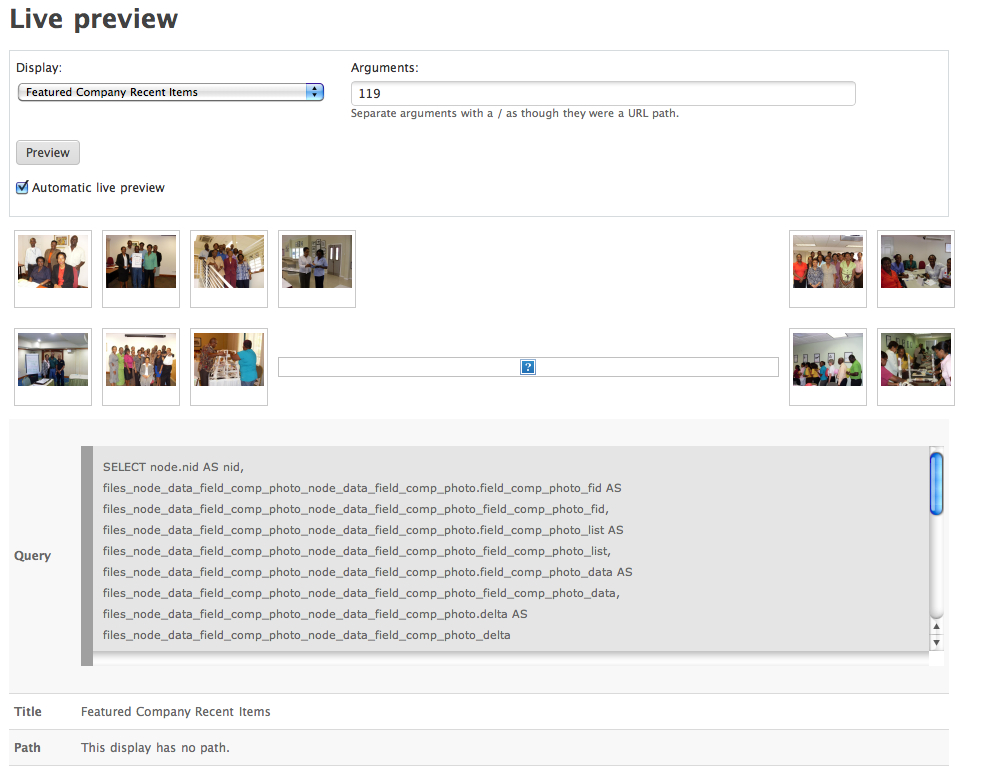
I want to output the company photo field which has multiple images attached to this field, in a view of style 'grid'. I am currently getting a few blank fields in between the out put when the query is executed. This output from the query is returned based on a an argument which is based on a 'user id from the url' which evaluates based on the node author.
I am using an image cache preset called 'recent_items_photos' to resize the images returned from the query. My challenge is that I do not know how to plug these requirements into the views custom field to get the necessary results.
Can someone please assist me?
The out put from the current query in view is:
SELECT node.nid AS nid, node_data_field_comp_photo.field_comp_photo_fid AS node_data_field_comp_photo_field_comp_photo_fid, node_data_field_comp_photo.field_comp_photo_list AS node_data_field_comp_photo_field_comp_photo_list, node_data_field_comp_photo.field_comp_photo_data AS node_data_field_comp_photo_field_comp_photo_data, node_data_field_comp_photo.delta AS node_data_field_comp_photo_delta, node.type AS node_type, node.vid AS node_vid FROM node node INNER JOIN users users ON node.uid = users.uid LEFT JOIN content_field_comp_photo node_data_field_comp_photo ON node.vid = node_data_field_comp_photo.vid WHERE (node.type in ('company_profile')) AND (node.status <> 0) AND (users.uid = 119)Please note that the user id will not be always 119. However this will be determined based on who the node author of the node being viewed is, and the main reason I am doing this is to get around the view returning empty rows in the display. See attached image. I wish they were an easier way around this challenge.
Regards,
Adrian Millington
Comment #68
arpas commenteddebug a view of other style. that html code is generated?
Comment #69
alice-kahn commentedHi,
I've a content type called "Profession" with some cck checkbox (YES/NO) fields for example;
Hepatitis
risk runner: YES/NO
risk maker: YES/NO
Diphtheria
risk runner: YES/NO
risk maker: YES/NO
I'm trying to create a view based on these checkbox (yes/no) fields. I've added NodeTitle and all these fields in a view. I've also added Customfield: PHP code with following code:
Its not working for me with this code. Can some one please help me with this code?
Thanks in advance,
Alice
Comment #70
arpas commentedI suggest to check values of $data->field_dip_riskrunner_value, $data->field_dip_riskmaker_value by printing. if you get missing values, then try contemplate module to understant who variables you must to use.
Comment #71
alice-kahn commentedI have tried this code as well but again no luck. Can anyone please help me????
Thanks
Comment #72
arpas commentedFirst suggestion - print $data->field_dip_riskrunner_value, $data->field_dip_riskmaker_value values. And post result.
Comment #73
francis55 commented@cbroberts26: Thanks for writing the introduction documentation of this fabulous module
Comment #74
whan commentedThanks
Comment #75
agalligani commentedNothing short of AWESOME!
Comment #76
agalligani commented.... but.... if I want to look at User:Roles Roles how can I do this? I don't see it in the list of variables...
Comment #77
agalligani commentedI figured it out yesterday. I needed to know if the individual who created the node was an "expert". For this I had created a role called expert so of course I had to assign that role to the users who were designated as experts.
So I created a Customfield and placed the following code in it:
So if the user is an expert, print out the div of class "expert", which will display a little png that the client asked for, in the view...
Note the variable $data->users_uid which is the user who created the node. Pretty slick! Hope this helps someone...
Comment #78
eebanos commentedI have this problem:
I have created custom CCK field wich contain a numeric value, i´m trying to retrieve using views custom field a numeric value wich allows to sum all these fields values and show it using the following code:
, the problem is when i have several values and it displays all values in a table it repeats the views custom field on each row, and i just want to display it once. Help me to solve this issue.
Comment #79
nkurothe commentedI know this is an old thread, I just started learning drupal
Thanx a ton for this, it took me three days to accomplish what I was trying for
thanx for the var_export!
Comment #80
agalligani commentedwelcome #79
Comment #81
hockey2112 commentedI'm not sure if this module is the solution I am looking for... I have Ubercart and the "Delivery time slots for Ubercart" module installed, and I have created a View to pull a custom report of orders. I need for that report to also include the delivery time slot chosen by the shopper on each order, but that module apparently does not have Views integration. Is there a way for me to pull the time slot value for each order into the view by using this module?
I also would like to be able to pull in each shopper's custom profile fields, as that will contain info about their allergies, etc.
I appreciate any feedback! Thanks!
Comment #82
ridefree commentedBeen a while on this thread but I wondered if anyone had some advice for me.
I'm trying to output some specific information from one of my views.
Using print_r I can see that the field I need in this case is: node_data_field_mp3_field_mp3_data
It outputs something like this ...
{s:11:"description";s:0:"";s:3:"fid";s:5:"32487";s:5:"width";i:0;s:6:"height";i:0;s:8:"duration";d:2071.56243750000021464074961841106414794921875;s:12:"audio_format";s:3:"mp3";s:17:"audio_sample_rate";i:44100;s:18:"audio_channel_mode";s:6:"stereo";s:13:"audio_bitrate";i:128000;s:18:"audio_bitrate_mode";s:3:"cbr";s:4:"tags";a:0:{}}All I want is the duration.
My best attempt so far is this (based on code we have working elsewhere on the site)
I would think that my $data->node_data_field_mp3_field_mp3_data should be something like:
$data->node_data_field_mp3_field_mp3_data['duration'] but I just can't seem to get the right syntax.
Anyone have any ideas here?
(perhaps goes without saying I'm no php expert)
thnx