

This project is not covered by Drupal’s security advisory policy.
Concept
Offers a content-type for a simple To do list. It can be used for anything that needs to be done: getting milk at the store, reminding yourself to update a profile, telling your users to vote on a poll by a certain date...
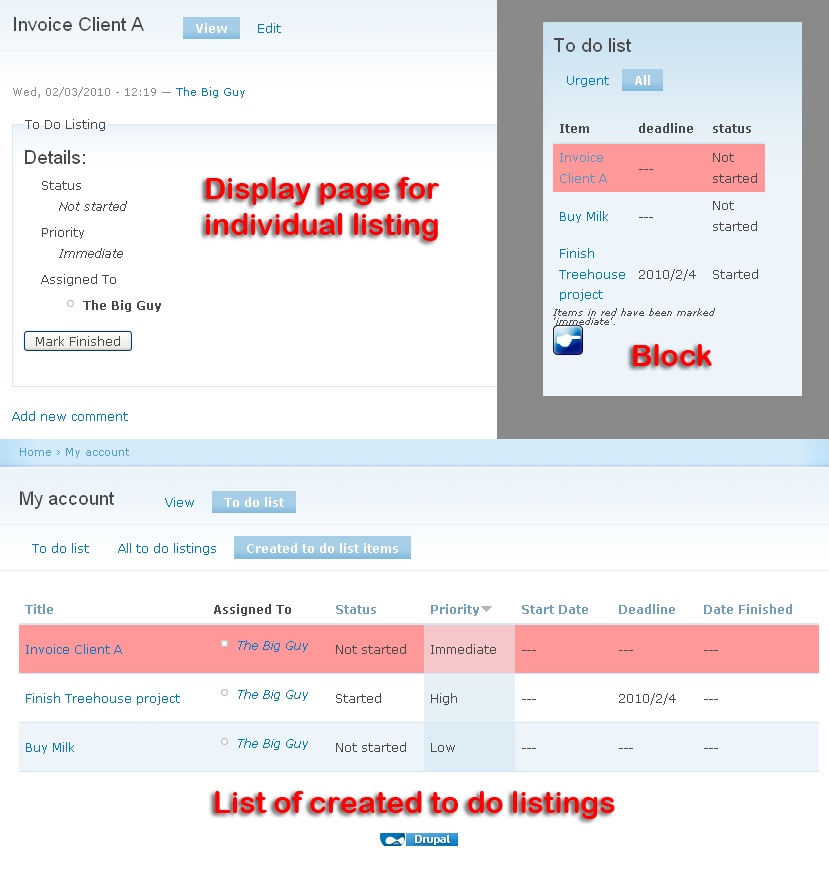
To do items can be assigned to users with permissions. Items can be given an optional status, priority, start date, and deadline. Items nearing their deadline or with a priority level of immediate are shown in the To do list block (requires the installation of the To do block module.) These events can also fire triggers (Actions & Rules support.)
Each user gets a page with lists of the To do items that: (1) are assigned to them, (2) still exist, or (3) that they created. Quite handy to stay on top!
For more information, read the extensive documentation.
UPGRADE WARNING
MAKE A DATABASE BACKUP FIRST!
Version 1.3 and above are using a new permission scheme that is better but is brand new. It is being used by about 250 people and seems to work just fine!
Upgrading from 1.2 works fine. Please, make a database backup first if you have important To Do information. This version will give you a much better control of who can do what permission wise.
See the new To Do List Permissions available in version 1.3.
IMPORTANT NOTE: When upgrading to 1.3, we attempt to upgrade the existing permissions to the new scheme. This will not be a 100% perfect process because there were some cases that were tricky to handle. Please, make sure that you are satisfied with the upgrade before marking your website as Online again. This means looking at the permissions and making sure that they match what you'd expect.
Version 1.1 and over are now available. It will definitively upgrade properly, however, just in case, we strongly advice that you first make a backup. Remember that Drupal downgrades do not restore the database.
Security note: It seems to me that the old version could leak some information for lack of proper checking of some permissions in the 2 or 3 JSON processes. This would be limited to a list of users and a list of node titles that would otherwise not be accessible. The new version fixes these issues.
New maintainer
This project has been taken over by a new maintainer, AlexisWilke. Thank you Alexis, and good luck with the module (from the old maintainer).
Thank you Jay.
Quick links inside the documentation
Basic module installation and configuration
Extend this module with others
Sponsor
Made to Order Software Corporation is a software company based in California.
Project information
- Project categories: Content editing experience
 6 sites report using this module
- Created by jaypan on , updated
 This project is not covered by the security advisory policy.
Use at your own risk! It may have publicly disclosed vulnerabilities.

