Closed (duplicate)
Project:
Airy Blue
Version:
6.x-1.3
Component:
Code
Priority:
Normal
Category:
Bug report
Assigned:
Reporter:
Created:
2 Jul 2009 at 09:25 UTC
Updated:
21 Aug 2011 at 11:08 UTC
Jump to comment: Most recent file


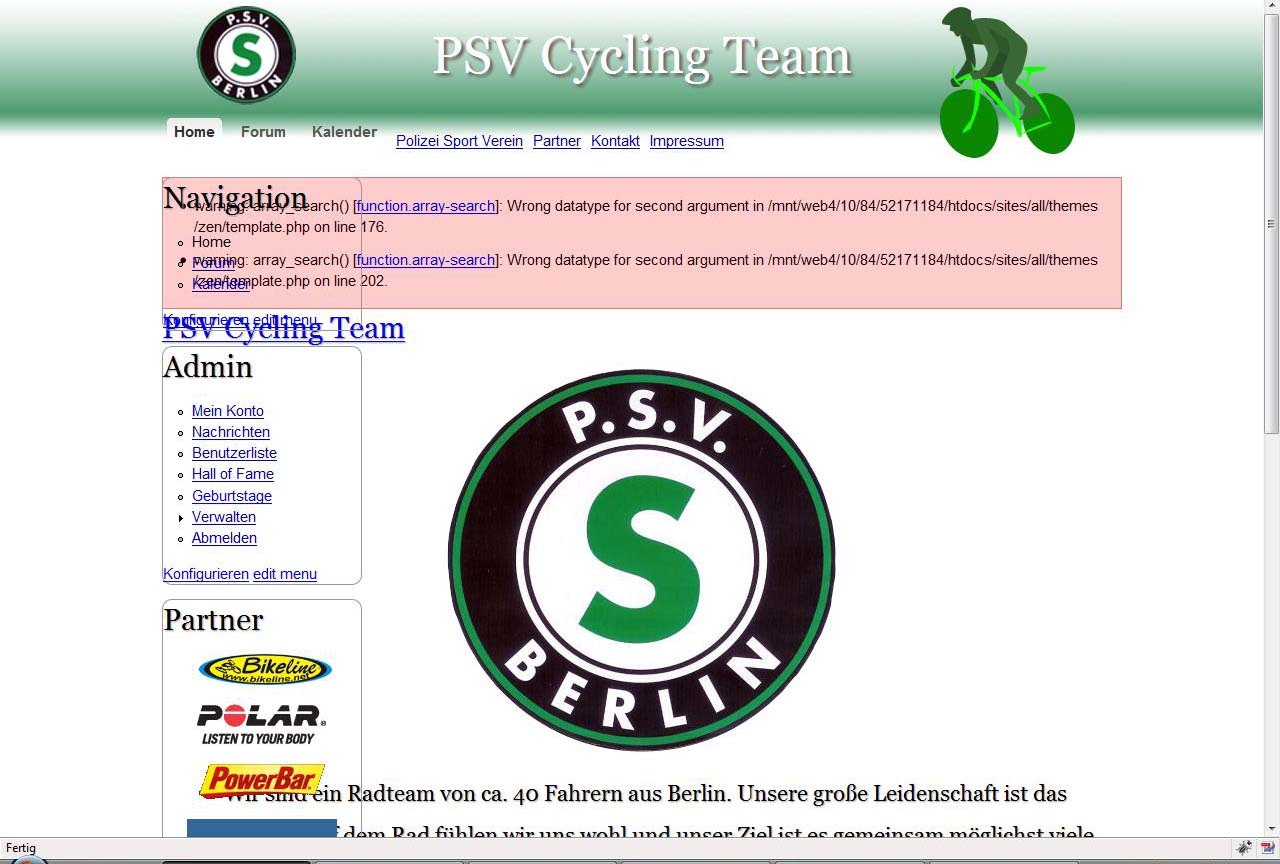
Great theme! Unfortunately, in Internet Explorer the main content is not moved to the right of the left sidebar, so the text of the main content area and the text of the left sidebar area is superimposed and thus impossible to read. There is then an empty white space towards the right sidebar where the main content should have been.
| Comment | File | Size | Author |
|---|---|---|---|
| #41 | ie7-overlap.jpg | 11.08 KB | ScottW |
| #30 | error.jpg | 154.83 KB | Coron |
| #29 | New Picture.jpg | 188.95 KB | colinjones |
| #22 | New Picture.jpg | 210.7 KB | colinjones |
| #16 | New Picture.jpg | 285.01 KB | colinjones |




Comments
Comment #1
balajibala commentedhai,
This is the css problem.kindly check the width and padding in the #main-content inner in the style.css
and the css of side-bar left.
Another solution is while uploading there may be some chance for missing of template.php of particular theme file.Kindly check that also.if so re-upload it
Thanks
Balaji
Comment #2
geerlingguy commentedI will take a glance at this tomorrow, and hopefully have a patch by then. I actually didn't test the left sidebar in IE at all (silly me), as the main site I'm using it on uses only a right sidebar.
Thanks for submitting the issue!
[Edit: Sorry I haven't gotten to this yet... I've been out of town this past week and couldn't get back to fixing the theme. I'll have it resolved as soon as I get back.]
Comment #3
lennart commentedThanks. Your effort is appreciated!
Comment #4
geerlingguy commentedHere's a patch which fixes the issue... has to do with a weird float bug in IE 6/7 (not present in 8), which can be resolved by simply adding the
display: inline;declaration on the #content element. You can either apply this patch immediately, or wait until I roll this and the other issue into a new version (6.x 1.1, coming soon :-)-Jeff Geerling
Comment #5
geerlingguy commentedMight help if I attach the patch :-)
Comment #6
geerlingguy commentedApplied to CVS, will release an updated version of the theme tonight (hopefully!).
Comment #7
geerlingguy commentedComment #8
Pastor Lee commentedGeerlingguy,
I'm having the same problem, and I'm using Google-Chrome. Left-sidebar Navigation overlapping main content. NICE Theme, but can't get the layout to work. I'm no software-guru either, so telling me to check this or insert that, is like me telling you to detect the mental-health issues of a criminal. Is it possible to tell a "newbie" how to fix this, in English ? -
Thank You !
Lee
Comment #9
geerlingguy commented@ Paster Lee - What version of the theme are you using?
Comment #10
dugh commentedLeft side bar is floating on top of the main content on my site, too. Using firefox 3.5
Comment #11
geerlingguy commented@dugh - could you please provide a screenshot (or even better, if the site's online, could you give a link?) I can't seem to replicate this problem on my local install...
Also, are you using version 1.1 or 1.0?
Comment #12
superflybenito commentedHey GeerlingGuy,
This issue is still occuring, whether the side bar is on the left or right - it overlaps the main content in Firefox and IE. (screenshot attached) Such a shame as this is a great theme.
Any closer to fixing this?
Comment #13
geerlingguy commentedI'm actually currently investigating this issue. I hope to have a patch in a day or two, and maybe a new release - it's one of those really annoying bugs :(
Comment #14
geerlingguy commentedRolled into 6.x-1.2 - release coming within 24 hours!
Comment #16
colinjones commentedgeerlingguy -
I am having this issue too! Using Firefox 3.0.14 and IE 8. In both the left block is shifted right to cover the main content. I am using 6.x-1.0 Zen and 6.x-1.2 Airyblue on Drupal 6.13
Comment #17
geerlingguy commented@ colinjones - You'll need to download Zen 2.x instead of 1.x; that should resolve the issue.
Comment #18
colinjones commentedhmmm didn't make any difference at all, I guess I must have done something wrong
Comment #19
geerlingguy commentedYou'll also have to clear all your caches, or at least the theme registry...
Comment #20
colinjones commentedall the caching options in "performance" are turned off (I chose clear cache there anyway), and hit CTRL-F5 to clear the browser cache of that page too. And the option to rebuild the theme registery on every page is turned on, but I still get this issue.... I think I must have really screwed something up somehow, but I don't really know what I'm doing here! So I think I will just have to give up.
Comment #21
geerlingguy commentedI just realized - the problem is that the title goes down below the navigation area, and screws with the rest of the layout. One solution would be to use a shorter page title.
Another solution would be to change the page title font size so it all fits nicely in the top header area. You could add a rule like:
h1#site-name {
  font-size: 80%;
}
Adjust this css rule as you see fit (smaller or larger).
Comment #22
colinjones commentedthanks so much for taking the time to look at this!! I tried shortening the title, rebuilding the theme cache (by leaving the option turned on for page refreshes), clearing the performance cache and CTRL-F5 refreshing on the browser, but still see this...
Comment #23
geerlingguy commentedHmm... perhaps a module you have enabled is interfering with the theme CSS. Do you have a live link to the site, so I could check out your site myself?
Thanks!
Comment #24
Zarevac commentedI have the same issue, I am gonna check my code in the validator.
Comment #25
colinjones commentedgeerlingguy - sorry, it is a purely internal site that I cannot expose to the Internet... modules I have installed: Ajax (although none of the components are enabled currently), CCK, Date/Time, Node Import, Faceted search, Advanced Help, DHTML Menu (I know this one causes problems with Ajax), Views, VBO and Views OR
Comment #26
Zarevac commentedgeerlingguy, ya need access to mine? I can email you some account data as its only possible to see the template when selected in an account.
Comment #27
geerlingguy commented@ Zarevac - that would be great! I will take a peek and see if I can get this issue resolved.
Comment #28
geerlingguy commentedAre you sure you're using Zen 2.x, or is that Zen 1.x? The reason I ask is that the zen stylesheet on your site is adding a default padding of 10 pixels to the body (something that's been fixed in Zen 6.x-2.x-dev), and also, the appropriate styles aren't being included on specific pages.
To download Zen 2.x, you need to go to the Zen project page, http://drupal.org/project/zen, and download the 6.x-2.x-dev snapshot (not the 6.x-1.0 version). Then delete the zen folder from your site, and copy the new zen project folder to sites/all/themes (or wherever your themes are stored).
Comment #29
colinjones commentedI'm pretty sure mine is 2.0 dev, see attached. Basically I deleted the contents of the old zen folder and moved the contents of the 2.0 folder into it, then refreshed the themes. Now it says 2.0
Comment #30
Coron commentedHey,
I got this error when updating to the new Zen 2.0 dev release. The left sidebar and content were overlapping and I got a error message.
Screenshot attached
Comment #31
geerlingguy commentedThis is very puzzling to me - I'm going to try to install Zen 1.x, then remove it and install Zen 2.x, to see if I can replicate this issue. The problem is that the Zen 2.x body classes (such as class="sidebar-left" or "sidebar-second") are not being added at all.
Comment #32
Coron commentedHey,
I updated the Zen 2.x dev Feb09 release to Zen 2.x Oct09 release, when the problem occured. I didn't use Zen 1.x at all but even if I undo the changes, the content is still overlapping with the left sidebar. Not sure why :(.
Comment #33
geerlingguy commentedJust realized - the latest -dev release of Zen 2.x has changed the way the page.tpl.php file handles body classes - instead of:
<body class="<?php print $body_classes; ?>">you need:
<body class="<?php print $classes; ?>">in your Airy Blue page.tpl.php file. I will release a new version of Airy Blue to get this bug worked out.
[Edit: I also realized that tabs are no longer styled correctly. I'll need to rework a bunch of things in the .info file and the folder structure (including adding a tabs.css file to airyblue).]
Comment #34
Zarevac commentedThat fixed it with me, thnx!
Comment #35
colinjones commentedyep! that fixed it for me too :) thanks heaps!
Comment #36
geerlingguy commentedAny time ;-)
I have the fixes ready, but I need to get back to the states, or onto a network where I can access CVS. As soon as I can, I'll roll a new release.
Comment #37
Coron commentedThat fixed it for me as well. Thx. :)
Comment #38
davidhk commentedsubscribe
Comment #39
Zarevac commentedOh a small btw :-p
In the admin section when you add blocks in both sidebars the problem occurs again on the lefthand side.
Comment #40
geerlingguy commentedFixed in CVS - http://drupal.org/cvs?commit=282234
Please test and see if you have any trouble - the 6.x-1.3 release should appear by tomorrow sometime. I will be testing it with the latest Zen 2.x-dev release on two live sites, so hopefully I'll find if there are any glaring problems.
Comment #41
ScottW commentedI'm still seeing this behavior in IE7 (i'm using 64 bit, but I assume 32 has the issue as well) - using latest dev snap of Zen and 1.3 of Airy. The problem is not present in FF, IE6 or IE8
Comment #42
geerlingguy commentedHmm... do you have a link where I could view your page? I can't replicate this issue locally, but I only have IETester - I'm wondering if IE 7's full version has some oddity I am missing.
P.S. I like the Tron reference!
Comment #43
ScottW commentedSorry - I should have included that;
http://www.parkerchamber.org/drupal/
IE8's compatibility mode seems to also faithfully replicate this.
My apologies for not knowing CSS well enough to help out with this, but for what it's worth, Adaptive Themes "AT Admin" theme is a 3 column layout that seems to have strong similarities with Airy - the AT theme renders fine under FF, IE6, IE7 and IE8
Comment #44
geerlingguy commentedSounds good - could you switch the theme back over to Airy Blue so I can sample the CSS on your site?
I'll try to get to this today (this afternoon if possible).
Comment #45
ScottW commentedI've switched the layout back and will leave it that way overnight. Here's something you may find interesting - 3 column layout without any CSS hacks for IE's broken box model and works with what looks like every browser out there.
http://matthewjamestaylor.com/blog/ultimate-3-column-holy-grail-pixels.htm
Also look for any "Grail" theme in drupal - looks like 3 of them are sub themes of zen.
Comment #46
geerlingguy commentedOkay, I figured out the bug - it also hit me on another project I'm working on. You need to add the property "width: 100%" to the #main selector in the layout.css file.
So, #main (line 138) should read:
Sorry about that - stupid IE 7 bugs! (It even works fine in IE 6 - how these things are possible boggles my mind).
I will try to incorporate this into an update tonight or tomorrow...
Comment #47
ScottW commentedI can confirm this resolves the issue in IE7 with no side effects in FF, IE6 and IE8.
Thanks!
--Scott
Comment #48
Zarevac commentedFixed on normal pages, however in the admin section it still goes into quirks.
Comment #49
geerlingguy commentedCould you give a screenshot?
Comment #50
Zarevac commentedIts the same site, just login. I just upgraded both Zen and this Template to the latest versions and it appears its all back the way it was.
Comment #51
geerlingguy commentedSame as this bug (but a little outdated): #623598: left sidebar overlaps content if nothing in right sidebar
It's an issue with one of the latest changes to the Zen 2.x-dev release. I'm working on it, should have an update out a.s.a.p.
Comment #52
drupalworlds commentedHi,
I could solve the problem after modifying/defining the widths for the content and sidebar in the style.css of the theme directory.
I got the theme code made by Artisteer and I had the same problem in IE8.
I have 2 computers, one monitor of which has 1280*768 resolution(notebook) and the other, 1280*720(desktop). Both have wide screen monitors and IE8 webbrowser.
There was no problem in the notebook, however, there was the left side menu's overlaping problem only in the desktop monitor.
I modified the style.css as follows.
-------------------------------------------------------------------------------------------------
/* begin LayoutCell, sidebar1 - to rectify the left sidebar overlapping content*/
.art-content-layout .art-sidebar1
{
max-width:230px;
width: 23%;
}
/* It is needed to define the min-width of content.*/
.art-content-layout .art-content
{
width: 75%;
min-width:500px;
}
.art-content-layout .art-content-width
{
width: 76%;
min-width:510px;
}
--------------------------------------------------------------------------------------------
If you use Zen or other themes, you should try to find the proper classes for the content and the sidebar.
Then you should restrict the min-width of the content and the max-width of the sidebar so that the content and sidebar should not overlap each other resulting in the broken style.
Hope that helps.
Drupalworlds