When I go to admin > quiz > matching I get this:
"Fatal error: Unsupported operand types in C:\EasyPHP\www\drupal\includes\common.inc on line 2831"
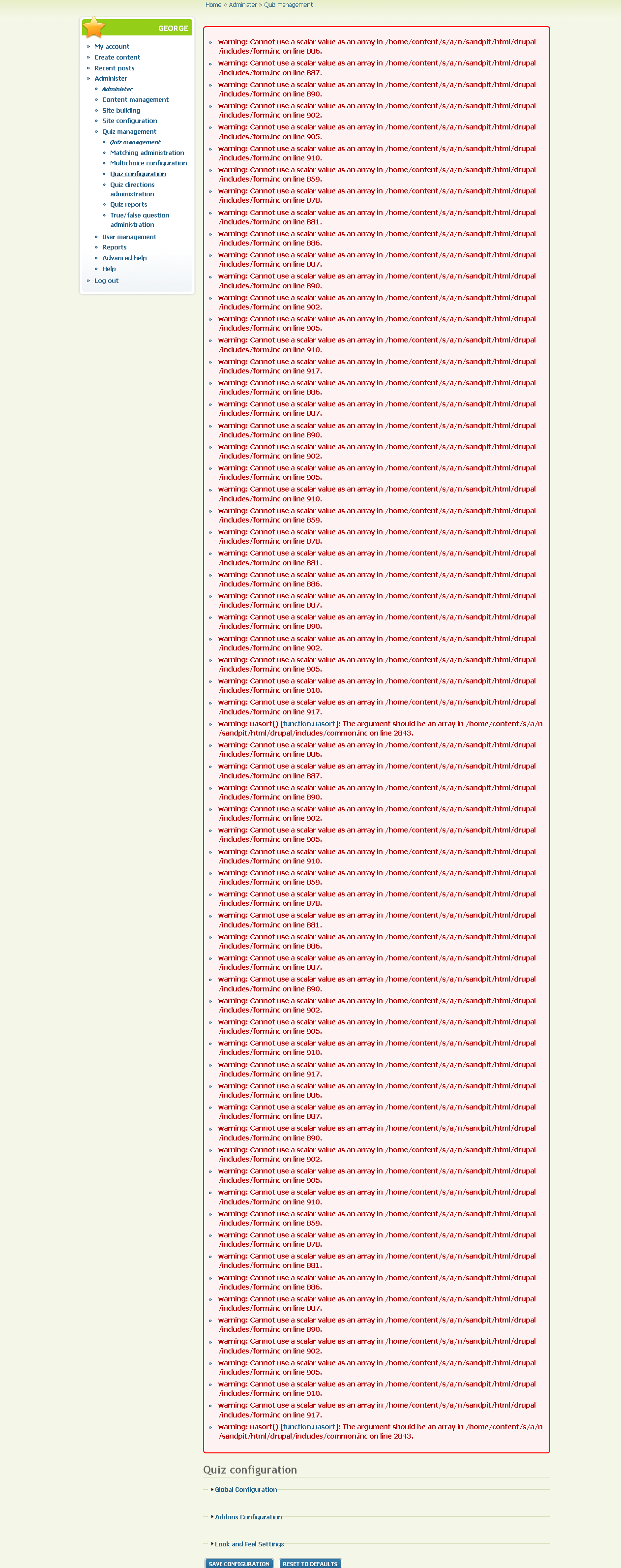
On the next refresh I get these error messages:
* warning: Cannot use a scalar value as an array in C:\EasyPHP\www\drupal\includes\form.inc on line 886.
* warning: Cannot use a scalar value as an array in C:\EasyPHP\www\drupal\includes\form.inc on line 887.
* warning: Cannot use a scalar value as an array in C:\EasyPHP\www\drupal\includes\form.inc on line 890.
* warning: Cannot use a scalar value as an array in C:\EasyPHP\www\drupal\includes\form.inc on line 902.
* warning: Cannot use a scalar value as an array in C:\EasyPHP\www\drupal\includes\form.inc on line 905.
* warning: Cannot use a scalar value as an array in C:\EasyPHP\www\drupal\includes\form.inc on line 910.
* warning: Cannot use a scalar value as an array in C:\EasyPHP\www\drupal\includes\form.inc on line 859.
* warning: Cannot use a scalar value as an array in C:\EasyPHP\www\drupal\includes\form.inc on line 878.
* warning: Cannot use a scalar value as an array in C:\EasyPHP\www\drupal\includes\form.inc on line 881.
* warning: Cannot use a scalar value as an array in C:\EasyPHP\www\drupal\includes\form.inc on line 886.
* warning: Cannot use a scalar value as an array in C:\EasyPHP\www\drupal\includes\form.inc on line 887.
* warning: Cannot use a scalar value as an array in C:\EasyPHP\www\drupal\includes\form.inc on line 890.
* warning: Cannot use a scalar value as an array in C:\EasyPHP\www\drupal\includes\form.inc on line 902.
* warning: Cannot use a scalar value as an array in C:\EasyPHP\www\drupal\includes\form.inc on line 905.
* warning: Cannot use a scalar value as an array in C:\EasyPHP\www\drupal\includes\form.inc on line 910.
* warning: Cannot use a scalar value as an array in C:\EasyPHP\www\drupal\includes\form.inc on line 917.
* warning: Cannot use a scalar value as an array in C:\EasyPHP\www\drupal\includes\form.inc on line 886.
* warning: Cannot use a scalar value as an array in C:\EasyPHP\www\drupal\includes\form.inc on line 887.
* warning: Cannot use a scalar value as an array in C:\EasyPHP\www\drupal\includes\form.inc on line 890.
* warning: Cannot use a scalar value as an array in C:\EasyPHP\www\drupal\includes\form.inc on line 902.
* warning: Cannot use a scalar value as an array in C:\EasyPHP\www\drupal\includes\form.inc on line 905.
* warning: Cannot use a scalar value as an array in C:\EasyPHP\www\drupal\includes\form.inc on line 910.
* warning: Cannot use a scalar value as an array in C:\EasyPHP\www\drupal\includes\form.inc on line 859.
* warning: Cannot use a scalar value as an array in C:\EasyPHP\www\drupal\includes\form.inc on line 878.
* warning: Cannot use a scalar value as an array in C:\EasyPHP\www\drupal\includes\form.inc on line 881.
* warning: Cannot use a scalar value as an array in C:\EasyPHP\www\drupal\includes\form.inc on line 886.
* warning: Cannot use a scalar value as an array in C:\EasyPHP\www\drupal\includes\form.inc on line 887.
* warning: Cannot use a scalar value as an array in C:\EasyPHP\www\drupal\includes\form.inc on line 890.
* warning: Cannot use a scalar value as an array in C:\EasyPHP\www\drupal\includes\form.inc on line 902.
* warning: Cannot use a scalar value as an array in C:\EasyPHP\www\drupal\includes\form.inc on line 905.
* warning: Cannot use a scalar value as an array in C:\EasyPHP\www\drupal\includes\form.inc on line 910.
* warning: Cannot use a scalar value as an array in C:\EasyPHP\www\drupal\includes\form.inc on line 917.
* warning: Cannot use a scalar value as an array in C:\EasyPHP\www\drupal\sites\all\modules\wysiwyg\wysiwyg.module on line 119.
* warning: Cannot use a scalar value as an array in C:\EasyPHP\www\drupal\sites\all\modules\wysiwyg\wysiwyg.module on line 119.
* warning: uasort() [function.uasort]: The argument should be an array in C:\EasyPHP\www\drupal\includes\common.inc on line 2829.
I have just updated quiz-HEAD, and reinstalled all quiz modules.



Comments
Comment #1
falcon commentedI've made a similar configuration form for scale now. Removing the fieldset removed the bug, and using system_settings_form on the return statment in my implementation of getAdminForm made the form work for me.
i.e.
public function getAdminForm($edit = NULL) {
$form['scale_max_num_of_alts'] = array(
'#type' => 'textfield',
'#title' => t('Maximum number of alternatives allowed'),
'#default_value' => variable_get('scale_max_num_of_alts',10),
);
return system_settings_form($form);
}
Attached is a patch doing something similar with the implementation of getAdminForm found in the matching question type. Don't know why the fieldset resulted in an error message, but I don't have time to investigate...
Comment #2
sivaji_ganesh_jojodae commentedThanks for the patch. Fixed and committed to 4.x
do you got it now ?
Comment #3
jfmoore commentedUnder Drupal 6.13, I tried Quiz 3 and got this same behavior. So, I tried dev version 4 and got similar behavior on nearly all admin setting pages. Doe this mean that neither version is ready to use?
Comment #4
sivaji_ganesh_jojodae commentedI am not able to reproduce it in all the admin setting pages. AFAIK it happens only in matching page and it has been fixed now. For other pages please do report a bug (with snapshot) we will try to fix it.
Comment #5
jfmoore commentedWhen you say fixed, I assume you mean in the dev version?
Comment #6
sivaji_ganesh_jojodae commentedThis issue was filed against quiz-4.x-dev so the answer is yes. You may have to wait for 12 hours for Drupal to build tar.gz package from CVS.
Comment #7
falcon commentedYes,
I didn't notice that the # was missing. Thanks sivaji
Comment #8
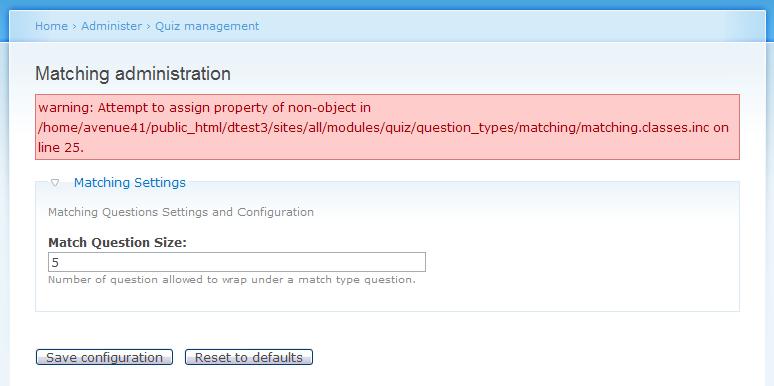
jfmoore commentedOkay, to remove potential conflicts, I did a clean install of Drupal 6.13, and the only contrib module I installed was Admin Menu. Then, I installed Quiz 6.x-4.x-dev dated July 15. I also installed QueryPath, AutoLoad, and Chart, and I think I got all the dependencies covered. Then, I enabled everything in modules admin. I'm still getting error notices when I go to modules admin/Quiz Question/Matching admin and modules admin/Quiz Question/Quiz directions admin. I am attaching screenshots. Hope it helps.
Comment #9
turadg commentedjfmoore, thanks for the report. The original bug was fixed and you uncovered a second bug.
Calls to _quiz_question_get_instance() need to pass a $node, but quiz_question_type_settings_form() was passing $type. I just made a dummy node:
/**
* Get the admin settings form for a question type.
*/
function quiz_question_type_settings_form($context, $type) {
$node = new stdClass();
$node->type = $type;
return _quiz_question_get_instance($node)->getAdminForm();
}
Please bang on this (with either the latest CVS update or wait 12 hours for a tar) and let us know whether any other problems creep up.
Incidentally, this is the kind of stuff unit tests would be great for. :) If anyone is looking to contribute but doesn't know how to get involved, writing unit tests would be very helpful.
Comment #10
jfmoore commentedI don't know how to do the CVS thing, so I guess I'll wait until tomorrow to download the latest dev tar. I'll keep the new Drupal site to use just for this module — at least for the time being anyway.
Comment #11
falcon commentedComment #12
stGeorge-1 commentedSorry to bother everyone, but I think I am still having the same problem. I have just instaled Quiz and when I select anything on Quiz Management I initially receive a white screen with
"Fatal error: Unsupported operand types in /home/content/s/a/n/sandpit/html/drupal/includes/common.inc on line 2845"
Upon refresh I receive a long list of error messages (please see attached).
I wonder if anyone has a clue what is going on? and how I can fix it?
Many thanks
Comment #13
falcon commentedI marked the bug with 6.x-3.0. I don't have overview of the 3.x branch so I don't want to make a new release, but a 3.x maintainer probably will.
Comment #14
mbutcher commentedShould I cut a Quiz 3.1 release? We have several resolved bugs, I believe.
Comment #15
sivaji_ganesh_jojodae commentedThanks I can reproduce the error message in #12. Now it is fixed.
Comment #16
Rosamunda commentedAfter reading all the comments here I really didn´t get it: Is it fixed or is it not?
I mean, the green stable version is the 3.x wich I´m installing and trying to use for a live site.
The 4.x does say that shouldn´t be used with a live site.
But I still got these errors ...
So what should I do?
Thanks for your guidance here :)
Rosamunda
Comment #17
sivaji_ganesh_jojodae commentedThis is fixed in quiz 3.x (to be precise quiz 3.4), read the release notes http://drupal.org/node/673286
Comment #18
Rosamunda commentedI see. Thanks for the clarification! Updating... :)
Comment #19
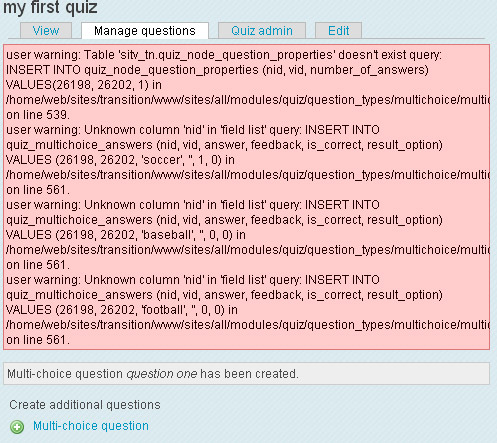
djmy commentedI deleted my dev quiz and installed quiz-6-1.x-3.4.tar. Unfortunately I am still getting errors just by adding multi-choice questions. I only have quiz and multichoice on. attached is a screenshot....
Comment #20
Rosamunda commentedOops! same here. The error is still there:
This error appears using latest stable release (3.4)
Comment #21
anodyne commentedRosamunda: I've modified quiz_directions.classes.inc (wrapped line 31 and 32 in an if() statement) and have attached the patch to this post. The same patch should be applied to 6.x-3.x-dev too.
Comment #22
sivaji_ganesh_jojodae commentedThe above three comments has nothing to do with this. It is a separate issue reported and fixed already, see #739306: Error:* warning: Attempt to assign property of non-object .../quiz_directions.classes.inc on line 31
Comment #24
ClearXS commented"XML Parsing Error: not well-formed" after installing modules, upgrade, update & ticking new modules
http://drupal.org/node/809244#comment-3027292
The Quiz module 6.3.5 resulted in loss of website that could be partly regained by reinstalling everything and loss of articles (but they are a few and can be copied back from the old database). Meanwhile 2 deactivation's of web-hosting service because of database errors (connected or not). The second time syslog might not have been turned on, so an erroneous installation might have caused a bypass to clog up the servers logfiles (that could be another cause than from Quiz).
The blocks c.s. the left and right columns were not showing up and the banner-block was not stretched anymore. Further see the last comments I've mentioned in above link, for the detailed error report. All the errors disappeared immediately after ticking off Quiz module.
(earlier I couldn't, because Seamonkey browser has a very severe error with Quiz that the website is gone and was the only browser automatically logged into the admin account, while the email function to send a new password just had stopped working and the passwords were heavily encrypted by another method than md5; but with reinstalling on a new database and getting the same error, I could login with IE that showed errors, but didn't block my screens)
Sorry I'm stressed because of these severe errors on my installation (the severity was a circumstance of other factors too), but suppose that in near future I might be very happy with this complex/complicated(=many features!) module and its developers!
Comment #25
falcon commentedI'm sorry for any trouble the quiz module might have caused you, although I'm not sure how much of the blame the quiz module should get for this. If the Quiz module caused these kinds of errors I'm quite sure we would get a lot more bug reports...
I'm not quite sure what to do about this one. If there still is a bug in the matching question types admin page you still must have had some unlucky circumstances in order to make it break down your site and become thrown out of your web-hosting service...
I will try to release a new beta version of Quiz 4 today. It will probably be more stable, and the bug in this issue is fixed in quiz 4. You can try that one. We're not planning on releasing any new version of Quiz 3 unless security errors or other serious errors are found. I agree that your experience is a very serious one, but I have a hard time imagining that this bug alone could cause all that havoc...
Comment #26
falcon commentedAdded some tags
Comment #27
ClearXS commentedI haven't found out what causes the problem. First it seemed to be Quiz (and not only seemed; it was an outcome of what I think was proper testing), but then also under other circumstances/modules the error could shows up.
It seems complex, like several combination's of modules can cause the problem and maybe some other 'magic' ghost factor
Installing Drupal 6.17 (without any part of IMC-Alba and Pressflow), one module re-uploaded (was incomplete without giving an immediate error; had some bad lines some days ago and sometimes a module was uploaded and extracted without an error message, but later turned to have a hidden error), only using the basic theme, installing and activating IE CSS Optimizer, not activating any blocks and/or eliminating all blocks and re-initiating them again...
Yes only the last one took some errors away, but on installing a bunch of modules, the XML parsing error returned on Seamonkey (Mozilla clone) showing nothing except for the error, while IE showed OK, untill logging in: theme gone completely.
But I will find out; have the time, so just stress- and logical-testing all possibilities. So probably the outcome will then be some not-Quiz-specific error that affects several modules or sequences with certain SQL versions, or whatever...
= = = = = = = = = = = = = = = = = = =
One of the complex issues is that it indeed seems to be Quiz that has some minor errors, that only come to light on activating JQuery Menu and/or one of its depending modules like Advanced Forums or Advanced Books. The developer says that these errors are normally to blame on other modules (of which I suspect Quiz is one) that are not formed correctly.
http://feedvalidator.org/
No..; Quiz is 'working' now with JQuery Menu with only a few other modules activated (+rebuild nodes +update.php + cron)...
I have all blocks (also that come standard with Drupal) de-activated, as some errors are caused by blocks being there on a new module or upgrade.
So now returning some blocks => Quiz with JQuery Menu still working... So it's even more complex involving a third module.
In the mean time found another module that causes these errors (but is not the only one).
Also upgraded to 6.x-4.0-beta5 but with a few errors from update.php:
=> removing all blocks, rebuild perm., update.php, cron.php
=> uploading/extracting 6.x-4.0-beta5 again (former was very slow & staggering during high traffic, now quick and smooth)
=> ticking on & activating Quiz core ( Quiz & Quiz question):
"Quiz module has been enabled. To create a quiz go to Content Management -> Create Content -> Quiz."
=> admin/content/node-settings/rebuild +update.php +cron.php
=> ticking on & activating all sub-modules, except for:
AJAX Quiz (could conflict), Quiz Results Export (Querypath missing), Quiz Statistics (Chart missing)
=> admin/content/node-settings/rebuild +update.php +cron.php
Module Hacked reports that all Quiz files are in original state
Module Schema reports:
# pollfield_votes.field_name_delta is type int but its default 0 is PHP type string
# pollfield_votes.weight is type int but its default 0 is PHP type string
So there seem to be database errors with the new release..?
(for the initial report: its unclear in what exact combination Quiz has/had this error; still sorting out if I can reproduce, could be in a few days)
Comment #28
falcon commented