

Closed (fixed)
Project:
Drupal core
Version:
7.x-dev
Component:
user interface text
Priority:
Normal
Category:
Task
Assigned:
Issue tags:
Reporter:
Created:
18 Jul 2009 at 13:49 UTC
Updated:
3 Jan 2014 at 00:29 UTC
Jump to comment: Most recent, Most recent file





Comments
Comment #1
keith.smith commentedYes, this seems fine.
As an aside, all this "grab a handle" business was put in at the last possible second of the Drupal 6 string freeze, because this was, then, a new interaction and we weren't certain that people would immediately grasp it, pun intended. But, it seems to have turned out fairly self-explanatory, so there's no need to have the additional text.
Comment #2
eigentor commentedNot bad, but we could be more noob-compatible, and even much shorter.
How about:
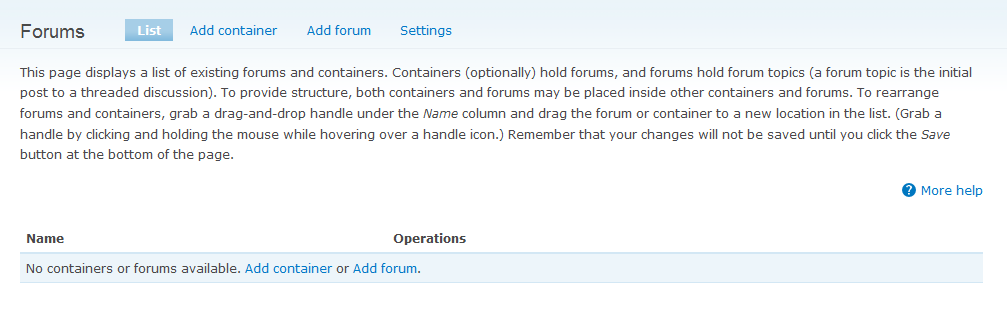
"All forums on your page. You can put forums into containers to group them."
No need to talk about topics and threads here: this should be on the thread list.
Comment #3
dries commented@eigenator: do you mean "All forums on you site" (instead of page)?
Comment #4
dries commentedCommitted to CVS HEAD. Thanks!
Comment #5
eigentor commented@Dries yes. All forums on your site. :)
Though the other version is already comitted, I'd like to give it a shot with the as-short-as-possible one.
Comment #6
eigentor commentedDarn, the last one had "page". This one has "site"
Comment #7
eigentor commentedAnd once more because of double hyphens...
It's a real drag that it is not possible to edit or remove attachments on issues in your own comments.
Comment #9
eigentor commentedO.K. this could not work, because the other patch was applied before. New attempt.
This is the description now:
"All forums on your site. You can put forums into containers to group them."
Comment #10
eigentor commentedComment #11
Bojhan commentedI think you should be able to catch it into one nicely flowing sentence, its to much a "two" thing sentence now. One does not need to explain what this page holds, merely the main concept it is for.
Comment #13
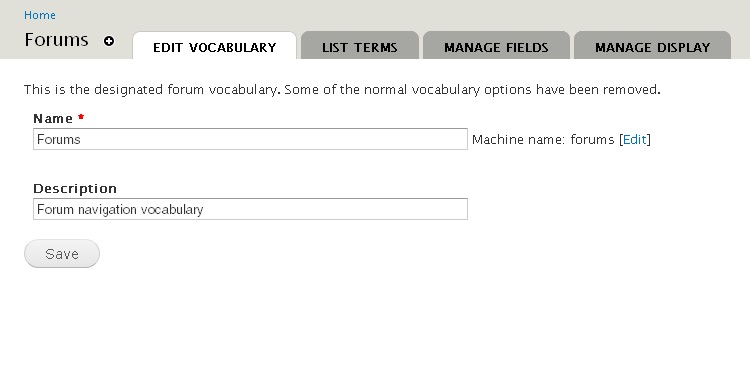
yoroy commentedcouple of changes added here, all related to the forum pages admin pages.
changed
to:
changed
to:
changed
to:
changed
to:
Comment #14
Bojhan commentedScreenshots please?
Comment #15
yoroy commentedhttp://skitch.com/yoroy/ngd5i/container-before
http://skitch.com/yoroy/ngdh8/container-after
http://skitch.com/yoroy/ngd57/forum-before
http://skitch.com/yoroy/ngdhj/forum-after
http://skitch.com/yoroy/ngd5x/forums-before
http://skitch.com/yoroy/ngdhg/forums-d7 (= after)
http://skitch.com/yoroy/ngf4m/forumsettings-before
http://skitch.com/yoroy/ngf4f/forumsettings-after
Comment #16
eigentor commentedimages from yoroy's patch:
Container before
after
Forum before
after
Forum before
after
Settings before
after
Comment #17
eigentor commentedRe-rolled it to make it even shorter and by removing unneeded words. Pattern: "For example, a Forum named Fruit" becomes "A forum named Fruit"
Patch and screenshots.
Comment #18
eigentor commentedRerolled, changed "Set content types to use on the Forum vocabulary page"
to "Select content types to use in Forums on the Forum vocabulary page"
Updated the link to that page. And - er - sometimes the controls to choose content types are missing on that page...
Comment #19
eigentor commenteduh, and the patch...
Comment #21
yoroy commentedOk here we go:
Forum list before:
Forum list after:
___
Forum settings before:
Forum settings after:
___
Add container before:
Add container after:
___
Add forum topic before:
Add forum topic after:
Comment #22
yoroy commentedstatus etc.
Comment #24
yoroy commentedNo idea how to fix tests.
Comment #27
yoroy commentedOr maybe I do.
Comment #28
yoroy commentedwoohoo! Now needs review of #21 by humans.
Comment #29
redndahead commentedLooking over the code it looks good. Nice change.
Comment #30
webchickCould we avoid silly, nonsensical examples? There is no one on this earth, even Martha Stewart, who is going to name forum categories Fruit and Vegetables and forums Apples and Bananas.
How about describing more "real world" sample forum containers/forums? You know, like these! http://drupal.org/forum
For example, categories of "General" and "Support", and "General" may contain forums such as "News and Announcements" and "General Discussion".
Comment #31
webchickOn the other hand, that Fruit/Vegetables and Apple/Bananas example might be very nice in the help text/help page for Taxonomy.
Comment #32
yoroy commentedOk, removed examples in this patch.
Comment #33
webchickGreat! Even fewer words. :)
Committed to HEAD.