We are upgrading from drupal 5-19 to 6-13. This includes going from Panels 5.x-2.0-rc1a to panels 6.x-3.0-rc1
Post upgrade we see a full list of all our panel pages on /admin/build/pages/list (site building => pages => list)
However when we try to normally navigate to any of these pages, they are not found, so I assume we have some repair/rebuilding to do.
Now our confusion/state of cluelessness begins when we choose "edit" for one of these panel pages (from the list at /admin/build/pages/list). When we choose edit we are confronted with a new UI that we know not what to do with. What do we do? I realize the panels 3 documentation is not done yet, but perhaps some clues might help us.
Attached is a screenshot of a typical panel page "edit screen" that we encounter.
Any help appreciated...



Comments
Comment #1
merlinofchaos commentedHmm. Ok, that screenshot indicates that something failed in the upgrade and didn't transition all of the data properly. There should be a variant attached to that panel which contains your previous layout and display, and that is not there.
Would it be possible for me to get a copy of the pre-upgrade database (or at least the panels related tables of the database) so I can run through the upgrade procedure and see what happened?
Comment #2
maxelrod commentedThank you! We will send you a link to download our database. Please let us know how to contact you so we can privately send you a link to download our database. Send a message to wxxi.online at gmail.com
Mike
P.S. Andy might get back to you as I am going on vacation.
Comment #3
dccircuit commentedHi there! This is the Andy mentioned in the above message. Hoping to send this link to the database, but don't want to post publicly... How can I send this link to you, Merlin? Thanks very much!!
Comment #4
merlinofchaos commentedI sent an email to the first address listed. I just realized there are 2 different people here. If worst comes to worst you can contact me by logging into IRC channel #drupal-views on freenode. See the http://drupal.org/irc for more information.
Comment #5
pyxio commentedI have the same problem. Has a fix been found for this yet?
Comment #6
merlinofchaos commentedWhat versions of PHP and MySQL are you running? This database updates okay for me. THere must be something else going on here.
Comment #7
pyxio commentedMySQL database 5.0.51a
PHP 5.2.4-2ubuntu5.6
Comment #8
merlinofchaos commentedThat's pretty close to what I am running. I am at a loss. I don't know why yours is mangled while mine works. Is it possible you didn't have the rc1 of both ctools and panels?
Comment #9
pyxio commentedyes, it is possible. i may have gone from beta to this upgrade. i guess i should i revert back to earlier version and upgrade one release at a time? that seems painstaking.
Comment #10
merlinofchaos commentedUpgrading one release at a time should not be necessary.
One thing I got in another report that may or may not be relevant. They had not deleted the panels directory for the update, and still had some old modules peeking in. While I do not know how such a thing could interfere, it's something to test. Does your install contain a panels_page.module perchance?
Comment #11
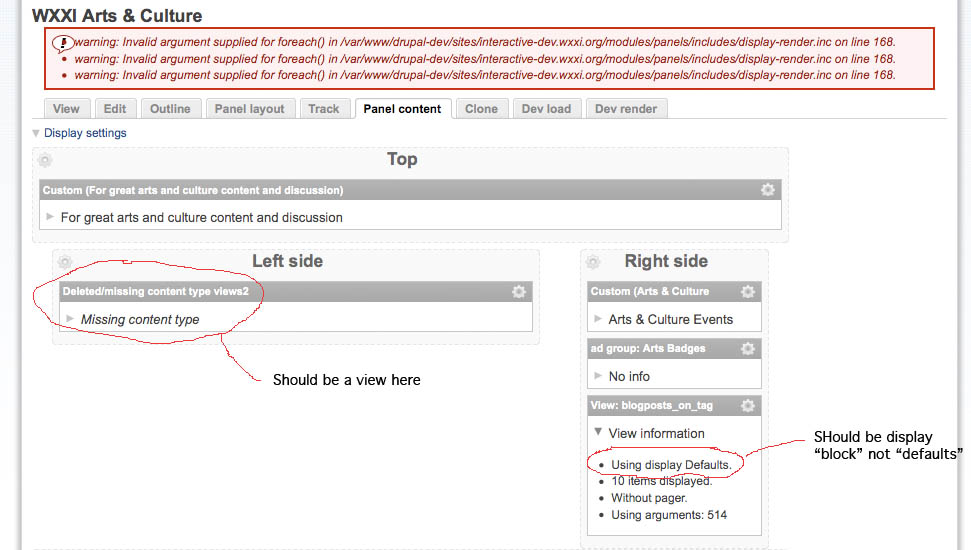
maxelrod commentedHere's another screen shot after our upgrade. In this case a panel node is not updating correctly. On the left (circled in red) you will see a pane that should contain a one of our views but it is missing. On the right you will see (circled in red) a pane that contains a view but it has the wrong display value. (should be "block" not "defaults". )
I am able to manually fix the panel node, although it would be nice to be able to just edit the display value. The way it works now I have to delete the piece of content and re add it with the correct display value.
Note: in this upgrade we are also upgrading from the old 5.x views to the new 6.x views 2 and we had to manually convert most our views after running update.php. We did this using the supplied conversion tool built in to the new views module. Most views convert ok, some needed hand tweaking. In the case of the attached screenshot these views converted ok, without any problem, but we still had to do the conversion and this took place "after" running update.php on panels.
Mike
Comment #12
merlinofchaos commented#11: Well, those unfortunately are fairly normal upgrade artifacts. AS the message in update.php says, the upgrade process is far from perfect. Views changed a lot from Drupal 5 to Drupal 6. This means that so much changed and sometimes Panels takes a guess at what it should do and guesses wrong. In these cases, you'll just have to fix your panes.
Comment #13
maxelrod commentedOk, we can rebuild by hand except for one problem.
We have in some of the panels a menu item we applied css styles on. In we can no longer do this (apply the CSS) the Drupal 5 way because the menu is no longer identified by number. I noticed when clicking on the gear menu => "CSS properites" as one of the options. Perhaps this is something we could use? However when clicking on it all we get is an error message and an empty pop up window. It says "loading..." but never loads anything.
An error occurred while attempting to process /panels/ajax/pane-css/44/247
Comment #14
merlinofchaos commentedIs this in a mini panel?
Comment #15
maxelrod commentedThe error:
"An error occurred while attempting to process /panels/ajax/pane-css/...etc.."
happens in both panel nodes and mini panels. It did not occur on a new panel page I created as a test.
BTW I am testing using the latest Safari (4.0.2) and Firefox 3.0.13 (latest of 3.0 build)
Comment #16
merlinofchaos commentedI think that one is fixed in -dev then. See #529258: Can't configure CSS properties on mini panel content
Comment #17
maxelrod commentedThanks! that patch did the trick for setting CSS on a pane.
Now I think we are down to only two remaining panels related problems that I know of:
1. The loss of panel pages on update (Which started this thread)
2. the warning message that appears on most of our panel nodes. ( See screen shot above )
"warning: Invalid argument supplied for foreach() in /var/www/drupal-dev/sites/interactive-dev.wxxi.org/modules/panels/includes/display-render.inc on line 168."
Comment #18
merlinofchaos commentedI'm pretty sure the warning comes from the broken panel pages. And I'm at a loss, because I can't reproduce the problem when I upgrade the database on my system. Maybe there's some other module involved that's interfering, I don't know.
Comment #19
merlinofchaos commentedOne thing that was discovered for me: _update_X() hooks run even if the module is disabled. That could cause the problems we're seeing here. When Iw as upgrading, I always had Panels enabled and things worked for me, even with these databases that are failing for others.
Comment #20
cgjohnson commentedI've posted a new issue this morning because I didn't see this thread in a search, but in fact this is exactly what happened to us.
I thought I followed the instructions to upgrade but it's possible I ran update.php with the new panels already in place (although not enabled), which may be causing my problem.
Our panels edit view is exactly the same as the screen shot in the original message - no layout/content tab, nothing after the Smmary variant.
I'll go back and try again being even more careful not to remove the old and add the new panels directory before I run update.php. If there's a way to restore the content info withouth having to revert and reupgrade, please let me know.
thanks,
cj
Comment #21
merlinofchaos commentedOk, I'm not fairly confident that this is the problem. I have checked in a fix that will prevent upgrades while Panels is disabled.
Comment #22
merlinofchaos commentedhttp://drupal.org/node/580742 is a dup of this and has some more information.
Comment #23
cgjohnson commentedI know there are three issues on this problem, but since this is the one with the most info so far, I'll use it.
Ours has gotten more complex in that when I reinstalled our old panels (6.x-2.0-alpha3), all of our panels disappear completely. Now they don't even show up on the panels admin pages.
Is there any info I can provide to help you troubleshoot any of this no-variant stuff?
Comment #24
merlinofchaos commentedYou need to revert to an older database.
Comment #25
cgjohnson commentedSince panels is such an important module for so many of us (thank you, merlinofchaos and the other awesome creators), documentation on how to upgrade would really help.
Are these the latest instructions? They clearly say disable panels before update.php but this is what got me into trouble....
http://drupal.org/node/515140
Comment #26
merlinofchaos commentedSorry, the disabled module breaking the upgrade thing is a bug. I checked in a fix to prevent it from screwing you. Documentation wouldn't help in the sense that I only understood what was happening here yesterday, and I checked in a fix this morning.
Comment #27
cgjohnson commentedthanks merlinofchaos. Should we add a step "re-enable your panels module before running update.php" to the How-to documentation here: node/515140 -- or should we not disable Panels the first place (step1)?
other than that, is this series of actions the correct way to safely upgrade? I don't want to lose everything again. thanks,
cj
Comment #28
merlinofchaos commentedNo, I'll release a 1.1 version soon and then people shouldn't run into these errors at all anymore.