

Closed (fixed)
Project:
Zero Point
Version:
6.x-1.7
Component:
Miscellaneous
Priority:
Critical
Category:
Bug report
Assigned:
Reporter:
Created:
31 Jul 2009 at 20:30 UTC
Updated:
25 Feb 2010 at 00:16 UTC
Jump to comment: Most recent file



Comments
Comment #1
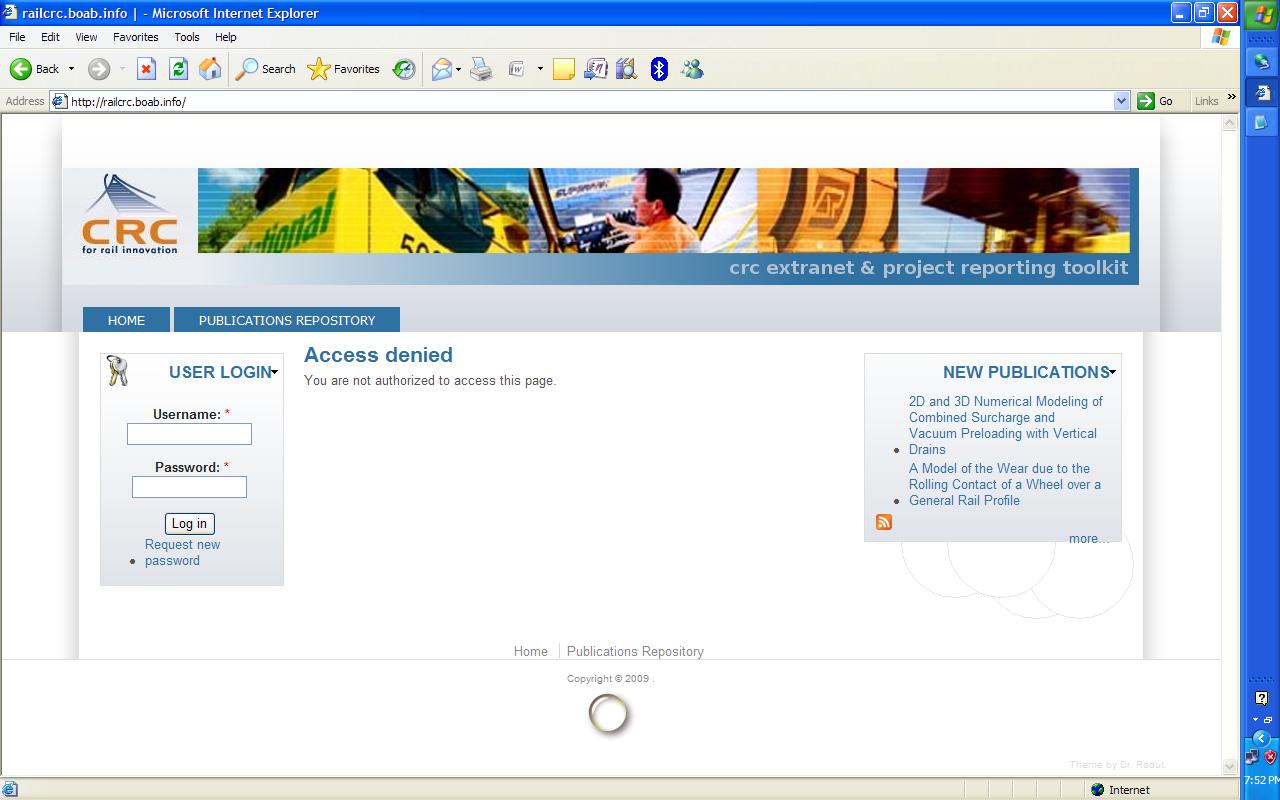
boabjohn commentedPossibly related: I have a site that fails in almost every respect with IE6. See screensot comparison MSIE6 and FFox3.5
Comment #2
amirtaiar commentedThats huge different friend!
First of all I suggest not to mension the IE6 in the theme page on drupal cuase its not true.
And still looking for some unswer...
Comment #3
boabjohn commentedI have the same problem in my other zeropoint site...MSIE 6 is not supported: is this true?
Here are my sites (I checked through browsershots...and through my angry users!)
http://railcrc.boab.info (restricted, but you can still see the front page)
http://ethicalfeast.net
Comment #4
florian commentedPlease read /sites/all/readme.txt in your Drupal installation. See this, also http://drupal.org/getting-started/5/install-contrib/themes. Any custom theme must be installed in /sites/all/themes/theme_name, not /sites/all/themes/contrib/theme_name.
Install 0 Point in the correct folder (sites/all/themes/zeropoint) and everything will work OK. In fact the only browser which have problems in case of an unusual install is always IE.
Comment #5
florian commentedamirtaiar, can you share your URL? I am sure your install has a problem, not the theme.
Comment #6
boabjohn commentedThanks for the pointer Florian.
Note, however, that:
- My sites are D6 (the instructions above are for D5)
- I understand your theme is a *contrib* theme, so for D6 it goes in the sites/all/themes/contrib path (yes?)
- If I subtheme, I can put that in the sites/all/themes/custom/ path... (yes?)
I'll shift to match the D5 advice anyway and see if MSIE behaves better.
Thanks.
Comment #7
florian commentedInstructions are the same for Drupal 6. All contributed things (themes, modules, libraries) must be installed in /sites/all/... Normally you should made two folders themes and modules, and upload the respective project files, as follow:
/sites/all/themes/zeropoint
/sites/all/themes/theme1
....
/sites/all/modules/module1
/sites/all/modules/module2
.... etc.
Of course, 0 Point theme can be installed in other folders but it requires some path adjustments in order to be fully compatible with IE6. In order to do so, you must adapt the path in /css/ie6.css and /css/iepngfix.htc. This is a must in a multi-site scenario, if the theme must be available to only one of the sub-sites.
Comment #8
kims commentedHi
I have the views problem with IE8.
I did empty my cache (several times, also directly in my DB).
I have the theme installed in /sites/all/themes/zeropoint
When i move og uninstall views, the site works erfectly.
I using the 6.x.1.7 version.
http://bistandsbums.dk and http://lager.bistandsbums.dk
Can anyone help me lease, both sites are produktion sites (i know i schould have checked this before, but i'm using FF or Konqurer, never IE)
***problem solved on http://lager.bistandsbums.dk, i disabled the Text Resize module, and all went fine. It wasnt enough on http://bistandsbums.dk ***
Comment #9
kims commentedUninstalling the Blockquotes module, made http://bistandsbums.dk, look fine, now only the colors are missing.
I tried to disable every module one by one, and found when i disable core forum module, i get my colors back, but i cant run my site without core forum module... i hope somone can help me with this.
Comment #10
kims commentedI solved it by changing style.css on line 10 to 20
to this
The same goes for top_bg and top_left!
or i could uninstall core forum module.
I hav'nt found out why IE dosnt get the nature.css file parsed, and why this only happens on sites where there is a view's view.
Comment #11
kims commentedProblem is back.
Looks like IE dosnt parse the css files for some reason. help please!
Comment #12
kims commentedI disabled suckerfish menu, and everything works.
Next time i need to change theme, i'll look for one where the Author actually will do some support, or at least anserw, when people needs help to solve some problems, with the theme!
Comment #13
kims commentedwhen installing google cse module, the theme messes up
Comment #14
kims commentedThe minimax pager module was messing up the views pages.
If you use Blockquotes and weblinks, you'll have to disable on of the modules to get zeropoint working, otherwise your views pages will mess up.
As usual this only happens in IE.
For now my site is working
Comment #15
florian commentedkims, can you post all the modules you have installed? Also, what version of 0 Point do you use? Your comment #10 shows me that it may be an older version.
Comment #16
boabjohn commentedFlorian,
Could we pull this thread back to its topic? It is regarding the theme's ability to function in MSIE6...a very bad browser, but it still has 27% of the market.
Now, you have advised that the theme will work fine if it loaded into:
sites/all/themes/zeropoint. Is that correct?
I have done this. It still does not work in IE6.
Here is a browsershot series for a default install of zeropoint, to the directory above, for the website: http://railcrc.boab.info
http://browsershots.org/requests/3336510/
FWIW, attached is a screenshot of MSIE6, 7, and FFox3.5
These are all coming from the theme installed as instructed: sites/all/themes/zeropoint
What is your advice?
Thanks in advance.
Comment #17
florian commentedI am sorry but I can not reproduce the issue using IE6 (see the image attached). Please take a look at my sites (www.boaz.ro, www.ecoimm.ro) and tell me how it appears in IE6, 7 and 8. I have to understand what is happening.
Comment #18
sokru commentedI can confirm that site with Block icons (either 32x32 or 48x48) enabled, will break up the page in IE6. Site will render ok without Block icons, but when enabled, template will be broken likewise in boabjohn's screencaps.
Comment #19
jdsaward commentedI have been working with boabjohn to resolve this issue.
I took some time to examine the css and go through the issue queue and attempt some fixes. For example I tried various derivations of the fix proposed here: http://drupal.org/node/487716#comment-1719612. I was fixated on trying to understand the role of the .fixer and .expander0 declarations in the layout structure. I began to see that it was not a case of the fixes in ie6.css not working as they should, but rather they were just not being applied. Running out of ideas, I moved the conditionals around in page.tpl.php and at one point as a 'wonder what will happen if' test I moved the
<!--[if lte IE 6]>section up above theprint $styles. AHA! Tolerable display in IE6.Here's what is happening:
IE has a limit of 30 CSS files per page. The combined module and theme css files were above that limit. The ie specific css files provided by the zeropoint theme were being loaded last, and just not being read by IE. This applied to both IE6 and IE7. At http://railcrc.boab.info I've installed a contrib module that was written to address that issue - "IE Unlimited CSS Loader" - http://drupal.org/project/unlimited_css. With that module enabled all the CSS files are read, and we begin to have tolerable layout in IE6 and IE7. The rest is just css tuning I think. Screenshot for IE6 attached.
I imagine some of the other issues being reported in this regard, and not being able to be reproduced by Florian, may be related to this limitation of IE. See eg http://drupal.org/node/487716, http://drupal.org/node/510840.
Comment #20
sokru commentedThanks! IE Unlimited CSS Loader fixed my problem.
Comment #21
florian commentedThanks John. The issue will be fixed in the next release.
Comment #22
Prasad Shir commentedI was also facing a lot of issues on IE (6, 7 & also 8) for Zero Point theme. The issues were primarily related to number of CSS files being loaded (IE, it seems, cannot handle more than 30 CSS files).
I did the following - Admin > Site Configuration > Performance : Enabled Optimize CSS option.
This option converts all required CSS files for a page into a single CSS file.
This solved the problem of IE compatability of Zero Point theme
Hope this helps
Prasad
Comment #23
tarunkumar1976 commentedHi All,
I am having the same problem . My site doesn't show properly in MSIE6 and MSIE7.My site doesnt display menus and site name in IE.It works pretty good in firefox and chrome. As JDSaward was mentioning i tried 'IE Unlimited CSS Loader' and enabled it but nothing changed ..i even tried 'Admin > Site Configuration > Performance : Enabled Optimize CSS' option even that didnt really change any thing.
Am i missing some thing ..do i need to modify the CSS files . Please help.I have attached the screen shots and the souce code for IE.I dont have a URL as i am working on my local host.
Firefox Link :
http://i36.tinypic.com/5chc2e.jpg
IE Link:
http://i34.tinypic.com/288v4er.jpg
Comment #24
jefflocke commentedProblem with Views display of images in IE8. No problems in FFox, Safari or or Chrome. Switched to Acquia Marina and IE8 worked properly.
Also Zero Point has a problem with the Gallery Assist module in all browsers. Thumbnails float right all other text and images float left. No problems with Marina or Waffles.
Too bad because I really like Zero Point but the IE issues are a real problem. Thanks very much for this theme. I look forward to the next release.
Comment #25
tarunkumar1976 commentedany help guys.
Comment #26
florian commentedFixed in releases 6.x-1.9 and 6.x-2.2
Comment #27
florian commented