

 The 2026 Drupal Business Survey is open. Your response will help shape the future of the Drupal business ecosystem.
Thanks for all your work on this module.
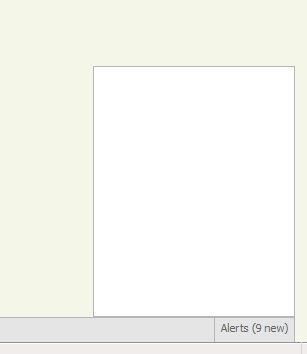
I have probably overlooked something, but the alert area shows the number of alerts, but does not show the actual alerts. Best illustrated in the attached screen capture.
Using the Acquia Marina theme. I am signed in as User 1.
| Comment | File | Size | Author |
|---|---|---|---|
| #27 | Alerts not showing in Alert Box.JPG | 10.76 KB | ortegai |
| #11 | appbar.js_.txt | 622 bytes | arhip |
| #3 | Test.txt | 17.57 KB | vanderlip |
| Capture.JPG | 12.08 KB | vanderlip |


Comments
Comment #1
icecreamyou commentedFirst make sure you're using the very latest development version. Also check what version of PHP and what version and type of SQL you're using (at admin/reports/status). What browser(s) are you using to test?
You'll need to do a bit of debugging. Copy this into the "body" textarea at node/add/page, set the Input Filter to "PHP" and click "Preview."
If that looks successful, the cause of your problem is either the AJAX-retrieval of the alert listing (which seems unlikely given that it seems to work for the count of new messages) or a stray >div< that will be removed in the next dev version. Try removing line 269 of appbar.module:
And see if that changes anything. If it doesn't, try running this at node/add/page:
That's unlikely to work and honestly I'm not sure what it would indicate if it did, but try it anyway if you can't identify the problem elsewhere.
If none of that indicates a problem, it may be an issue with another module conflicting, like JQuery Upgrade or similar. Try disabling modules like that (one by one) and see if Appbar works.
Comment #2
icecreamyou commentedI committed the fix to remove the stray div, so you may want to wait and try the next dev version. Just make sure to refresh your cache because the CSS changed a bit too.
Comment #3
vanderlip commentedThanks again for your work on this.
I installed the latest dev and still have the same issue in Firefox 3.0.1.2 and Internet Explorer 8.0.7. In addition when the new dev is installed, I do not have access to the admin section of my site. I either experience a white screen or the following error message:
Fatal error: Maximum execution time of 30 seconds exceeded in C: \wamp\www\alternateroutes\includes\common.inc on line 511
PHP 5.2.9
MySQL 5.1.33
WAMP on Windows Vista
I have attached the results of the code you asked me to run.
Comment #4
icecreamyou commentedThis really does not sound symptomatic of a problem created by Appbar, assuming you've installed it correctly. I test on almost the same system you have (I use MySQL 5.2) with a variety of browsers (FF 2.0+, IE7+, Safari 3+, Chrome, Opera 9+) and I haven't come across anything remotely similar to what you're experiencing, nor is there anything in the code that I can find that would cause this behavior. The module is actually surprisingly simple, and based on the results of the tests you ran for me, the back-end is working perfectly; the only issue is with the presentational layer, and probably more specifically the JQuery. That suggests to me that there's a conflict somewhere with another module, or maybe it's not even a conflict--just a bug that happens to be expressed when Appbar runs.
Without more information, I'm afraid I can't really do anything about it. I know it's a pain, but you could try disabling modules that relate to JQuery one-by-one to see if anything changes. Otherwise you may want to just wait for a bit until the module matures. Do let me know what you end up doing though (if anything) -- both out of personal interest and so that this issue doesn't sit around with no conclusion.
Comment #5
vanderlip commentedThanks for your quick response.
I did try a number of things, just to let you know. I am not a developer, so I am sorry that I can't do more meaningful investigations. I disabled all the modules that I thought might conflict. I tried several different themes. I moved the site from my Windows test environment to my Linux host. I even did a little bit of hunting around with Firebug. I have been unable to solve the issue. I will do as you suggest and see what happens as the module matures and more people try it out.
Thanks again.
Comment #6
icecreamyou commentedThank you for your thoroughness, and I have to say I'm quite bewildered by this one. The only thing I can think of is that it could be a Windows problem, as I vaguely recall hearing of this kind of thing happening before--but I test the module on XAMPP...
I will keep this issue in mind as I develop and I will let you know if I come across anything that I think might solve it. I'm sorry it isn't working out for you at the moment.
Comment #7
pribeh commentedYo Ice, this module's potential is crazy good. Unfortunately I'm getting the same results as vanderlip so I would suggest to leave this one open for now. I'm running a dev site on the latest mamp (os x). I will try this on my development server soon and let you know about the results. Let me know if there's anything else I can do to help.
Comment #8
icecreamyou commentedI have a feeling it's related to server settings regarding security that's interfering with the AHAH. However, I can't test this, because I have no information regarding the settings that could cause this to occur, and this type of problem tends to be unfixable anyway. So, keeping at closed in lieu of a "Cannot Reproduce" status.
Comment #9
pribeh commentedK, I'll work on it then.
Comment #10
vanderlip commentedPribeh/Ice -
I have tried it both on WAMP and on hosted Linux, so it would surprise me if this were server settings, but I am in no way technical so I am not qualified to say. Two points that might be helpful, I do use the Secure Site module which has caused other troubles before, although I did disable it, and still had this issue. I am using the Acquia Marina theme.
Comment #11
arhip commentedI'm experiencing this too. My site has url base "http://test.example.kom/drupal6", but appbar requests from "http://test.example.kom/appbar/refresh/list" that results in 404. I changed every instance of "/appbar/refresh/list" in appbar.js to "appbar/refresh/list" (without / character) and the problem fixed.
Comment #12
vanderlip commentedArhip -
Thanks a lot!!! That did the trick for me, and it seems to be working correctly now.
Comment #13
pribeh commentedAha! arhip got to posting it before me ....
Comment #14
icecreamyou commentedThanks arhip and pribeh... unfortunately, that causes the system to break (at least for me) on sites where Drupal is not installed in a subdirectory. I think there should be a way around this by figuring out where Drupal is installed in PHP and passing that setting to the JS, but there may still be a small number of servers for which this is impossible...
Anyway, to figure that out, I'll need someone to run this code once and copy-paste the results here (copy-paste this code at a node/add page, set the input format to PHP, and click Preview).
Comment #15
design.er commentedI also have sometimes this empty alert window so here is my result of your request from #14.
BTW: I had to replace the actual URL to (sub)domain.tld because it's a current project domain of a client.
Nevertheless it's a real subdomain.domain.tld so I hope it helps:
Comment #16
icecreamyou commented@design.er: The blank alert dialog happens inevitably for a short period of time while the AJAX retrieves the updated list. If that's your problem -- and, based on the information provided by pribeh and arhip and confirmed by vanderlip, your domain would indicate that your problem is at least different from the one being addressed in this issue -- then there's not much that can be done about it, and your response to #14 (while appreciated) doesn't really help me. I test the module on a site that's on a subdomain, so I know that's not the problem (at least, not on Apache 2/Linux). However, you might try changing your JS file as indicated in #11 to see if it still works for you.
@ everyone else, a response to #14 is still needed to solve this problem.
Comment #17
icecreamyou commentedNot sure what to do with this one--I can't support anything I don't know anything about, so I may just end up marking "won't fix" for now if I can't get any data on this.
Comment #18
detectedstealth commentedCauses my page to redirect that is the same problem that happens when taking the '/' out of the .js file.
When adding my subdomain/root directory before appbar the problem is fixed.
appbar.js
Now the question is how do you pull the location from jQuery?
Comment #19
icecreamyou commentedLet me reiterate that this will not get fixed unless someone follows the instructions in #14.
Comment #20
detectedstealth commentedHere is the output, also note I ran this and it was how I figured out I needed the base_path.
Comment #21
icecreamyou commentedCommitted the fix to CVS. This will probably fix detectedstealth...'s problem but it may not fix things for others. I had the insight, however, that the issue for the rest of you might be Clean URLs. For the people who fixed their problem by removing the opening slash: did you have Clean URLs disabled?
Comment #22
icecreamyou commentedActually, on further thought, I think it's likely that this fix will resolve Clean URLs-based problems as well.
Comment #23
detectedstealth commentedThanks, the fix solved the problem I was having.
Comment #24
vanderlip commentedI am using clean urls and this fixed my issue. Thanks a lot!
Comment #25
pribeh commentedFixed. WOO!
Comment #27
ortegai commentedGreetings
I have the same problem as indicated on this page. I see the notification of the alert but do not show me nothing in the box. I can add menu and work well. My server is a server running windows 2003 std r3 iis 6.0 asp.net 2.0 ajax 1.0 extension all of microsoft update. I am using mysql 5.2 and php 05/02/1913. I tried and I can create forms of all kinds in and out of drupal and work well. The server has the latest version of java installed. I have no more information than can be supplied for this error and I can not use clean url because I am using iis 6.0. What information that you have any suggestions are welcome thank you all before hand.