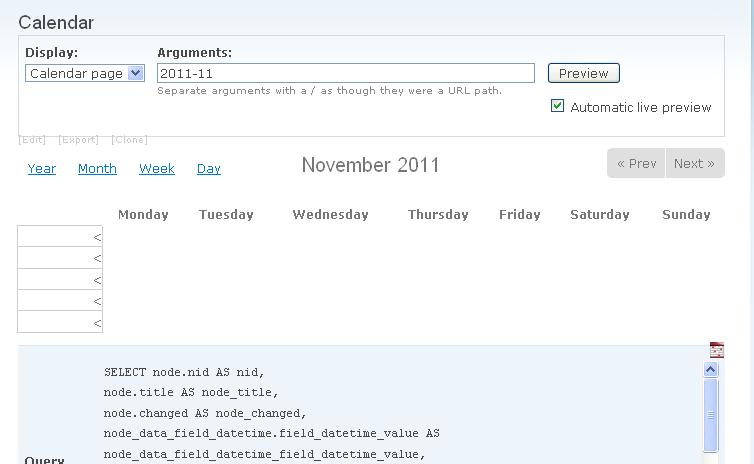
I was using 2.1 version without any problem, but after upgrading to 2.2, the Calendar Views(2.6) always gives me a error message: The date argument date fields must be added to this query. You can exclude them if you do not want them.
I have double checked that each of the calendar view has date in both argument and fields. So, I don't know what the problem is.
Below is my exported Calendar Views, I am not sure if this exported version is my working version, since I the error prevents me saving the views
$view = new view;
$view->name = 'calendar';
$view->description = 'A multi-dimensional calendar view with back/next navigation.';
$view->tag = 'Calendar';
$view->view_php = '';
$view->base_table = 'node';
$view->is_cacheable = FALSE;
$view->api_version = 2;
$view->disabled = FALSE; /* Edit this to true to make a default view disabled initially */
$handler = $view->new_display('default', 'Defaults', 'default');
$handler->override_option('fields', array(
  'title' => array(
    'label' => '',
    'link_to_node' => 1,
    'exclude' => 0,
    'id' => 'title',
    'field' => 'title',
    'table' => 'node',
    'relationship' => 'none',
  ),
  'field_datetime_value2' => array(
    'label' => 'Event Date and Time',
    'alter' => array(
      'alter_text' => 0,
      'text' => '',
      'make_link' => 0,
      'path' => '',
      'link_class' => '',
      'alt' => '',
      'prefix' => '',
      'suffix' => '',
      'help' => '',
      'trim' => 0,
      'max_length' => '',
      'word_boundary' => 1,
      'ellipsis' => 1,
      'strip_tags' => 0,
      'html' => 0,
    ),
    'link_to_node' => 0,
    'label_type' => 'widget',
    'format' => 'time',
    'multiple' => array(
      'multiple_number' => '',
      'multiple_from' => '',
      'multiple_to' => '',
      'group' => TRUE,
    ),
    'repeat' => array(
      'show_repeat_rule' => '',
    ),
    'fromto' => array(
      'fromto' => 'both',
    ),
    'exclude' => 0,
    'id' => 'field_datetime_value2',
    'table' => 'node_data_field_datetime',
    'field' => 'field_datetime_value2',
    'relationship' => 'none',
    'override' => array(
      'button' => 'Override',
    ),
  ),
  'field_location_nid' => array(
    'label' => '',
    'link_to_node' => 1,
    'label_type' => 'none',
    'format' => 'default',
    'multiple' => array(
      'group' => TRUE,
      'multiple_number' => '',
      'multiple_from' => '',
      'multiple_reversed' => FALSE,
    ),
    'exclude' => 0,
    'id' => 'field_location_nid',
    'table' => 'node_data_field_location',
    'field' => 'field_location_nid',
    'relationship' => 'none',
    'override' => array(
      'button' => 'Override',
    ),
  ),
));
$handler->override_option('sorts', array(
  'field_datetime_value' => array(
    'order' => 'ASC',
    'delta' => -1,
    'id' => 'field_datetime_value',
    'table' => 'node_data_field_datetime',
    'field' => 'field_datetime_value',
    'relationship' => 'none',
  ),
));
$handler->override_option('arguments', array(
  'date_argument' => array(
    'default_action' => 'default',
    'style_plugin' => 'default_summary',
    'style_options' => array(),
    'wildcard' => 'all',
    'wildcard_substitution' => 'All',
    'title' => '',
    'breadcrumb' => '',
    'default_argument_type' => 'date',
    'default_argument' => '',
    'validate_type' => 'none',
    'validate_fail' => 'not found',
    'date_fields' => array(
      'node_data_field_datetime.field_datetime_value' => 'node_data_field_datetime.field_datetime_value',
    ),
    'year_range' => '-3:+3',
    'date_method' => 'OR',
    'granularity' => 'month',
    'id' => 'date_argument',
    'table' => 'node',
    'field' => 'date_argument',
    'relationship' => 'none',
    'default_argument_user' => 0,
    'default_argument_fixed' => '',
    'default_argument_php' => '',
    'validate_argument_node_type' => array(
      'blog' => 0,
      'poll' => 0,
      'image' => 0,
      'job_posting' => 0,
      'multichoice' => 0,
      'quiz' => 0,
      'forum' => 0,
      'book' => 0,
      'brand' => 0,
      'chain' => 0,
      'distributor' => 0,
      'event' => 0,
      'festival' => 0,
      'importer' => 0,
      'list' => 0,
      'page' => 0,
      'product' => 0,
      'retailer' => 0,
      'story' => 0,
    ),
    'validate_argument_node_access' => 0,
    'validate_argument_nid_type' => 'nid',
    'validate_argument_vocabulary' => array(
      '1' => 0,
      '3' => 0,
      '5' => 0,
      '6' => 0,
      '7' => 0,
      '4' => 0,
    ),
    'validate_argument_type' => 'tid',
    'validate_argument_php' => '',
    'override' => array(
      'button' => 'Override',
    ),
    'default_options_div_prefix' => '',
    'validate_argument_node_flag_name' => '*relationship*',
    'validate_argument_node_flag_test' => 'flaggable',
    'validate_argument_node_flag_id_type' => 'id',
    'validate_argument_user_flag_name' => '*relationship*',
    'validate_argument_user_flag_test' => 'flaggable',
    'validate_argument_user_flag_id_type' => 'id',
    'validate_argument_is_member' => 0,
    'validate_user_argument_type' => 'uid',
    'validate_user_roles' => array(
      '2' => 0,
      '6' => 0,
      '4' => 0,
      '3' => 0,
      '7' => 0,
      '5' => 0,
    ),
    'validate_argument_transform' => 0,
    'validate_user_restrict_roles' => 0,
    'image_size' => array(
      '_original' => '_original',
      'thumbnail' => 'thumbnail',
      'preview' => 'preview',
      'icon' => 'icon',
    ),
    'validate_argument_signup_status' => 'any',
    'validate_argument_signup_node_access' => 0,
  ),
));
$handler->override_option('filters', array(
  'status' => array(
    'operator' => '=',
    'value' => 1,
    'group' => '0',
    'exposed' => FALSE,
    'expose' => array(
      'operator' => FALSE,
      'label' => '',
    ),
    'id' => 'status',
    'table' => 'node',
    'field' => 'status',
    'relationship' => 'none',
  ),
  'type' => array(
    'operator' => 'in',
    'value' => array(
      'event' => 'event',
    ),
    'group' => '0',
    'exposed' => FALSE,
    'expose' => array(
      'operator' => FALSE,
      'label' => '',
    ),
    'id' => 'type',
    'table' => 'node',
    'field' => 'type',
    'relationship' => 'none',
  ),
));
$handler->override_option('access', array(
  'type' => 'none',
  'role' => array(),
  'perm' => '',
));
$handler->override_option('cache', array(
  'type' => 'none',
));
$handler->override_option('title', 'Calendar');
$handler->override_option('header_format', '1');
$handler->override_option('header_empty', 0);
$handler->override_option('footer', 'To add an event, click the “Add+” link at the top of the calendar.  If you do not see this link, please <a href="/contact"><strong>contact us</strong></a> to request permission to add events.  You must be affiliated with a <a href="/great-brewers-alliance">Great Brewers Alliance</a> wholesaler to add events to this calendar.');
$handler->override_option('footer_format', '1');
$handler->override_option('footer_empty', 0);
$handler->override_option('items_per_page', 0);
$handler->override_option('use_more', 0);
$handler->override_option('style_plugin', 'calendar_nav');
$handler = $view->new_display('calendar', 'Calendar page', 'calendar_1');
$handler->override_option('relationships', array(
  'field_location_nid' => array(
    'label' => 'Retail Location',
    'required' => 0,
    'delta' => '0',
    'id' => 'field_location_nid',
    'table' => 'node_data_field_location',
    'field' => 'field_location_nid',
    'override' => array(
      'button' => 'Use default',
    ),
    'relationship' => 'none',
  ),
));
$handler->override_option('filters', array(
  'status' => array(
    'operator' => '=',
    'value' => 1,
    'group' => '0',
    'exposed' => FALSE,
    'expose' => array(
      'operator' => FALSE,
      'label' => '',
    ),
    'id' => 'status',
    'table' => 'node',
    'field' => 'status',
    'relationship' => 'none',
  ),
  'type' => array(
    'operator' => 'in',
    'value' => array(
      'event' => 'event',
    ),
    'group' => '0',
    'exposed' => FALSE,
    'expose' => array(
      'operator' => FALSE,
      'label' => '',
    ),
    'id' => 'type',
    'table' => 'node',
    'field' => 'type',
    'relationship' => 'none',
  ),
  'province' => array(
    'operator' => 'is',
    'value' => '',
    'group' => '0',
    'exposed' => TRUE,
    'expose' => array(
      'use_operator' => 0,
      'operator' => 'province_op',
      'identifier' => 'province',
      'label' => 'State',
      'optional' => 1,
      'single' => 0,
      'remember' => 0,
    ),
    'id' => 'province',
    'table' => 'location',
    'field' => 'province',
    'override' => array(
      'button' => 'Use default',
    ),
    'relationship' => 'field_location_nid',
  ),
));
$handler->override_option('path', 'calendar');
$handler->override_option('menu', array(
  'type' => 'normal',
  'title' => 'Calendar',
  'description' => '',
  'weight' => '0',
  'name' => 'primary-links',
));
$handler->override_option('tab_options', array(
  'type' => 'none',
  'title' => '',
  'description' => '',
  'weight' => 0,
));
$handler->override_option('calendar_colors', array(
  '0' => array(),
));
$handler->override_option('calendar_colors_vocabulary', array(
  '6' => 6,
));
$handler->override_option('calendar_colors_taxonomy', array(
  '939' => '#eac561',
  '942' => '#0c4cd4',
  '944' => '#ffffff',
  '943' => '#868f05',
  '941' => '#a70d0c',
  '938' => '#a90a8c',
  '940' => '#1f6704',
));
$handler->override_option('calendar_popup', '1');
$handler->override_option('calendar_date_link', 'event');
$handler = $view->new_display('calendar_block', 'Calendar block', 'calendar_block_1');
$handler->override_option('block_description', 'Calendar');
$handler->override_option('block_caching', -1);
$handler = $view->new_display('calendar_period', 'Year view', 'calendar_period_1');
$handler->override_option('style_plugin', 'calendar_style');
$handler->override_option('style_options', array(
  'display_type' => 'year',
  'name_size' => 1,
  'max_items' => 0,
  'truncated_fields' => array(),
  'truncate_length' => '',
));
$handler->override_option('attachment_position', 'after');
$handler->override_option('inherit_arguments', TRUE);
$handler->override_option('inherit_exposed_filters', TRUE);
$handler->override_option('displays', array(
  'calendar_1' => 'calendar_1',
  'default' => 0,
  'calendar_block_1' => 0,
));
$handler->override_option('calendar_type', 'year');
$handler = $view->new_display('calendar_period', 'Month view', 'calendar_period_2');
$handler->override_option('style_plugin', 'calendar_style');
$handler->override_option('style_options', array(
  'display_type' => 'month',
  'name_size' => '99',
  'with_weekno' => '1',
  'date_fields' => NULL,
  'max_items' => 0,
  'truncated_fields' => array(),
  'truncate_length' => '',
));
$handler->override_option('attachment_position', 'after');
$handler->override_option('inherit_arguments', TRUE);
$handler->override_option('inherit_exposed_filters', TRUE);
$handler->override_option('displays', array(
  'calendar_1' => 'calendar_1',
  'default' => 0,
  'calendar_block_1' => 0,
));
$handler->override_option('calendar_type', 'month');
$handler = $view->new_display('calendar_period', 'Day view', 'calendar_period_3');
$handler->override_option('style_plugin', 'calendar_style');
$handler->override_option('style_options', array(
  'name_size' => '99',
  'with_weekno' => 0,
  'max_items' => 0,
  'max_items_behavior' => 'more',
  'groupby_times' => 'hour',
  'groupby_times_custom' => '',
  'groupby_field' => '',
  'truncated_fields' => array(),
  'truncate_length' => '',
));
$handler->override_option('attachment_position', 'after');
$handler->override_option('inherit_arguments', TRUE);
$handler->override_option('inherit_exposed_filters', TRUE);
$handler->override_option('displays', array(
  'calendar_1' => 'calendar_1',
  'default' => 0,
  'calendar_block_1' => 0,
));
$handler->override_option('calendar_type', 'day');
$handler = $view->new_display('calendar_period', 'Week view', 'calendar_period_4');
$handler->override_option('style_plugin', 'calendar_style');
$handler->override_option('style_options', array(
  'name_size' => '99',
  'with_weekno' => 0,
  'max_items' => 0,
  'max_items_behavior' => 'more',
  'groupby_times' => 'hour',
  'groupby_times_custom' => '',
  'groupby_field' => '',
  'truncated_fields' => array(),
  'truncate_length' => '',
));
$handler->override_option('attachment_position', 'after');
$handler->override_option('inherit_arguments', TRUE);
$handler->override_option('inherit_exposed_filters', TRUE);
$handler->override_option('displays', array(
  'calendar_1' => 'calendar_1',
  'default' => 0,
  'calendar_block_1' => 0,
));
$handler->override_option('calendar_type', 'week');
$handler = $view->new_display('calendar_period', 'Block view', 'calendar_period_5');
$handler->override_option('style_plugin', 'calendar_style');
$handler->override_option('style_options', array(
  'display_type' => 'month',
  'name_size' => '1',
));
$handler->override_option('attachment_position', 'after');
$handler->override_option('inherit_arguments', TRUE);
$handler->override_option('inherit_exposed_filters', TRUE);
$handler->override_option('displays', array(
  'calendar_1' => 0,
  'default' => 0,
  'calendar_block_1' => 'calendar_block_1',
));
$handler->override_option('calendar_type', 'month');
$handler = $view->new_display('calendar_ical', 'iCal feed', 'calendar_ical_1');
$handler->override_option('filters', array(
  'status' => array(
    'operator' => '=',
    'value' => 1,
    'group' => '0',
    'exposed' => FALSE,
    'expose' => array(
      'operator' => FALSE,
      'label' => '',
    ),
    'id' => 'status',
    'table' => 'node',
    'field' => 'status',
    'relationship' => 'none',
  ),
  'date_filter' => array(
    'operator' => '>=',
    'value' => array(
      'value' => NULL,
      'min' => NULL,
      'max' => NULL,
      'default_date' => 'now',
      'default_to_date' => '',
    ),
    'group' => '0',
    'exposed' => FALSE,
    'expose' => array(
      'operator' => FALSE,
      'label' => '',
    ),
    'date_fields' => array(
      'node.changed' => 'node.changed',
    ),
    'granularity' => 'day',
    'form_type' => 'date_select',
    'default_date' => 'now',
    'default_to_date' => '',
    'id' => 'date_filter',
    'table' => 'node',
    'field' => 'date_filter',
    'override' => array(
      'button' => 'Use default',
    ),
    'relationship' => 'none',
  ),
));
$handler->override_option('style_plugin', 'ical');
$handler->override_option('style_options', array(
  'mission_description' => FALSE,
  'description' => '',
  'summary_field' => 'node_title',
  'description_field' => '',
  'location_field' => '',
));
$handler->override_option('row_plugin', '');
$handler->override_option('path', 'calendar/ical');
$handler->override_option('menu', array(
  'type' => 'none',
  'title' => '',
  'description' => '',
  'weight' => 0,
  'name' => 'navigation',
));
$handler->override_option('tab_options', array(
  'type' => 'none',
  'title' => '',
  'description' => '',
  'weight' => 0,
));
$handler->override_option('displays', array(
  'calendar_1' => 'calendar_1',
  'calendar_block_1' => 'calendar_block_1',
  'block_1' => 'block_1',
  'default' => 0,
));
$handler->override_option('sitename_title', FALSE);
$handler = $view->new_display('block', 'Upcoming', 'block_1');
$handler->override_option('fields', array(
  'title' => array(
    'label' => '',
    'link_to_node' => 1,
    'exclude' => 0,
    'id' => 'title',
    'field' => 'title',
    'table' => 'node',
    'relationship' => 'none',
  ),
  'field_datetime_value2' => array(
    'label' => '',
    'link_to_node' => 0,
    'label_type' => 'none',
    'format' => 'medium',
    'multiple' => array(
      'group' => TRUE,
      'multiple_number' => '',
      'multiple_from' => '',
      'multiple_reversed' => FALSE,
    ),
    'exclude' => 0,
    'id' => 'field_datetime_value2',
    'table' => 'node_data_field_datetime',
    'field' => 'field_datetime_value2',
    'relationship' => 'none',
    'override' => array(
      'button' => 'Use default',
    ),
  ),
  'field_location_nid' => array(
    'label' => 'at',
    'alter' => array(
      'alter_text' => 0,
      'text' => '',
      'make_link' => 0,
      'path' => '',
      'alt' => '',
      'prefix' => '',
      'suffix' => '',
      'help' => '',
      'trim' => 0,
      'max_length' => '',
      'word_boundary' => 1,
      'ellipsis' => 1,
      'strip_tags' => 0,
      'html' => 0,
    ),
    'link_to_node' => 0,
    'label_type' => 'custom',
    'format' => 'default',
    'multiple' => array(
      'group' => 0,
      'multiple_number' => '',
      'multiple_from' => '',
      'multiple_reversed' => 0,
    ),
    'exclude' => 0,
    'id' => 'field_location_nid',
    'table' => 'node_data_field_location',
    'field' => 'field_location_nid',
    'relationship' => 'none',
    'override' => array(
      'button' => 'Use default',
    ),
  ),
));
$handler->override_option('arguments', array(
  'group_nid' => array(
    'default_action' => 'ignore',
    'style_plugin' => 'default_summary',
    'style_options' => array(),
    'wildcard' => 'all',
    'wildcard_substitution' => 'All',
    'title' => '',
    'breadcrumb' => '',
    'default_argument_type' => 'fixed',
    'default_argument' => '',
    'validate_type' => 'none',
    'validate_fail' => 'not found',
    'break_phrase' => 0,
    'not' => 0,
    'id' => 'group_nid',
    'table' => 'og_ancestry',
    'field' => 'group_nid',
    'validate_user_argument_type' => 'uid',
    'validate_user_roles' => array(
      '2' => 0,
      '6' => 0,
      '4' => 0,
      '3' => 0,
      '7' => 0,
      '5' => 0,
    ),
    'override' => array(
      'button' => 'Use default',
    ),
    'relationship' => 'none',
    'default_options_div_prefix' => '',
    'default_argument_user' => 0,
    'default_argument_fixed' => '',
    'default_argument_php' => '',
    'validate_argument_node_type' => array(
      'blog' => 0,
      'poll' => 0,
      'image' => 0,
      'job_posting' => 0,
      'multichoice' => 0,
      'quiz' => 0,
      'forum' => 0,
      'book' => 0,
      'brand' => 0,
      'chain' => 0,
      'distributor' => 0,
      'event' => 0,
      'festival' => 0,
      'importer' => 0,
      'list' => 0,
      'page' => 0,
      'product' => 0,
      'retailer' => 0,
      'story' => 0,
    ),
    'validate_argument_node_access' => 0,
    'validate_argument_nid_type' => 'nid',
    'validate_argument_vocabulary' => array(
      '1' => 0,
      '3' => 0,
      '5' => 0,
      '6' => 0,
      '7' => 0,
      '4' => 0,
    ),
    'validate_argument_type' => 'tid',
    'validate_argument_transform' => 0,
    'validate_user_restrict_roles' => 0,
    'validate_argument_node_flag_name' => '*relationship*',
    'validate_argument_node_flag_test' => 'flaggable',
    'validate_argument_node_flag_id_type' => 'id',
    'validate_argument_user_flag_name' => '*relationship*',
    'validate_argument_user_flag_test' => 'flaggable',
    'validate_argument_user_flag_id_type' => 'id',
    'image_size' => array(
      '_original' => '_original',
      'thumbnail' => 'thumbnail',
      'preview' => 'preview',
      'icon' => 'icon',
    ),
    'validate_argument_is_member' => 0,
    'validate_argument_signup_status' => 'any',
    'validate_argument_signup_node_access' => 0,
    'validate_argument_php' => '',
  ),
  'date_argument' => array(
    'default_action' => 'ignore',
    'style_plugin' => 'default_summary',
    'style_options' => array(),
    'wildcard' => 'all',
    'wildcard_substitution' => 'All',
    'title' => '',
    'breadcrumb' => '',
    'default_argument_type' => 'date',
    'default_argument' => '',
    'validate_type' => 'none',
    'validate_fail' => 'not found',
    'date_fields' => array(
      'node_data_field_datetime.field_datetime_value' => 'node_data_field_datetime.field_datetime_value',
    ),
    'year_range' => '-3:+3',
    'date_method' => 'OR',
    'granularity' => 'month',
    'id' => 'date_argument',
    'table' => 'node',
    'field' => 'date_argument',
    'relationship' => 'none',
    'default_argument_user' => 0,
    'default_argument_fixed' => '',
    'default_argument_php' => '',
    'validate_argument_node_type' => array(
      'blog' => 0,
      'poll' => 0,
      'image' => 0,
      'job_posting' => 0,
      'multichoice' => 0,
      'quiz' => 0,
      'forum' => 0,
      'book' => 0,
      'brand' => 0,
      'chain' => 0,
      'distributor' => 0,
      'event' => 0,
      'festival' => 0,
      'importer' => 0,
      'list' => 0,
      'page' => 0,
      'product' => 0,
      'retailer' => 0,
      'story' => 0,
    ),
    'validate_argument_node_access' => 0,
    'validate_argument_nid_type' => 'nid',
    'validate_argument_vocabulary' => array(
      '1' => 0,
      '3' => 0,
      '5' => 0,
      '6' => 0,
      '7' => 0,
      '4' => 0,
    ),
    'validate_argument_type' => 'tid',
    'validate_argument_php' => '',
    'override' => array(
      'button' => 'Use default',
    ),
    'default_options_div_prefix' => '',
    'validate_argument_node_flag_name' => '*relationship*',
    'validate_argument_node_flag_test' => 'flaggable',
    'validate_argument_node_flag_id_type' => 'id',
    'validate_argument_user_flag_name' => '*relationship*',
    'validate_argument_user_flag_test' => 'flaggable',
    'validate_argument_user_flag_id_type' => 'id',
    'validate_argument_is_member' => 0,
    'validate_user_argument_type' => 'uid',
    'validate_user_roles' => array(
      '2' => 0,
      '6' => 0,
      '4' => 0,
      '3' => 0,
      '7' => 0,
      '5' => 0,
    ),
    'validate_argument_transform' => 0,
    'validate_user_restrict_roles' => 0,
    'image_size' => array(
      '_original' => '_original',
      'thumbnail' => 'thumbnail',
      'preview' => 'preview',
      'icon' => 'icon',
    ),
    'validate_argument_signup_status' => 'any',
    'validate_argument_signup_node_access' => 0,
  ),
));
$handler->override_option('filters', array(
  'status' => array(
    'operator' => '=',
    'value' => 1,
    'group' => '0',
    'exposed' => FALSE,
    'expose' => array(
      'operator' => FALSE,
      'label' => '',
    ),
    'id' => 'status',
    'table' => 'node',
    'field' => 'status',
    'relationship' => 'none',
  ),
  'date_filter_1' => array(
    'operator' => '>',
    'value' => array(
      'value' => NULL,
      'min' => NULL,
      'max' => NULL,
      'default_date' => 'now',
      'default_to_date' => '',
    ),
    'group' => '0',
    'exposed' => FALSE,
    'expose' => array(
      'operator' => FALSE,
      'label' => '',
    ),
    'date_fields' => array(
      'node_data_field_datetime.field_datetime_value2' => 'node_data_field_datetime.field_datetime_value2',
    ),
    'date_method' => 'OR',
    'granularity' => 'minute',
    'form_type' => 'date_select',
    'default_date' => 'now',
    'default_to_date' => '',
    'year_range' => '-3:+3',
    'id' => 'date_filter_1',
    'table' => 'node',
    'field' => 'date_filter',
    'override' => array(
      'button' => 'Use default',
    ),
    'relationship' => 'none',
  ),
));
$handler->override_option('title', 'Upcoming Events');
$handler->override_option('footer', '<a href="/calendar">Full Calendar</a>');
$handler->override_option('items_per_page', 4);
$handler->override_option('style_plugin', 'list');
$handler->override_option('style_options', array(
  'grouping' => '',
  'type' => 'ul',
));
$handler->override_option('row_options', array(
  'inline' => array(),
  'separator' => '',
));
$handler->override_option('block_description', 'Upcoming');
$handler->override_option('block_caching', '-1');








Comments
Comment #1
skyredwangI was using 2.1 version without any problem, but after upgrading to 2.2, the Calendar Views(2.6) always gives me a error message: The date argument date fields must be added to this query. You can exclude them if you do not want them.
I have double checked that each of the calendar view has date in both argument and fields. So, I don't know what the problem is.
Below is my exported Calendar Views, I am not sure if this exported version is my working version, since the error prevents me saving the views
Comment #2
skyredwang$view = new view;
$view->name = 'calendar';
$view->description = 'A multi-dimensional calendar view with back/next navigation.';
$view->tag = 'Calendar';
$view->view_php = '';
$view->base_table = 'node';
$view->is_cacheable = FALSE;
$view->api_version = 2;
$view->disabled = FALSE; /* Edit this to true to make a default view disabled initially */
$handler = $view->new_display('default', 'Defaults', 'default');
$handler->override_option('fields', array(
'title' => array(
'label' => '',
'link_to_node' => 1,
'exclude' => 0,
'id' => 'title',
'field' => 'title',
'table' => 'node',
'relationship' => 'none',
),
'field_datetime_value2' => array(
'label' => 'Event Date and Time',
'alter' => array(
'alter_text' => 0,
'text' => '',
'make_link' => 0,
'path' => '',
'link_class' => '',
'alt' => '',
'prefix' => '',
'suffix' => '',
'help' => '',
'trim' => 0,
'max_length' => '',
'word_boundary' => 1,
'ellipsis' => 1,
'strip_tags' => 0,
'html' => 0,
),
'link_to_node' => 0,
'label_type' => 'widget',
'format' => 'time',
'multiple' => array(
'multiple_number' => '',
'multiple_from' => '',
'multiple_to' => '',
'group' => TRUE,
),
'repeat' => array(
'show_repeat_rule' => '',
),
'fromto' => array(
'fromto' => 'both',
),
'exclude' => 0,
'id' => 'field_datetime_value2',
'table' => 'node_data_field_datetime',
'field' => 'field_datetime_value2',
'relationship' => 'none',
'override' => array(
'button' => 'Override',
),
),
'field_location_nid' => array(
'label' => '',
'link_to_node' => 1,
'label_type' => 'none',
'format' => 'default',
'multiple' => array(
'group' => TRUE,
'multiple_number' => '',
'multiple_from' => '',
'multiple_reversed' => FALSE,
),
'exclude' => 0,
'id' => 'field_location_nid',
'table' => 'node_data_field_location',
'field' => 'field_location_nid',
'relationship' => 'none',
'override' => array(
'button' => 'Override',
),
),
));
$handler->override_option('sorts', array(
'field_datetime_value' => array(
'order' => 'ASC',
'delta' => -1,
'id' => 'field_datetime_value',
'table' => 'node_data_field_datetime',
'field' => 'field_datetime_value',
'relationship' => 'none',
),
));
$handler->override_option('arguments', array(
'date_argument' => array(
'default_action' => 'default',
'style_plugin' => 'default_summary',
'style_options' => array(),
'wildcard' => 'all',
'wildcard_substitution' => 'All',
'title' => '',
'breadcrumb' => '',
'default_argument_type' => 'date',
'default_argument' => '',
'validate_type' => 'none',
'validate_fail' => 'not found',
'date_fields' => array(
'node_data_field_datetime.field_datetime_value' => 'node_data_field_datetime.field_datetime_value',
),
'year_range' => '-3:+3',
'date_method' => 'OR',
'granularity' => 'month',
'id' => 'date_argument',
'table' => 'node',
'field' => 'date_argument',
'relationship' => 'none',
'default_argument_user' => 0,
'default_argument_fixed' => '',
'default_argument_php' => '',
'validate_argument_node_type' => array(
'blog' => 0,
'poll' => 0,
'image' => 0,
'job_posting' => 0,
'multichoice' => 0,
'quiz' => 0,
'forum' => 0,
'book' => 0,
'brand' => 0,
'chain' => 0,
'distributor' => 0,
'event' => 0,
'festival' => 0,
'importer' => 0,
'list' => 0,
'page' => 0,
'product' => 0,
'retailer' => 0,
'story' => 0,
),
'validate_argument_node_access' => 0,
'validate_argument_nid_type' => 'nid',
'validate_argument_vocabulary' => array(
'1' => 0,
'3' => 0,
'5' => 0,
'6' => 0,
'7' => 0,
'4' => 0,
),
'validate_argument_type' => 'tid',
'validate_argument_php' => '',
'override' => array(
'button' => 'Override',
),
'default_options_div_prefix' => '',
'validate_argument_node_flag_name' => '*relationship*',
'validate_argument_node_flag_test' => 'flaggable',
'validate_argument_node_flag_id_type' => 'id',
'validate_argument_user_flag_name' => '*relationship*',
'validate_argument_user_flag_test' => 'flaggable',
'validate_argument_user_flag_id_type' => 'id',
'validate_argument_is_member' => 0,
'validate_user_argument_type' => 'uid',
'validate_user_roles' => array(
'2' => 0,
'6' => 0,
'4' => 0,
'3' => 0,
'7' => 0,
'5' => 0,
),
'validate_argument_transform' => 0,
'validate_user_restrict_roles' => 0,
'image_size' => array(
'_original' => '_original',
'thumbnail' => 'thumbnail',
'preview' => 'preview',
'icon' => 'icon',
),
'validate_argument_signup_status' => 'any',
'validate_argument_signup_node_access' => 0,
),
));
$handler->override_option('filters', array(
'status' => array(
'operator' => '=',
'value' => 1,
'group' => '0',
'exposed' => FALSE,
'expose' => array(
'operator' => FALSE,
'label' => '',
),
'id' => 'status',
'table' => 'node',
'field' => 'status',
'relationship' => 'none',
),
'type' => array(
'operator' => 'in',
'value' => array(
'event' => 'event',
),
'group' => '0',
'exposed' => FALSE,
'expose' => array(
'operator' => FALSE,
'label' => '',
),
'id' => 'type',
'table' => 'node',
'field' => 'type',
'relationship' => 'none',
),
));
$handler->override_option('access', array(
'type' => 'none',
'role' => array(),
'perm' => '',
));
$handler->override_option('cache', array(
'type' => 'none',
));
$handler->override_option('title', 'Calendar');
$handler->override_option('header_format', '1');
$handler->override_option('header_empty', 0);
$handler->override_option('footer', 'To add an event, click the “Add+” link at the top of the calendar. If you do not see this link, please contact us to request permission to add events. You must be affiliated with a Great Brewers Alliance wholesaler to add events to this calendar.');
$handler->override_option('footer_format', '1');
$handler->override_option('footer_empty', 0);
$handler->override_option('items_per_page', 0);
$handler->override_option('use_more', 0);
$handler->override_option('style_plugin', 'calendar_nav');
$handler = $view->new_display('calendar', 'Calendar page', 'calendar_1');
$handler->override_option('relationships', array(
'field_location_nid' => array(
'label' => 'Retail Location',
'required' => 0,
'delta' => '0',
'id' => 'field_location_nid',
'table' => 'node_data_field_location',
'field' => 'field_location_nid',
'override' => array(
'button' => 'Use default',
),
'relationship' => 'none',
),
));
$handler->override_option('filters', array(
'status' => array(
'operator' => '=',
'value' => 1,
'group' => '0',
'exposed' => FALSE,
'expose' => array(
'operator' => FALSE,
'label' => '',
),
'id' => 'status',
'table' => 'node',
'field' => 'status',
'relationship' => 'none',
),
'type' => array(
'operator' => 'in',
'value' => array(
'event' => 'event',
),
'group' => '0',
'exposed' => FALSE,
'expose' => array(
'operator' => FALSE,
'label' => '',
),
'id' => 'type',
'table' => 'node',
'field' => 'type',
'relationship' => 'none',
),
'province' => array(
'operator' => 'is',
'value' => '',
'group' => '0',
'exposed' => TRUE,
'expose' => array(
'use_operator' => 0,
'operator' => 'province_op',
'identifier' => 'province',
'label' => 'State',
'optional' => 1,
'single' => 0,
'remember' => 0,
),
'id' => 'province',
'table' => 'location',
'field' => 'province',
'override' => array(
'button' => 'Use default',
),
'relationship' => 'field_location_nid',
),
));
$handler->override_option('path', 'calendar');
$handler->override_option('menu', array(
'type' => 'normal',
'title' => 'Calendar',
'description' => '',
'weight' => '0',
'name' => 'primary-links',
));
$handler->override_option('tab_options', array(
'type' => 'none',
'title' => '',
'description' => '',
'weight' => 0,
));
$handler->override_option('calendar_colors', array(
'0' => array(),
));
$handler->override_option('calendar_colors_vocabulary', array(
'6' => 6,
));
$handler->override_option('calendar_colors_taxonomy', array(
'939' => '#eac561',
'942' => '#0c4cd4',
'944' => '#ffffff',
'943' => '#868f05',
'941' => '#a70d0c',
'938' => '#a90a8c',
'940' => '#1f6704',
));
$handler->override_option('calendar_popup', '1');
$handler->override_option('calendar_date_link', 'event');
$handler = $view->new_display('calendar_block', 'Calendar block', 'calendar_block_1');
$handler->override_option('block_description', 'Calendar');
$handler->override_option('block_caching', -1);
$handler = $view->new_display('calendar_period', 'Year view', 'calendar_period_1');
$handler->override_option('style_plugin', 'calendar_style');
$handler->override_option('style_options', array(
'display_type' => 'year',
'name_size' => 1,
'max_items' => 0,
'truncated_fields' => array(),
'truncate_length' => '',
));
$handler->override_option('attachment_position', 'after');
$handler->override_option('inherit_arguments', TRUE);
$handler->override_option('inherit_exposed_filters', TRUE);
$handler->override_option('displays', array(
'calendar_1' => 'calendar_1',
'default' => 0,
'calendar_block_1' => 0,
));
$handler->override_option('calendar_type', 'year');
$handler = $view->new_display('calendar_period', 'Month view', 'calendar_period_2');
$handler->override_option('style_plugin', 'calendar_style');
$handler->override_option('style_options', array(
'display_type' => 'month',
'name_size' => '99',
'with_weekno' => '1',
'date_fields' => NULL,
'max_items' => 0,
'truncated_fields' => array(),
'truncate_length' => '',
));
$handler->override_option('attachment_position', 'after');
$handler->override_option('inherit_arguments', TRUE);
$handler->override_option('inherit_exposed_filters', TRUE);
$handler->override_option('displays', array(
'calendar_1' => 'calendar_1',
'default' => 0,
'calendar_block_1' => 0,
));
$handler->override_option('calendar_type', 'month');
$handler = $view->new_display('calendar_period', 'Day view', 'calendar_period_3');
$handler->override_option('style_plugin', 'calendar_style');
$handler->override_option('style_options', array(
'name_size' => '99',
'with_weekno' => 0,
'max_items' => 0,
'max_items_behavior' => 'more',
'groupby_times' => 'hour',
'groupby_times_custom' => '',
'groupby_field' => '',
'truncated_fields' => array(),
'truncate_length' => '',
));
$handler->override_option('attachment_position', 'after');
$handler->override_option('inherit_arguments', TRUE);
$handler->override_option('inherit_exposed_filters', TRUE);
$handler->override_option('displays', array(
'calendar_1' => 'calendar_1',
'default' => 0,
'calendar_block_1' => 0,
));
$handler->override_option('calendar_type', 'day');
$handler = $view->new_display('calendar_period', 'Week view', 'calendar_period_4');
$handler->override_option('style_plugin', 'calendar_style');
$handler->override_option('style_options', array(
'name_size' => '99',
'with_weekno' => 0,
'max_items' => 0,
'max_items_behavior' => 'more',
'groupby_times' => 'hour',
'groupby_times_custom' => '',
'groupby_field' => '',
'truncated_fields' => array(),
'truncate_length' => '',
));
$handler->override_option('attachment_position', 'after');
$handler->override_option('inherit_arguments', TRUE);
$handler->override_option('inherit_exposed_filters', TRUE);
$handler->override_option('displays', array(
'calendar_1' => 'calendar_1',
'default' => 0,
'calendar_block_1' => 0,
));
$handler->override_option('calendar_type', 'week');
$handler = $view->new_display('calendar_period', 'Block view', 'calendar_period_5');
$handler->override_option('style_plugin', 'calendar_style');
$handler->override_option('style_options', array(
'display_type' => 'month',
'name_size' => '1',
));
$handler->override_option('attachment_position', 'after');
$handler->override_option('inherit_arguments', TRUE);
$handler->override_option('inherit_exposed_filters', TRUE);
$handler->override_option('displays', array(
'calendar_1' => 0,
'default' => 0,
'calendar_block_1' => 'calendar_block_1',
));
$handler->override_option('calendar_type', 'month');
$handler = $view->new_display('calendar_ical', 'iCal feed', 'calendar_ical_1');
$handler->override_option('filters', array(
'status' => array(
'operator' => '=',
'value' => 1,
'group' => '0',
'exposed' => FALSE,
'expose' => array(
'operator' => FALSE,
'label' => '',
),
'id' => 'status',
'table' => 'node',
'field' => 'status',
'relationship' => 'none',
),
'date_filter' => array(
'operator' => '>=',
'value' => array(
'value' => NULL,
'min' => NULL,
'max' => NULL,
'default_date' => 'now',
'default_to_date' => '',
),
'group' => '0',
'exposed' => FALSE,
'expose' => array(
'operator' => FALSE,
'label' => '',
),
'date_fields' => array(
'node.changed' => 'node.changed',
),
'granularity' => 'day',
'form_type' => 'date_select',
'default_date' => 'now',
'default_to_date' => '',
'id' => 'date_filter',
'table' => 'node',
'field' => 'date_filter',
'override' => array(
'button' => 'Use default',
),
'relationship' => 'none',
),
));
$handler->override_option('style_plugin', 'ical');
$handler->override_option('style_options', array(
'mission_description' => FALSE,
'description' => '',
'summary_field' => 'node_title',
'description_field' => '',
'location_field' => '',
));
$handler->override_option('row_plugin', '');
$handler->override_option('path', 'calendar/ical');
$handler->override_option('menu', array(
'type' => 'none',
'title' => '',
'description' => '',
'weight' => 0,
'name' => 'navigation',
));
$handler->override_option('tab_options', array(
'type' => 'none',
'title' => '',
'description' => '',
'weight' => 0,
));
$handler->override_option('displays', array(
'calendar_1' => 'calendar_1',
'calendar_block_1' => 'calendar_block_1',
'block_1' => 'block_1',
'default' => 0,
));
$handler->override_option('sitename_title', FALSE);
$handler = $view->new_display('block', 'Upcoming', 'block_1');
$handler->override_option('fields', array(
'title' => array(
'label' => '',
'link_to_node' => 1,
'exclude' => 0,
'id' => 'title',
'field' => 'title',
'table' => 'node',
'relationship' => 'none',
),
'field_datetime_value2' => array(
'label' => '',
'link_to_node' => 0,
'label_type' => 'none',
'format' => 'medium',
'multiple' => array(
'group' => TRUE,
'multiple_number' => '',
'multiple_from' => '',
'multiple_reversed' => FALSE,
),
'exclude' => 0,
'id' => 'field_datetime_value2',
'table' => 'node_data_field_datetime',
'field' => 'field_datetime_value2',
'relationship' => 'none',
'override' => array(
'button' => 'Use default',
),
),
'field_location_nid' => array(
'label' => 'at',
'alter' => array(
'alter_text' => 0,
'text' => '',
'make_link' => 0,
'path' => '',
'alt' => '',
'prefix' => '',
'suffix' => '',
'help' => '',
'trim' => 0,
'max_length' => '',
'word_boundary' => 1,
'ellipsis' => 1,
'strip_tags' => 0,
'html' => 0,
),
'link_to_node' => 0,
'label_type' => 'custom',
'format' => 'default',
'multiple' => array(
'group' => 0,
'multiple_number' => '',
'multiple_from' => '',
'multiple_reversed' => 0,
),
'exclude' => 0,
'id' => 'field_location_nid',
'table' => 'node_data_field_location',
'field' => 'field_location_nid',
'relationship' => 'none',
'override' => array(
'button' => 'Use default',
),
),
));
$handler->override_option('arguments', array(
'group_nid' => array(
'default_action' => 'ignore',
'style_plugin' => 'default_summary',
'style_options' => array(),
'wildcard' => 'all',
'wildcard_substitution' => 'All',
'title' => '',
'breadcrumb' => '',
'default_argument_type' => 'fixed',
'default_argument' => '',
'validate_type' => 'none',
'validate_fail' => 'not found',
'break_phrase' => 0,
'not' => 0,
'id' => 'group_nid',
'table' => 'og_ancestry',
'field' => 'group_nid',
'validate_user_argument_type' => 'uid',
'validate_user_roles' => array(
'2' => 0,
'6' => 0,
'4' => 0,
'3' => 0,
'7' => 0,
'5' => 0,
),
'override' => array(
'button' => 'Use default',
),
'relationship' => 'none',
'default_options_div_prefix' => '',
'default_argument_user' => 0,
'default_argument_fixed' => '',
'default_argument_php' => '',
'validate_argument_node_type' => array(
'blog' => 0,
'poll' => 0,
'image' => 0,
'job_posting' => 0,
'multichoice' => 0,
'quiz' => 0,
'forum' => 0,
'book' => 0,
'brand' => 0,
'chain' => 0,
'distributor' => 0,
'event' => 0,
'festival' => 0,
'importer' => 0,
'list' => 0,
'page' => 0,
'product' => 0,
'retailer' => 0,
'story' => 0,
),
'validate_argument_node_access' => 0,
'validate_argument_nid_type' => 'nid',
'validate_argument_vocabulary' => array(
'1' => 0,
'3' => 0,
'5' => 0,
'6' => 0,
'7' => 0,
'4' => 0,
),
'validate_argument_type' => 'tid',
'validate_argument_transform' => 0,
'validate_user_restrict_roles' => 0,
'validate_argument_node_flag_name' => '*relationship*',
'validate_argument_node_flag_test' => 'flaggable',
'validate_argument_node_flag_id_type' => 'id',
'validate_argument_user_flag_name' => '*relationship*',
'validate_argument_user_flag_test' => 'flaggable',
'validate_argument_user_flag_id_type' => 'id',
'image_size' => array(
'_original' => '_original',
'thumbnail' => 'thumbnail',
'preview' => 'preview',
'icon' => 'icon',
),
'validate_argument_is_member' => 0,
'validate_argument_signup_status' => 'any',
'validate_argument_signup_node_access' => 0,
'validate_argument_php' => '',
),
'date_argument' => array(
'default_action' => 'ignore',
'style_plugin' => 'default_summary',
'style_options' => array(),
'wildcard' => 'all',
'wildcard_substitution' => 'All',
'title' => '',
'breadcrumb' => '',
'default_argument_type' => 'date',
'default_argument' => '',
'validate_type' => 'none',
'validate_fail' => 'not found',
'date_fields' => array(
'node_data_field_datetime.field_datetime_value' => 'node_data_field_datetime.field_datetime_value',
),
'year_range' => '-3:+3',
'date_method' => 'OR',
'granularity' => 'month',
'id' => 'date_argument',
'table' => 'node',
'field' => 'date_argument',
'relationship' => 'none',
'default_argument_user' => 0,
'default_argument_fixed' => '',
'default_argument_php' => '',
'validate_argument_node_type' => array(
'blog' => 0,
'poll' => 0,
'image' => 0,
'job_posting' => 0,
'multichoice' => 0,
'quiz' => 0,
'forum' => 0,
'book' => 0,
'brand' => 0,
'chain' => 0,
'distributor' => 0,
'event' => 0,
'festival' => 0,
'importer' => 0,
'list' => 0,
'page' => 0,
'product' => 0,
'retailer' => 0,
'story' => 0,
),
'validate_argument_node_access' => 0,
'validate_argument_nid_type' => 'nid',
'validate_argument_vocabulary' => array(
'1' => 0,
'3' => 0,
'5' => 0,
'6' => 0,
'7' => 0,
'4' => 0,
),
'validate_argument_type' => 'tid',
'validate_argument_php' => '',
'override' => array(
'button' => 'Use default',
),
'default_options_div_prefix' => '',
'validate_argument_node_flag_name' => '*relationship*',
'validate_argument_node_flag_test' => 'flaggable',
'validate_argument_node_flag_id_type' => 'id',
'validate_argument_user_flag_name' => '*relationship*',
'validate_argument_user_flag_test' => 'flaggable',
'validate_argument_user_flag_id_type' => 'id',
'validate_argument_is_member' => 0,
'validate_user_argument_type' => 'uid',
'validate_user_roles' => array(
'2' => 0,
'6' => 0,
'4' => 0,
'3' => 0,
'7' => 0,
'5' => 0,
),
'validate_argument_transform' => 0,
'validate_user_restrict_roles' => 0,
'image_size' => array(
'_original' => '_original',
'thumbnail' => 'thumbnail',
'preview' => 'preview',
'icon' => 'icon',
),
'validate_argument_signup_status' => 'any',
'validate_argument_signup_node_access' => 0,
),
));
$handler->override_option('filters', array(
'status' => array(
'operator' => '=',
'value' => 1,
'group' => '0',
'exposed' => FALSE,
'expose' => array(
'operator' => FALSE,
'label' => '',
),
'id' => 'status',
'table' => 'node',
'field' => 'status',
'relationship' => 'none',
),
'date_filter_1' => array(
'operator' => '>',
'value' => array(
'value' => NULL,
'min' => NULL,
'max' => NULL,
'default_date' => 'now',
'default_to_date' => '',
),
'group' => '0',
'exposed' => FALSE,
'expose' => array(
'operator' => FALSE,
'label' => '',
),
'date_fields' => array(
'node_data_field_datetime.field_datetime_value2' => 'node_data_field_datetime.field_datetime_value2',
),
'date_method' => 'OR',
'granularity' => 'minute',
'form_type' => 'date_select',
'default_date' => 'now',
'default_to_date' => '',
'year_range' => '-3:+3',
'id' => 'date_filter_1',
'table' => 'node',
'field' => 'date_filter',
'override' => array(
'button' => 'Use default',
),
'relationship' => 'none',
),
));
$handler->override_option('title', 'Upcoming Events');
$handler->override_option('footer', 'Full Calendar');
$handler->override_option('items_per_page', 4);
$handler->override_option('style_plugin', 'list');
$handler->override_option('style_options', array(
'grouping' => '',
'type' => 'ul',
));
$handler->override_option('row_options', array(
'inline' => array(),
'separator' => '',
));
$handler->override_option('block_description', 'Upcoming');
$handler->override_option('block_caching', '-1');
Comment #3
oskar_calvo commentedHello, I have the same problem, since I update to the new versión the calendars views doesn't works.
Thanks
Oskar
Comment #4
easp commentedSame problem also.
Comment #5
skyredwangchange the priority to critical, since this bug prevents making changes to calendar views.
Comment #6
borjagut commentedI've the same problem too.
Comment #7
cglusky commentedSame error after trying to change argument from default node update to a CCK date field. Tried a few different things based on past experience:
- Date 2.3, Cal 2.2, CCK 2.5 and Views 2.6
- edited/saved each content type again with the subject CCK date field
- added cck date field to fields list (exclude from display and not)
- tried different granularity for arg
- turned on Content Permissions and granted view to anonymous for the CCK date field
None of the usual suspects seems to work to make Views happy with a CCK date field as an argument
Thanks,
C
Comment #8
kjay commentedI was experiencing the same issue on a dev site I'm putting together. I have been tweaking against the default calendar view so I exported the view as a backup and then reverted the default calendar view using the 'revert' link in the views list.
Going back into the default calendar view and setting up again (from scratch) with argument and fields cleared this issue for me - odd
Thought this might be of help to others.
Comment #9
ck9 commentedAlso having this issue. My site is project management related and so dates are v.important and this is critical.
EDIT - Downgraded to the old version of Calendar until this is fixed (the error killed my website).
Comment #10
ck9 commentedCan somebody please fix this. I tried the suggestion of #8 but it didn't work for me.
Comment #11
Anonymous (not verified) commentedsubscribing. same issue here.
Comment #12
koens commentedWhile tracing the problem with my calendar, I ran into the error described in the issue title. I'll post my experience hoping it will help Karen in debugging the issue.
On my site I am trying to display two different content types in the day view. Let's call them foo and bar.
The content type foo has a CCK field named field_date of type Datetime. All foo nodes are displayed both in the 'Edit view calendar' preview (day view), and in the actual calendar day view page.
The content type bar has a CCK field named field_banana of type Datetime. None of the bar nodes are displayed neither in the 'Edit view calendar' preview, nor in the calendar day view page.
The view is configured so the argument Date: Date (node) takes as date field either field_date OR field_banana.
If I change the CCK field for content type bar from field_banana to (existing field) field_date, the nodes of type bar are being displayed in day view.
Upon deleting the CCK field field_date from all content types, I get the above error. Because the field_date option does not show up anymore in the 'Date field(s):' list in 'Edit view calendar', the only way to make the error disappear is by re-creating a CCK field field_date in either content type foo or bar, and re-enabling the field_date checkbox in the 'Date field(s):' list.
When I look at the preview query, I see:
Executing this query directly on the database (I'm using PostgreSQL, but I don't think it matters) yields all foo and bar nodes I expect to see for a given day, so the WHERE-clause is OK, but the node_data_field_date_field_date_value column is NULL for all bar nodes.
The SQL code shows a LEFT JOIN for each content type that holds a CCK date field, but I was expecting to see a UNION somewhere to get field_banana_value in the same column as field_date_value.
Hope this hints someone in the right direction.
Comment #13
AgaPe commentedsubscribing
Comment #14
Witch commentedsubscribe
Comment #15
cglusky commentedOK. I browsed CVS and found where Karen made the commit that relates to this change:
http://cvs.drupal.org/viewvc.py/drupal/contributions/modules/calendar/in...
This change came about because we needed logic to check for existence of a date field, which is a requirement of the calendar style view. See this issue for background #389294: Time Slot Calendar does not work
So, what I did
1) used the default calendar view
2) added the CCK date field to the "Fields" list and selected "Exclude from display" as I do not want to see it in the display
3) then changed the argument from the default of node update date to my CCK date field
The only difference appears to be the order in which I changed the default view. The key seems to be adding the CCK date field to the fields in the view **first** so we can pass the check added in the above code change.
I am not sure why you can not add the field after you get the error or even if my fix will work for anyone else.
Hope this helps,
Coby
Comment #16
Letharion commentedThanks cglusky, that helped me.
Comment #17
easp commentedThe method in #15 did not work for me. The date field I am trying to use is a repeating date field.
Comment #18
Mikael commentedSame problem here, could not get any of the workarounds posted here to work. Unable to use the Calendar, are there any alternatives to this calendar out there?
(subscribing and whining..)
Comment #19
pfx75 commentedSame problem here and method in #15 did not work for me.
Comment #20
agerson commentedSame problem.
Comment #21
harper1983 commentedSame problem.
Subscribing.
Edit: #15 solved the problem.
Comment #22
mchevallier commentedSame problem.
Subscribing.
Comment #23
mikeker commentedYet another subscribe. #15 didn't work for me, rolling back to 2.1 did work.
Comment #24
Gregory commentedThis is really frustrating, subscribing to hear of a fixed version.
Comment #25
koens commentedForget what I said about my custom content types.
I was able to reproduce the error described in the issue title on a Drupal installation with no user defined content types, nor user defined nodes. That should somewhat reduce the playing field for the bug hunters.
Method to reproduce:
Clean install Drupal 6.13 + CCK (6.x-2.5) + Views (6.x-2.6) + Date (6.x-2.x-dev) + Calendar (6.x-2.x-dev)
RDBMS is PostgreSQL
Administer
Site building
Modules
Enable the modules:
Save configuration
Administer
Site Building
Views
calendar (Calendar) Enable
calendar (Calendar) Edit
In the Arguments section click on:
Date: Date (node) Node/updated
In the Date fields section, check/uncheck the check boxes so you get the situation:
[X] Node: Post date
[ ] Node: Updated date
Update
The Live Preview pane shows:
I don't understand why the error message is displayed five times nor why it is displayed only five times.
Comment #26
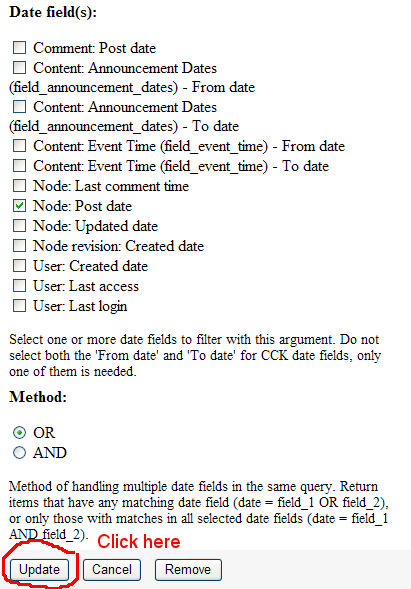
arlinsandbulte commentedI am not having this issue, but seeing #25 I think I know what you are doing wrong. You are missing or forgetting a step to change the Views Field display to match the arguments setting.
Note: the error message is "The date argument date fields must be added to this query." In simpler terms, what this means is that the SAME date field you are using in the Views Arguments list must also be added to the Views Fields list.
So, in #25's example, a step is missing to update the Views Field Display:
Starting with the default Calendar View (Enable it and/or revert it)
1.) Under Arguments, click on Date: (node) Node: Updated date
2.) Under Date Fields, check/uncheck the boxes so only Node: Post Date is checked.
3.) Click Update NOTE: you now get the 5 errors as described above... THIS IS NORMAL continue on to fix...
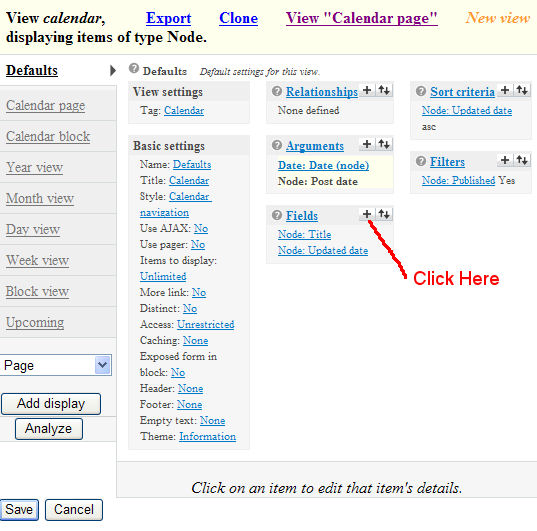
4.) Under the Views Fields display, click the + button.
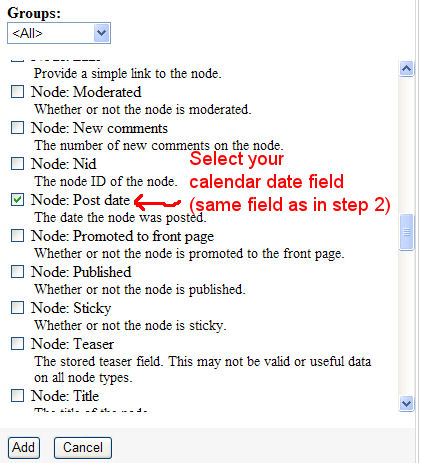
5.) Check the Node: Post date - The date the node was posted.
6.) Click Add
7.) Click Update
8.) Click Save to save the calendar view.
Errors should now go away and calendar should work as expected.
Here is the Key:
The SAME date field MUST be listed under the View's Arguments AND the View's Fields.
If you don't want to display the date field on your view, it can be excluded from display.
I KNOW this will help #25, and I hope that clears it up for everyone else too.
Comment #27
arlinsandbulte commentedHere is a step-by-step screenshot list...
Comment #28
techczech commentedSame problem, here. None of the suggestions seem to work.
Comment #29
techczech commentedActually, the solution suggested in this thread did work http://drupal.org/node/389294. It is the same as #26 but the reason I could get that to work was because the error was being displayed when editing a block display with a pager not the actual display where the field needed to be added.
Comment #30
arlinsandbulte commented@bohemicus: Do you mean your block display was overridden and did not contain the right fields?
That could be why other people are having issues, they did not check ALL of their displays for overridden settings and add the correct fields there too.
Comment #31
cglusky commentedRE my steps in #15...
Yes, my CCK Date field was added to the "Defaults" view fields list so I did not need to override any of the other views to include the field. When I start tweaking a Calendar view I try to start my big changes like arguments in the Defaults view because the Year, Month, Day and Block views have Attachment settings such as Inherit Arguments etc. By starting with the Defaults view you help to make sure that the new settings are properly propagated to the other views that need the changes.
And you can see from the screenshot in #27 that step 1 is also in the Defaults view. However, there are a bunch of comments in here that are talking about core node fields and not CCK Date fields.
Please make sure if you are "subscribing" in this queue you are stating more details like whether you are using a CCK Date field and whether you are changing the Defaults view or trying to override Defaults to create another type of display like a block.
R,
C
Comment #32
skyredwangTo fix this issue, 1) delete all your date fields in the Views.Fields. 2) Add those fields back in.
Comment #33
koens commentedSolution #26 solves the problem I have described in #25.
Maybe it's a good idea to modify the error message.
Comment #34
techczech commented@arlinsandbulte No my problem was that my default display didn't have the fields. The overridden block display did have them. My issue was that after upgrading I was getting the errors on AJAX paging in the block display which did have the field and not on paging in the default displays that didn't. So I went in, added the field, made it hidden, and that fixed it.
Here's a proposed alternative wording for the error message:
"It appears that one of your views displays is missing a date field that is also in the argument. Please add it there. If you don't want the field to show, set it to 'Exclude from display'"
Comment #35
maerys commented#27 worked for me. thanks :)
Comment #36
easp commented#27 worked for me as well. Thanks for the detailed instructions.
Comment #37
Anonymous (not verified) commentedThis is not fixed in my opinion, as there are only work-arounds.
I got it to work only when adding the fields to the defautl view. I thought, this must be working also with fields, overriding the default view, but it does not.
So be careful: add the fields an the argument to the default view, then your calendar will work.
Comment #38
arlinsandbulte commentedOK, maybe "fixed" was not the proper status.... but this is the way the calendar view works, so I will mark it "by design"
Comment #39
steve42 commentedDeleted
Comment #40
sistegraf commented27 worked for me, thanks!
Comment #41
arlinsandbulte commentedFYI:
I created a screencast showing how to setup the Calendar Module here: http://vimeo.com/6544779
I also created a followup on how to setup an Upcoming Events list using Calendar here: http://vimeo.com/6547042
Comment #42
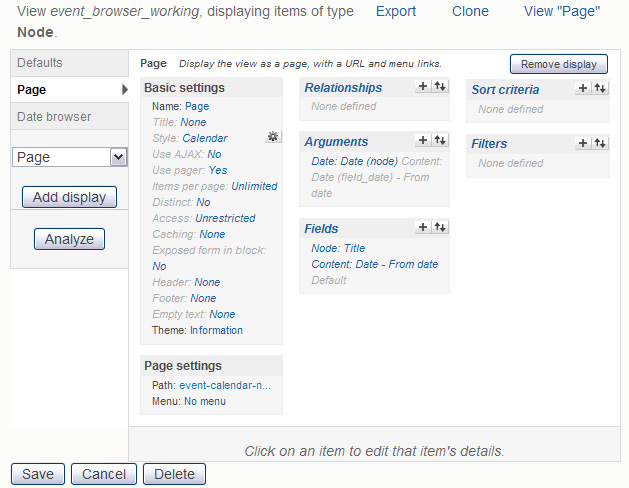
NickWebman commented#27 works! - Just make sure you pick the appropriate Field for the Argument you're using. For example...
I took this tutorial regarding Date, Calendar, and Views -> http://www.drupaltherapy.com/node/76 - When I was done completing the steps to setup the calendar view, I received the "The date argument date fields..." error. Why didn't the dude in the tutorial get the error?
Anyway, this Argument -> "Date: Date (node) Content: Date (field_date) - From date " wouldn't work without this Field -> "Content: Date - From date Default ".
You can set the "extra" field as hidden if you like. It's likely you'd want to hide it, otherwise, you wouldn't have received the error in the first place :)
See screenshot for view configuration.
Comment #43
work77 commentedThanks. That image in #42 made me realize the error of my ways.
When selecting a new field from the drop-down, I was choosing Node (because the argument reads Node), but you're supposed to select Content. Then,
"Content: Date - From date Default".
I learned something :)
Thanks.
Comment #44
js commentedI have tried all of the suggestions above, but I can't get the calendar to work when using CCK fields. I get the errors about how it will not work without a Date argument when I delete the "Node: Updated date Updated date" from Arguments.
Errors like "The Calendar display 'Calendar page' will not work without a Date argument."
I have tried just changing the default and also just changing the Calendar page and the Calendar block (which is the view I require).
I have the CCK field:
Date: Date (node) Content: Date (field_date) - From date
I have disabled and re-enabled the Calendar and Date modules. I un-installed Calendar. I was concerned about losing data so I did not un-install the date field..
I added the field to the "Fields" and "Arguments". I have tried in every order of steps I could think of including removing "Node: Updated date" before and after adding the CCK field. I have tried leaving "Node: Updated date" in the Fields and also without. I have reverted the default Calendar view and I have tried cloning the Calendar view after re-installing the module.
I have tried using Views 6.x-3.x-dev (2009-Oct-08) as well.
I would really appreciate any suggestions. All this guessing devours time as many of you know.
Thanks, Jerry
Comment #45
js commentedI did get this to work. I have no idea what magic words I spoke, or sequence of events, but after un-installing Calendar and Views again I was able to get this to work. I wish I had kept track of the exact steps better to hopefully help someone else because this can be so painful. I am sure I added the CCK field to the field list and to the Arguments before deleting the Node: Update date from the Arguments. My wild guess is that it is more to do with re-installing Views and Calendar together--just guessing.
Jerry
Comment #46
morthylla commented#26, thank you!!! It worked, thank you very much.
Comment #47
developer-x commentedPosting #15 did the trick for me - but we should get a patch to make this whole thing a non-issue, no? The argument and field were the same, but apparently if I add the argument then the field, it breaks. If I add the field, then the argument it works. This is a bug, no?
Comment #48
aldass commentedFor #27... it worked perfectly... much thanks.
Comment #50
j0nathan commented#15 worked for me
Thank you
Comment #51
corbin commented5.) i first try checking "Node: Post date - The date the node was posted."
it didn't work.
but i checked (also) "Updated/commented date" and it's ok
explanation of a funny procedure :
first, it didn't work.
as i am french, i had to be sure of the translation to check the right field ... and i search 'The date the node" in the translation search.
and found of course "The date the node was updated", but also "The date the node was last updated" : it is only a comment under the line "Updated/commented date" !
Comment #52
geomarketing commentedI don't think you want the post date, this worked for me but I put in the "date from" on my Event content type not the date posted.
But thanks I am good to go now.
Comment #53
izmeez commentedsubscribe
Comment #54
AdrianB commented#15 worked for me as well, and when I read it I realized how logical it was. You have to add the field to use it for argument, it's quite simple.
But I didn't understand the error message before I read #15, even though I understand it now. If it is possible to somehow change the error massage to be just a little more understandable I think it would help others as well.
Comment #55
anewbie commentedI met the same problem too but now problem solved.
When I create a new view for my calendar, I hit the problem and missing "Style: Calendar navigation" in the view.
Instead I tried to use the default view which had already been there:
Default Node view: calendar (Calendar)
then everything worked, including no more "The date argument date fields must be added to this query. You can exclude them if you do not want them " message. Everything seemed to be just exactly like those demo videos.
Hope this can help.
Comment #56
odinsandoval commentedthe #27 is great and work fine! tnks
Comment #57
redpuma commented#26 & #27 worked for me too.
Comment #58
ThemeShaper commented#26 worked for me. The key being …
The SAME date field MUST be listed under the View's Arguments AND the View's Fields.
Comment #59
loophole080 commentedsame story as everyone else.... works if adding desired date field FIRST and THEN resetting arg to that field
could the readme file be updated to explain this, which just says "changing the date argument to use the correct fields", no mention of having to add the fields first? would save loads of frustration.... :-)
Comment #60
stephenrobinson commentedBefore whining about this stuff too much, make sure anything you have added date wise to the argumants is also in your fields section of views and hidden if not required, seems to be a cause of issues, flush all caches as well.
S:)
Comment #61
TheThumbPuppy commentedI would like to report that the same problem has appeared again by using the following configuration:
- Date 2.4
- Cal 2.2
- CCK 2.6
- Views 3.0-alpha2
Fix at #26 and #27 did not work.
The update in Step 3 does not work. If you do Step 1 again to check if the update worked [Under Arguments, click on Date: (node) Node: Updated date], the box checked in Step 2 is now unchecked again.
I will try to perform a test with the following configuration and report my test results:
- Date 2.4
- Cal 2.2
- CCK 2.6
- Views 2.8
Comment #62
TheThumbPuppy commentedThe test was successful with the following configuration:
- Date 2.4
- Cal 2.2
- CCK 2.6
- Views 2.8
In fact cloning the view calendar was also successful.
And so far I have not needed to perform fix at #26 and #27 with this configuration.
Comment #63
drupallover8 commented.
Comment #64
mitz commentedFWIW, #58 worked for me using CiviCRM Activities Scheduled Activity Date as the date reference in both Fields and Arguments
Comment #65
aacraig commentedI'm not sure if this is a related issue, but the symptoms are the same, so I'll add to this thread.
In following the steps in #27, I can't get past step three. After clicking "Update" all of the selected date nodes are unchecked. In other words, I CANNOT CHANGE THE DATE FIELD. All of the previously selected date fields are unchecked, including the default one.
This, of course, means the the successive steps won't work.
Comment #66
gotux commentedExactly the same problem as #65 here: After selecting the relevant Date field (Content: Datum (field_eventdate) - From date) and pressing "Update" the selection will be ignored and the date field is unchecked again. This problem occurs with Calendar 6.x-2.2 or 6.x-2.x-dev and Views 6.x-3.x-dev or 6.x-3.0-alpha3. Attached you'll find a screenshot and the relevant log output of mysql after pressing the "Update" button.
Thanks and best regards
Stefan
Comment #68
kenorb commentedBut this error is even where a field is added to argument and is selected (See #66).
It's datetime, but it's still a date field and it's on the list.
If it's invalid to add datetime to argument, why it's on the list?
If I remember correctly, this error wasn't there before, because I wrote the module which using Calendar with datetime field only (booking_timeslots). Now it doesn't work with this error.
Comment #69
alex.skrypnykFor everyone there to avoid spending your time reading through the whole bunch of posts here are the steps that you have to go through before reading:
1. Check versions of your Views, Date and Calendar modules. Make sure that Date is at least version 2.4 and Calendar at least version 2.2.
2. Create your Event content type for testing. Use CCK of type 'Date' for your 'Start date'.
3. Enable calendar view.
3.a Do not try to create separate view. Use calendar or clone it and use that version. In this way you can guarantee that module will work the way it was designed.
4. Make sure that you have added required field into Fields and only then try to change argument.
5. DO NOT DELETE DEFAULT ARGUMENT!!! There is an inconsistency (comparing to normal views) in how this module utilizes arguments. Date: Date (node) is an argument that must stay there.
5.a Do not add your date field as second argument. You might not even see it in Content list. Instead do 5.b
5.b Click on the Date(node) and you will see a list of all available CCK date fields that can be specified as argument. This is a place you were looking for.
6. If there is still an error, check that any Overridden displays have the Date(node) field as an argument. If not - add it.
If you still experience problems you can follow one of the following instructions:
- Video instructions (you may want to skip 6 first minutes of modules installation) http://vimeo.com/6544779
- Comment #26 has step-by-step walkthrough
- Comment #27 has step-by-step screenshots
Comment #70
nimzie commentedI was able to fix this same issue using #15 - sort of. The order doesn't matter.
What seems to matter is the field you wish to use as your argument date field must be present within the field list. I haven't looked in to why (in the code)...
Comment #71
kenorb commentedI've started from clean calendar view. I had the same datetime field in the the View's Fields, but when I'm trying to select it from Arguments list, it throwing this error and automatically removing this selection.
I've tried suggestions from #26, #27, #69, but none of them are working.
Views: 6.x-3.0-alpha3
CCK: 6.x-2.6
Date: 6.x-2.4
How to reproduce the error on clean installation:
1. Create new content type with some datetime field.
2. Enable calendar view and try to add it into field list.
3. Now click on the Argument and try to select this newly created datetime field and unselect the rest.
You should see the error. I've got 6 of them (1 on the top, 5 others below the view)!
Tell me if you don't have, it will be very weird.
Comment #72
kenorb commentedSome technical details:
Backtrace:
Here is my understanding:
Empty argument list on validate()
Check views_ui_preview($js, $view) in views/includes/admin.inc
After submitting new date argument in view we don't have argument set, because we haven't saved our view. We have our arguments in special key:
Then in form_state we have:
Then we call calendar validate(), so we have:
which is empty, because arguments doesn't exist yet in the view, because View is not saved. And this error is when we submit only Arguments sub-form, without saving our View.
So in my opinion this argument validation should be not executed for views_ui_preview().
Maybe I'm wrong, but something doesn't work correctly.
Comment #73
kenorb commentedReported as duplicate: #566978: Date CCK field not being recognized as date argument
Comment #74
kenorb commentedDuring testing with Views 6.x-3.0-alpha3 I get into this issue as well:
#754294: foreach warning produced in views_plugin_argument_default_taxonomy_tid.inc
Comment #75
kenorb commentedTested on clean Drupal installation:
Views: 6.x-3.0-alpha3 + CCK: 6.x-2.6 + Date: 6.x-2.4 + Calendar: 6.x-2.2
1. Enable calendar view (admin/build/views)
2. Go to Arguments page: (admin/build/views/edit/calendar)
3. Don't change anything, just press 'Update'
All selected Date field(s) disappeared.
Comment #76
kcad commentedI am having a similar issue , when adding the date argument the calenar does not respect the date specified, just the date submitted. Here is my "view" exported:
$view = new view;
$view->name = 'calendar';
$view->description = 'A multi-dimensional calendar view with back/next navigation.';
$view->tag = 'Calendar';
$view->view_php = '';
$view->base_table = 'node';
$view->is_cacheable = FALSE;
$view->api_version = 2;
$view->disabled = FALSE; /* Edit this to true to make a default view disabled initially */ $handler =
$view->new_display('default', 'Defaults', 'default');
$handler->override_option('fields', array( 'title' =>
array( 'label' => '',
'link_to_node' => 1,
'exclude' => 0, 'id' => 'title',
'field' => 'title',
'table' => 'node',
'relationship' => 'none', ),
'field_date_value' => array( 'label' => '',
'alter' => array( 'alter_text' => 0,
'text' => '',
'make_link' => 0, '
path' => '',
'link_class' => '',
'alt' => '',
'prefix' => '',
'suffix' => '',
'target' => '',
'help' => '',
'trim' => 0,
'max_length' => '',
'word_boundary' => 1,
'ellipsis' => 1,
'html' => 0,
'strip_tags' => 0, ),
'empty' => '',
'hide_empty' => 0,
'empty_zero' => 0,
'link_to_node' => 0,
'label_type' => 'none',
'format' => 'default',
'multiple' => array( 'multiple_number' => '',
'multiple_from' => '',
'multiple_to' => '',
'group' => TRUE, ),
'repeat' => array( 'show_repeat_rule' => '', ),
'fromto' => array( 'fromto' => 'both', ),
'exclude' => 0, 'id' => 'field_date_value',
'table' => 'node_data_field_date',
'field' => 'field_date_value', 'relationship' => 'none', ), ));
$handler->override_option('sorts', array( 'changed' => array( 'order' => 'ASC', 'delta' => '-1', 'id' => 'changed', 'table' => 'node', 'field' => 'changed', 'relationship' => 'none', ), ));
$handler->override_option('arguments', array( 'date_argument' => array( 'default_action' => '
default', 'style_plugin' =>
'default_summary', 'style_options' =>
array(), 'wildcard' => 'all',
'wildcard_substitution' => 'All', 'title' => '',
'breadcrumb' => '', 'default_argument_type' => 'date',
'default_argument' => '', 'validate_type' => 'none',
'validate_fail' => 'not found', 'date_fields' => array( 'node_data_field_date.field_date_value' => 'node_data_field_date.field_date_value', ), 'year_range' => '-3:+3', 'date_method' => 'OR', 'granularity' => 'month', 'id' => 'date_argument', 'table' => 'node', 'field' => 'date_argument', 'relationship' => 'none', 'default_argument_user' => 0, 'default_argument_fixed' => '', 'default_argument_php' => '', 'validate_argument_node_type' => array( 'blog' => 0, 'gallery_assist' => 0, 'date' => 0, 'event' => 0, 'lightboxgallery' => 0, 'page' => 0, 'story' => 0, ), 'validate_argument_node_access' => 0, 'validate_argument_nid_type' => 'nid', 'validate_argument_vocabulary' => array(), 'validate_argument_type' => 'tid', 'validate_argument_php' => '', 'override' => array( 'button' => 'Override', ), 'default_options_div_prefix' => '', 'validate_user_argument_type' => 'uid', 'validate_user_roles' => array( '2' => 0, '3' => 0, '4' => 0, ), 'validate_argument_transform' => 0, 'validate_user_restrict_roles' => 0, ), ));
$handler->override_option('filters', array( 'status' => array( 'operator' => '=', 'value' => 1, 'group' => '0', 'exposed' => FALSE, 'expose' => array( 'operator' => FALSE, 'label' => '', ), 'id' => 'status', 'table' => 'node', 'field' => 'status', 'relationship' => 'none', ), ));
$handler->override_option('access', array( 'type' => 'none', 'role' => array(), 'perm' => '', ));
$handler->override_option('cache', array( 'type' => 'none', )); $handler->override_option('title', 'Calendar'); $handler->override_option('header_empty', 1); $handler->override_option('items_per_page', 0); $handler->override_option('use_more', 0); $handler->override_option('style_plugin', 'calendar_nav');
$handler = $view->new_display('calendar', 'Calendar page', 'calendar_1'); $handler->override_option('path', 'calendar'); $handler->override_option('menu', array( 'type' => 'none', 'title' => '', 'description' => '', 'weight' => 0, 'name' => 'navigation', )); $handler->override_option('tab_options', array( 'type' => 'none', 'title' => '', 'description' => '', 'weight' => 0, 'name' => 'navigation', ));
$handler->override_option('calendar_colors', array( '0' => array(), )); $handler->override_option('calendar_colors_vocabulary', array());
$handler->override_option('calendar_colors_taxonomy', array()); $handler->override_option('calendar_popup', 0); $handler->override_option('calendar_date_link', ''); $handler = $view->new_display('calendar_block', 'Calendar block', 'calendar_block_1');
$handler->override_option('block_description', 'Calendar'); $handler->override_option('block_caching', -1);
$handler = $view->new_display('calendar_period', 'Year view', 'calendar_period_1');
$handler->override_option('style_plugin', 'calendar_style');
$handler->override_option('style_options', array( 'display_type' => 'year', 'name_size' => 1, 'max_items' => 0, ));
$handler->override_option('attachment_position', 'after');
$handler->override_option('inherit_arguments', TRUE);
$handler->override_option('inherit_exposed_filters', TRUE);
$handler->override_option('inherit_pager', FALSE); $handler->override_option('render_pager', TRUE);
$handler->override_option('displays', array( 'calendar_1' => 'calendar_1', 'default' => 0, 'calendar_block_1' => 0, ));
$handler->override_option('calendar_type', 'year');
$handler = $view->new_display('calendar_period', 'Month view', 'calendar_period_2');
$handler->override_option('style_plugin', 'calendar_style');
$handler->override_option('style_options', array( 'display_type' => 'month', 'name_size' => '99', 'with_weekno' => '1', 'date_fields' => NULL, 'max_items' => 0, ));
$handler->override_option('attachment_position', 'after');
$handler->override_option('inherit_arguments', TRUE); $handler->override_option('inherit_exposed_filters', TRUE);
$handler->override_option('inherit_pager', FALSE); $handler->override_option('render_pager', TRUE);
$handler->override_option('displays', array( 'calendar_1' => 'calendar_1', 'default' => 0, 'calendar_block_1' => 0, )); $handler->override_option('calendar_type', 'month');
$handler = $view->new_display('calendar_period', 'Day view', 'calendar_period_3');
$handler->override_option('style_plugin', 'calendar_style');
$handler->override_option('style_options', array( 'name_size' => '99', 'with_weekno' => 0, 'max_items' => 0, 'max_items_behavior' => 'more', 'groupby_times' => 'hour', 'groupby_times_custom' => '', 'groupby_field' => '', )); $handler->override_option('attachment_position', 'after');
$handler->override_option('inherit_arguments', TRUE); $handler->override_option('inherit_exposed_filters', TRUE);
$handler->override_option('inherit_pager', FALSE); $handler->override_option('render_pager', TRUE);
$handler->override_option('displays', array( 'calendar_1' => 'calendar_1', 'default' => 0, 'calendar_block_1' => 0, ));
$handler->override_option('calendar_type', 'day');
$handler = $view->new_display('calendar_period', 'Week view', 'calendar_period_4');
$handler->override_option('style_plugin', 'calendar_style');
$handler->override_option('style_options', array( 'name_size' => '99', 'with_weekno' => 0, 'max_items' => 0, 'max_items_behavior' => 'more', 'groupby_times' => 'hour', 'groupby_times_custom' => '', 'groupby_field' => '', )); $handler->override_option('attachment_position', 'after'); $handler->override_option('inherit_arguments', TRUE); $handler->override_option('inherit_exposed_filters', TRUE); $handler->override_option('inherit_pager', FALSE); $handler->override_option('render_pager', TRUE); $handler->override_option('displays', array( 'calendar_1' => 'calendar_1', 'default' => 0, 'calendar_block_1' => 0, )); $handler->override_option('calendar_type', 'week'); $handler = $view->new_display('calendar_period', 'Block view', 'calendar_period_5'); $handler->override_option('style_plugin', 'calendar_style'); $handler->override_option('style_options', array( 'display_type' => 'month', 'name_size' => '1', )); $handler->override_option('attachment_position', 'after'); $handler->override_option('inherit_arguments', TRUE); $handler->override_option('inherit_exposed_filters', TRUE); $handler->override_option('inherit_pager', FALSE); $handler->override_option('render_pager', TRUE);
$handler->override_option('displays', array( 'calendar_1' => 0, 'default' => 0, 'calendar_block_1' => 'calendar_block_1', )); $handler->override_option('calendar_type', 'month');
$handler = $view->new_display('block', 'Upcoming', 'block_1');
$handler->override_option('fields', array( 'title' => array( 'label' => '', 'link_to_node' => 1, 'exclude' => 0, 'id' => 'title', 'field' => 'title', 'table' => 'node', 'relationship' => 'none', 'format' => 'default', ), 'changed' => array( 'label' => '', 'link_to_node' => 0, 'exclude' => 0, 'id' => 'changed', 'field' => 'changed', 'table' => 'node', 'relationship' => 'none', 'date_format' => 'small', 'format' => 'default', ), )); $handler->override_option('arguments', array());
$handler->override_option('filters', array( 'status' => array( 'operator' => '=', 'value' => 1, 'group' => '0', 'exposed' => FALSE, 'expose' => array( 'operator' => FALSE, 'label' => '', ), 'id' => 'status', 'table' => 'node', 'field' => 'status', 'relationship' => 'none', ), 'date_filter' => array( 'operator' => '>=', 'value' => array( 'value' => NULL, 'min' => NULL, 'max' => NULL, 'default_date' => 'now', 'default_to_date' => '', ), 'group' => '0', 'exposed' => FALSE, 'expose' => array( 'operator' => FALSE, 'label' => '', ), 'date_fields' => array( 'node.changed' => 'node.changed', ), 'granularity' => 'day', 'form_type' => 'date_select', 'default_date' => 'now', 'default_to_date' => '', 'id' => 'date_filter', 'table' => 'node', 'field' => 'date_filter', 'override' => array( 'button' => 'Use default', ), 'relationship' => 'none', ), ));
$handler->override_option('title', 'Upcoming');
$handler->override_option('items_per_page', 5);
$handler->override_option('use_more', 1);
$handler->override_option('style_plugin', 'list');
$handler->override_option('style_options', array( 'grouping' => '', 'type' => 'ul', ));
$handler->override_option('block_description', 'Upcoming');
$handler->override_option('block_caching', -1);
Also all created static pages are on the calendar by post date but even when changing the date argument and field they stay. Any and all help is gratefully appreciated.
sorry if this is sloppy, my first support request
Comment #77
wheneverisay commented#26 worked for me, thanks !
Comment #78
pogle commented#26 worked for me too. Many thanks for such clear instructions.
Comment #79
mrf commentedI was experiencing the same (or similar) issue, but wasn't able to solve with any of the above solutions. I did however find another workaround that ended up with the desired results and may help someone else.
On my site I had two different variations of the standard calendar views that had spun off in different directions. One could use my CCK date field no problem, the other one gave me 'date field must be added' no matter what order I added the field and the argument any time I tried to use the CCK date field and not a standard field.
I solved it by creating a new copy of my site locally, deleting the view that was working correctly leaving only one calendar view active. I was then able to use my cck date field as intended. I then exported the view to my original site and I am now able to have both views using the CCK field.
Comment #80
aamin commentedSame Issue. Tried #15. works great now.
Thanks.
Comment #81
kenorb commentedTo add field to the "Fields" list and select this in the Argument should be something obvious.
#15, #26, #27, #69 etc. helps people who don't know how to set up the proper configuration.
It's making this bug less important and confusing people that they doing something wrong and it isn't a bug.
Please read more tutorials instead.
Let's focus on the bug.
Versions affected:
6.x-2.2, 6.x-3.0-alpha2, 6.x-3.x-dev (2009-Oct-08)
Please don't post when you have different version which does work.
People who have the same problem:
#1, #3, #5, #7, #44, #61, #63, #65, #66,
Clear steps how to reproduce the bug (check for proper affected version):
#71, #75
Technical details:
#12, #15, #72
If you can pass the Step 3 described in #27, please don't post that, probably your version is not affected.
After you submit the form in Argument section (Step 3) , your checkboxes are not saved (doesn't matter if it's Node: Updated date, or Post Date), that means your version of Views is affected.
Comment #82
r_honey commentedsubscribe
Comment #83
PeteS commentedI compared the code from the version of Views I have installed (6.x-3.x-dev) with a slightly older one (alpha1) which seems to work.
It seems like the interesting area is views_ui_config_item_form_submit() in includes/admin.inc. In the older version, it basically just merges the form data with the default data for the handler, and that's it. In the newer version, it calls a seemingly new function called unpack_options(), which, among other things, checks to make sure that each form field exists in the definition for the handler. I think this is why we're seeing trouble in the Date module -- I can't find anywhere where Date is creating a definition array (apparently within the option_definition() method?)
Anyway, I added this code to the bottom of date/includes/date_api_argument_handler.inc (well, before the very last right curly bracket):
... and now at least my checkboxes are saved, and my calendar seems to work.
Comment #84
riovescu commentedsubscribing. same issue here.
Comment #85
aacraig commentedI was able to get the settings to save using the above code, however I'm wondering if I'm experiencing another symptom of this error.
I cannot change the format settings for the Upcoming block.
Steps to reproduce:
Click the Upcoming block tab
Click your CCK date field link in the Fields section
Change the format settings at the bottom to something other than the default
Click Update
Click your CCK date field link in the Fields section and see that the new value was not saved.
Comment #86
ekbiddle commentedI've followed every piece of advice on here I could find, watched the video posted earlier about the calendar, looked at all the tutorial images, and I'm still getting the create content page when you go to book a timeslot.
:(
Anyone have any other ideas?
Comment #87
peterparker commentedPete at #83
Your code has put an end to my torment. I applaud you.
Craig at #85
I tried to recreate the steps you outline but my formatting changes are saved.
The side-effect I am seeing is that my Filter choices are not being honored. Specifically, I have two date fields in the Argument (one each for two different content types), and if I try to set up a Filter to eliminate one of those types from the display the Filter is ignored. In fact it looks like any Filter configuration I try is ignored. I removed the code from #83 but later replaced it once I determined that it was not affecting the filter.
Another persisting Argument problem is that I am unable to get the AND operator to stick.
Finally, regarding the Filter trouble I set the filter to only show the content type Blog (of which I have zero). The SQL query shown is
That OR which appears near the end is wrong. The parts that come after it are the Arguments. Correct me if I am wrong but that OR should be an AND.
Comment #88
kenorb commented#86 ekbiddle: create an issue against booking_timeslots module, this issue is related to Calendar module.
Comment #89
Steadroy commentedThanks Very much this helped me a lot ....
Comment #90
rcastera commented@arlinsandbulte #26 is correct! Thanks for helping out on this issue. Adding the field to the argument list solved the problem. If you don't want it to display, just exclude it.
Comment #91
jelenex commentedThe code in #83 works for me with the latest Views-3.x-dev version, so I've created a patch..
Thanks!
Comment #92
not_Dries_Buytaert commentedAdding the argument to the field list, turned out to be a workaround. Thx!
Running:
drupal-6.19
date-6.x-2.6
calendar-6.x-2.2
Also discussed here: http://drupal.org/node/326061#comment-2439444
Comment #93
nenio commented#15 work for me for this:
1) im not using the default calendar view but my copy of this view
2) added the CCK date field to the "Fields" list and selected "Exclude from display" as I do not want to see it in the display
3) then changed the argument from the default of node update date to my CCK date field
4) save your view
message disappears and its functional
Comment #94
kenorb commentedPatch available here: #91
Comment #95
Pooka commented#26 worked for me (hilited sentence in favour :-) )
Thank you very much!
I'm using:
Drupal 6.19
cck-6.x-2.8
date-6.x-2.6
views-6.x-2.11
calendar-6.x-2.2
Comment #96
threequarks commentedi can confirm #69 worked for me. followed it to the letter (after installing calender) and was able to filter by content type and the cck date field associated with that content type.
drupal 6.19
calendar 6.x-2.x-dev
date 6.x-2.x-dev
date api 6.x-2.x-dev
views 6.x-3.x-dev
Thanks Alex.
Comment #97
karens commentedUgh, this issue is a mess, partly because I didn't get to it very fast and partly because we have a bunch of 'kitchen sink' reports of a whole lot of unrelated issues. The title of this issue says it is about seeing errors when adding a date argument, so all the stuff about problems with filters does NOT belong in this issue. Nor is this a place to complain about not knowing how to create a calendar.
The error message is by design -- it is supposed to show up when you are creating a view until you satisfy the requirements of the view, in the same way that you will keep seeing a message that you need to add a path or add fields to a view that requires them. The error message shows up five times because it is a display error and there are five displays. Views has a built-in system for handling errors by display but no system for seeing if the same message has already shown up on another display. The validation message goes away when you do what it is asking you to do -- add a date field to the view.
The only thing about this that might be perceived as a bug as far as I can tell is that the validation message is repeated, and I don't know that I can prevent that.
'Needs review' implies there is a patch. People are then supposed to review that patch. We have a patch that no one has reviewed and numerous reports that #26 worked or #69 worked or #15 worked (none of which are patches).
Comment #98
karens commentedIf someone is convinced there is actually a bug here, please enlighten me. I think almost everything in this thread is a misunderstanding about how to create a calendar.
Comment #99
macmaci commentedJust wanted to send a hugh thank you to user arlinsandbulte who posted in #26 and #27 steps that were a hugh help. It should have been obvious to me but sometimes it is easy to overlook these things. Thanks so much especially for the screenshots.
Great work!!!
Comment #100
AdrianB commented#97: I wouldn't call it a bug, but the error message is hard to understand at first, even if it makes perfect sence once you do.
That was my experience, as I wrote in #54: "I didn't understand the error message before I read #15, even though I understand it now. If it is possible to somehow change the error massage to be just a little more understandable I think it would help others as well."
Almost 100 post in this issues shows that there are a lot of others who see this error message and does not have knowledge enough (about Views) to understand what the message really means.
Comment #101
Beve commentedI just change the version Drupal 6.20 and View 6.x-2.12.
In the default, i put the event date in the fields (it does not appear in the upper part but whatever).
And after , it is very very very good. I do not see the message :
"The date argument date fields must be added to this query. You can exclude them if you do not want them"
I update and save.
The posting of events is correct. They are in the right place.
That sounds good.
Good luck to all and thank you
Je viens de changer de version en Drupal 6.20 et view 6.x-2.12.
Dans la partie défaut, J'ai mis la date de l'évènement dans les champs (elle ne s'affiche pas dans la partie haute mais qu'importe).
Je ne vois plus le message:
"The date argument date fields must be added to this query. You can exclude them if you do not want them"
Je mets à jour et sauve.
L'affichage des évènements est correct. Ils sont à la bonne place.
Cela semble bon.
Bon courage à tous, et merci.
Beve
Comment #102
fortis commentedjust check that other displays not have overrided args or fields. all works for me
Comment #103
sachin475 commentedwhen i copy booking_timeslots/theme/ to my theme directory then calender month view is not shown and week view contain "book now option" for only 4 days. day view option is working properly. i am trying it from last 3 days please anybody help me.
i have attached screenshot with my issue.
i have tried every step correctly but its not working
Comment #104
karens commented@sachin475, Don't come in and change an issue to something else, especially when you have reported that issue already in duplicate other places AND also sent me an email about it.
And don't assign yourself to all these issues -- that implies you are planning to fix them.
If you have a problem with another module (the booking module) you have to ask about it on that module's issue queue. I have no time to debug problems of other modules. Opening issue after issue about it here will not change anything -- I cannot fix it.
Comment #105
arlinsandbulte commentedKaren,
Since there was/is a lot of confusion regarding this error message (The date argument date fields must be added to this query. You can exclude them if you do not want them), I have been thinking about a better way to say it, which is really hard in a clear, concise way.
How about this:
The same date field added to this calendar view's Arguments list must also be added to this calendar view's Fields list. If you do not want to show the date field in this view's output, check 'Exclude from display' under the date field's field configuration settings.
Or just:
The same date field added to this calendar view's Arguments list must also be added to this calendar view's Fields list.
Comment #106
tribsel commentedok, when I followed instructions in 15 or 26, all error messages disappeared. The only problem was, that calendar did not show anything (just the heading - like january 2010, but no data nor even table).
What helped: remove all fields in display fields and then add them again. save view, and its working.
BUT: it works only for "page" display. Block display still shows just the heading, and its using just "default" fields and values, no overrides.
Maybe there is no bug in calendar module and a lots of people just "dont get it" but thats because this behavior is definitely strange.
Comment #108
christiemade commentedI was having this same problem with 6.x.-2.4, and matching the argument with the fields wasn't working for me either.
What did it was going through every display in the view and making sure ALL of them had the CCK field (Date: Date(node)) selected. The entire view has to be dedicated to that version of the Calendar. If your site has multiple calendars with different content in them, make different views for them. I used the default View for Calendar and then cloned it, and made sure all displays agreed on the arguments. I know someone earlier on suggested it but it was the only place where I saw it mentioned.
Comment #109
Lildrmerboy commented#26 worked for me, thank you very much.
Comment #110
EastWan commented#108 was the (obvious) solution for me. Had to debug in includes/calendar_plugin_style.inc, line 95 ff.) where the script checks for whether the field names correspond to the argument.
Turns out I had a wrong date field in one of my sub-views - that caused the error although everything was fine on the default view. So really keep looking at all your sub-views if you have this issue! (The code seems to be fool-proof, so (almost) no chance for a bug!)
Comment #111
benlowery commentedThis fixes the problem for me.
Dude you are a legend!.
Comment #112
Jimbo Slice commented#15 worked for me, emphasis on order. Thanks cglusky!
Comment #113
Shyghar commentedI found the 'problem' in the code.
in the line 6: '!empty($handler->min_date'
When the argument is created the min_date wasn't added to the handler so, if a developer of this module find where this 'min_date' should be valorized we solve the problem ^^
Comment #114
mikeker commentedComment #115
mikeker commentedPlease keep titles relevant to the issue so that they show up in search results.
Comment #116
kjwaddel commented#69 worked for me. 5b was the step I was missing. The date field(s) that are checked in the argument also need to be added as a field.
Comment #117
scotwith1tVersion shouldn't have been changed either.