Issue
Many fieldsets can be expanded and collapsed by clicking on a link with the name of the fieldset (e.g. "File Attachements" and "Tags"). This does not properly convey the purpose of the link, nor does the links context within the page.
Success criterion 2.4.4 of WCAG 2.0 requires that:
Link Purpose (In Context): The purpose of each link can be determined from the link text alone or from the link text together with its programmatically determined link context, except where the purpose of the link would be ambiguous to users in general
.
Recommendation
Provide better link text for the expand / collapse links, or otherwise provide context for the purpose of the link, in a non-visual manner.
Resources
Understanding Success Criterion 2.4.4 | Understanding WCAG 2.0
- http://www.w3.org/TR/2008/NOTE-UNDERSTANDING-WCAG20-20081211/navigation-...




Comments
Comment #1
bowersox commented+1 for this as an important accessibility issue
Here is the fieldset at /admin/structure/taxonomy/1 if Javascript is enabled (which makes the fieldset collapsible):
"Settings" is not accessible link text because it does not tell screenreader users that by clicking that link there will be a bunch of new form elements that will magically appear. An accessibility review we conducted recommended that the link text become something like "Show Settings" instead. Here's one option if we want to hide that from sighted users (since they see visual cues such as a triangle and a border):
Comment #2
Everett Zufelt commentedCollapsed and expanded fieldsets do have an icon indicating the expanded / collapsed status. The icon is added using CSS (see below). It would be an easy fix, from an accessibility perspective, if this icon were to be an actual image element with appropriate alt text.
Excerpt from /themes/garland/style.css
Comment #3
bowersox commented@Everett
Using an actual img element and alt attribute would be good for accessibility if we can make that work. It may be tricky because Javascript is setting the fieldset.collapsed class, so script would need to add the real img elements too. Alternatively, the img elements could be placed on the page from the start as display:none and then activated by javascript. Did you have a similar strategy or an easier way?
Comment #4
Everett Zufelt commented@brandonojc
I think that having one img element with javascript switching the alt attribute and image is the best method. I am also happy with having both and using display: none on the img not visible. The earlier suggestion of using hidden link text would also work, but is less ideal, lets use element-invisible as seldom as we can and focus on making the markup of core more semantically correct where we can to improve accessibility. I.e. there is an image that represents something, so lets use an img element with an alt attribute describing what is being represented.
Comment #5
Everett Zufelt commentedThe following two classes are defined in modules/system/system.css. They set the expand / collapse image for fieldsets. The file misc/collapse.js adds an expand/collapse anchor to the fieldset just after the legend and the icon is shown as a background image for the anchor.
My recommendation is that an img element be added to the link text and that the icon be displayed in the img element. The same JS function that switches the class for expanded / collapsed now can switch the class and alt attribute of the img element.
Comment #6
bowersox commented@Everett
I agree with this approach. There is an image on the screen and we should simply have a real img element with good alt text. Are you ready to code a patch or do you want to collaborate on this one?
Comment #7
Everett Zufelt commented@brandon
Might be easier if someone else works on this patch, since there is a lot of visual checking to be done, and I am working on form labeling / menu_local_tasks
Comment #8
bowersox commentedPlease review this patch. The patch has 2 significant problems listed below that I'd like advice on how to resolve. I believe we need a broader discussion about our approach.
Also, this patch does not yet include the removal of all the expand/collapse images from CSS, so sighted users of this patch will notice 2 triangles. In addition, the path to the img src is relative so the image won't work from all pages yet.
I agree with the comments above that a real img tag is more semantically correct, but because of these challenges I am re-considering whether hidden text may be easier to accomplish. Any advice would be appreciated.
Comment #9
Everett Zufelt commented@Brandon
For JS translation and JS theming see drupal.t and drupal.theme in misc/drupal.js
Comment #10
mgiffordThanks Brandon. Not that I'm in any way a javascript guy, but isn't there a way to pull the language right out of:
As an element of the header it should be readily available to the javascript code.
That's only going to go so far though as you'd have to put a translation file......
Hmm.. this must be something that the i18n folks have struggled with and have a solution for.
Mike
Comment #11
mgiffordOk, not sure where the js.api.drupal.org is, but since I can't seem to find it or find good docs outside of the code, thought I'd bring in the code -->> misc/drupal.js:
So I think that we're looking at the following to do the language switching:
It's also good to have an example of where to look to validate if the test is working. Don't know exactly where to look in D7.
Comment #12
bowersox commented@mgifford
In D7 the first place you can find a collapsed fieldset is on the install screens where you enter database settings. There is a fieldset for Advanced options. To test that you'll need to move your settings.php file out of the way, copy default.settings.php to settings.php, and browse to /install.php.
Thanks for the translation example! This will really help.
Comment #13
mgiffordThanks for a good place to test this. So the HTML I get is:
I don't know if I'm looking at the source if I should expect to see the Show in it or not. Firefox isn't showing it.
I've attached two screenshots. I think there may be an extra arrow in the display.
Comment #14
bowersox commented@mgifford
Firefox apparently does not show the HTML added by Javascript in the 'View Source' window. But if you have the Firebug add-on you can view the full, live HTML source. For me with Firefox 3.5.2 and Firebug the HTML is:
Good point about the double arrows. That is a known problem with this patch since I haven't yet removed the CSS-background arrows. I'll work on addressing that in an updated patch soon. Thanks for the feedback!
Comment #15
bowersox commentedPlease review this updated patch.
To test: Apply the patch, then move your settings.php file out of the way, copy default.settings.php to settings.php, and browse to /install.php. Pick a profile and language. The on the 'Database configuration' page look for the Advanced options fieldset near the bottom.
This patch now includes the following:
I would especially appreciate feedback on the use of Drupal.settings. Let me know if you agree with the approach and how we can make this better to improve D7.
Comment #16
mgifford+1
Patch applies nicely on a fresh version of the CVS. I've got it running here - http://drupal7.dev.openconcept.ca
this is one of the critical items defined here so we need to get it RTBC - http://openconcept.ca/blog/everett/final_stretch_help_needed_for_drupal_...
I'm not a JS person, but this looks fine with me:
+ Drupal.settings.img_src_collapsed = 'misc/menu-collapsed.png';
+ Drupal.settings.img_src_expanded = 'misc/menu-expanded.png';
+ var img_src_collapsed = Drupal.settings.img_src_collapsed;
+ var img_src_expanded = Drupal.settings.img_src_expanded;
+ if (typeof(Drupal.settings.base_path) !== 'undefined') {
+ img_src_collapsed = Drupal.settings.base_path + img_src_collapsed;
+ img_src_expanded = Drupal.settings.base_path + img_src_expanded;
+ }
http://api.drupal.org/api/function/drupal_add_js/5
"Add settings ('setting'): Adds a setting to Drupal's global storage of JavaScript settings. Per-page settings are required by some modules to function properly. The settings will be accessible at Drupal.settings."
Comment #17
Everett Zufelt commented@brandon @mgifford
This applies nicely for me to, but as a screen-reader user I notice no functional difference, there is still no non-visual representation of the expand / collapsed state of the fieldset. Tested with JAWS10.0.1154 and FF3.5
Comment #18
annmcmeekin commentedIt would be great if we can get this to a point where it works, because knowing the state of the fieldsets is really important.
Comment #19
bowersox commentedPlease review the updated patch. It should fix the JAWS accessibility. It also provides CSS so this feature leaves the visual look in Seven, Garland/Minnelli and Stark unchanged.
I tested these scenarios:
Question: How do we use Drupal.settings for a theme, such as Garland, to override the default expand/collapse images? I tried this in garland/template.php but it did not work:
The other problem I'm aware of is that Safari 4 causes the link to move to the right when the fieldset is opened in Seven. It appears to be the way Safari handles the position:absolute on the legend and how that interacts with the fieldset padding-left. Any advice would be appreciated.
Comment #20
bowersox commentedTo Test: If you don't want to re-install drupal with the instructions in #15, here are a few easier places to try a fieldset:
Comment #21
Everett Zufelt commentedTested on clean head with this patch installed. JAWS 10.0.1154 and FF 3.5
I am still not getting any indication that a fieldset is expanded or collapsed.Tested on clean head with this patch installed. JAWS 10.0.1154 and FF 3.5
I am still not getting any indication that a fieldset is expanded or collapsed.
Comment #22
Everett Zufelt commentedThis is now working perfectly well for me. I had to clear the theme cache to notice the changes.
JAWS10.0.1154 / FF3.5 is reading the link to expand / collapse fieldsets correctly:
http://berry.d7.zufelt.ca/
"Link Show link advanced search"
Not sure why link is being read twice, but it is not that big of a deal. Jaws is also reading the line twice, once as a link, once as not a link, but this is a JAWS issue.
NVDA 0.6p3.2 / FF 3.5 is not reading the line or link twice, and works wonderfully well.
Comment #23
mgifford+1
I think this is ready to be committed!
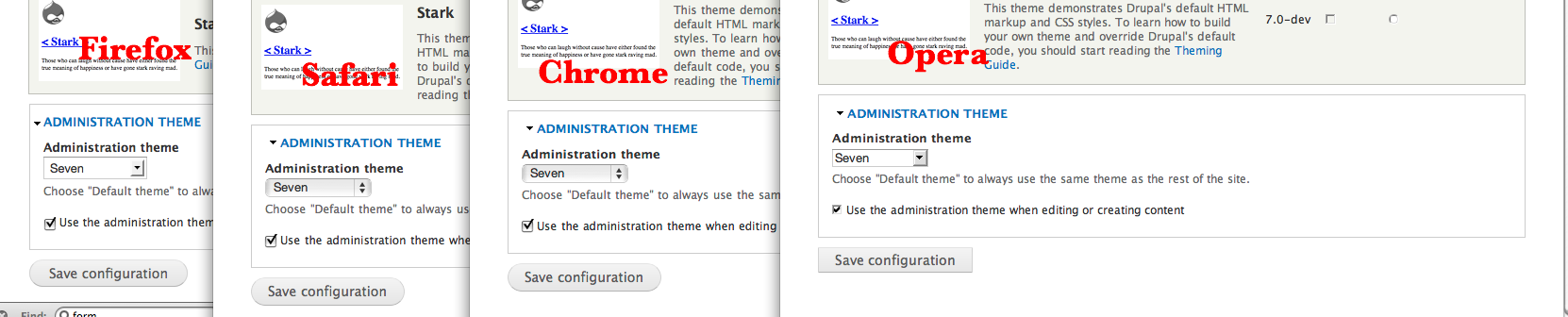
I now tested this patch in a fresh install with FF, Opera, Safari & Chrome for the Mac.
All work as expected! There will be no changes for visual users, while AT users will be able to use collapsed fieldsets for the first time with Drupal!
Suddenly blind users will be able to use the advanced search feature on Drupal!
Comment #24
bowersox commentedPlease review this update. It uses Drupal.theme to allow Garland to provide its own image. If people like this approach, we are close to finished. The only remaining issue I'm aware of is the slight pixel jump using Safari in Seven.
Comment #25
mgiffordI applied the latest patch. Nice to have the flexibility for Garland.
I've attached a screen-shot for the pixel jump in Firefox, Safari, Chrome & Opera for the Mac. It's there if you're looking for it for sure. However it just further enhances the expanded text as far as I'm concerned.
It would be more consistent (with Garland) if it didn't. Certainly my testing of the new code for the search field behaved without the image moving in any.
Not sure that this is a problem, but willing to pass it to the Seven team.
Comment #26
bowersox commentedPlease review this patch. It may be ready for RTBC as it fixes all identified problems.
How to test?
This patch builds on the prior patch by allowing either new Drupal.theme function to be overriden. It also fixes the jump illustrated in the #25 screenshot which was actually an existing problem in Seven support for Safari.
Comment #27
mgiffordLooking better all the time Brandon.
I applied it to D7 Head. Added the themes & saved the configs. Then cleared the cache as well.
I tested /search, /admin/appearance & /admin/structure/block/ in FF. All worked fine.
I tested these without Javascript and the boxes remained expanded but looked proper.
I tested in all four themes and was testing in FF & Safari for the Mac.
Great job in fixing the issue with Seven as well.
++1
Comment #28
Everett Zufelt commented@brandon @mgifford
I applied this to a clean head at http://berry.d7.zufelt.ca/search and cleared all caches.
JAWS is not recognizing the link or the extra text.
Comment #29
bowersox commented@Everett
HEAD is broken--collapsible fieldsets do not work for me right now. Something broke with the set of commits in the last 12 hours. We need to wait to get this patch reviewed and RTBC'd until that is fixed.
Comment #30
bowersox commentedUpdate:
Here's what is broken in HEAD: #444344: jQuery .once() method for adding behaviors once.
If you add the new file jquery.once.js into your site manually you can test this expand/collapse patch. There is now a patch in that issue to do so.
I think once HEAD is fixed we can re-test and get this back to RTBC.
Comment #31
Everett Zufelt commented@Brandon
Following your instructions in #30 the patch applies correctly and works well with NVDA / JAWS.
Comment #32
bowersox commentedUpdate: webchick just fixed HEAD, so we can now confirm that this patch works cleanly. RTBC anyone?
Comment #33
bowersox commentedComment #34
Everett Zufelt commentedDownloaded fresh head from cvs and applied the most recent patch before installing.
On the database configuration page the Advanced link was read by JAWS as "Link #". The patch does seem to be working correctly everywhere else.
JAWS 10.0.1154 / FF 3.5
Comment #35
owen barton commentedI looked at the advanced fieldset on the installation page, and at least with firebug I could not detect any difference in the HTML source or general behaviour from a fieldset elsewhere (e.g. on a taxonomy term edit page). Could this perhaps be a caching issue?
In terms of the code, I was not sure about the following:
Could this line and associated 2 functions (collapseImage and collapseImageSrc) not be replaced with something like:
Comment #36
bowersox commented@Owen
Thanks for the feedback. I'm glad to hear it works for you.
Regarding your code suggestion, we need to set both the ALT and the SRC attributes, so the reason I introduced Drupal.theme() is so that different themes can override the HTML to give their own image SRC. In fact here's how Garland does that with its collapse.js file in this patch:
@Everett
I set this back to 'needs review' because it's sounding more and more likely that JAWS is reading these correctly as "Show XYZ" and there may be caching that stopped it from working for you on the install page. I look forward to getting in touch directly tomorrow to troubleshoot that more.
Comment #37
Everett Zufelt commentedI applied the patch in comment #27 again today to a clean db / install of head. Everything seems to be working well now with JAWS 10.0.1154 / NVDA 0.6p3.2 and FF 3.5. Not sure why this wasn't working yesterday.
I believe that this is ready to be RTBC.
Comment #38
cliffSubscribe. Related to http://drupal.org/node/467296 ?
Comment #40
mgiffordnot sure why this broke. I just cleaned up the fuzz and repatched it. Shouldn't be any different than the previously submitted RTBC though so I'm setting it back there.
Comment #41
bowersox commented@mgifford, Thanks for catching that!
Comment #43
bowersox commentedRe-rolled the patch. The only difference from prior versions is the fuzz so I'm setting back to RTBC.
FYI, this re-roll does include the new file themes/garland/collapse.js again. It was inadvertently left out of v8 but was present in v7. Rolling a patch to add a new file requires use of the special instructions here: http://drupal.org/patch/create#new
I think this will make a big improvement for accessibility. If there's anything else I can do to make it better, let me know.
Comment #44
mgiffordThis was first RTBC now almost two months ago. - Bump!
Comment #45
webchick@mgifford and others: Pursuant to the Drupal 7 development schedule, patches around API clean-ups and feature exceptions were given priority during the period from Drupalcon to Oct. 15 (later extended to Oct. 17). Over the next month (from now until Dec. 1) is where we focus on accessibility, usability, and performance. Hence why some of these have been sitting in the queue for awhile.
I'd like to get some of our usual front-end patch reviewers (sun, Rob Loach, quicksketch, kkaefer, etc.) to look at this patch. It seems like it's doing some very weird things, but I don't have enough experience to make a call.
a) I've never seen a selector before like $('> legend > a > img', fieldset)
b) I'm not sure why we'd need both a theme.collapseImage and theme.collapseImageSrc. We don't have both theme_image() and theme_image_src(), for example.
c) The docs of both need to be adjusted per coding standards.
Comment #46
bowersox commented@webchick: Yes, I'd love to get some feedback from the usual front-end patch reviewers. Here's a few brief explanations:
a) To the best of my knowledge, that selector is valid, but if we have a more typical way of doing it I'll gladly change and re-roll.
b) The idea of breaking theme.collapseImageSrc off on its own was to make the shortest and easiest way for any theme to override the collapse/expand image with just 3 clean lines of code:
Lots of themes would provide their own image but wouldn't want to change the other functionality of theme.collapseImage. At least that was the thinking.
c) I believe the comments should be more like this, but please correct if I'm wrong:
Comment #47
webchickRight, I understand the logic of having the theme function, but I think I'd rather not have a specific one for src and just adjust the src in the themeImage, because it's more consistent with what Drupal core does.
And yep, the doc formatting there looks good to me.
Comment #48
bowersox commented@webchick: Cool. I'll wait for feedback from front-end reviewers, but I'll gladly re-roll with the fixed comments and combined theme functions whenever we're ready.
Comment #49
bowersox commentedPlease review this updated patch. Here are the changes:
To test this patch, you need to clear your cache by visiting /admin/appearance and saving.
The only remaining issue is getting some front-end patch reviewers to check this out and give advice on @webchick's question in #46(a). Yay!
Comment #50
mgiffordApplies nicely & works well. Just waiting on #46(a) to be RTBC!
Comment #51
sunInstead of starting with a new selector from scratch, you can just continue the previous stack:
I don't like the name "collapser", because it has no meaning. The name should also be in the namespace of the behavior.
.collapse-title
or
.collapse-legend
or something like that would be more appropriate.
Images have a performance impact.
Instead of (re-)injecting images, you want to inject a SPAN containing the text.
Then, you make the text invisible by doing the following in the CSS:
Additionally, you create another style that changes the background image URL to the other image when the CSS class .collapsed is removed from the fieldset.
We should not underline this by default.
Seven theme can do if required, but most other themes don't want that.
This is not required and needs to be removed.
These are already defined in system.css.
We should use CSS2 selectors here, because supporting IE6 is really nonsense. So:
This looks a bit wonky, because it presumes a very special fieldset markup in the output.
I'm on crack. Are you, too?
Comment #52
bowersox commented@sun:
Because the triangle image has meaning to sighted users, for accessibility and semantic accuracy we felt it should be an actual IMG instead of a CSS background. See our discussion in comments #2-5. Are you willing to go with that?
Lots of your smaller suggestions make sense and I can re-roll to address them. This issue of IMG versus CSS might take more discussion but whatever we decide on I'm eager to update and move this forward. Thanks for the feedback and support!
Comment #53
sunI understand that, but injecting countless of single images has a performance impact on page loading. Additionally, an IMG is very hard to style differently in your theme. You need to override a JavaScript theming function to just change markup to something that can be styled differently.
Comment #54
bowersox commented@sun: Here's an alternative patch with the approach you suggested. Do you have any suggestions about naming and code style?
This patch is all-new code unrelated to the previous patches because it takes a different approach: it simply uses hidden span.element-invisible text to put the word "Show" or "Hide" in the links for collapsible fieldsets.
I'd appreciate more testing and input from other accessibility advocates to decide if this alternative approach is acceptable and accessible. I tested in JAWS 10 and confirmed that the screenreader speaks, "Show Advanced search link" and "Hide Advanced search link" as appropriate.
Comment #55
bowersox commentedA few notable aspects of this patch:
I tried to clean up indenting. I couldn't tell why the
$(this)line was originally indented deeper, for example. Point me in the right direction if anything looks off.Also, notice the added space immediately within the a tag:
'<a href="#"> '. That space is needed so that words don't run together (e.g., "ShowAdvanced search") for screenreaders and non-CSS users.We prepend this span inside the legend a element. If you think this span deserves a different class, please advise.
This is the only CSS change involved. We need to make sure the new span does not end up with display:none. (See http://drupal.org/node/472572 for details).
Also, please advise if you think I should sneak in comments any place this deserves explanation.
Comment #56
mgiffordThis worked fine in all Mac browsers I tested it with (Firefox, Safari & Chrome) with the exception of Opera. In Opera it worked, but looked funny because there was too much spacing between the lines. This might not be something that is easily resolvable.
I did test this also for keyboard-only browsing and it worked fine.
Interesting approach to keep the css images, but just ensure that we've added in the text so it's clear what state the fieldset is in. I can't see an accessibility issue with this.
@sun thanks again for your detailed review above!
Comment #57
sunI'm not particular happy with the leading space in here. Can't we append after the injected "Show/Hide " string? i.e. directly
+ ' '.NIH: I'm not sure who invented this, but it's a royal pain for themers. I'll create a separate issue to move this into the static markup.
That, I don't understand.
Why do we need to apply styles to an element that's not visible at all? Ah, I see it now. Because above mentioned wrapper is injected via JS, so there is no way to hide the fieldset contents when the fieldset is collapsed, and that's why it's using a * selector right above these styles to hide everything in the fieldset, and after doing so, it unhides the legend. Clusterfuck. meh, people like to introduce awkward code in core.
So, yeah, we need to do that here, because the invisible SPAN would be hidden, not invisible otherwise.
I'm on crack. Are you, too?
Comment #58
bowersox commentedPlease review this new patch. I think it's ready for final feedback and RTBC.
This is the same as the patch in #54 but it made one change to take out the space as @sun suggested and put in an additional
.after(' ')call to add the space after the hidden text. Functionality should be unchanged but the code is more readable.@sun, about your other comments:
* display:nonedoes not apply.Thanks for all the feedback and guidance!
Comment #59
sunOnly remaining problem: All of the methods need to be on the same indentation level.
I see that already the existing code is using some awkward indentation and parenthesis logic.
The improper indentation in this patch happened, because you tried (probably hard) to make any sense of it... but let me tell you: with jQuery's method chaining, it's very hard to achieve a good-lookin' coding style.
This is where the indentation/parenthesis goes wrong.
On a second look, it actually seems like there's one closing parenthesis too much.
This review is powered by Dreditor.
Comment #60
sunDid you test this with vertical tabs? Vertical tabs turns fieldsets into a tabset...
Comment #61
bowersox commented@sun, this plays nice with vertical tabs. This patch (and the original collapse.js) do not act on vertical tabs. In vertical-tabs.js we find fieldset elements inside .vertical-tabs-panes and call
.removeClass('collapsible collapsed')on each one. Vertical-tabs.js runs before collapse.js. Once those classes are gone, that means none of the selectors in misc/collapse.js will pick up the vertical tabs.Comment #62
bowersox commented@sun, here is an updated patch. No changes to code or functionality, but re-indented and formatted for 80 chars. I'm curious what you think.
Comment #63
bowersox commented[Deleted this comment and removed the jQuery coding standards conversation to its own issue: #625926: jQuery coding standards -brandonojc]
Comment #64
mgiffordJust wanted to toss in that Vertical tabs look fine for me. Just attached a screenshot with the latest (v3) patch applied. They looked fine with (v2) too.
Hopefully the code cleanup will be enough to get into core!
Comment #65
sunThe previous indentation was correct.
I'm on crack. Are you, too?
Comment #66
bowersox commentedPlease review this patch. The only changes are coding indentation, but not functionality.
I tried to make the indentation right in the places this patch touches, but some of the other indent problems and the fieldset-wrapper issue with collapse.js can be handled in a separate issue.
Comment #67
sunWonderful. Good job!
Comment #68
webchickAwesome. Thanks for the great review sun, and excellent work Brandon and Mike!
Committed to HEAD. Thanks!
Comment #69
mgiffordThat's excellent! Glad to see another issue fixed.
Comment #71
m-patate commentedHi all,
Thanks for all your previous works.
I should have a suggestion :in collapse.js, in the Drupal.toggleFieldset function, is it possible to move the trigger for "collapsed" event after the slideUp & the slideDown animation instead of before, in order to be more coherent with the event status name ?
Comment #72
Lidyaamush commented@Everett
for accessibility. To use an alt attribute & img can be good, but probably its a bit tricky due to Javascript is setting the fieldset, so it would be good if we can make that work. coz jvscript would need to add the real img element as well.
Alternatively, the img elements could be placed on the page from the start as display:none and then activated by javascript. Did you have a similar strategy or an easier way?
LCD Shoes
Comment #73
pverrier commentedIn http://drupal.org/node/983372#comment-3810044 (module Fieldset helper) was reported a bug with jQuery caused by the adding of
.after(' ')in this current issue ; I met the same problem but I've not installed Fieldset helper for which this problem is reported.There seems to be a bug in collapse.js, in certain circumstances, the
.after(' ')throws an exception "Syntax error, unrecognized expression: " (+ a space).Please see http://drupal.org/node/983372#comment-6029570 for more details ; I have this error on the edit term page, for certain vocabularies only ; it causes everything using JS (wysiwyg CKeditor and Relations fieldset) not to be well displayed.
Comment #74
nod_Please open a new issue with a link to this one if it's still relevant. This one has been fixed.
Comment #75
pverrier commentedOK, done here : http://drupal.org/node/1606110
Thanks